
- Posts: 73
- Thank you received: 8
Work with probe
- jcdammeyer
- Offline
- Senior Member
-

Less
More
4 years 11 months ago #227274
by jcdammeyer
Replied by jcdammeyer on topic Work with probe
For my MESA based system which started out as a PP type I had:
# net min-home-x <= parport.0.pin-11-in
Now it's which is the same pin on the DB25.
net min-home-x <= hm2_7i92.0.gpio.014.in
I have my probe on the second PP documented like this:
#IO Connections for P1
#Pin# I/O Pri. func Sec. func Chan Pin func Pin Dir
# 15 20 IOPort Probe 1 Probe (In) Probe Input
# ---probe signal---
# begin Touch Probe
# DB25-2_15 is Touch Probe Input.
net probe-in <= hm2_7i92.0.gpio.020.in_not => motion.probe-input
# end Touch Probe
I believe you'd have to do this:
net probe-in <= parport.0.pin-11-in => motion.probe-input
you might need parport.0.pin-11-in_not if the polarity is backwards.
Hope that helps a bit.
John
# net min-home-x <= parport.0.pin-11-in
Now it's which is the same pin on the DB25.
net min-home-x <= hm2_7i92.0.gpio.014.in
I have my probe on the second PP documented like this:
#IO Connections for P1
#Pin# I/O Pri. func Sec. func Chan Pin func Pin Dir
# 15 20 IOPort Probe 1 Probe (In) Probe Input
# ---probe signal---
# begin Touch Probe
# DB25-2_15 is Touch Probe Input.
net probe-in <= hm2_7i92.0.gpio.020.in_not => motion.probe-input
# end Touch Probe
I believe you'd have to do this:
net probe-in <= parport.0.pin-11-in => motion.probe-input
you might need parport.0.pin-11-in_not if the polarity is backwards.
Hope that helps a bit.
John
Please Log in or Create an account to join the conversation.
- tuzki
- Offline
- Senior Member
-
Less
More
- Posts: 48
- Thank you received: 1
4 years 11 months ago #227281
by tuzki
Replied by tuzki on topic Work with probe
OK,Thank you ヾ(≧▽≦*)o
Have you tried using "probe_screen_v2" in "gmoccapy GUI"
Have you tried using "probe_screen_v2" in "gmoccapy GUI"
Please Log in or Create an account to join the conversation.
- tuzki
- Offline
- Senior Member
-
Less
More
- Posts: 48
- Thank you received: 1
4 years 11 months ago #227366
by tuzki
Replied by tuzki on topic Work with probe
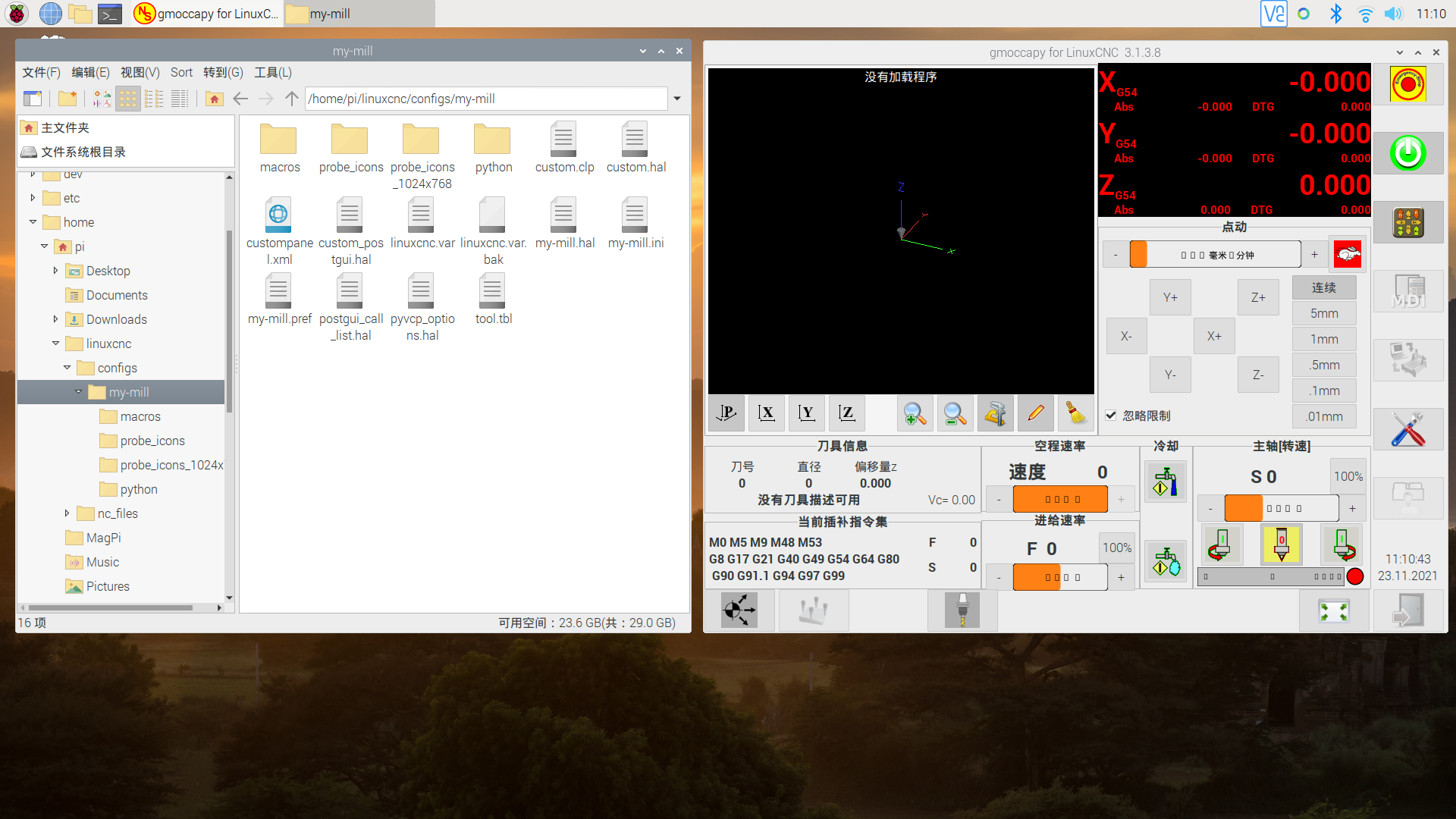
I have a problem using "probe_screen_v2" in "gmoccapy GUI". I followed the guide, I opened "gmoccapy GUI" and found that there was no interface about "probe_screen"
Please Log in or Create an account to join the conversation.
- ikkuh
- Offline
- Elite Member
-

Less
More
- Posts: 273
- Thank you received: 48
4 years 11 months ago #227385
by ikkuh
I have been using the screen for months now, most errors are fixed, the develloppers are very responsive and nice in case of a bug or question.
As I understand it Norbert is working on a new version of gmoccapy, you can wait for that too.
Replied by ikkuh on topic Work with probe
I do not mean to hijack this thread but why don't you switch to qtDragon? Chris has been busy the last few months to make it a very good and stable screen (and it look great too). You can use the gmoccapy probing routines if you want to remap M6. The probe-basic and VersaProbe screens are already built in and work fine. All you need is a properluy setup probe and the probe screens will work. For the M6 remap you have to do a little more work, but there is some progress in automating stuff and making things more user friendly.I have a problem using "probe_screen_v2" in "gmoccapy GUI". I followed the guide, I opened "gmoccapy GUI" and found that there was no interface about "probe_screen"
I have been using the screen for months now, most errors are fixed, the develloppers are very responsive and nice in case of a bug or question.
As I understand it Norbert is working on a new version of gmoccapy, you can wait for that too.
Please Log in or Create an account to join the conversation.
- tuzki
- Offline
- Senior Member
-
Less
More
- Posts: 48
- Thank you received: 1
4 years 11 months ago #227405
by tuzki
Replied by tuzki on topic Work with probe
Thank you for your recommendation, I will try qtDragon.
I just started learning LinuxCNC and always use "gmoccapy GUI". Compared with gmoccapy GUI, I don't know much about qtDragon
I just started learning LinuxCNC and always use "gmoccapy GUI". Compared with gmoccapy GUI, I don't know much about qtDragon
Please Log in or Create an account to join the conversation.
- ikkuh
- Offline
- Elite Member
-
Less
More
- Posts: 273
- Thank you received: 48
4 years 11 months ago - 4 years 11 months ago #227409
by ikkuh
You can always ask questions at the qtvcp forum.
Replied by ikkuh on topic Work with probe
There is proper documentation at linuxcnc.org/docs/devel/html/gui/qtdragon.html it's updated on an almost weekly basis.Thank you for your recommendation, I will try qtDragon.
I just started learning LinuxCNC and always use "gmoccapy GUI". Compared with gmoccapy GUI, I don't know much about qtDragon
You can always ask questions at the qtvcp forum.
Last edit: 4 years 11 months ago by ikkuh.
Please Log in or Create an account to join the conversation.
Time to create page: 0.408 seconds