

Custom Mint-19.2 with Linuxcnc

More
6 years 8 months ago #157436 by tommylight

BeagleBrainz wrote: But with a fresh install of Mint 19.2 and installing kernel it's a mess graphics wise.

Maybe I'll try again.

Dont !
That has has more to do with hardware, i have the same RTAI from /temp, on the Asus J1800 board it works with full HD resolution out of the box, on 2 or 3 PC's it has the same issue with graphics limited o 1024x768.
It also has no suspend and some other ACPI functions. None of them are needed for running machines, but the resolution can be an issue on big monitors, depending on the board.
BTW, I downloaded the ISO, it does boot even from a Multisystem USB, installing to a hard drive (well SSD) is nearly finished, so stay tuned.

Please Log in or Create an account to join the conversation.

More
6 years 8 months ago #157438 by tommylight
It works properly, booting, installation to HDD/SSD and boots from new install, Linuxcnc works using POSIX realtime.
Updates and dist-upgrades also work. No issues with generating SSL.
I wonder what would be the procedure for making this the official release, given that soon enough the Stretch version is going to be superseded, and being a free version of Debian, comes without some non-free drivers causing some issues for new users regarding ethernet and wireless network cards.
I might be pushing this to much, so opinions are welcomed.
Thank you.

Please Log in or Create an account to join the conversation.
  • BeagleBrainz
  • Topic Author
  • New Member
  • New Member
More
6 years 8 months ago - 6 years 8 months ago #157465 by BeagleBrainz
Replied by BeagleBrainz on topic Custom Mint-19.2 with Linuxcnc
The funny thing is that on the iso I made the other day with the rtai kernel I have no issue with the graphics.
But when I started with a fresh install of Mint and then installed the same rtai kernel the graphics was sluggish.
I have an idea of what the issue may very well be, I just have to test the the theory.

On the other hand it’s great to know that there aren’t any issues yet with newest iso.
Thanks with all the time all those have spent testing, much appreciated.
I guess the Mint guys may want to review and suggest some changes just so it is clear to users that it is not an official Mint release but a custom remaster. Which isn’t an unfair thing in my opinion.
Last edit: 6 years 8 months ago by BeagleBrainz.

Please Log in or Create an account to join the conversation.

  • BeagleBrainz
  • Topic Author
  • New Member
  • New Member
More
6 years 8 months ago - 6 years 8 months ago #157495 by BeagleBrainz
Replied by BeagleBrainz on topic Custom Mint-19.2 with Linuxcnc
Ok this is really weird.

I have an iso with this kernel
linux-image-4.14.132-rtai-amd64_4.14.132-rtai-amd64-1_amd64.deb

When I boot with the Live CD everything is responsive and fine.
Yet when I use the installer and reboot from the SSD it's basically like moving through molasses, mouse, keyboard and display are sluggish and it's just about unusable in any normal way.
For the life of me I can't quite work it out, kernel & modules are the same, all apps & libs are the same.
TBH I haven't tried it on another machine, only the T530. Wonder how it would go on the T61 or the Lenovo desktop.

Update 16-02-2020 09:59
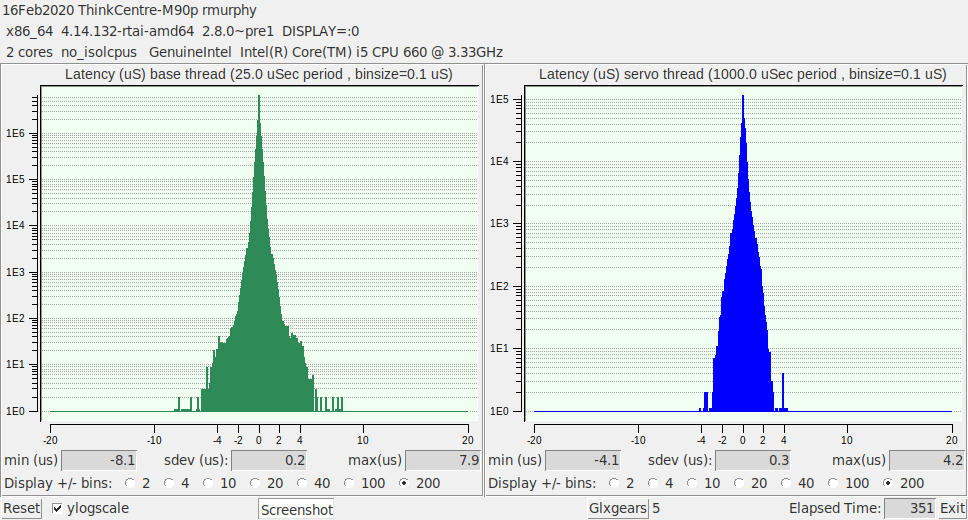
RTAI currently installed and running on the ThinkCentre M90P, apart from the display being at 1024x768 all seems ok, actually using this system to write this edit.
Last edit: 6 years 8 months ago by BeagleBrainz.

Please Log in or Create an account to join the conversation.

More
6 years 8 months ago #157498 by rodw
Replied by rodw on topic Custom Mint-19.2 with Linuxcnc

BeagleBrainz wrote: Ok this is really weird.

I have an iso with this kernel
linux-image-4.14.132-rtai-amd64_4.14.132-rtai-amd64-1_amd64.deb

When I boot with the Live CD everything is responsive and fine.
Yet when I use the installer and reboot from the SSD it's basically like moving through molasses, mouse, keyboard and display are sluggish and it's just about unusable in any normal way.
For the life of me I can't quite work it out, kernel & modules are the same, all apps & libs are the same.
TBH I haven't tried it on another machine, only the T530. Wonder how it would go on the T61 or the Lenovo desktop.

Update 16-02-2020 09:59
RTAI currently installed and running on the ThinkCentre M90P, apart from the display being at 1024x768 all seems ok, actually using this system to write this edit.


Can you check CPU and memory usage with top or something like that?

Often that behavior is caused by spurious interrupts occurring. This can be as a result of failing hardware like a hard drive flooding the BUS with interrupts so there is no time left to service the keyboard etc.

Please Log in or Create an account to join the conversation.

  • BeagleBrainz
  • Topic Author
  • New Member
  • New Member
More
6 years 8 months ago - 6 years 8 months ago #157500 by BeagleBrainz
Replied by BeagleBrainz on topic Custom Mint-19.2 with Linuxcnc
The T530 is my main machine, it's what I have used to create all the images and test as well. The RT_PREEMPT kernels are fine.
My main OS on this machine is Mint 18.3 and there are no issues. I also have a vanilla install of Mint 19.2, no issues with a plain kernel or RT_PREEMPT kernel.
I also have Win7 Ultimate installed and apart from it being Win 7 no issues.
Usually this machine doesn't get turned off. I close the lid at night, go to work during the day come back home open the lid and the wifi connects and I'm good to go.
The SSD is a Crucial MX500GB that isn't quite 12 months old and there has never been any hiccups.
When running the LiveCD and mounting the SSD the sluggishness isn't there. When booting from the RTAI from the SSD and opening any actual console, not an xterm, the keyboard is responisve, unlike when using the desktop.
As the T530 has an Nvidia GPU as well as the on board graphics I've played around with the graphics settings in the BIOS and the issue is still there with the RTAI kernel.
And here is the kicker, I'll boot up the T530 Mint 18.3 with the standard kernel, start a Vbox virtual machine, boot with my RTAI iso and go through the install in VBox. Then I'll boot with RTAI installed on a Virtual disk and it is NOT as sluggish as it is with real hardware.
There is some scuttlebutt regarding the graphics with 4.14 kernels, but I'm not sure whether this is an issue here.
I wondering if compiling the kernel with more i915 options would make a difference. At the moment I'm not sure and just making a guess.

Answers on the back of a postcard if anyone has any.

I've also compared syslogs, dmesg and loaded kernel modules between livecd & installed and there isn't any major differences. The only difference is on the Livecd there are some extra modules due to loop mounts but there are expected to be there.
Last edit: 6 years 8 months ago by BeagleBrainz.

Please Log in or Create an account to join the conversation.

Time to create page: 0.083 seconds
Powered by Kunena Forum