
Linuxcnc & the Raspberry Pi (4 & 5) Official Images Only!!!
- billykid
-

- Offline
- Platinum Member
-

Less
More
- Posts: 486
- Thank you received: 82
15 Jun 2025 14:08 - 15 Jun 2025 14:14 #330308
by billykid
Replied by billykid on topic Linuxcnc & the Raspberry Pi (4 & 5) Official Images Only!!!
so it's perfect! if I think how much time I wasted with a nuc i3 to improve the latency without succeeding... I need it to tune up some drives that I recovered 2 years ago, now I also have the servos. if anyone knows these maybe they can give me some advice on how to use them in the best way.
drive Sanmotion rs2aa03a0al0 motor r2aa06040fxp
drive Sanmotion rs2aa03a0al0 motor r2aa06040fxp
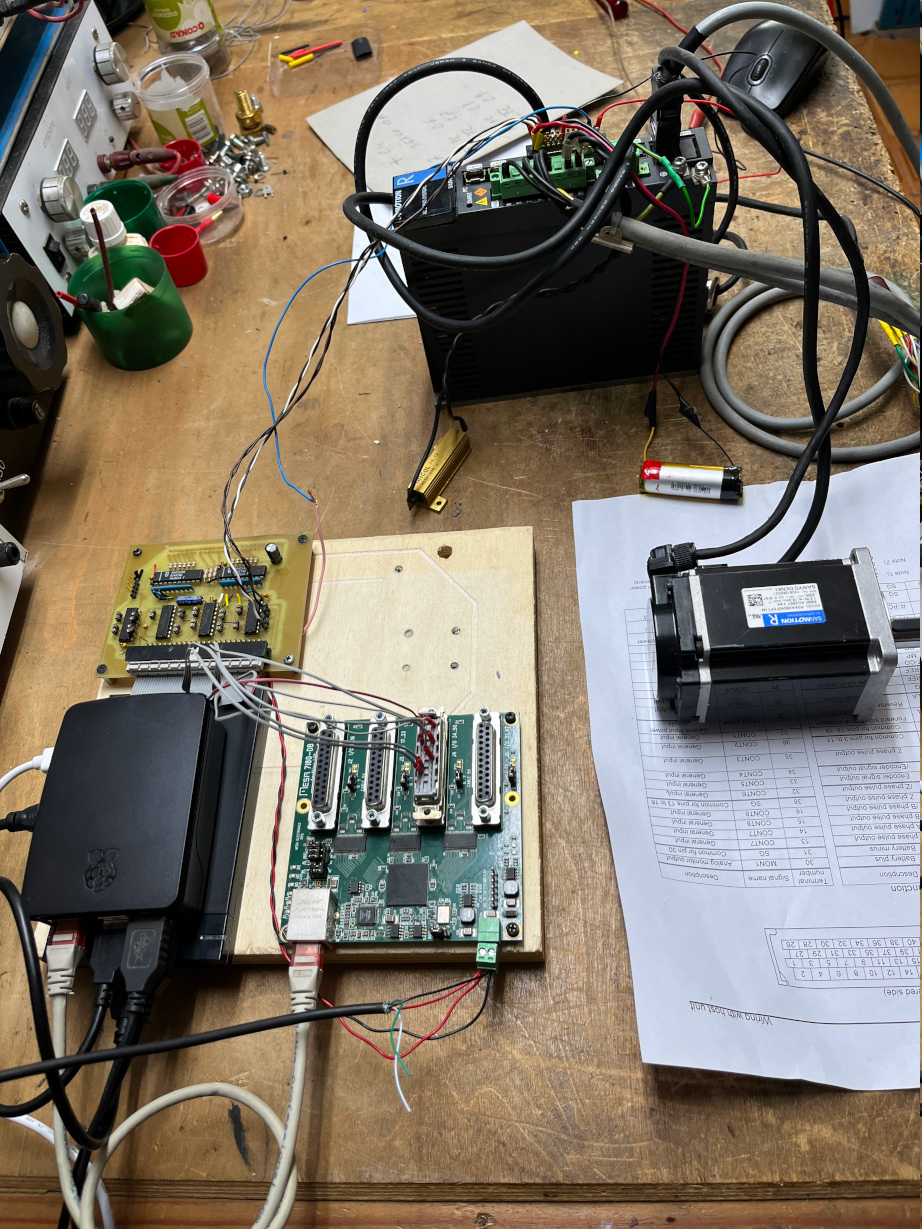
Last edit: 15 Jun 2025 14:14 by billykid. Reason: add image
Please Log in or Create an account to join the conversation.
- RNZ
- Offline
- Senior Member
-

Less
More
- Posts: 48
- Thank you received: 15
30 Jan 2026 22:23 #342224
by RNZ
Replied by RNZ on topic Linuxcnc & the Raspberry Pi (4 & 5) Official Images Only!!!
I haven't been on the Forum for ages but today I noticed that someone asked if I could post my RPi 5 ethernet settings on this thread.
I think they have been posted a few pages back by someone else, nevertheless the following wider context may be helpful.
As an aside, my RPi 5 and Mesa setup has worked perfectly since the ethernet issue (below) was fixed.
================================================================
The following is copied from another thread.
================================================================
I ran my RPi 5 and 7i96s overnight and completed 40 million pings with zero errors.
sudo chrt 99 ping -i .001 10.10.10.10 -c 40000000
At the same time in the background, I ran Latency Histogram and two Glxgears. I have attached photos in case anybody is interested in seeing the results.
I’m not sure what to make of the maximum ping time of just over 10 ms.
It seems that "hardware-irq-coalesce-rx-usecs 0" has fixed the issues I was having (aside from the 10 ms issue) at least on RPi 5 * GB with LinuxCNC 2.9.2.
======================================
What is this "coalesce" thing?
Interrupt coalesce settings ( access.redhat.com/documentation/en-us/re...ing_networking/index )
"By using interrupt coalescing, the system collects network packets and generates a single interrupt for multiple packets. This increases the amount of data sent to the kernel with one hardware interrupt, which reduces the interrupt load, and maximizes the throughput."
=====================================
My /etc/network/interfaces looks like this:
=====================================
source /etc/network/interfaces.d/*
auto lo
iface lo inet loopback
auto eth0
iface eth0 inet static
address 10.10.10.11
hardware-irq-coalesce-rx-usecs 0
===========================
I think they have been posted a few pages back by someone else, nevertheless the following wider context may be helpful.
As an aside, my RPi 5 and Mesa setup has worked perfectly since the ethernet issue (below) was fixed.
================================================================
The following is copied from another thread.
================================================================
I ran my RPi 5 and 7i96s overnight and completed 40 million pings with zero errors.
sudo chrt 99 ping -i .001 10.10.10.10 -c 40000000
At the same time in the background, I ran Latency Histogram and two Glxgears. I have attached photos in case anybody is interested in seeing the results.
I’m not sure what to make of the maximum ping time of just over 10 ms.
It seems that "hardware-irq-coalesce-rx-usecs 0" has fixed the issues I was having (aside from the 10 ms issue) at least on RPi 5 * GB with LinuxCNC 2.9.2.
======================================
What is this "coalesce" thing?
Interrupt coalesce settings ( access.redhat.com/documentation/en-us/re...ing_networking/index )
"By using interrupt coalescing, the system collects network packets and generates a single interrupt for multiple packets. This increases the amount of data sent to the kernel with one hardware interrupt, which reduces the interrupt load, and maximizes the throughput."
=====================================
My /etc/network/interfaces looks like this:
=====================================
source /etc/network/interfaces.d/*
auto lo
iface lo inet loopback
auto eth0
iface eth0 inet static
address 10.10.10.11
hardware-irq-coalesce-rx-usecs 0
===========================
The following user(s) said Thank You: tommylight
Please Log in or Create an account to join the conversation.
- fenton06
- Offline
- New Member
-

Less
More
- Posts: 2
- Thank you received: 0
05 Feb 2026 04:37 - 05 Feb 2026 04:38 #342439
by fenton06
Replied by fenton06 on topic Linuxcnc & the Raspberry Pi (4 & 5) Official Images Only!!!
Looks like the Trixie issues repo got nuked, does anyone know what happened?
Last edit: 05 Feb 2026 04:38 by fenton06.
Please Log in or Create an account to join the conversation.
- unknown
- Offline
- Platinum Member
-
Less
More
- Posts: 888
- Thank you received: 325
05 Feb 2026 11:44 #342467
by unknown
Mental health issues.
Replied by unknown on topic Linuxcnc & the Raspberry Pi (4 & 5) Official Images Only!!!
Looks like the Trixie issues repo got nuked, does anyone know what happened?
Mental health issues.
Please Log in or Create an account to join the conversation.
- snowgoer540
-

- Offline
- Moderator
-

Less
More
- Posts: 2572
- Thank you received: 905
07 Aug 2026 20:19 #348545
by snowgoer540
Replied by snowgoer540 on topic Linuxcnc & the Raspberry Pi (4 & 5) Official Images Only!!!
The following user(s) said Thank You: aabtech
Please Log in or Create an account to join the conversation.
- tommylight
-

- Away
- Moderator
-
Less
More
- Posts: 21901
- Thank you received: 7465
08 Aug 2026 00:22 #348547
by tommylight
Replied by tommylight on topic Linuxcnc & the Raspberry Pi (4 & 5) Official Images Only!!!
Not me.
The following user(s) said Thank You: snowgoer540
Please Log in or Create an account to join the conversation.
- snowgoer540
-
- Offline
- Moderator
-
Less
More
- Posts: 2572
- Thank you received: 905
08 Aug 2026 13:05 #348557
by snowgoer540
But surely someone knows who does it.
Replied by snowgoer540 on topic Linuxcnc & the Raspberry Pi (4 & 5) Official Images Only!!!
Not me.
But surely someone knows who does it.
Please Log in or Create an account to join the conversation.
- rodw
-

- Offline
- Platinum Member
-
Less
More
- Posts: 12141
- Thank you received: 4141
09 Aug 2026 11:19 #348591
by rodw
Replied by rodw on topic Linuxcnc & the Raspberry Pi (4 & 5) Official Images Only!!!
I created the original 2.9.2 image, but have not touched it since. I don't have a pi to do anything further. I think Andy may have rebuilt later versions.
We had no choice but to build the kernel from the official pi source back then.
I think there could be better ways to do this as preempt_rt is now supported.
We had no choice but to build the kernel from the official pi source back then.
I think there could be better ways to do this as preempt_rt is now supported.
The following user(s) said Thank You: snowgoer540
Please Log in or Create an account to join the conversation.
- snowgoer540
-
- Offline
- Moderator
-
Less
More
- Posts: 2572
- Thank you received: 905
09 Aug 2026 12:37 #348594
by snowgoer540
Replied by snowgoer540 on topic Linuxcnc & the Raspberry Pi (4 & 5) Official Images Only!!!
I tried this method (but did RIP instead):
forum.linuxcnc.org/9-installing-linuxcnc...th-preempt-rt-kernel
and the latency was horrid. The thread is from Dec 2022 thought it seems, so maybe there is a better way?
The latency isn't very good on the 2.9.8 image from the downloads page either, but not as bad as it was following the above guide. Maybe that's to be expected?
Everything just feels sluggish, and "jerky".
forum.linuxcnc.org/9-installing-linuxcnc...th-preempt-rt-kernel
and the latency was horrid. The thread is from Dec 2022 thought it seems, so maybe there is a better way?
The latency isn't very good on the 2.9.8 image from the downloads page either, but not as bad as it was following the above guide. Maybe that's to be expected?
Everything just feels sluggish, and "jerky".
Please Log in or Create an account to join the conversation.
- rodw
-
- Offline
- Platinum Member
-
Less
More
- Posts: 12141
- Thank you received: 4141
11 Aug 2026 12:30 #348644
by rodw
Replied by rodw on topic Linuxcnc & the Raspberry Pi (4 & 5) Official Images Only!!!
Is it a Pi5 or 4b? the 4b was always a bit marginal but some say the 5 is flawless for them.
You could try the Respberry way perhaps. Once you get the RT kernel sorted, just compile linuxcnc
forums.raspberrypi.com/viewtopic.php?t=396623
You could try the Respberry way perhaps. Once you get the RT kernel sorted, just compile linuxcnc
forums.raspberrypi.com/viewtopic.php?t=396623
Please Log in or Create an account to join the conversation.
Time to create page: 0.171 seconds