
- Configuring LinuxCNC
- Advanced Configuration
- EtherCAT
- Help with Delta E3 Ethercat drives - hal and ethercat-conf.xml
Help with Delta E3 Ethercat drives - hal and ethercat-conf.xml
- SPH
-
 Topic Author
- Offline
- Premium Member
-

Less
More
- Posts: 109
- Thank you received: 6
23 Oct 2025 11:31 #336954
by SPH
Replied by SPH on topic Help with Delta E3 Ethercat drives - hal and ethercat-conf.xml
That'd be amazing. I'll be putting some more time into the setup tomorrow so I'll get in touch once I'm back at the machine.
Please Log in or Create an account to join the conversation.
- SPH
-
Topic Author
- Offline
- Premium Member
-
Less
More
- Posts: 109
- Thank you received: 6
23 Oct 2025 21:52 #336992
by SPH
Replied by SPH on topic Help with Delta E3 Ethercat drives - hal and ethercat-conf.xml
Ok, I feel a bit lost on how to proceed with actually getting my drive connected in HAL.
My previous machine was using MESA hardware and pncconf did most of the heavy lifting, at least giving me a working hal and ini file to work from. As it is I'm struggling to find good tutorials or videos online that actually spell out how to get an axis drive connected and a motor moving. The one video I found (showing a full setup from scratch) gets to the cia402 stage and just says "I wont go into detail on the cia402 setup" and then just shows a moving motor... which makes me think I'm missing something really obvious.
My previous machine was using MESA hardware and pncconf did most of the heavy lifting, at least giving me a working hal and ini file to work from. As it is I'm struggling to find good tutorials or videos online that actually spell out how to get an axis drive connected and a motor moving. The one video I found (showing a full setup from scratch) gets to the cia402 stage and just says "I wont go into detail on the cia402 setup" and then just shows a moving motor... which makes me think I'm missing something really obvious.
Please Log in or Create an account to join the conversation.
- SPH
-
Topic Author
- Offline
- Premium Member
-
Less
More
- Posts: 109
- Thank you received: 6
23 Oct 2025 23:55 - 23 Oct 2025 23:57 #336996
by SPH
Replied by SPH on topic Help with Delta E3 Ethercat drives - hal and ethercat-conf.xml
I've found a setup on the forums using Leadshine EL8 drivers and trying to work from there.
Setup I'm following.
I've attached the hal, ini and ethercat.xml files. It doesn't load, I get the following error.
Not surprising as I've pruned the file down from 5 drives and a spindle to 1, different brand drives etc.
I've used the xml file that I generated.
Am I on the right track at all?[/code][/url]
I've attached the hal, ini and ethercat.xml files. It doesn't load, I get the following error.
Debug file information:
Note: Using POSIX realtime
./EL8_machine.hal:42: Pin 'lcec.0.3.cia-statusword' does not exist
14897
Stopping realtime threads
Unloading hal components
Note: Using POSIX realtime
Not surprising as I've pruned the file down from 5 drives and a spindle to 1, different brand drives etc.
I've used the xml file that I generated.
Am I on the right track at all?[/code][/url]
Last edit: 23 Oct 2025 23:57 by SPH.
Please Log in or Create an account to join the conversation.
- Hakan
- Offline
- Platinum Member
-

Less
More
- Posts: 1317
- Thank you received: 454
24 Oct 2025 04:27 #337020
by Hakan
Replied by Hakan on topic Help with Delta E3 Ethercat drives - hal and ethercat-conf.xml
Yes you are almost there.
Just the pins are named lcec.0.0.something I would think. Second zero refers to ethercat slave id.
It's a bit catch 22. Easiest way to check pin names is with halshow and for that linuxcnc need to run and for that you need the pin names.
One can possibly temporarily comment out all reference to lcec.0.everything to use halshow to check the names.
Or use the name="X" in the slave line i ethercat-conf.xml and refer to lcec.0.X.something.
Just the pins are named lcec.0.0.something I would think. Second zero refers to ethercat slave id.
It's a bit catch 22. Easiest way to check pin names is with halshow and for that linuxcnc need to run and for that you need the pin names.
One can possibly temporarily comment out all reference to lcec.0.everything to use halshow to check the names.
Or use the name="X" in the slave line i ethercat-conf.xml and refer to lcec.0.X.something.
Please Log in or Create an account to join the conversation.
- rodw
-

- Offline
- Platinum Member
-
Less
More
- Posts: 12156
- Thank you received: 4149
24 Oct 2025 07:29 - 24 Oct 2025 07:29 #337025
by rodw
Replied by rodw on topic Help with Delta E3 Ethercat drives - hal and ethercat-conf.xml
with just one drive, the cia402 is probably numbered 0. Your 3. is coming from these lines in your hal. If in doubt, comment them all out so LinuxCNC ipens, then use halshow to work out the correct pin names# ethercat to cia402 driver
net x-statusword lcec.0.3.cia-statusword => cia402.0.statusword
net x-opmode-display lcec.0.3.opmode-display => cia402.0.opmode-display
net x-drv-act-pos lcec.0.3.actual-position => cia402.0.drv-actual-position
# cia402 driver to ethercat
net x-controlword cia402.0.controlword => lcec.0.3.cia-controlword
net x-modes-of-operation cia402.0.opmode => lcec.0.3.opmode
net x-drv-target-pos cia402.0.drv-target-position => lcec.0.3.target-position
net x-statusword lcec.0.3.cia-statusword => cia402.0.statusword
net x-opmode-display lcec.0.3.opmode-display => cia402.0.opmode-display
net x-drv-act-pos lcec.0.3.actual-position => cia402.0.drv-actual-position
# cia402 driver to ethercat
net x-controlword cia402.0.controlword => lcec.0.3.cia-controlword
net x-modes-of-operation cia402.0.opmode => lcec.0.3.opmode
net x-drv-target-pos cia402.0.drv-target-position => lcec.0.3.target-position
Last edit: 24 Oct 2025 07:29 by rodw.
Please Log in or Create an account to join the conversation.
- Hakan
- Offline
- Platinum Member
-
Less
More
- Posts: 1317
- Thank you received: 454
24 Oct 2025 07:32 - 24 Oct 2025 07:33 #337026
by Hakan
Replied by Hakan on topic Help with Delta E3 Ethercat drives - hal and ethercat-conf.xml
Here is a way to check pin names without modifying the hal file.
Use the halrun command (linuxcnc off), load lcec and lcec_config. The start halshow in another window and explore names.
debian@plasma:~/linuxcnc/configs/QtPlasma$ halrun
halcmd: loadusr -W lcec_conf ethercat-conf.xml
halcmd: loadrt lcec
Note: Using POSIX realtime
halcmd:
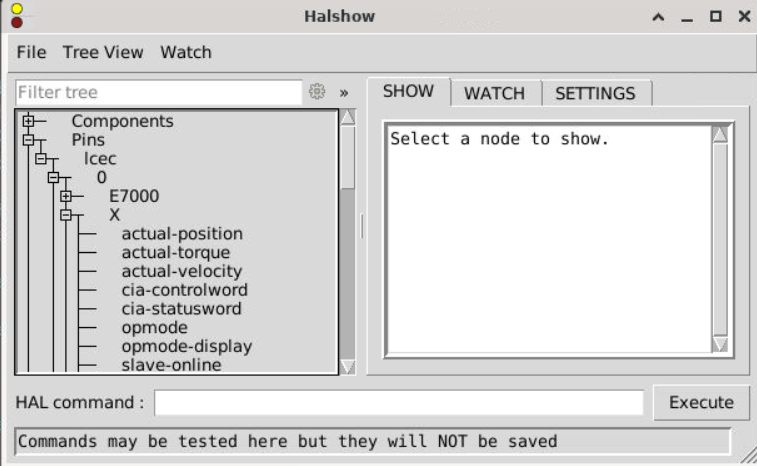
Use the halrun command (linuxcnc off), load lcec and lcec_config. The start halshow in another window and explore names.
debian@plasma:~/linuxcnc/configs/QtPlasma$ halrun
halcmd: loadusr -W lcec_conf ethercat-conf.xml
halcmd: loadrt lcec
Note: Using POSIX realtime
halcmd:
Attachments:
Last edit: 24 Oct 2025 07:33 by Hakan. Reason: bbcode
Please Log in or Create an account to join the conversation.
- SPH
-
Topic Author
- Offline
- Premium Member
-
Less
More
- Posts: 109
- Thank you received: 6
24 Oct 2025 10:49 - 24 Oct 2025 10:50 #337038
by SPH
Replied by SPH on topic Help with Delta E3 Ethercat drives - hal and ethercat-conf.xml
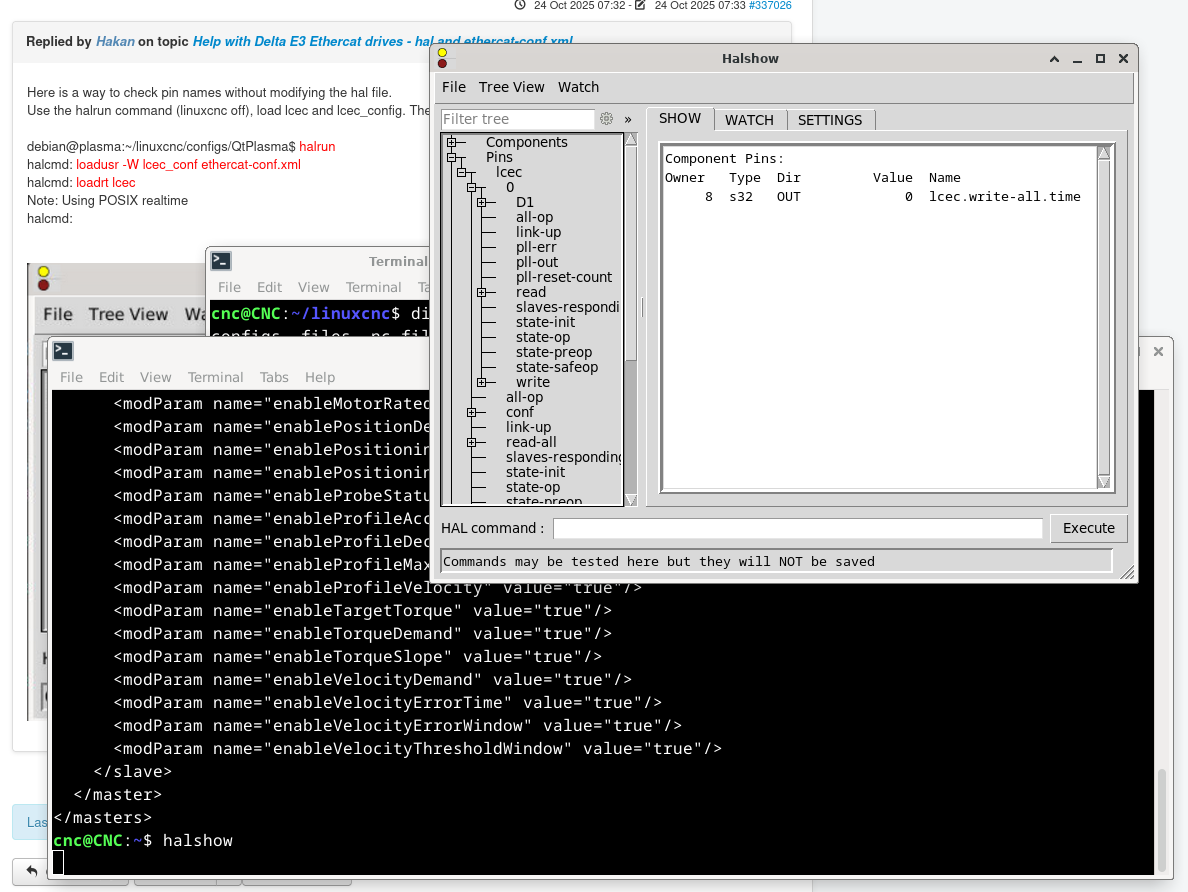
Here's the result of halshow after following your instructions. Is my drive perhaps not defined correctly or something like that? I don't seem to have any pins like your screen shot shows.
Last edit: 24 Oct 2025 10:50 by SPH.
Please Log in or Create an account to join the conversation.
- Hakan
- Offline
- Platinum Member
-
Less
More
- Posts: 1317
- Thank you received: 454
24 Oct 2025 11:19 #337040
by Hakan
Replied by Hakan on topic Help with Delta E3 Ethercat drives - hal and ethercat-conf.xml
Click the D1 node. Obviously it is called D1 in ethercat-conf.xml
Please Log in or Create an account to join the conversation.
- SPH
-
Topic Author
- Offline
- Premium Member
-
Less
More
- Posts: 109
- Thank you received: 6
24 Oct 2025 12:13 - 24 Oct 2025 12:14 #337045
by SPH
Replied by SPH on topic Help with Delta E3 Ethercat drives - hal and ethercat-conf.xml
*facepalm* I must have clicked every option except that one.
Well at least now I understand how to rename the drives in the xml file to make organising things simpler.
Here's the output from halcmd show pin
What are the basic pins I need for motion?
And a massive thank you to everyone who takes the time to offer help and guidance, it's genuinely amazing.
Well at least now I understand how to rename the drives in the xml file to make organising things simpler.
Here's the output from halcmd show pin
What are the basic pins I need for motion?
And a massive thank you to everyone who takes the time to offer help and guidance, it's genuinely amazing.
Last edit: 24 Oct 2025 12:14 by SPH.
Please Log in or Create an account to join the conversation.
- SPH
-
Topic Author
- Offline
- Premium Member
-
Less
More
- Posts: 109
- Thank you received: 6
24 Oct 2025 12:41 - 24 Oct 2025 12:43 #337047
by SPH
Replied by SPH on topic Help with Delta E3 Ethercat drives - hal and ethercat-conf.xml
Ok, I think I've replaced all the relevant pins from the EL8 config with my Delta ASDA pins.
Hal file attached. Fails to run with the following error.
Hal file attached. Fails to run with the following error.
Debug file information:
Note: Using POSIX realtime
LCEC: Invalid appTimePeriod of 0 for master 0 (should be 1000000).
note: MAXV max: 50.000 units/sec 3000.000 units/min
note: LJOG max: 50.000 units/sec 3000.000 units/min
note: LJOG default: 2.500 units/sec 150.000 units/min
note: jog_order='X'
note: jog_invert=set()
HAL: ERROR: function 'conv-s32-float.0' not found
pyvcp_panel.hal:8: addf failed
27918
27951
Stopping realtime threads
Unloading hal components
Note: Using POSIX realtime


I can't find any reference to conv-s32-float.0 in any of the files.
Last edit: 24 Oct 2025 12:43 by SPH.
Please Log in or Create an account to join the conversation.
- Configuring LinuxCNC
- Advanced Configuration
- EtherCAT
- Help with Delta E3 Ethercat drives - hal and ethercat-conf.xml
Time to create page: 0.168 seconds