Ver 2.9.4 iso clean install Trouble when disabling EOE

More
8 months 2 weeks ago - 8 months 2 weeks ago #343082 by Hakan
Halfway down in this post rodw describes how to add a udev rule for /dev/EtherCAT0
forum.linuxcnc.org/ethercat/45336-etherc...-how-to-step-by-step

For the interface, there are many ways. I have the following in /etc/network/interfaces for my ethercat interface
It brings the enp2s0 interface up, without IP address
Code:
auto enp2s0 iface enp2s0 inet manual         hardware-irq-coalesce-rx-usecs 0         pre-up /sbin/ip link set dev $IFACE up         post-down /sbin/ip link set dev $IFACE down

Check what's in syslog (sudo dmesg) if there are more problem
Last edit: 8 months 2 weeks ago by Hakan.
The following user(s) said Thank You: tar_san

Please Log in or Create an account to join the conversation.

More
8 months 2 weeks ago - 8 months 2 weeks ago #343136 by tar_san
Thank you so much, Mr Hakan.
I set udev rule, and then I don't need to type "chmod 666 /dev/EtherCAT0" anymore to exec LinuxCNC.

I'm using  PC,  HP Elite800 G4 which have Intel NIC , And I clean installed for 3 times. (In BIOS I disabled SecureBoot )

But all results was same.
Ethercat is unstable. (Alarm A12 flicking,  I can't do anything.  But I could reset if A12 happend before with EoE disabled master, and I could Jog, Run GCode with Yaskawa servo with DELL OLD PC)

I have attached dmesg file.

By the way, which LinuxCNC version (iso?) are good for EtherCAT( Especially DisablingEOE) ?


Last edit: 8 months 2 weeks ago by tar_san.

Please Log in or Create an account to join the conversation.

More
8 months 2 weeks ago #343140 by Hakan
I am getting out of ideas.

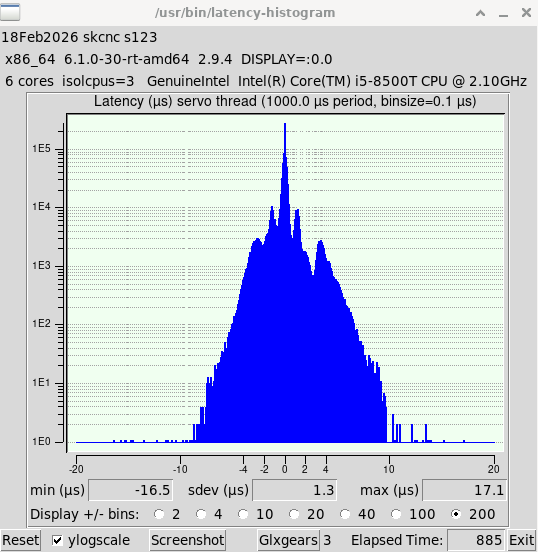
It's a new computer so if you haven't done so already, you can check overall latency with
Code:
latency-histogram --nobase --sbinsize 1000 --show
and make sure the min and max are below +- 20 microseconds or so.

If that doesn't give anything I think you should go back to the working setup you had
with a laptop. If I understood right that setup worked, with the Realtek dkms driver.
Follow your own notes in this thread.

Ethercat master is always distributed as a package separate from linuxcnc due to licensing constraints.
So there is no better or worse linuxcnc version, they are all the same what concerns ethercat and locally compiled master.

Please Log in or Create an account to join the conversation.

More
8 months 2 weeks ago - 8 months 1 week ago #343168 by tar_san
This is a snapshot of latency of that PC when I tested servomotors.

I'll try exact same former procedures ( I have written something important about disabling eoe, and recalling everything as much as possible ) with former PC today.

Thank you so much for your every skillful reply.
 
Last edit: 8 months 1 week ago by tar_san.

Please Log in or Create an account to join the conversation.

More
8 months 1 week ago #343186 by Hakan
Those latency values should work, perfectly normal for linuxcnc.

What I see is in your syslog
Code:
[ 42.074431] EtherCAT 0: Starting EtherCAT-OP thread. [ 47.297383] EtherCAT WARNING 0-0: Slave did not sync after 5000 ms. [ 47.304384] EtherCAT 0: Domain 0: Working counter changed to 2/9.
The slaves were not able to synchronize their time in 5 sec.
I have had that problem myself and didn't solve it, it just went away one day.
The ethercat master sends a synchronize request every 1 msec, so 5000 requests are sent.
What I understand is that this initial synchronization is a slow process and sometimes 5000 requests is not enough.
What I read is that TwinCAT can send tens of thousands of synchronization requests when needed.

As an experiment you can increase this value to 50000, 10 times more, why hold back when experimenting?
It is this value in ethercat/master/fsm_slave_config.c
Code:
/** Maximum time (in ms) to wait for clock discipline.  */ #define EC_DC_SYNC_WAIT_MS 5000
Change to
Code:
#define EC_DC_SYNC_WAIT_MS 50000
Compile the ethercat master, install it and make sure the new version runs.
And try again.
Interesting to hear if that works.
 

Please Log in or Create an account to join the conversation.

More
8 months 6 days ago - 8 months 6 days ago #343517 by tar_san
Thanks! ( I haven't done it yet. )

My progress is...

I found ( in "ethercat slaves" command response ) that one servo drive version was 1.07, and anotehr was 2.09 in 3axis. But I have orderd  them recently at the same time.

Yaskawa support person said, this version is ESI version ( in servo driver ? ), but I haven't send ESI file to slaves as far as I remember.
Their suggestion is to use the same ESI file, and sent me the link of the latest ESI file for Sigma X.

How do I apply the latest ESI file to IgH Master and slaves?
I googled it and ask AI how to do it, but I couldn't get the answer for IgH master.
Last edit: 8 months 6 days ago by tar_san.

Please Log in or Create an account to join the conversation.

Time to create page: 0.397 seconds
Powered by Kunena Forum