Advanced Search

Search Results (Searched for: )

  • Lcvette
  • Lcvette's Avatar
06 Aug 2025 05:09
Replied by Lcvette on topic Probe Basic ATC Questions

Probe Basic ATC Questions

Category: QtPyVCP

Enter these numbers in your var file...

kcjengr.github.io/probe_basic/probe_basic_parameters.html
  • Lcvette
  • Lcvette's Avatar
06 Aug 2025 05:05
Replied by Lcvette on topic Probe Basic ATC Questions

Probe Basic ATC Questions

Category: QtPyVCP

You need to update the var file parameters, also in the docs.

I'm not sure what you mean about the tool table and the rack the rack stores tools the tool data is stored in the tool table. The rack holds whatever tools you put in it they don't have to be in order it tracks them persistently as long as you have the var file set up. When a tool is loaded from the rack and you use the offset for stored in the tool table everything works as expected it works perfectly fine with cheat code. You call the tool not the rack number.
  • heaven
  • heaven
06 Aug 2025 04:05 - 06 Aug 2025 04:06
vibration at lowspeed. was created by heaven

vibration at lowspeed.

Category: Advanced Configuration

I'm developing a feature that is called "admittance control", it's a method to control motor base on external force.
The system workflow is:

External force (from ft sensor)-> admittance module (100Hz update rate) -->joint cmd--> simple_tp/limit3 (1Khz) -> ethercat -> driver motor

The admittance module will convert external force to joint-cmd to control motor. Everything look fine except vibration at low speed like this chart


The velocity input look fine but the output velocity-cmd (derivative from position) is not smooth at low speed. Is this problem come from simple_tp/limit3 component? I look at linuxcnc code note and see cubic interpolator is using. Should i rewrite a cubic interpolator to replace simple_tp/limit3 or try to increase admittance update rate to 1 Khz and skip interpolator?
  • PCW
  • PCW's Avatar
06 Aug 2025 01:57

5i25 to 7i92TM - Spindle Index No Longer Working

Category: HAL

The most likely issue on the index is that the encoder differential
receiver (U6 ISL32273) or possibly U13 (74ACT04) have been damaged

On the other 7I76, do you mean 1 isolated input does not work?
This is odd because there is a relatively high power 10K resistor
in series with each isolated input so even a short connection to
120 VAC  is survive-able. It might be a contamination issue.
Perhaps the resistive divider and filter cap for the specific input
could be looked at closely  
  • snowgoer540
  • snowgoer540's Avatar
06 Aug 2025 01:29
Replied by snowgoer540 on topic Acr ok/Up/Down not working

Acr ok/Up/Down not working

Category: Plasmac

The inputs below are only valid while cutting as mentioned in  this table
plasmac.move-up
plasmac.move-down

The reason is because while the inputs are from an external source, the PlasmaC component still takes the following into consideration before making torch height corrections:
THC enabled?
Torch on (meaning the component is actually commanding the plasmac.torch-on output TRUE)?
Ignore Arc OK enabled?
Mesh Mode enabled?
Velocity anti-dive (cornerlock) enabled and are you below the anti-dive velocity?
Did we reach a top or bottom limit?

If you are curious, the pertinent Mode 2 code controlling all of this is here .  The GUI indicators only turn on when led_down or led_up are TRUE (assuming the correct HAL connections are made between the component and the GUI, of course).

I think you did the pertinent test by seeing that the appropriate HAL pins light up in halshow, and ensuring the correct HAL connections have been made.  I dont know what you mean by a simulated cut, but if the torch was not on (plasmac.torch-on TRUE), then it would not have worked.

I am not sure I would call it strange, but you'll have to make some actual test cuts to see the indicators light up.
  • jlennox
  • jlennox
06 Aug 2025 01:04 - 06 Aug 2025 01:05

5i25 to 7i92TM - Spindle Index No Longer Working

Category: HAL

Peter,

Confirmed firmware is correct using latest firmware from Mesa website.

Encoder set to TTL mode and no state change to index-input when idx+ is grounded.

I have confirmed the cable between 7i92tm and 7i76 has continuity on all pins.

Reading other posts with similar issues, I did have an instance when I still had the 5i25 working the cable was loose and cycled the power to the 7i76 ~3-4 times before I picked up on it possibly damaging pin 14. Not sure I rigid tapped at all after this event thought.

As the 7i92tm is brand new, is there a bus chip on the 7i76 I can replace to fix this issue?
While talking chips, I have blown a single input on my 7i76 (older model ~2018), what is the IC part number I need to replace this chip?
  • tommylight
  • tommylight's Avatar
05 Aug 2025 23:50
Replied by tommylight on topic Acr ok/Up/Down not working

Acr ok/Up/Down not working

Category: Plasmac

This was way back so no idea if this got fixed or not, but this did not work for some very strange reason as it is a must when setting up such a system.
You can try running a cut or two with the torch off, see if that activates the LED's.
You can also use hal show to watch the input pins and check if they are correctly set in hal, the do some actual cuts.
  • Kempinger
  • Kempinger
05 Aug 2025 22:35 - 05 Aug 2025 22:35
Acr ok/Up/Down not working was created by Kempinger

Acr ok/Up/Down not working

Category: Plasmac

Hi guys,
I'm having some troble with my Plasmac setup: Signals for Up/Down/Arc do not show up in GUI, in HAL monitor pins from mesa 7i96s act like they should (Proma THC Compact set to Test mode). No response for "Virtual LEDs" in GUI. Tried idle and also duringe a simulated cutting operation.

Float-Switch works perfectly, also axis movement. Machine was configured using pncconf wizzard, set to mode 2. 

Thanks for any information!
  • tommylight
  • tommylight's Avatar
05 Aug 2025 22:09
Replied by tommylight on topic Enable / Disable Output when Spindle is ON /OFF

Enable / Disable Output when Spindle is ON /OFF

Category: Advanced Configuration

Pretty sure this is all you need
net spindle.0.on hm2_7i76e.0.7i76.0.0.output-11
or this
net solenoid-bearing_air spindle.0.on hm2_7i76e.0.7i76.0.0.output-11
  • Benb
  • Benb's Avatar
05 Aug 2025 21:56 - 05 Aug 2025 21:57
Replied by Benb on topic Switch relay in a defined x position

Switch relay in a defined x position

Category: Advanced Configuration

Did you add new limit switch to monitor the cylinder extended position? 

if not, right now you are activating a relay when the cylinder position is in between

(cylinder-position < 900) and (cylinder-position > 1600)

And you would like to stop any axis movement when the above statement is true AND the cylinder-position < 1600?

please upload you hal file and I will add for you some hal code that you can test.
  • tsaG
  • tsaG
05 Aug 2025 21:53

Enable / Disable Output when Spindle is ON /OFF

Category: Advanced Configuration

Ah, even easier. Thanks!

Like so ( I would also like to use manually using code, thus mapped to motion pin)?
net solenoid-bearing_air spindle.0.on hm2_7i76e.0.7i76.0.0.output-11 <= motion.digital-out-05
  • small panda
  • small panda
05 Aug 2025 21:36
Replied by small panda on topic Linux_Mint_22.1_LinuxCNC_2.10.iso

Linux_Mint_22.1_LinuxCNC_2.10.iso

Category: Installing LinuxCNC

在相同的电脑配置下版本对比2.94版本哪个实时性能更好?
我的电脑配置如下;
cpu i3 9300
主板微星b360M直击炮
内存双通道16G
M.2 256G固态
关闭了睿频,隔离了2—3个内核。
整机配置不到100美元(我是来自中国的数控爱好者)
  • nanowhat
  • nanowhat
05 Aug 2025 21:21
Replied by nanowhat on topic Controlling existing motors with resolvers

Controlling existing motors with resolvers

Category: Driver Boards

There is no wiring between the motors and controller: all power and signals pass through the drives. The wiring diagram doesn't help: communication to the control, whether data or discrete signal, isn't explained (i.e. wire xxx connects terminal y1 to x1, but you don't get to know what it does).

Given that I can't actually test the questionable motor properly, I think it may make more sense to replace the motors with modern servo systems.
  • tsaG
  • tsaG
05 Aug 2025 21:14 - 05 Aug 2025 21:15
Replied by tsaG on topic Probe Basic ATC Questions

Probe Basic ATC Questions

Category: QtPyVCP

Thanks for pointing to the Manual, I was not aware that this document changed. :)

I got it working now. One thing I added was the Airblast when picking up / putting away the tool by rewriting M24 and M25.

However, there is also the Airblast Button in the GUI. Is it actually connected to something?

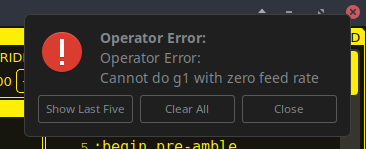
Another point is that the ATC seems to forget the traverse Feedrate every time I start linuxcnc. When picking up a tool I get the error "Cannot do g1 with zero Feed rate" and have to go into the Rack Setup and click "Update rack parameters" (although the Feedrate is stated correctly here).

I now know that clicking "Ref Rack data"  loads the Tools that are stored in the Rack. Unfortunately, It doesn't use the Tool Table "Rack" coloumn as I understood. 
I assume this would require a Python script to read the tool table and make it usable via Gcode?

Thank you for your patience by the way, really appreciated!
Displaying 12121 - 12135 out of 16323 results.
Time to create page: 0.498 seconds
Powered by Kunena Forum