Advanced Search

Search Results (Searched for: )

  • rodw
  • rodw's Avatar
22 Mar 2025 02:44
Replied by rodw on topic QTPlasmaC post processor - SheetCam?

QTPlasmaC post processor - SheetCam?

Category: Plasmac

Yes, that was one of the original reasons the ohmic test was included. It was intended to check if there was a short like yours before starting a job. It does not happen very often. I only ever experienced it once and I found a bit of rubbish inside the tip,  much like you did. I have thought of setting it up to use one thcad. I'm sure it could be done fairly easily.
  • cmorley
  • cmorley
22 Mar 2025 02:22
Replied by cmorley on topic development of a qt version of ncam

development of a qt version of ncam

Category: Qtvcp

Ok thanks I'll look at that!
  • cmorley
  • cmorley
22 Mar 2025 02:17
Replied by cmorley on topic USB pendant not drive axis

USB pendant not drive axis

Category: Qtvcp

I suggest you use halmeter ti watch some relevant pins/signals to see what is or is not happening.

for instance use halmeter to watch:
halui.axis.jog-speed (does it change when you press joystick buttons?)
halui.axis.x.plus (does it change when a button is pressed?)
input.0.abs-x-is-pos (does it change when a button is pressed?)

etc.
Then come back here when you track down the problem a little more.
  • JTknives
  • JTknives's Avatar
22 Mar 2025 02:16
Replied by JTknives on topic QTPlasmaC post processor - SheetCam?

QTPlasmaC post processor - SheetCam?

Category: Plasmac

Oh ok so you’re not waiting for the voltage to go to zero to trigger the contact. Your looking at any voltage drop and once it does it’s triggering contact. That make perfect sense to use a thcad and watch the frequency output. Then you could set the trip frequency on the encoder input on your mesa board. I wonder if there is a way to double duty a single thcad-10.

You know I stumbled upon something the other day by accident that could work. I was using my fine cut consumables. And I was testing my retraction to make sure my actual retraction was what the display was stating it was. I held the ohmic button down and moved z down till it stopped from the ohmic trip. But I noticed when it touched I seen a +10v on the cut voltage. I did it agian and it was still there. So I started looking around and found a tiny slag bead stuck up in the nozzle bridging the nozzle to the shield. This was back feeding the ohmic voltage into the nozzle and it was showing up on the cut voltage.

Would there be a way to use this to sense ohmic. I don't know the ramifications to running the nozzle bridged to shield but it had been like that for awhile as I had just been cutting.
  • ContinenteCNC
  • ContinenteCNC's Avatar
22 Mar 2025 02:01 - 22 Mar 2025 02:06

PCI and PCI-E add on cards with parallel port that work out of the box

Category: Computers and Hardware
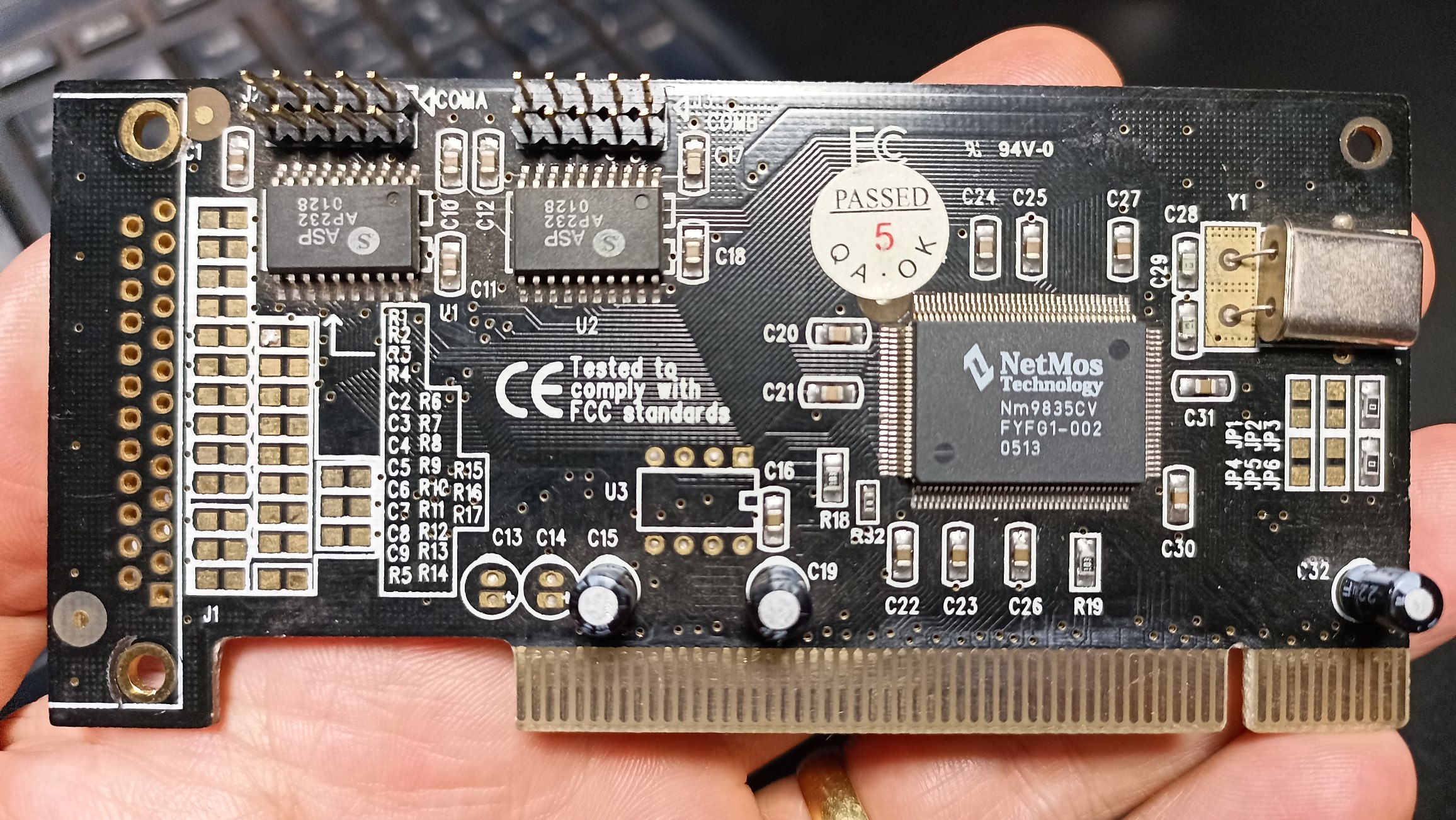
However this one here will probably work if I add the missing connector, capacitors and resistors.

PCI ID describes it as 1 parallel port + 2 serial ports (1P2S). 

It shows as a parallel port in dmesg and ioports and when I read the registers they are not empty (and numbers kind of make sense)


  • unknown
  • unknown
22 Mar 2025 01:51

PCIe - No parport registered at "0x " . This is not Always an error.Continuing.

Category: Advanced Configuration

I'd check the kernel Configs to see what if any parallel ports are being left out.
Who ever built the kernel may have decided to include support for parallel ports, as we're probably the only old fellas that use them.
You should be able to grep the kernel config file that is in the boot directory.
  • unknown
  • unknown
22 Mar 2025 01:46 - 22 Mar 2025 01:52

PCI and PCI-E add on cards with parallel port that work out of the box

Category: Computers and Hardware
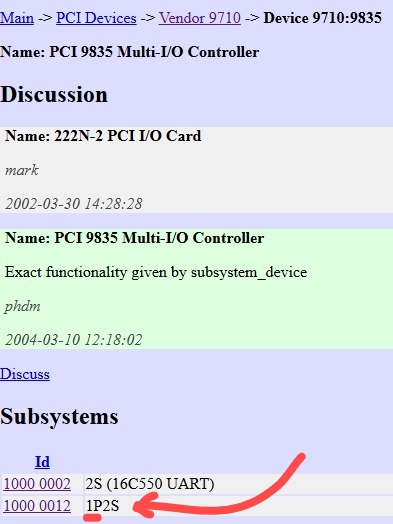
So you have 2 parallel ports
A legacy on board port at 0x378 and your PCIe on at 0xccc8.

Nice to get responses and not have argue with a user. Thank you very much.

Cheers
Rob
  • ContinenteCNC
  • ContinenteCNC's Avatar
22 Mar 2025 01:21 - 22 Mar 2025 01:24

PCI and PCI-E add on cards with parallel port that work out of the box

Category: Computers and Hardware
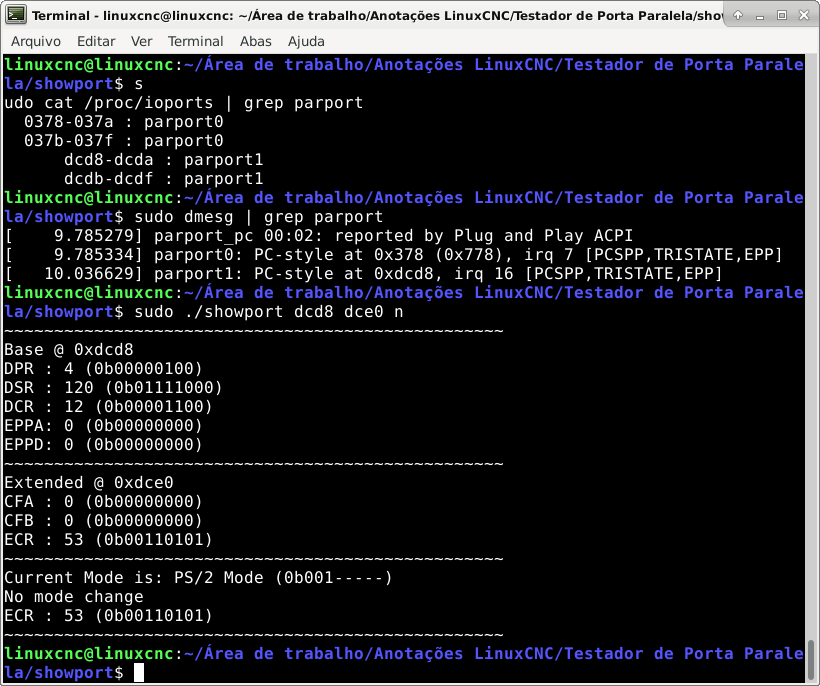
I forgot to mention you also look in /dev to see how many nodes are made for the parallel port, and also look at what dmesg reports .

sudo cat /proc/ioports

Will return addresses
 

sudo cat /proc/ioports | grep parport returns only one set of addresses, (just to make sure)

  • unknown
  • unknown
22 Mar 2025 01:07

PCI and PCI-E add on cards with parallel port that work out of the box

Category: Computers and Hardware
I forgot to mention you also look in /dev to see how many nodes are made for the parallel port, and also look at what dmesg reports .

sudo cat /proc/ioports

Will return addresses
  • ContinenteCNC
  • ContinenteCNC's Avatar
22 Mar 2025 00:57 - 22 Mar 2025 01:02

PCI and PCI-E add on cards with parallel port that work out of the box

Category: Computers and Hardware
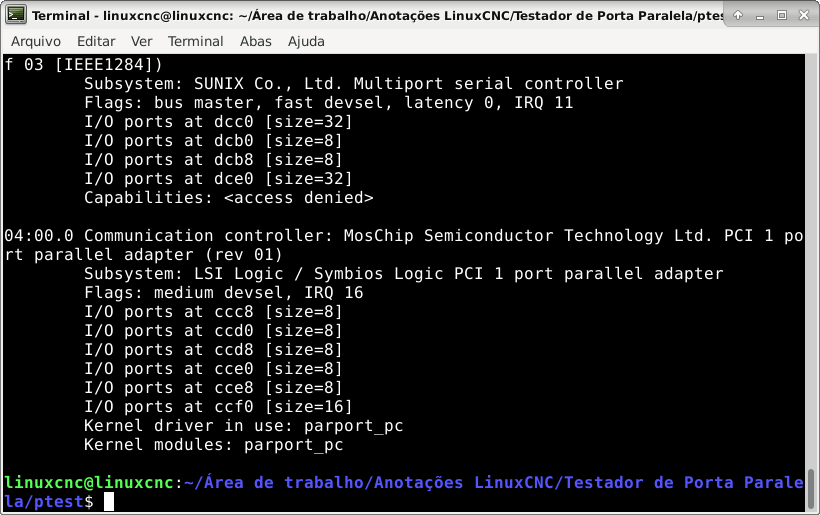
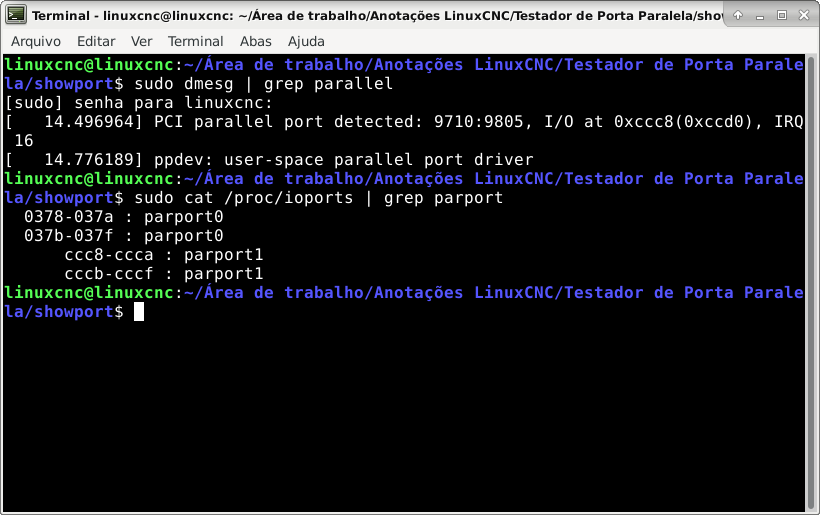
What's the PCI ID of this card, that's the secret source.


9710:9805 - NetMos Technology - PCI 1 port parallel adapter

Thank you very much for the tip!
  • ContinenteCNC
  • ContinenteCNC's Avatar
22 Mar 2025 00:50

PCI and PCI-E add on cards with parallel port that work out of the box

Category: Computers and Hardware
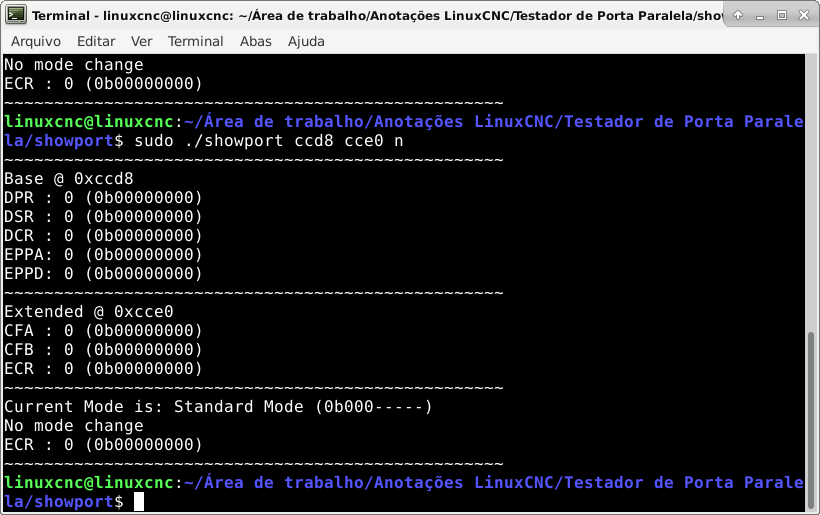
With regards to the second port, you'll have to check how the second parallel port is enabled, some chipsets use strapping or use a eeprom for the config.
If you aren't getting the address of the second parallel port come up adding the connector and resistors may not enable it.
Find the data sheet first and work out how to config the chip first before getting out the soldering iron.

You are right!

I tried to read the registers with the remaning adresses and it didn't work.  


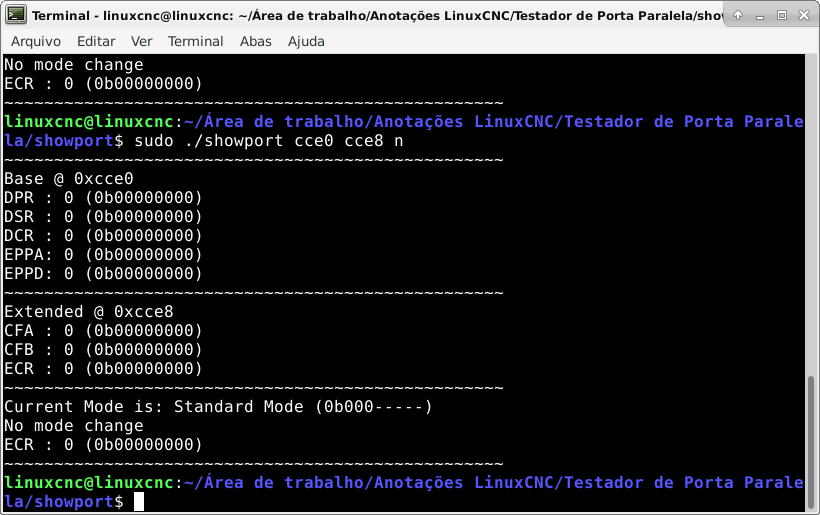
I tried both Base/Extended ccd8/cce0 and cce0/cce8. Didn't work. They must be strapped, as you said.


  • tommylight
  • tommylight's Avatar
22 Mar 2025 00:46

PCIe - No parport registered at "0x " . This is not Always an error.Continuing.

Category: Advanced Configuration

I think i should do a summary of the Sunix PCI-E card as the info got scattered in pieces, so:
I had one, it works perfectly but:
In a Lenovo PC it show the warning when LinuxCNC starts, but it works fine
In another PC with Asus Prime Z270 board, it shows no warning and no ................................
IT JUST dawned on me:
It will show the warning on older kernels, it will not show on new-er kernels!!!
Lenovo has Mint 19.3, the Asus has Mint 21.3, the friend with the same model cards has LMDE 6
Ok just checked the original post and it is Debian 12 so most probably 6.1.nn kernel, should be the same as in LMDE 6, so there goes my joy, oh hell, back to more testing! :) :) :)
  • unknown
  • unknown
22 Mar 2025 00:33

PCI and PCI-E add on cards with parallel port that work out of the box

Category: Computers and Hardware
With regards to the second port, you'll have to check how the second parallel port is enabled, some chipsets use strapping or use a eeprom for the config.
If you aren't getting the address of the second parallel port come up adding the connector and resistors may not enable it.
Find the data sheet first and work out how to config the chip first before getting out the soldering iron.
  • unknown
  • unknown
22 Mar 2025 00:29
  • unknown
  • unknown
22 Mar 2025 00:27

PCIe - No parport registered at "0x " . This is not Always an error.Continuing.

Category: Advanced Configuration

Offensive ?
Pointing out someone didn't want to lift a finger to sort the issue out even after they were given the solution ?
What really got my goat was the OP was the one with the issue, the OP had all the information available. If I was to raise an issue on GitHub, I would need to get my tower out storage, install a PCIe card, create a config and attempt to replicate the issue. Now how many cards would I need to try ?
So I'd put in a hour or two of my time for something the OP could of done in the time he made the post to say he had nothing more to say or make the report. And if it didn't get actioned straight away and new packages put up with their time frame the OP would not be satisfied.


Tho to tell the truth I wasn't surprised at considering the attitude.

As I stated before, a driver will load if there is a matching PCI ID for the hardware. I even gave the instruction that will show how to figure this out. Now if for some reason or another the people involved with producing or wholesaling the board decide for whatever reason to change the PCI ID and the driver doesn't know about it the driver won't load, it's not rocket science. Anyone who has anything to do with computer hardware knows that companies will change chipsets with models and give them new revision numbers, this was a thing to look for in the early days of wifi support in Linux, buy 2 models of the same card and one driver would work another wouldn't due to a change of chipset and PCI ID.
Displaying 17191 - 17205 out of 18507 results.
Time to create page: 0.936 seconds
Powered by Kunena Forum