Advanced Search

Search Results (Searched for: )

  • Aciera
  • Aciera's Avatar
15 Jan 2025 13:59
Replied by Aciera on topic Using G64 with M66 for smooth robot control

Using G64 with M66 for smooth robot control

Category: General LinuxCNC Questions

Have you thought about using the python interface to issue MDI commands to the queue instead of running a parametric gcode program?
  • liutas4x4
  • liutas4x4
  • hellvetica
  • hellvetica
15 Jan 2025 13:19
Replied by hellvetica on topic Using G64 with M66 for smooth robot control

Using G64 with M66 for smooth robot control

Category: General LinuxCNC Questions

The positional values are determined by a camera running object detection.

We're using it for a pick and place system so sometimes the entire move is known ahead of time (when object is being placed) but sometimes i want to change the target depending on camera feedback.
  • CNC_Bot
  • CNC_Bot
15 Jan 2025 12:58
Replied by CNC_Bot on topic Has Anyone used DeskProto

Has Anyone used DeskProto

Category: CAD CAM

Hello, I have been using Deskproto on Linux for years now, with a 4 axes CNC6040 (in fact the 4th axe is a rotation axe). It works great, it is stable. The support is good. The price seems OK for the value (hobbyist version). My setup is Blender + Deskproto. For carving, I use Aspire. I have not checked the latest version of Deskproto, which does carving. I have done a number of projects with very satisfatory results, on wood but also brass and titanium.
  • mat1370
  • mat1370
15 Jan 2025 12:55

Linuxcnc-ethercat: undefined symbol: ecrt_slave_config_sdo

Category: Installing LinuxCNC

thanks it worked for me,
only one thing: first i found where is the location of libethercat.so files for me.
i mean these three files: libethercat.so.1, libethercat.so.1.1.0, libethercat.so

then i copied them to the /lib/x86_64-linux-gnu/

then by running your edited make file the problem solve.
  • Aciera
  • Aciera's Avatar
15 Jan 2025 12:53 - 15 Jan 2025 12:58
Replied by Aciera on topic LinuxCNC with OKUMA OSP MX-55VA

LinuxCNC with OKUMA OSP MX-55VA

Category: Basic Configuration

Please don't create multiple threads about the same topic as it will invariably create confusion. I have deleted your other thread.
Thanks

[edit]
Moved the above post over from the deleted thread.
  • Aciera
  • Aciera's Avatar
15 Jan 2025 12:43
Replied by Aciera on topic Using G64 with M66 for smooth robot control

Using G64 with M66 for smooth robot control

Category: General LinuxCNC Questions

Where are you reading those positional values from and how far in advance are they known?
  • programador
  • programador's Avatar
15 Jan 2025 12:29 - 15 Jan 2025 12:30
Replied by programador on topic home axis problem

home axis problem

Category: AXIS

Good morning, to no home index, try this code in the INI file, but be careful, there may be severe collisions if you exceed the machine limits.
HOME_USE_INDEX = NO
  • hellvetica
  • hellvetica
15 Jan 2025 12:23

Using G64 with M66 for smooth robot control

Category: General LinuxCNC Questions

Hi, I've been using linuxcnc to control my delta robot arm through HAL pins and M66 commands.
This is my GCODE
(AXIS,stop)

O500 WHILE [1]

( Main loop )
M66 E0 L0 ; Read from motion.analog-in-0 (X)
#1 = #5399 ; Store the read value in variable #1
M66 E1 L0 ; Read from motion.analog-in-1 (Y)
#2 = #5399 ; Store the read value in variable #2
M66 E2 L0 ; Read from motion.analog-in-2 (Z)
#3 = #5399 ; Store the read value in variable #3

G1 X#1 Y#2 Z#3 F1000 ; Move to the new position


; G4 P0.1 ; Wait a short time before the next read (optional)

O500 ENDWHILE
M30

I connect custom pins to the motion analog in pins and then set the xyz values in my python or c program.
This works great, but when I try to add G64 blending to make the robot keep its speed it doesn't work.
Obviously this is because the trajectory planner doesn't know the next target point until it's read by M66 in the next gcode loop, so I tried adding the next target point into the gcode as well with 6 analog inputs:
(AXIS,stop)
G64 P50
O500 WHILE [1]

; G4 P0.001 ; Wait a short time before the next read (optional)

( Main loop )
M66 E0 L0 ; Read from motion.analog-in-0 (X)
#1 = #5399 ; Store the read value in variable #1
M66 E1 L0 ; Read from motion.analog-in-1 (Y)
#2 = #5399 ; Store the read value in variable #2
M66 E2 L0 ; Read from motion.analog-in-2 (Z)
#3 = #5399 ; Store the read value in variable #3

M66 E3 L0 ; Read from motion.analog-in-3 (X)
#4 = #5399 ; Store the read value in variable #4
M66 E4 L0 ; Read from motion.analog-in-4 (Y)
#5 = #5399 ; Store the read value in variable #5
M66 E5 L0 ; Read from motion.analog-in-5 (Z)
#6 = #5399 ; Store the read value in variable #6

G1 X#1 Y#2 Z#3 F30000 ; Move to the new position

G1 X#4 Y#5 Z#6 F30000 ; Load next position


O500 ENDWHILE
M30

This only works for every other point, because when the gcode loops, the trajectory planner has no information about the next point.

What I would need is to load the next target point into the trajectory planner so that G64 can use it, but not go there with G1. I tried adding O500 continue between the G1s but then the gcode is smart and ignores the second G1.

Is there a way to do this?


  • programador
  • programador's Avatar
15 Jan 2025 12:18
Replied by programador on topic LinuxCNC with OKUMA OSP MX-55VA

LinuxCNC with OKUMA OSP MX-55VA

Category: Basic Configuration

Good morning, my friend. Unfortunately, there won't be a ready-made cake recipe. Each machine requires a different methodology. I would start by studying the electrical part of the machine, to find out how many inputs and outputs it has, then how many movements it has, and finally which devices will be used. With this, you can get an idea of ​​which electronic boards from the manufacturer Mesa  store.mesanet.com/ will be necessary for the Retrofit. If you post the electrical part on this forum, we can help you.
  • timo
  • timo
15 Jan 2025 11:13 - 15 Jan 2025 11:18

Can the stepgen LPT work in conjunction with the mesa card?

Category: General LinuxCNC Questions

It is a PCIe Mesa 6i25 with 7i76 plug and go kit. I do not know when I updated Linux CNC last time on that device. Must be a two or three year old installation.

I do not think it will make a difference, besides the naming conventions in the hal files.

How I did it:
a) create a Machine configuration with stepconf
b) create similar Machine configuration with pncconf

Then I deleted the axis information from the pnconf generated file, for the motors that will run on the parallel port. I deleted all the axis information from the stepconf gnerated file, that will belong to the Mesa card.

Then I merged the two configs step by step by copying the "Mesa stuff" into the LPT configuration. (ended up with a convoluted hal and ini file that works and contains snippets of "both worlds")

Greetings Timo

p.s. I did not have mentionable prior experience, so it took a while to get it "free of startup errors", but no involved adjustments. Mainly removing double entries and correcting my own typos.
  • tivoi
  • tivoi's Avatar
15 Jan 2025 10:58
  • nicton
  • nicton
15 Jan 2025 09:04

Can the stepgen LPT work in conjunction with the mesa card?

Category: General LinuxCNC Questions

Files

File Attachment:

File Name: mesa122.hal
File Size:12 KB

File Attachment:

File Name: mesa122.ini
File Size:5 KB

File Attachment:

File Name: mesa122.hal
File Size:12 KB

File Attachment:

File Name: mesa122.ini
File Size:5 KB
  • Aciera
  • Aciera's Avatar
15 Jan 2025 08:27
Replied by Aciera on topic LCNC 2.10 - Ask for AUTOMATIC_G43

LCNC 2.10 - Ask for AUTOMATIC_G43

Category: Gmoccapy
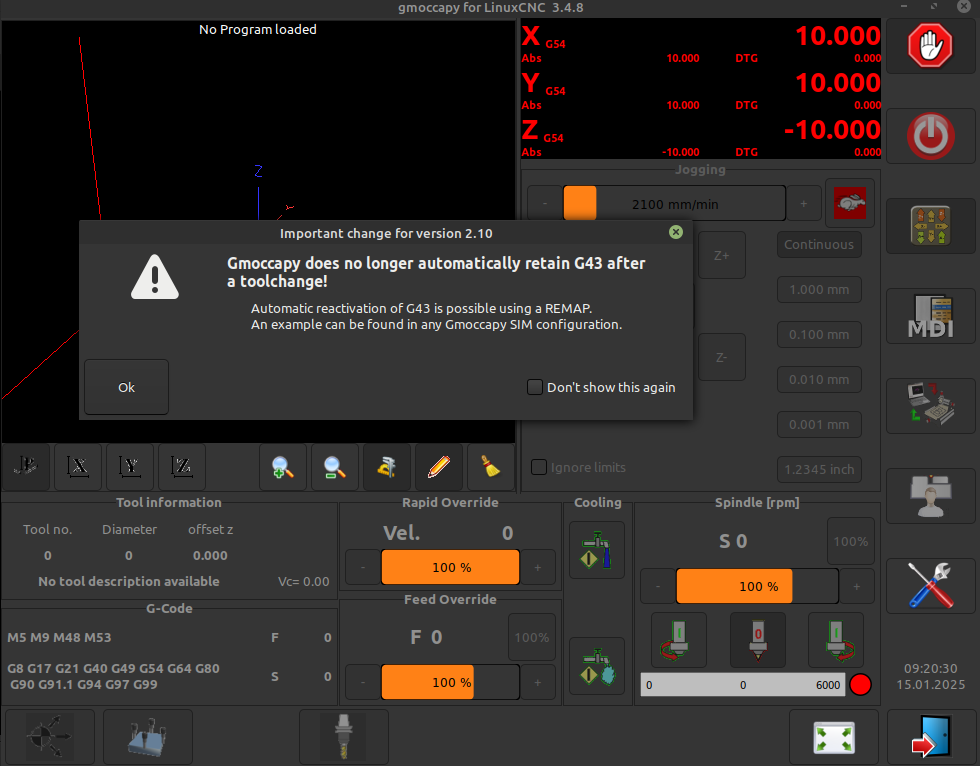
code snippets:

gmoccapy.py:
        if self.prefs.getpref("show_startup_messsage", True, bool):
            title = "Important change for version 2.10"
            message = "Gmoccapy does no longer automatically retain G43 after a toolchange!"
            sub_message = "Automatic reactivation of G43 is possible using a REMAP.\nAn example can be found in any Gmoccapy SIM configuration."
            cb_value = self.dialogs.show_startup_message(self, _(message), _(sub_message), _(title))
            if cb_value:
                self.prefs.putpref("show_startup_messsage", False, bool)

dialogs.py:
    def show_startup_message(self, caller, message, sub_message, title = _("Operator Message")):
        dialog = Gtk.MessageDialog(caller.widgets.window1,
                                   Gtk.DialogFlags.DESTROY_WITH_PARENT,
                                   Gtk.MessageType.WARNING,
                                   Gtk.ButtonsType.NONE)
        dialog.set_title(str(title))
        dialog.set_markup("<span size='12000'><b>" + message + "</b></span>")
        dialog.format_secondary_text(sub_message)
        ok_button = Gtk.Button.new_with_mnemonic(_("_Ok"))
        ok_button.set_size_request(-1, 56)
        ok_button.connect("clicked",lambda w:dialog.response(Gtk.ResponseType.OK))
        box = Gtk.HButtonBox()
        box.add(ok_button)
        cb = Gtk.CheckButton(label = "Don't show this again")
        box.pack_start(cb, True, True, 0)
        dialog.action_area.add(box)
        dialog.set_border_width(5)
        dialog.show_all()
        self.emit("play_sound", "alert")
        response = dialog.run()
        dialog.destroy()
        return cb.get_active()
  • Aciera
  • Aciera's Avatar
15 Jan 2025 08:17 - 15 Jan 2025 08:22
Replied by Aciera on topic LCNC 2.10 - Ask for AUTOMATIC_G43

LCNC 2.10 - Ask for AUTOMATIC_G43

Category: Gmoccapy

Turned out to be not too difficult, adds an entry 'show_startup_message' in the .pref file:  
 
Displaying 19816 - 19830 out of 21715 results.
Time to create page: 0.452 seconds
Powered by Kunena Forum