Advanced Search

Search Results (Searched for: )

  • dunnitagain
  • dunnitagain
11 Jun 2025 00:45

Linuxcnc 2.4.5 with Ubuntu 10.04 , Terminated with Error!

Category: General LinuxCNC Questions

Thank You Andy, Im sure it was my fault, just to old and Technologically inferior to comprehend.
  • dunnitagain
  • dunnitagain
11 Jun 2025 00:43

Linuxcnc 2.4.5 with Ubuntu 10.04 , Terminated with Error!

Category: General LinuxCNC Questions

Great ! i have to figure out how to load the error files to a USB Stick .
The builder was a bit of a Conspiracy theorist... he had everything locked down.
  • FixItWithMonkeyWrench
  • FixItWithMonkeyWrench
11 Jun 2025 00:08
Latency Issues - Histogram Shape was created by FixItWithMonkeyWrench

Latency Issues - Histogram Shape

Category: Installing LinuxCNC

Hi all,

I'm new to Lcnc, and have been for the past week trying to get my PC to hit the right latency levels.
After a week i've managed to get the base thread down from 126us to about 90us (worst case) which I've read is okay if you're using it with ethercat.

However I've noticed most of the graphs, especially for the servo period Histogram Latency graph that the shapes that most users have is a single peak. I've always been getting 3 peaks.

I'd like to confirm whether having this type of histogram shape is normal? or whether this shape indicates further sources of latency to be reduced. 

For Background:

Setup:QBiX-GLKB4125-A1 Mini -PC  J4125 Processor

I've grubbed out all i can think of to help the latency with a small amount of success to when it was out of the box

GRUB_CMDLINE_LINUX_DEFAULT="quiet splash kthread_cpus=0,1 irqaffinity=0,1 rcu_nocbs=2,3 nohz_full=2,3 isolcpus=2,3 rcu_nocb_poll nohz=on intel_pstate=disable amd_pstate=disabled amd_idle.max_cstate=1  processor.max_cstate=0 idle=halt skew_tick=1 idle=poll cpufreq.off=1 cpuidle.off=1 intel_idle.max_cstate=0 nowatchdog nosoftlockup igb.EEE=0 apm=off nosmt=force acpi_irq_nobalance i915.enable_rc6=0 i915.enable_dc=0 i915.enable_psr=0 i915.enable_fbc=0 drm_kms_helper.poll=0 pcie_aspm=off r8168.aspm=0 r8168.eee_enable=0 mitigations=off pcie_aspm=off hpet=disable"

got the governor running on performance, and .sh to set the IRQ affinities.

disabled stuff in the bios

updated drivers via the terminal but haven't yet tried updating the NIC,Graphics, and Chipset drivers from the manufacturer.

Any help would be much appreciated, as I'm new to linux. Thanks. 
  • unknown
  • unknown
10 Jun 2025 23:38
Replied by unknown on topic Flyback diode mesa 7i95t

Flyback diode mesa 7i95t

Category: Driver Boards

Is it really bickering when correcting so much bad information from langdons ?

This is what I meant in my problem thread.

Apologies to the OP, just didn't want you to do anything that could cause issues.
  • unknown
  • unknown
10 Jun 2025 23:32

Raspberry Pi Kernel recompile for waveshare 1Gbit Network interface

Category: Computers and Hardware

Like I said the kernel in the image is the same as the RPi OS (with realtime added)

Driver is there:
cnc@raspberrypi:/boot$ ls /lib/modules/6.12.11/kernel/drivers/net/ethernet/realtek/
r8169.ko.xz
cnc@raspberrypi:/boot$ sudo modinfo r8169
filename:       /lib/modules/6.12.11/kernel/drivers/net/ethernet/realtek/r8169.ko.xz
firmware:       rtl_nic/rtl8126a-3.fw
firmware:       rtl_nic/rtl8126a-2.fw
firmware:       rtl_nic/rtl8125b-2.fw
firmware:       rtl_nic/rtl8125a-3.fw
firmware:       rtl_nic/rtl8107e-2.fw
firmware:       rtl_nic/rtl8168fp-3.fw
firmware:       rtl_nic/rtl8168h-2.fw
firmware:       rtl_nic/rtl8168g-3.fw
firmware:       rtl_nic/rtl8168g-2.fw
firmware:       rtl_nic/rtl8106e-2.fw
firmware:       rtl_nic/rtl8106e-1.fw
firmware:       rtl_nic/rtl8411-2.fw
firmware:       rtl_nic/rtl8411-1.fw
firmware:       rtl_nic/rtl8402-1.fw
firmware:       rtl_nic/rtl8168f-2.fw
firmware:       rtl_nic/rtl8168f-1.fw
firmware:       rtl_nic/rtl8105e-1.fw
firmware:       rtl_nic/rtl8168e-3.fw
firmware:       rtl_nic/rtl8168e-2.fw
firmware:       rtl_nic/rtl8168e-1.fw
firmware:       rtl_nic/rtl8168d-2.fw
firmware:       rtl_nic/rtl8168d-1.fw
license:        GPL
softdep:        pre: realtek
description:    RealTek RTL-8169 Gigabit Ethernet driver
author:         Realtek and the Linux r8169 crew <netdev@vger.kernel.org>
srcversion:     668EE5A1A5251AE4E5F0F08
alias:          pci:v000010ECd00003000sv*sd*bc*sc*i*
alias:          pci:v000010ECd00008126sv*sd*bc*sc*i*
alias:          pci:v000010ECd00008125sv*sd*bc*sc*i*
alias:          pci:v00000001d00008168sv*sd00002410bc*sc*i*
alias:          pci:v00001737d00001032sv*sd00000024bc*sc*i*
alias:          pci:v000016ECd00000116sv*sd*bc*sc*i*
alias:          pci:v00001259d0000C107sv*sd*bc*sc*i*
alias:          pci:v00001186d00004302sv*sd*bc*sc*i*
alias:          pci:v00001186d00004300sv*sd*bc*sc*i*
alias:          pci:v00001186d00004300sv00001186sd00004B10bc*sc*i*
alias:          pci:v000010ECd00008169sv*sd*bc*sc*i*
alias:          pci:v000010FFd00008168sv*sd*bc*sc*i*
alias:          pci:v000010ECd00008168sv*sd*bc*sc*i*
alias:          pci:v000010ECd00008167sv*sd*bc*sc*i*
alias:          pci:v000010ECd00008162sv*sd*bc*sc*i*
alias:          pci:v000010ECd00008161sv*sd*bc*sc*i*
alias:          pci:v000010ECd00008136sv*sd*bc*sc*i*
alias:          pci:v000010ECd00008129sv*sd*bc*sc*i*
alias:          pci:v000010ECd00002600sv*sd*bc*sc*i*
alias:          pci:v000010ECd00002502sv*sd*bc*sc*i*
depends:        
intree:         Y
name:           r8169
vermagic:       6.12.11 SMP preempt_rt mod_unload modversions aarch64
sig_id:         PKCS#7
signer:         Build time autogenerated kernel key
sig_key:        14:CE:12:BC:56:1A:45:BD:26:4B:22:D7:A5:0D:7A:06:44:B9:F4:69
sig_hashalgo:   sha1
signature:      4A:5E:4B:28:A7:ED:65:3D:C8:53:C3:E2:BD:07:40:04:C0:32:C0:8E:
		4E:C5:37:6A:AE:02:25:29:77:E4:6F:92:65:10:15:3D:2A:05:62:9C:
		13:B7:B5:8A:8F:CA:95:FF:A6:B6:73:E2:85:75:D2:FD:C1:1E:58:64:
		3D:B1:97:1A:DB:85:9D:30:5F:98:FB:B6:55:54:42:37:8E:33:C2:36:
		0A:D5:DF:96:4D:9E:C1:1E:FE:B3:33:B1:7F:B2:1B:B4:76:FD:16:2C:
		66:22:9C:02:B2:ED:32:99:47:6B:96:FB:4D:1F:0F:DF:BE:D2:D7:F2:
		4E:FB:DB:AF:70:ED:AD:91:22:3F:08:96:88:C3:C9:BB:7A:80:7F:E4:
		40:E7:4D:AA:25:E5:DD:0D:78:0D:7E:14:EB:98:05:36:31:D2:2F:FA:
		9E:55:3F:11:71:F6:3A:4C:A5:F2:A7:F7:D6:B3:84:31:27:88:0B:18:
		61:F6:68:F9:31:D6:C7:8D:E6:9C:17:2F:25:05:DF:3F:19:7F:69:95:
		5E:C4:1F:09:D1:31:CE:E2:77:A3:F2:63:F4:16:9D:EC:B8:5D:33:01:
		75:BB:59:6E:6D:70:93:92:4F:CF:45:9A:9C:AA:DB:F0:C3:CB:CD:54:
		14:EF:25:C3:61:5F:05:52:BB:57:9D:D4:DA:F6:72:F4:AC:56:1E:EC:
		5D:3D:79:EB:15:67:2A:80:CD:D8:2E:D1:AA:07:8F:C5:BB:E3:BD:32:
		A7:E8:32:F7:5E:CD:E0:42:C1:05:EB:28:41:C4:FE:34:E0:6D:7E:E1:
		4F:34:EF:C0:25:95:A3:4D:7F:AE:04:7A:9A:9E:17:91:5C:89:CF:F1:
		E7:27:B1:D9:E2:F5:9E:45:DE:C3:78:15:B9:35:29:3A:83:0E:54:EF:
		80:D6:A6:09:0D:9C:F0:18:4A:5C:00:89:88:10:B6:66:44:31:78:A9:
		C3:47:1D:73:C6:1C:0E:33:DE:01:13:A8:C1:7B:13:82:D9:CB:0F:E5:
		2C:AC:24:70:F1:4A:45:E9:67:0F:38:94:0A:51:72:A7:4A:3A:BA:05:
		89:D0:0D:13:A2:23:05:3A:1B:96:EE:5E:28:79:14:C9:20:F6:D4:94:
		F7:C0:20:FB:E3:B9:52:3D:BB:C5:BB:68:DE:F8:08:32:4E:A4:F2:F5:
		2C:98:87:E8:E5:23:3A:7A:7A:A7:4C:AA:97:04:07:3A:4A:FF:AD:EA:
		1C:52:C0:2D:20:73:F7:75:A1:94:92:4E:64:21:4A:0E:35:22:73:81:
		92:84:97:98:3A:C2:3E:06:99:42:86:1D:33:7E:8A:22:90:3F:66:8C:
		57:76:DE:B3:EC:D2:AA:DE:54:E4:C0:6E

You may have to check dmesg for any references to R8169. PCIe should be enabled, I used a NVMe boot drive. Remember that the location of config.txt is
/boot/broadcom/config.txt
I sure this is mentioned in the main image RPi5 thread.
  • mediocre_chloride
  • mediocre_chloride's Avatar
10 Jun 2025 22:43 - 10 Jun 2025 22:44

Raspberry Pi Kernel recompile for waveshare 1Gbit Network interface

Category: Computers and Hardware
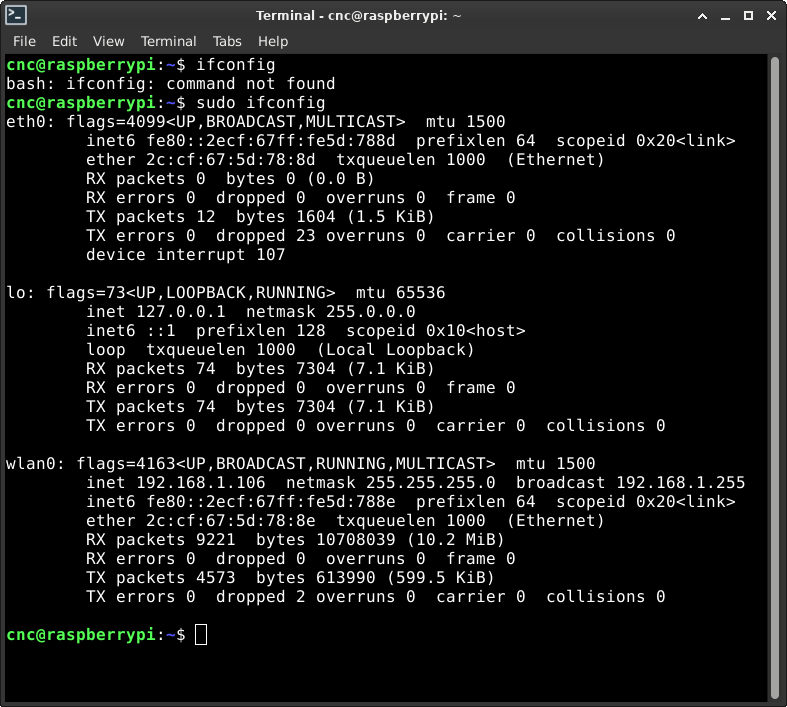
Thanks for the fast reply

I Downloaded 2.94 Rpi 5 based OS from the official linuxcnc/download site.

The Waveshare user guide states that something in the lines of:
Device Drivers
> Network device support
    > Ethernet driver support
       > Realtek devices
          > Realtek 8169/8168/8101/8125 ethernet support

needs to be added if not using original rpi os.
i am pretty sure that is the problem, as i see the card with lspci as described in the user guide:


but not in ifconfig:


it is also stated, drivers could be installed manually but its not recommended.
Also, there are other rpi linuxcnc distros floating around, do you think its worth switching around?
 
  • jlfauvel
  • jlfauvel's Avatar
10 Jun 2025 22:26
Replied by jlfauvel on topic LinuxCNC will not start... report file crated

LinuxCNC will not start... report file crated

Category: General LinuxCNC Questions

… any advice on how to fix that?
  • Benb
  • Benb's Avatar
10 Jun 2025 22:14

Request for adding second led to existing hal push button

Category: Qtvcp

Chris is it possible to add a second hal led to the existing hal push button similar to:
 
Thank you
  • russkinch
  • russkinch's Avatar
10 Jun 2025 21:13
Replied by russkinch on topic Encoder for rigid tapping

Encoder for rigid tapping

Category: HAL

I did as you suggested. Many thanks. It worked a dream and I can still thread at 1000rpm. Going to sort my motor slow down speed as its currently two revolutions. So i have modified my ngc file for not to account for this. Many thanks again
  • unknown
  • unknown
10 Jun 2025 20:59

Raspberry Pi Kernel recompile for waveshare 1Gbit Network interface

Category: Computers and Hardware

Shouldn't need recompiling as, our images use a kernel built from the Raspberry Pi GitHub sources.
The only difference being is choosing the kernel config option for real time.
If the standard kernel doesn't work give me a yell and I'll build an update image, as there are a few minor things I would like to add.
  • bobwolf
  • bobwolf
10 Jun 2025 20:21
Another "arduino io panel" was created by bobwolf

Another "arduino io panel"

Category: Show Your Stuff

Hello everyone
I was inspired to make an interface to manage a generic operator panel (not for real time operation). I saw that there are already many; mine would be a little simpler and above all easily expandable.
the first idea, which I tried on a breadboard, was to use physical pins (parallel port, mesa, etc etc) controlled by hal with an ad hoc program and with a sort of multiplexer to be able to multiply them almost at will. in theory I could reach 256 inputs and 256 outputs. even too many, but these are its potential.
then I said: let's try to put a jog wheel in the system, and there the problems came; with my system I lost too many steps and had dead times. unusable.
I began to understand if with arduino I would have had more chances of success, and always in theory, since I'm waiting for the components to do the experiments, I should have good results.

prototype features:
128 maximum inputs
128 maximum outputs
3 inputs for rotary encoders
3 inputs for potentiometers
communication with hal via arduino usb
data update time 10/20ms (50/100Hz)
for an operator panel 50/100ms would also be fine but doing the math I should be fine with the shorter times.

what could be useful to insert in this system? the first thing that came to mind would be analog outputs to drive pointer instruments or digital displays that accept 0-5v voltages, to be used to display parameters such as spindle speed, feeds, or anything else that comes to mind.

could it be a good system to develop?

ciao
Roberto
  • PCW
  • PCW's Avatar
10 Jun 2025 19:42

LinuxCNC will not start... report file crated

Category: General LinuxCNC Questions

The error is is right here:

hm2_eth: ERROR : can't connect: Network is unreachable

Follow tommylights advice in the other thread...
 
  • deltafox24
  • deltafox24
10 Jun 2025 18:44
Replied by deltafox24 on topic SANGE elec IO

SANGE elec IO

Category: EtherCAT

thanks for the tip, i got the lcec_configgen file
   <slave idx="4" type="generic" vid="0xee000002" pid="0x00010205" name="D5">
      <!--SG-ELC-ADIO-DI16-DO16-PNP(Digital 16-Input/16-Output)-->
      <syncManager idx="0" dir="out">
        <pdo idx="1a00">
          <!--Output Group 0-->
          <pdoEntry idx="3101" subIdx="01" bitLen="8" halPin="output-00-07-" halType="BLANK"/>
        </pdo>
      </syncManager>
      <syncManager idx="1" dir="out">
        <pdo idx="1a01">
          <!--Output Group 1-->
          <pdoEntry idx="3101" subIdx="02" bitLen="8" halPin="output-08-15-" halType="BLANK"/>
        </pdo>
      </syncManager>
      <syncManager idx="2" dir="in">
        <pdo idx="1600">
          <!--Input Group 0-->
          <pdoEntry idx="3001" subIdx="01" bitLen="8" halPin="input-00-07-" halType="BLANK"/>
        </pdo>
        <pdo idx="1601">
          <!--Input Group 1-->
          <pdoEntry idx="3001" subIdx="02" bitLen="8" halPin="input-08-15-" halType="BLANK"/>
        </pdo>
      </syncManager>
    </slave>

Based on it, I modified my XML file in this way
  <!-- IO -->
<slave idx="4" type="generic" vid="EE000002" pid="00010205" configPdos="true">
  <dcConf assignActivate="0000" sync0Cycle="0" sync0Shift="0"/>

 
  <syncManager idx="0" dir="out">
    <pdo idx="1a00">
      <pdoEntry idx="3101" subIdx="1" bitLen="8" halType="complex">
        <complexEntry bitLen="1" halPin="out-00" halType="bit"/>
        <complexEntry bitLen="1" halPin="out-01" halType="bit"/>
        <complexEntry bitLen="1" halPin="out-02" halType="bit"/>
        <complexEntry bitLen="1" halPin="out-03" halType="bit"/>
        <complexEntry bitLen="1" halPin="out-04" halType="bit"/>
        <complexEntry bitLen="1" halPin="out-05" halType="bit"/>
        <complexEntry bitLen="1" halPin="out-06" halType="bit"/>
        <complexEntry bitLen="1" halPin="out-07" halType="bit"/>
      </pdoEntry>
    </pdo>
  </syncManager>

 
  <syncManager idx="1" dir="out">
    <pdo idx="1a01">
      <pdoEntry idx="3101" subIdx="2" bitLen="8" halType="complex">
        <complexEntry bitLen="1" halPin="out-08" halType="bit"/>
        <complexEntry bitLen="1" halPin="out-09" halType="bit"/>
        <complexEntry bitLen="1" halPin="out-10" halType="bit"/>
        <complexEntry bitLen="1" halPin="out-11" halType="bit"/>
        <complexEntry bitLen="1" halPin="out-12" halType="bit"/>
        <complexEntry bitLen="1" halPin="out-13" halType="bit"/>
        <complexEntry bitLen="1" halPin="out-14" halType="bit"/>
        <complexEntry bitLen="1" halPin="out-15" halType="bit"/>
      </pdoEntry>
    </pdo>
  </syncManager>

 
  <syncManager idx="2" dir="in">
    <pdo idx="1600">
      <pdoEntry idx="3001" subIdx="1" bitLen="8" halType="complex">
        <complexEntry bitLen="1" halPin="in-00" halType="bit"/>
        <complexEntry bitLen="1" halPin="in-01" halType="bit"/>
        <complexEntry bitLen="1" halPin="in-02" halType="bit"/>
        <complexEntry bitLen="1" halPin="in-03" halType="bit"/>
        <complexEntry bitLen="1" halPin="in-04" halType="bit"/>
        <complexEntry bitLen="1" halPin="in-05" halType="bit"/>
        <complexEntry bitLen="1" halPin="in-06" halType="bit"/>
        <complexEntry bitLen="1" halPin="in-07" halType="bit"/>
      </pdoEntry>
    </pdo>
    <pdo idx="1601">
      <pdoEntry idx="3001" subIdx="2" bitLen="8" halType="complex">
        <complexEntry bitLen="1" halPin="in-08" halType="bit"/>
        <complexEntry bitLen="1" halPin="in-09" halType="bit"/>
        <complexEntry bitLen="1" halPin="in-10" halType="bit"/>
        <complexEntry bitLen="1" halPin="in-11" halType="bit"/>
        <complexEntry bitLen="1" halPin="in-12" halType="bit"/>
        <complexEntry bitLen="1" halPin="in-13" halType="bit"/>
        <complexEntry bitLen="1" halPin="in-14" halType="bit"/>
        <complexEntry bitLen="1" halPin="in-15" halType="bit"/>
      </pdoEntry>
    </pdo>
  </syncManager>
</slave>

but still after using the IO module, I get an error when lifting the zed axis.


  • jlfauvel
  • jlfauvel's Avatar
10 Jun 2025 18:11
Replied by jlfauvel on topic LinuxCNC ne démarre pas... message d'erreur

LinuxCNC ne démarre pas... message d'erreur

Category: Français

... i change the .txt file to .doc simply to be able insert the attachment to the forum.
But yes, I will try to fix the networking.
Displaying 13531 - 13545 out of 17415 results.
Time to create page: 0.368 seconds
Powered by Kunena Forum