
Advanced Search

Search Results (Searched for: )

  • Roger S
  • Roger S
11 May 2025 13:02
Replied by Roger S on topic Using POSIX realtime

Using POSIX realtime

Category: EtherCAT

Hi everyone, I've already done that. I've reinstalled the PC three times and always encountered the same problems. I included Mok Management during the second installation. I've done that again this time.
roger@roger:~$ mokutil --sb-state
SecureBoot disabled
roger@roger:~$ 

and yet something seems to have gone wrong:
dpkg: Fehler beim Bearbeiten des Paketes linux-image-6.1.0-34-rt-amd64 (--config
ure):
 »installiertes post-installation-Skript des Paketes linux-image-6.1.0-34-rt-amd
64«-Unterprozess gab den Fehlerwert 1 zurück
dpkg: Abhängigkeitsprobleme verhindern Konfiguration von linux-image-rt-amd64:
 linux-image-rt-amd64 hängt ab von linux-image-6.1.0-34-rt-amd64 (= 6.1.135-1); 
aber:
  Paket linux-image-6.1.0-34-rt-amd64 ist noch nicht konfiguriert.

dpkg: Fehler beim Bearbeiten des Paketes linux-image-rt-amd64 (--configure):
 Abhängigkeitsprobleme - verbleibt unkonfiguriert
Trigger für initramfs-tools (0.142+deb12u1) werden verarbeitet ...
update-initramfs: Generating /boot/initrd.img-6.1.0-34-rt-amd64
raspi-firmware: missing /boot/firmware, did you forget to mount it?
run-parts: /etc/initramfs/post-update.d//z50-raspi-firmware exited with return c
ode 1
dpkg: Fehler beim Bearbeiten des Paketes initramfs-tools (--configure):
 »installiertes post-installation-Skript des Paketes initramfs-tools«-Unterproze
ss gab den Fehlerwert 1 zurück
Fehler traten auf beim Bearbeiten von:
 linux-image-6.1.0-34-rt-amd64
 linux-image-rt-amd64
 initramfs-tools
E: Sub-process /usr/bin/dpkg returned an error code (1)

With the workaround everything works so far (I hope) and thanks again
  • CallumRD1
  • CallumRD1
11 May 2025 12:51 - 11 May 2025 12:55
Replied by CallumRD1 on topic G-code file loading at G53 instead of G54

G-code file loading at G53 instead of G54

Category: Qtvcp

Hi rodw, thanks for the response. I think you are missing the problem so please allow me to clarify.

On my Tormach, this process makes perfect sense. I touch off with a probe or tool or edge finder or whatever, and then hit the zero buttons in the GUI. This sets the DRO readout to zero, puts the work offset origin symbol in the workspace viewer at the current position, and populates the offsets table with the position of the work offset in absolute coordinates. No problems here.

But on my new LinuxCNC mill, this process isn't working. When I hit the zero buttons in the gui, the DRO readout gets set to zero, the work offset symbol in the workspace viewer (3 colored axis arrows) gets put at my present position, but the offsets table doesn't update. It remains unchanged. You can see this in the images I attached to my previous post. More so, if I try to manually enter values in the offsets table, I get an error. I also included this info in my previous post.

Please let me know if there's anything else I can clarify. I understand that this is a bit of a subtle issue and I haven't done the best job of explaining it so far, so I hope this is a little better.

Edit: The mill is already homed in both situations described above. When run in what I call Bridgeport mode, moving the tool around manually and using the readout as a simple DRO, everything functions normally. The gui buttons zero the G54 work offset in the DRO correctly, it's just that the offsets table isn't updating along with this. When I load a G-code file, it appears to be respecting the offsets table G54 offset rather than the DRO-shown G54 offset, so the tool paths are not where I want them to be.
  • machinedude
  • machinedude's Avatar
11 May 2025 11:55 - 11 May 2025 19:51
Replied by machinedude on topic Black Friday Deal got me :)

Black Friday Deal got me :)

Category: Plasma & Laser

add loaded forces to the mix and i just learned something else this weekend. always something with this project, it seems. 450lbs of force is no joke or 2000N for everyone over on the other side of the pond.
  • Esaber
  • Esaber
11 May 2025 10:43 - 11 May 2025 11:01
  • Esaber
  • Esaber
11 May 2025 10:37
Replied by Esaber on topic Esab Ultrarex UXD-P2000 Upgrade Project

Esab Ultrarex UXD-P2000 Upgrade Project

Category: Plasma & Laser

Hi guys ! Long time no see !
Back to this project after a long pause, a new mesa 7i77 board and some wiring mess cleaning. We managed to do some successful test cuts. The machine did even cut some 12mm sheets last Friday. But we still have issues with height control as the torch gets too close to the materiel and this messes up the cut and the torch tip. I'm uploading some test cut videos and will upload some more in order to have your feedback on height control and correct voltage values. Big Thanks for Tommy for his great help with this project. @Tommy, hope you're doing well and enjoying your projects !
Will update with youtube links soon.
  • Aciera
  • Aciera's Avatar
11 May 2025 09:17 - 11 May 2025 09:21

Planning to Retrofit a Mazak Integrex200Y Mill-Turn Machine

Category: Advanced Configuration

Please note the update regarding tool-spindle orientation in the post above.

Also note that there is a sim config for fanuc style tool change and tool-wear, which you may find interesting:
github.com/LinuxCNC/linuxcnc/tree/master...im/axis/lathe-fanucy
  • Wischi
  • Wischi
11 May 2025 09:10
Replied by Wischi on topic Gmoccapy Tool Change Dialog

Gmoccapy Tool Change Dialog

Category: Gmoccapy

Take a look at:

www.linuxcnc.org/docs/html//gui/gmoccapy...l#_tool_related_pins

It seems that you are missing the iocontrol connections. Putting these into the postgui file is correct.
  • timo
  • timo
11 May 2025 09:10
Replied by timo on topic comparing to Grbl, or FluidNC

comparing to Grbl, or FluidNC

Category: Milling Machines

More things I learned today, about Grbl:

Say you start a jog, and realize you meant to go the other way, and select the other direction. In LinuxCNC, this Just Works. Using Grbl, first the errant jog has to finish, and only then the next queued jog is executed. Not terribly efficient.
 

Not only "not terribly efficient", but can become very ugly. It all depends on the situation or machine. Those jog functions for a heavy machine are outright dangerous. Imagine it beeing set to a 10 mm jog distance. Push the wrong direction and off it goes into whatever is in the way. :-)
If you are lucky it goes (pling) and the tip of the 3d probe ( 40 moneys ) is the only victim.

 
  • Hakan
  • Hakan
11 May 2025 08:23

Ethercat LinuxCNC board for a 4 axis router

Category: General LinuxCNC Questions
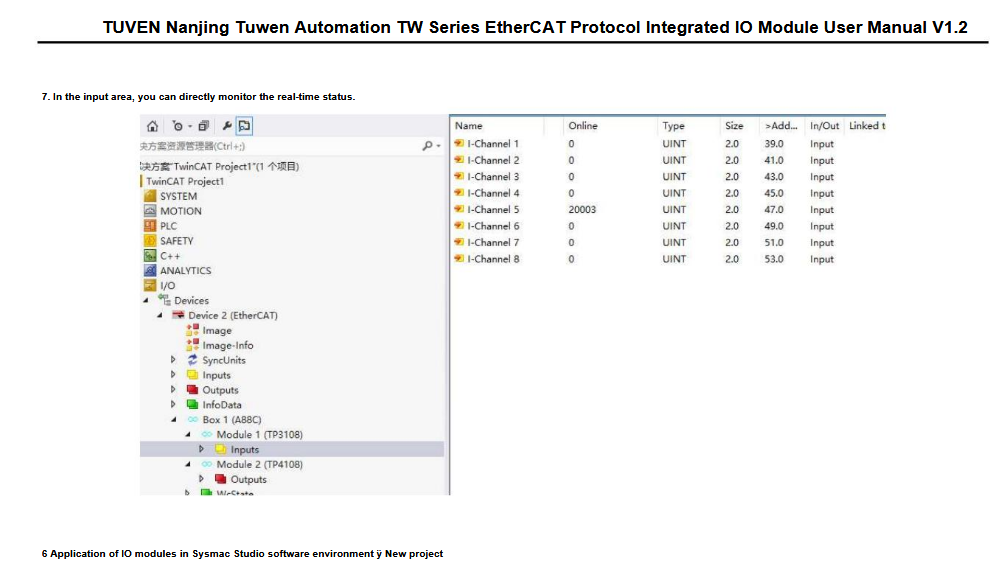
The device linked to from aliexpress should work, it is a simple interface that is easily configured with the generic device.
But be prepared to learn the translate tool in your browser, documentation is all in chines.
Here is a translated screen shot from the manual
 
If you understand what this is, go right ahead. If you don't understand it, take a safer and easier path.
  • Hakan
  • Hakan
11 May 2025 08:05
Replied by Hakan on topic Using POSIX realtime

Using POSIX realtime

Category: EtherCAT

That could be the case, good to get an explanation to this.
Was thinking of the lack of error messages when ethercatctl tried to modprobe ec_generic,
but the error messages might be in /var/log/daemon.log and not in syslog (dmesg).
Also strange that the module can be loaded by hand using modprobe.
If that's caused by secure boot, then that's clear.

Roger can you please check for secure boot in BIOS.
And yes, no problem to update.
Hopefully it goes away with the secure boot flag.
  • electrosteam
  • electrosteam
11 May 2025 05:26
Gmoccapy Tool Change Dialog was created by electrosteam

Gmoccapy Tool Change Dialog

Category: Gmoccapy

Still on the learning path of Gmoccapy.

Now trying to get the Tool Table to work.
I do not have a tool changer in operation, just manual.

On my Axis GUI, "Tn M6" initiates a pop-up dialog box with a prompt to accept tool number "n", and Continue.
Gmoccapy does not, it just stalls without an error declared.

Dug into the Hal files for Axis and Gmoccapy.
Discovered a Section " ... Use external manual tool change dialog ..." in the Axis file but not in the Gmoccapy file.
Perhaps I entered an incorrect response in the PnCConf Wizard when I generated my Gmoccapy install.

But, my searching found old posts that suggested inclusion of this section in the gmoccapy_postgui.hal file.
My Axis postgui.hal file is empty.
My gmoccapy_postgui.hal contains similar entries, but with differences.

This is my gmoccapy_postgui.hal file:
 #  ---manual tool change signals to gmoccapy's dialog---

net tool-change-request    => gmoccapy.toolchange-change
net tool-change-confirmed  <= gmoccapy.toolchange-changed
net tool-number            => gmoccapy.toolchange-number


Is this correct ?
Is there anything else I should do to get the Tool Change Dialog working ?

John.
  • rodw
  • rodw's Avatar
11 May 2025 04:21

G-code file loading at G53 instead of G54

Category: Qtvcp

Normally, you would touch off on your workpiece and set RefX, Y, and Z or use the probe screen (my preference),
Jog away from the home position and touch off all axes (using Ref buttons) then look at your offsets.
Press ABS and G54 to cycle between G54 and absolute coordinates.

The process is no different on a Tormach machine or any other machine including a manual mill with a DRO. Possibly your Tormach was dialed in on your vice long ago you forgot doing it.
  • rodw
  • rodw's Avatar
11 May 2025 04:01
Replied by rodw on topic New Config, issues with homing.

New Config, issues with homing.

Category: Basic Configuration

I think your latch velocity is going the wrong way. You need it to back off the home switch so it can't have the same sign.
in your ini try
HOME_LATCH_VEL = -0.500000
  • PCW
  • PCW's Avatar
10 May 2025 23:46
Replied by PCW on topic New Config, issues with homing.

New Config, issues with homing.

Category: Basic Configuration

Did you verify that

joint.2.home-sw-in

Goes true when the Z axis limit switch is triggered?


  • ccatlett1984
  • ccatlett1984
10 May 2025 23:28
Replied by ccatlett1984 on topic New Config, issues with homing.

New Config, issues with homing.

Category: Basic Configuration

Coorrect Z is a NO switch, X and Y are NC
Displaying 15136 - 15150 out of 17467 results.
Time to create page: 0.354 seconds
Powered by Kunena Forum


