
Search Results (Searched for: )
- thanks for the help
- thanks for the help
21 Sep 2025 16:21
Replied by thanks for the help on topic Linear Move Exceeds Lower Limit
Linear Move Exceeds Lower Limit
Category: General LinuxCNC Questions
Yeah, I have home and limit switches. They came with the machine, so I was able to wire them in the control board.
- PCW
21 Sep 2025 16:19
Replied by PCW on topic Update LinuxCNC 2.9.5 on debian 13
Update LinuxCNC 2.9.5 on debian 13
Category: Installing LinuxCNC
The SmartSerial is also a latency related issue
Pinning the Ethernet IRQ to the top processor in conjunction with isolcpus=LastCPU
can also help a lot (LastCPU =3 for a 4 core processor)
This script can do this temporarily:
Pinning the Ethernet IRQ to the top processor in conjunction with isolcpus=LastCPU
can also help a lot (LastCPU =3 for a 4 core processor)
This script can do this temporarily:
- upplib
- upplib
21 Sep 2025 16:17
Replied by upplib on topic Mesa hm2/hm2_7i96: error finishing read - Dell 3050 Realtek NIC r8168
Mesa hm2/hm2_7i96: error finishing read - Dell 3050 Realtek NIC r8168
Category: Installing LinuxCNC
Thanks to all, I reinstalled, then installed dkms-r8168 pkg. This fixed the issue.
Now the driver is r8168 instead of r8169.
Now the driver is r8168 instead of r8169.
- phew
- phew
21 Sep 2025 12:21
LCNC 2.9.5 - How to jog with a wireless xbox bt controller was created by phew
LCNC 2.9.5 - How to jog with a wireless xbox bt controller
Category: Basic Configuration
Hey,
I am trying to set up my xbox controller to jog a three axis machine (y-gantry). Using a bluetooth dongle I had to fiddle around a bit (and install xpadneo) to get the controller to connect to the system but I eventually got there and do see input when pressing buttons/moving the joysticks.
I was digging into LinuxCNC a few years ago but then life happened and I had to put the project on ice up until now. This is my first home-built CNC (wood router) and I am very new to all of this.
My goal is to be able to move the X, Y (gantry) and Z axis using the gaming controller when there is no gcode being executed.
Currently this is a parport setup and the stepper motors are not actually installed on ball screws so I do not mess up anything while testing. I am planning on switching to a mesa card in the near future.
xyyz.ini (machine basic setup)
xyyz.hal:
xbox.hal
With this setup I can see input from the controller in halshow:
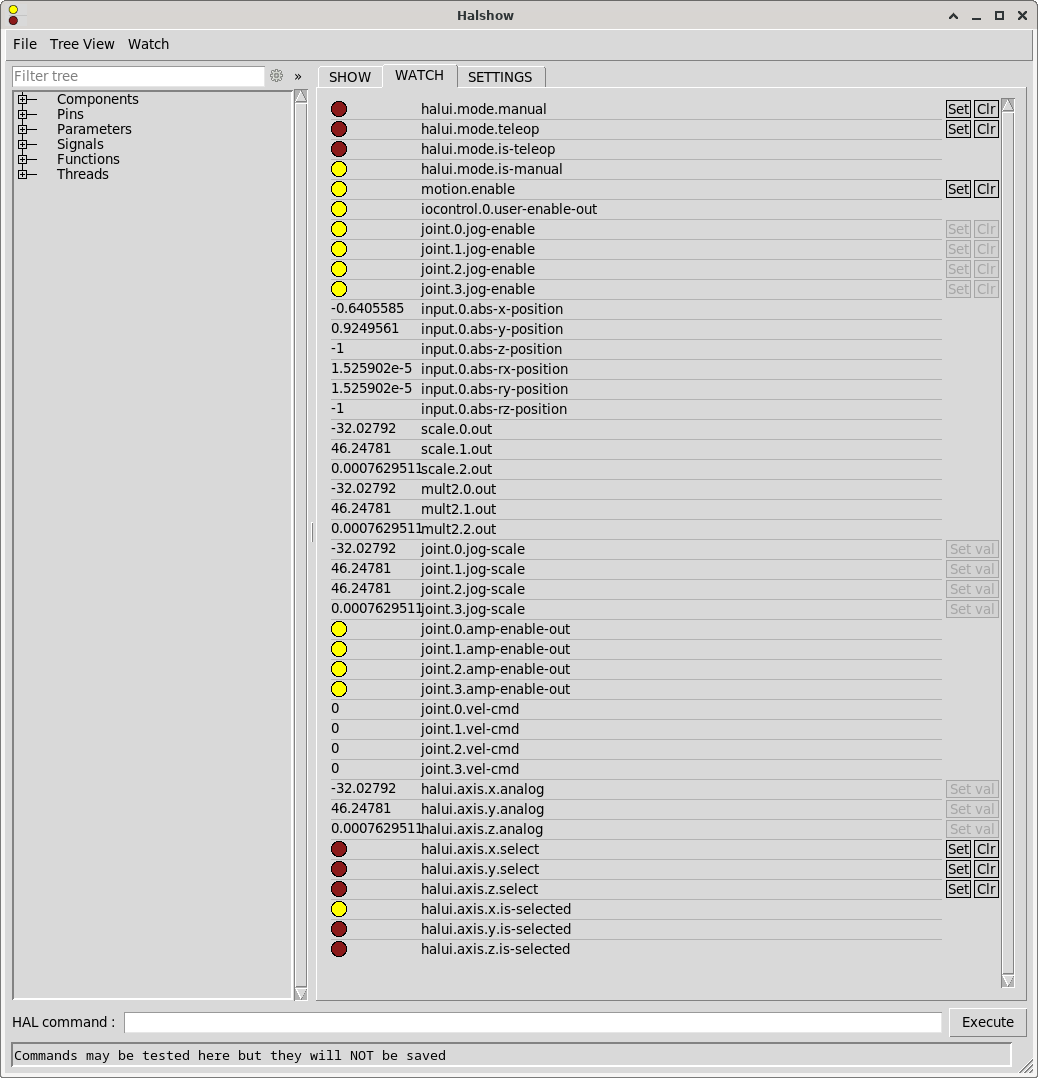
However, joint.*.vel-cmd always stays 0 and obviously the stepper motors are not spinning. Also I am not sure what mode I have to use, but I also tried setting halui.mode.manual and halui.mode.teleop using the [Set] button in halshow, but this did not change anything.
Setting it up like this will not allow the machine to start when the Xbox Controller is not connected as it expects the controller to be found. The controller will shut itself off if not being used for a certain period of time and this will also result in an error popping up in axis ui.
I think my current approach is way more complicated and clumsy than it actually needs to be, but the learning curve seems to be pretty steep for me and therefore I probably resorted to using way more AI generated code than I should have.
How do I
I am trying to set up my xbox controller to jog a three axis machine (y-gantry). Using a bluetooth dongle I had to fiddle around a bit (and install xpadneo) to get the controller to connect to the system but I eventually got there and do see input when pressing buttons/moving the joysticks.
I was digging into LinuxCNC a few years ago but then life happened and I had to put the project on ice up until now. This is my first home-built CNC (wood router) and I am very new to all of this.
My goal is to be able to move the X, Y (gantry) and Z axis using the gaming controller when there is no gcode being executed.
Currently this is a parport setup and the stepper motors are not actually installed on ball screws so I do not mess up anything while testing. I am planning on switching to a mesa card in the near future.
phew@linuxcnc:~$ sudo lsusb
Bus 001 Device 002: ID 2357:0604 TP-Link TP-Link Bluetooth USB Adapter
phew@linuxcnc:~$ sudo dkms status
hid-xpadneo/v0.9-226-ga16acb0, 6.1.0-39-rt-amd64, x86_64: installed
phew@linuxcnc:~$ sudo dmesg | grep -i xbox
[   41.033957] input: Xbox Wireless Controller as /devices/virtual/misc/uhid/0005:045E:0B13.0007/input/input16
[   41.034076] hid-generic 0005:045E:0B13.0007: input,hidraw6: BLUETOOTH HID v5.23 Gamepad [Xbox Wireless Controller] on 98:03:8e:4f:32:fd
[   41.094172] input: Xbox Wireless Controller as /devices/virtual/misc/uhid/0005:045E:0B13.0007/input/input17
[   41.094277] xpadneo 0005:045E:0B13.0007: input,hidraw6: BLUETOOTH HID v11.30 Gamepad [Xbox Wireless Controller] on 98:03:8e:4f:32:fd
[   41.094307] input: Xbox Wireless Controller Consumer Control as /devices/virtual/misc/uhid/0005:045E:0B13.0007/input/input18
[   41.094367] input: Xbox Wireless Controller Keyboard as /devices/virtual/misc/uhid/0005:045E:0B13.0007/input/input19
[   42.076531] xpadneo 0005:045E:0B13.0007: Xbox Wireless Controller [14:cb:65:c7:03:1e] connected
[   42.206305] input: Xbox Wireless Controller as /devices/virtual/misc/uhid/0005:045E:0B13.0007/input/input20
[   42.206585] xpadneo 0005:045E:0B13.0007: input,hidraw6: BLUETOOTH HID v11.30 Gamepad [Xbox Wireless Controller] on 98:03:8e:4f:32:fd
[   42.206615] input: Xbox Wireless Controller Consumer Control as /devices/virtual/misc/uhid/0005:045E:0B13.0007/input/input21
[   42.206743] input: Xbox Wireless Controller Keyboard as /devices/virtual/misc/uhid/0005:045E:0B13.0007/input/input22
[   43.189177] xpadneo 0005:045E:0B13.0007: Xbox Wireless Controller [14:cb:65:c7:03:1e] connected
xyyz.ini (machine basic setup)
# Generated by stepconf 1.1 at Thu Sep 11 20:35:55 2025
# If you make changes to this file, they will be
# overwritten when you run stepconf again

[EMC]
MACHINE = xyyz
DEBUG = 0
VERSION = 1.1

[DISPLAY]
DISPLAY = axis
EDITOR = gedit
POSITION_OFFSET = RELATIVE
POSITION_FEEDBACK = ACTUAL
ARCDIVISION = 64
GRIDS = 10mm 20mm 50mm 100mm 1in 2in 5in 10in
MAX_FEED_OVERRIDE = 1.2
MIN_SPINDLE_OVERRIDE = 0.5
MAX_SPINDLE_OVERRIDE = 1.2
DEFAULT_LINEAR_VELOCITY = 10.0
MIN_LINEAR_VELOCITY = 0
MAX_LINEAR_VELOCITY = 50.0
CYCLE_TIME = 0.100
INTRO_GRAPHIC = linuxcnc.gif
INTRO_TIME = 5
PROGRAM_PREFIX = /home/phew/linuxcnc/nc_files
INCREMENTS = 20mm 10mm 5mm 1mm .5mm .1mm .05mm .01mm .005mm

[KINS]
JOINTS = 4
KINEMATICS = trivkins coordinates=XYYZ kinstype=both

[FILTER]
PROGRAM_EXTENSION = .png,.gif,.jpg Greyscale Depth Image
PROGRAM_EXTENSION = .py Python Script
PROGRAM_EXTENSION = .nc,.tap G-Code File
png = image-to-gcode
gif = image-to-gcode
jpg = image-to-gcode
py = python

[TASK]
TASK = milltask
CYCLE_TIME = 0.010

[RS274NGC]
PARAMETER_FILE = linuxcnc.var

[EMCMOT]
EMCMOT = motmod
COMM_TIMEOUT = 1.0
BASE_PERIOD = 50000
SERVO_PERIOD = 1000000

[HAL]
HALUI = halui
HALFILE = xyyz.hal
HALFILE = custom.hal
HALFILE = xbox.hal
POSTGUI_HALFILE = postgui_call_list.hal
MDI_COMMAND = G0 X0
MDI_COMMAND = G0 Y0
MDI_COMMAND = G0 Z0
JOINT_0 = X
JOINT_1 = Y
JOINT_2 = Y
JOINT_3 = Z

[TRAJ]
COORDINATES =  X Y Y Z
LINEAR_UNITS = mm
ANGULAR_UNITS = degree
DEFAULT_LINEAR_VELOCITY = 2.50
MAX_LINEAR_VELOCITY = 25.00

[EMCIO]
EMCIO = io
CYCLE_TIME = 0.100
TOOL_TABLE = tool.tbl

[AXIS_X]
MAX_VELOCITY = 50.0
MAX_ACCELERATION = 25.0
MIN_LIMIT = -0.001
MAX_LIMIT = 800.0

[JOINT_0]
TYPE = LINEAR
HOME = 0.0
MIN_LIMIT = -0.001
MAX_LIMIT = 800.0
MAX_VELOCITY = 50.0
MAX_ACCELERATION = 1875.0
STEPGEN_MAXACCEL = 1875
SCALE = 160
FERROR = 1
MIN_FERROR = .25
HOME_SEQUENCE = 0
HOME_SEARCH_VEL = -20.0
HOME_LATCH_VEL = 2.0
HOME_OFFSET = -1.0
HOME_USE_INDEX = NO
HOME_IGNORE_LIMITS = YES

[AXIS_Y]
MAX_VELOCITY = 50.0
MAX_ACCELERATION = 25.0
MIN_LIMIT = -0.001
MAX_LIMIT = 1000.0

[JOINT_1]
TYPE = LINEAR
HOME = 0.0
MIN_LIMIT = -0.001
MAX_LIMIT = 1000.0
MAX_VELOCITY = 50.0
MAX_ACCELERATION = 1875.0
STEPGEN_MAXACCEL = 1875
SCALE = 160
FERROR = 1
MIN_FERROR = .25
HOME_SEQUENCE = 1
HOME_SEARCH_VEL = -20.0
HOME_LATCH_VEL = 2.0
HOME_OFFSET = -1.0
HOME_USE_INDEX = NO
HOME_IGNORE_LIMITS = YES

[JOINT_2]
TYPE = LINEAR
HOME = 0.0
MIN_LIMIT = -0.001
MAX_LIMIT = 1000.0
MAX_VELOCITY = 50.0
MAX_ACCELERATION = 1875.0
STEPGEN_MAXACCEL = 1875
SCALE = 160
FERROR = 1
MIN_FERROR = .25
HOME_SEQUENCE = 1
HOME_SEARCH_VEL = -20.0
HOME_LATCH_VEL = 2.0
HOME_OFFSET = -1.0
HOME_USE_INDEX = NO
HOME_IGNORE_LIMITS = YES

[AXIS_Z]
MAX_VELOCITY = 25.0
MAX_ACCELERATION = 10.0
MIN_LIMIT = -150.0
MAX_LIMIT = 0.001

[JOINT_3]
TYPE = LINEAR
HOME = 0.0
MIN_LIMIT = -150.0
MAX_LIMIT = 0.001
MAX_VELOCITY = 25.0
MAX_ACCELERATION = 1000.0
STEPGEN_MAXACCEL = 1875
SCALE = 160
FERROR = 1
MIN_FERROR = .25
HOME_SEQUENCE = 2
HOME_SEARCH_VEL = 20.0
HOME_LATCH_VEL = -2.0
HOME_OFFSET = 1.0
HOME_USE_INDEX = NO
HOME_IGNORE_LIMITS = YES
xyyz.hal:
loadrt [KINS]KINEMATICS kinstype=both
loadrt [EMCMOT]EMCMOT base_period_nsec=[EMCMOT]BASE_PERIOD servo_period_nsec=[EMCMOT]SERVO_PERIOD num_joints=[KINS]JOINTS
loadrt hal_parport cfg="1 out+in"
setp parport.0.reset-time 5000
loadrt stepgen step_type=0,0,0,0
loadrt pwmgen output_type=1

addf parport.0.read base-thread
addf stepgen.make-pulses base-thread
addf pwmgen.make-pulses base-thread
addf parport.0.write base-thread
addf parport.0.reset base-thread

addf stepgen.capture-position servo-thread
addf motion-command-handler servo-thread
addf motion-controller servo-thread
addf stepgen.update-freq servo-thread
addf pwmgen.update servo-thread

net x-home-raw parport.0.pin-11-in
net x-home-raw => joint.0.home-sw-in
#net x-home-raw => joint.0.neg-lim-sw-in
# net x-home-raw => joint.0.pos-lim-sw-in  # optional

net y0-home-raw parport.0.pin-12-in
net y0-home-raw => joint.1.home-sw-in
#net y0-home-raw => joint.1.neg-lim-sw-in

net y1-home-raw parport.0.pin-13-in
net y1-home-raw => joint.2.home-sw-in
#net y1-home-raw => joint.2.neg-lim-sw-in

net z-home-raw parport.0.pin-15-in
net z-home-raw => joint.3.home-sw-in
#net z-home-raw => joint.3.neg-lim-sw-in

setp stepgen.0.position-scale [JOINT_0]SCALE
setp stepgen.0.steplen 1
setp stepgen.0.stepspace 0
setp stepgen.0.dirhold 40000
setp stepgen.0.dirsetup 40000
setp stepgen.0.maxaccel [JOINT_0]STEPGEN_MAXACCEL
net xpos-cmd  joint.0.motor-pos-cmd => stepgen.0.position-cmd
net xpos-fb   stepgen.0.position-fb => joint.0.motor-pos-fb
net xstep     stepgen.0.step => parport.0.pin-02-out
net xdir      stepgen.0.dir  => parport.0.pin-03-out
net xenable   joint.0.amp-enable-out => stepgen.0.enable

net y-enable joint.1.amp-enable-out
net y-enable => stepgen.1.enable
net y-enable => stepgen.2.enable

setp stepgen.1.position-scale [JOINT_1]SCALE
setp stepgen.1.steplen 1
setp stepgen.1.stepspace 0
setp stepgen.1.dirhold 40000
setp stepgen.1.dirsetup 40000
setp stepgen.1.maxaccel [JOINT_1]STEPGEN_MAXACCEL
net ypos-cmd  joint.1.motor-pos-cmd => stepgen.1.position-cmd
net ypos-fb   stepgen.1.position-fb => joint.1.motor-pos-fb
net y0step    stepgen.1.step => parport.0.pin-04-out
net y0dir     stepgen.1.dir  => parport.0.pin-05-out

setp stepgen.2.position-scale [JOINT_2]SCALE
setp stepgen.2.steplen 1
setp stepgen.2.stepspace 0
setp stepgen.2.dirhold 40000
setp stepgen.2.dirsetup 40000
setp stepgen.2.maxaccel [JOINT_2]STEPGEN_MAXACCEL
net y1pos-cmd joint.2.motor-pos-cmd => stepgen.2.position-cmd
net y1pos-fb  stepgen.2.position-fb => joint.2.motor-pos-fb
net y1step    stepgen.2.step => parport.0.pin-06-out
net y1dir     stepgen.2.dir  => parport.0.pin-07-out

setp stepgen.3.position-scale [JOINT_3]SCALE
setp stepgen.3.steplen 1
setp stepgen.3.stepspace 0
setp stepgen.3.dirhold 40000
setp stepgen.3.dirsetup 40000
setp stepgen.3.maxaccel [JOINT_3]STEPGEN_MAXACCEL
net zpos-cmd joint.3.motor-pos-cmd => stepgen.3.position-cmd
net zpos-fb  stepgen.3.position-fb => joint.3.motor-pos-fb
net zstep    stepgen.3.step => parport.0.pin-08-out
net zdir     stepgen.3.dir  => parport.0.pin-09-out
net zenable  joint.3.amp-enable-out => stepgen.3.enable

net estop-out <= iocontrol.0.user-enable-out
net estop-out => iocontrol.0.emc-enable-in
xbox.hal
loadusr -W hal_input -KRAL Xbox

loadrt scale count=3
addf scale.0 servo-thread
addf scale.1 servo-thread
addf scale.2 servo-thread

setp scale.0.gain 50.0   # X
setp scale.1.gain 50.0   # Y
setp scale.2.gain 50.0   # Z

loadrt mult2 count=3
addf mult2.0 servo-thread
addf mult2.1 servo-thread
addf mult2.2 servo-thread

loadrt conv_bit_float
addf conv-bit-float.0 servo-thread

net xbox-x-raw input.0.abs-x-position => scale.0.in
net xbox-y-raw input.0.abs-y-position => scale.1.in
net xbox-z-raw input.0.abs-ry-position => scale.2.in

net xbox-x-scaled scale.0.out => mult2.0.in0
net xbox-y-scaled scale.1.out => mult2.1.in0
net xbox-z-scaled scale.2.out => mult2.2.in0

net xbox-jog-bit input.0.btn-a => conv-bit-float.0.in
net xbox-jog-float conv-bit-float.0.out => mult2.0.in1
net xbox-jog-float => mult2.1.in1
net xbox-jog-float => mult2.2.in1

net xbox-x-vel mult2.0.out => joint.0.jog-scale   # X
net xbox-y-vel mult2.1.out => joint.1.jog-scale   # Y (Y0)
net xbox-y-vel => joint.2.jog-scale                      # Y (Y1)
net xbox-z-vel mult2.2.out => joint.3.jog-scale   # Z

# Press [A]-button to enable joints
net xbox-jog-bit => joint.0.jog-enable
net xbox-jog-bit => joint.1.jog-enable
net xbox-jog-bit => joint.2.jog-enable
net xbox-jog-bit => joint.3.jog-enable

setp joint.0.jog-vel-mode TRUE
setp joint.1.jog-vel-mode TRUE
setp joint.2.jog-vel-mode TRUE
setp joint.3.jog-vel-mode TRUE

net xbox-x-vel => halui.axis.x.analog
net xbox-y-vel => halui.axis.y.analog
net xbox-z-vel => halui.axis.z.analog
With this setup I can see input from the controller in halshow:
However, joint.*.vel-cmd always stays 0 and obviously the stepper motors are not spinning. Also I am not sure what mode I have to use, but I also tried setting halui.mode.manual and halui.mode.teleop using the [Set] button in halshow, but this did not change anything.
Setting it up like this will not allow the machine to start when the Xbox Controller is not connected as it expects the controller to be found. The controller will shut itself off if not being used for a certain period of time and this will also result in an error popping up in axis ui.
I think my current approach is way more complicated and clumsy than it actually needs to be, but the learning curve seems to be pretty steep for me and therefore I probably resorted to using way more AI generated code than I should have.
How do I
- set this up correctly so the Xbox Controller input can actually controll the X, Y and Z axis?
- set this up in a way so the controller does not need to be connected in order for the machine to start and won't result in an error when the controller disconnects for some reason
Time to create page: 1.176 seconds