Advanced Search

Search Results (Searched for: )

  • Shu
  • Shu's Avatar
18 Oct 2026 17:03

New User Lichuan CL3 57E and Stepper Online A6 - Problems

Category: EtherCAT

 
github.com/shulter/biber-ethercat/blob/main/tools/servo-tune.py
here is a script for tuning the servos over the ethercat bus with the most important parameters. it's hardcoded for one of my machines, just edit it. (todo: implement a bus enumeration at startup, get rid of the hardcoded stuff)

and here a working config with stepperonline a6 and beckhoff ek1100: github.com/shulter/biber-ethercat/blob/m...ax/ethercat-conf.xml

 
  • Shu
  • Shu's Avatar
18 Oct 2026 17:02
Replied by Shu on topic A6 1000w troubles.

A6 1000w troubles.

Category: EtherCAT

github.com/shulter/biber-ethercat/blob/main/tools/servo-tune.py

here is a script for tuning the servos over the ethercat bus with the most important parameters. it's hardcoded for one of my machines, just edit it. (todo: implement a bus enumeration at startup, get rid of the hardcoded stuff)

it wasn't possible to get the stepperonline tuning software for windows to talk to all servo drives simultaneously. it was really annoying to tune a dual servo gantry that way.
  • Lcvette
  • Lcvette's Avatar
18 Oct 2026 16:36
Replied by Lcvette on topic calling all probe basic lathe users!

calling all probe basic lathe users!

Category: QtPyVCP

hit me up on the qtpyvcp chat for beta testing information
  • tommylight
  • tommylight's Avatar
18 Oct 2026 15:31
Replied by tommylight on topic Z-axis doesn’t move

Z-axis doesn’t move

Category: Flex GUI

Files?
  • richcolvin
  • richcolvin's Avatar
18 Oct 2026 15:13
Jogging a 2nd Spindle was created by richcolvin

Jogging a 2nd Spindle

Category: AXIS

The Axis GUI works well to jog all the defined axes, but it seems like it is only capable of jogging a single spindle ($0) using the F3 Manual Control screen. 

Has anyone figured out how to enable it to jog all the spindles defined in the HAL or INI?

[TRAJ]
SPINDLES = 2

[DISPLAY]
DISPLAY  = axis
  • yaska
  • yaska
18 Oct 2026 14:40
Replied by yaska on topic Z-axis doesn’t move

Z-axis doesn’t move

Category: Flex GUI

As I mentioned earlier, in FlexGui, the Z-axis = 2 on a milling machine, and on the lathe, Z = 1. If I change Z to Y in the ini file to the following:
KINEMATICS = trivkins coordinates=xy
COORDINATES = X Y
[AXIS_Y]
Then I can jog the Z-axis after homing, just as it’s supposed to work,
but of course the lathe won’t run because it requires XZ.
So now I hope you’ll make the necessary changes so it works correctly.


  • trackwhack
  • trackwhack
18 Oct 2026 06:48
SolidCraft was created by trackwhack

SolidCraft

Category: CAD CAM

Still buggy but here is a direct open source ripoff of Fusion - Its only CAD now and looking at it, it violates every design and copyright that Fusion probably holds. But how in the hell are they ever gonna stop them?

Frankly, despite the bugs, I'm picking my jaws off the floor - its that good already.

solidcraftcad.com/
 
  • tuxcnc
  • tuxcnc
17 Oct 2026 18:34
Replied by tuxcnc on topic Themes

Themes

Category: Gmoccapy

For example
<context id="spindle-control" style-ref="spindle-control">    
    <keyword>M[345]{1}</keyword>                
    <keyword>M0[345]{1}</keyword>    
    <keyword>G9[67]</keyword>
instead of
<context id="spindle-control" style-ref="spindle-control">    
    <match>M0?[345]|G9[67]</match>
More work, but better results
 
  • tuxcnc
  • tuxcnc
17 Oct 2026 18:02 - 17 Oct 2026 18:04
Themes was created by tuxcnc

Themes

Category: Gmoccapy

First of all, I would like to remind you about something that is obvious and should not be discussed.
A CNC machine is not a toy. Even a small desktop milling machine can destroy valuable material or injure the operator. Therefore, all important controls should be clearly visible and easy to find and use, even when the operator is surprised, tired or nervous. Aesthetic preferences are always secondary.

Now to the point.
I have never been interested in the appearance of the interfaces I used (previously Axis, now Gmoccapy). I assumed that if the author liked it and I can use it, there are more important matters. (That's why I don't know many things and I will probably try to force open doors...)
But today a serious problem arose and I had to look into it
Well, I started configuring the milling machine with xyzab_tdr_kins kinematics (five-axis with switchable mode).
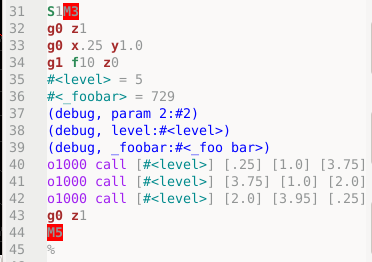
And I see something like this:
 
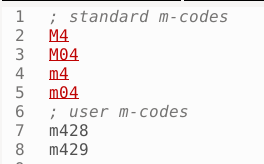
This is the code M428, not M4 28 (!!!)
I started searching and found nothing. As if the authors wanted to keep it a secret... But after some time I came to some conclusions.
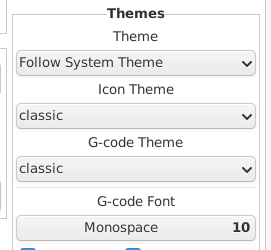
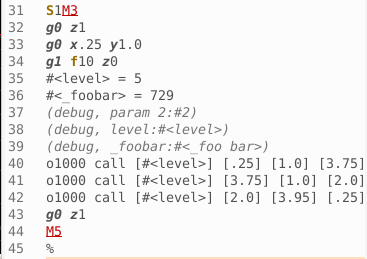
The default Gmoccapy setting looks like this:
 
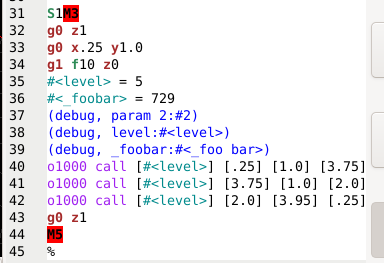
And it works like this:
 
 
The second image is in program execution mode. Why the hell do the parameters change from black to gray, I'll probably never know, I assume the "artist" who came up with it liked it so much...
I haven't found the file responsible for this display parameters anywhere, I must have been looking in the wrong place or wrong name, but I shouldn't be looking for it at all, because it should be in the documentation.
I found the gcode.lang file, which is probably the only one existing in LinuxCNC sources. If this is indeed the case, it is also the only file on which the authors of LinuxCNC as the only ones have influence and no one will mess anything up without their consent and knowledge. And if this is the case, why is the default g-code theme set to "classic" and not "gcode"?
As for the gcode.lang file, it is far from perfect, but it is there, so it can be improved. First of all, the user can map any g- or m-code using REMAP in the ini file and this must be kept in mind when creating matching patterns.
 

My suggestion is to work on the gcode.lang file and set it as the default one.
  • anfänger
  • anfänger's Avatar
17 Oct 2026 17:59
Replied by anfänger on topic Fehlmann Picomax 100 Retrofit

Fehlmann Picomax 100 Retrofit

Category: Milling Machines

Now that most of work which came with moving is done its time to finish the reason why I bought this machine in the first place...
The 4th Axis. The servo is running, so it's time to finish the brake, lubrication and homing. Then using the chance to also install the tool setter.

File Attachment:


Also using the chance to update the scematics

File Attachment:


now I am waining for some additional pins for the Harting connectors 

File Attachment:


Then making a small junction box, so the A-Axis can be easily removed 
 
  • PCW
  • PCW's Avatar
17 Oct 2026 14:29

7i96S custom bitfile: 4x PktUART V3 on P1 (3x Modbus + 1 full-duplex link) + St

Category: Driver Boards

I would definitely post the two odd hm2_modbus behaviours as issues on the LinuxCNC github site.
  • MueTho
  • MueTho's Avatar
17 Oct 2026 12:00

7i96S custom bitfile: 4x PktUART V3 on P1 (3x Modbus + 1 full-duplex link) + St

Category: Driver Boards

Hi Peter,

as promised, here are the results of the bench test with all PktUART instances working at the same time.

Setup:
- LinuxCNC 2.9.10 uspace, Debian 13 PREEMPT_RT, Intel N150 (fixed at 800 MHz), hm2_eth, servo thread 1 ms
- pktuart.0 (TB2): on-board transceiver
- pktuart.1 and pktuart.4 (P1): small SP3485 auto-direction RS-485 modules, no TXEN pin
- 3 x StepperOnline A6-RS servo drives, one per port, Modbus RTU 115200 8N1, addresses 1/2/3, rxdelay 40 / txdelay 45 / icdelay 20
- pktuart.2 <-> pktuart.3 cross-connected at logic level; a small RT component on pktuart.3 acts as Modbus slave simulator (with fault injection) or as full-duplex loop partner
- in total 4 hm2_modbus instances in parallel plus one extra PktUART user
- test tooling vibe coded with Claude

Results:
- Endurance: one run of 2 h plus two earlier runs of 30 min each. The 2-h run had about 3.3 million Modbus transactions with 0 errors on all instances. Cycle 8 ms per drive (2 registers + status), 11 ms for the simulator. Servo thread tmax <= 260 us, no watchdog bite.
- RX masking without TXEN works with the auto-direction transceivers on P1, no echo problems.
- Isolation between ports: unplugging a cable, swapping two cables during operation or adding 1 ms response delay only affected the instance on that port. The others kept running without errors.
- Fault injection: timeout (110), CRC error (52), late answer (110) and exception (74) are detected correctly, only on the affected instance.
- Watchdog bite: all instances report a fault. After clearing has_bit and pulsing hm2_modbus.N.reset all ports run again, no PktUART reconfiguration needed.
- 9600 8E1 on one port next to 115200 8N1 on the others: no problems.
- 60-register read: 20 ms, 0 errors.
- Full-duplex P1 port (drive enable set statically, 2.5 and 5 Mbit/s): 1.8 million frames, 0 bad, 0 lost, while the Modbus instances ran in parallel without errors. My component counted one framing-error flag right at each session start, probably start-up, not investigated further.

Two hm2_modbus behaviours worth knowing (2.9.10, not related to the bitfile):
1. After 5 consecutive errors a command is disabled. It stays disabled even after the device answers again, until there is a rising edge on hm2_modbus.N.reset (or command.NN.reset). So an application needs its own reset logic.
2. An answer with a wrong slave address is not counted as an error, it is only logged and the request is resent (hm2_modbus.c, around line 1780). The HAL value then freezes silently while errors and fault stay 0. I monitor the age of each value for this reason.

Are these behaviours intended, or should I report them as an issue?

Limitations: bench setup only. Motors not energized (no PWM noise), short cables, one device per port. I have not run a test longer than 2 h with all ports in parallel.

So far the bitfile looks solid for my use case. Thanks again!

Thorsten
  • Muzzer
  • Muzzer
17 Oct 2026 09:36

Usefull Open Source software, vibe coded in Rust

Category: Off Topic and Test Posts

I'll be using my Claude Code / Fusion to recreate the demo example, then if that goes well I may attempt a fairly simply layout that I was planning to do myself.

Like others, I've spent hundreds, perhaps thousands of hours of my life doing PCB layouts over the past 50-odd years, either personally or sitting alongside CAD jockeys. Good layout artists are a rare breed, yet few experienced engineers fancy spending their time simply laying out boards. If these agents can successfully acquire that knowledge and experience, perhaps we can end up with tools that deliver robust designs in record time. That's how technology moves forward in leaps and bounds.
  • tommylight
  • tommylight's Avatar
17 Oct 2026 08:35
Replied by tommylight on topic Usefull Open Source software, vibe coded in Rust

Usefull Open Source software, vibe coded in Rust

Category: Off Topic and Test Posts

Just today someone showed me a video of the latest Tesla car. Almost like science fiction but it is for real.

It is not real.
How can you believe that is a 2 ton car doing that?
That is a 20-40Kg heavy something that looks like a car.
Displaying 166 - 180 out of 12194 results.
Time to create page: 0.512 seconds
Powered by Kunena Forum