Advanced Search

Search Results (Searched for: )

  • zelo
  • zelo
01 Jan 2025 13:36 - 01 Jan 2025 16:20

Remora - ethernet NVEM / EC300 / EC500 cnc board

Category: Computers and Hardware

I have my config here for ec500 with nvmpg: github.com/zelo/linuxcnc-remora-ec500-rt1052-cfg

- For now basic spindle controll works
- Stepper drivers (DM556T) using DMA stepgen.
- NVMPG - signal generator, multiplier button, and axis selection

I have still issues with following joint errors, but thats with faster movement or direction change. I guess when i jog too fast with the wheel it cant keep up.
EDIT: fixed following joint errors by setting lower max velocity values
  • _skinner
  • _skinner
01 Jan 2025 13:00
Spindle speed and instatnly powered led was created by _skinner

Spindle speed and instatnly powered led

Category: Qtvcp

Hello,
I have little troubles with my spindle, I have to S1200 to get 12000RPM, S1800 to get 18000RPM etc, i tried many things with parameters but without results:
Generally PWM signal from motion controller card drive a 0-10V signal to spindle, when scale set to 24000 it won't work at all.
MAX_OUTPUT = 24000.0
OUTPUT_SCALE = 1
OUTPUT_MIN_LIMIT = 5000
OUTPUT_MAX_LIMIT = 24000
hal:
net spindle-pid-out  pid.s.output    => scale.gear.in
setp scale.gear.gain 0.00035
net spindle-output        <=  scale.gear.out
setp   hm2_7c81.0.pwmgen.01.output-type 1
setp   hm2_7c81.0.pwmgen.01.scale  [SPINDLE_0]OUTPUT_SCALE
net spindle-output      => hm2_7c81.0.pwmgen.01.value
net spindle-enable      => hm2_7c81.0.pwmgen.01.enable
net spindle-at-speed     <=  hm2_7c81.0.gpio.051.in_not

second thing I like to drive LED in qtdragon_hd which is instantly powered on after spindle enable:
in ini file in DISPLAY section I've added :
USER_COMMAND_FILE = CONFIGFOLDER/qtdragonrc.py
and code in file:
print('\nUser command file for following spindle.0.at_speed\n')

# needed to instance patch
# reference: ruivieira.dev/python-monkey-patching-for-readability.html
import types

# import the handlerfile to get reference to it's libraries.
# use <screenname>_handler
import qtdragon_handler as SELF

###############################################
# add hook to add a status request
###############################################
def before_loop__(self):
    try:
        #self.w.led_at_speed.setProperty('halpin_option',False)
        self.w.led_at_speed.setProperty('follow_halpin_state',True)
        self.w.led_at_speed.setProperty('halpin_name','spindle.0.at-speed')
        self.w.led_at_speed. _hal_init()
    except Exception as e:
        pass

# Here we are instance patching the original handler file to add a new
# function that calls our new function (of the same name)
# defined in this file
self.before_loop__ = types.MethodType(before_loop__, self)


but led won't work (i tried 'self.w.led_at_speed' and 'self.w.hal_led_atspeed'), i have simple relay to inform that spindle reach speed, which is working correctly but only led on screen not working

Thank You in advance for help
  • Cant do this anymore bye all
  • Cant do this anymore bye all's Avatar
01 Jan 2025 12:49
Replied by Cant do this anymore bye all on topic LinuxCNC on Raspberry Pi 5

LinuxCNC on Raspberry Pi 5

Category: Installing LinuxCNC

You coming at this arse about. Which makes me wonder if this is for academic purposes, a potential commercial endeavor or a tech blog.
First one decides on the type of cnc machine they want to build, then they choose the controller to suit.
The simplest entry point for one who has no plan for their actual "cnc machine" would be.

A Lenovo M73e tower, preferably with an i5, the appropriate MB to Parallel Port cable ( there's some trickery with the cable that enables the PP hardware) and a generic Parallel Port breakout board. I've recommended this combination as I know it works, I have tested it with a lathe for basic functionality. I actually found this machine on the side of road with a celeron processor, which I swapped out for an i5 (3470 I think) and an SSD from the "useful box".

What people want is something that will run their hardware (their cnc machine be it a plasma cutter, lathe, mill router, laser tube profiler, PnP machine, cnc soldering machine) at a price point they can afford. As you can guess this is quite an expansive list.
  • MrDe
  • MrDe
01 Jan 2025 12:42

Remora - ethernet NVEM / EC300 / EC500 cnc board

Category: Computers and Hardware

Hello,I’m experiencing an issue with the NVEM V5 board (RT1052) when using the Remora firmware. The spindle output (VSO) is functioning as expected, providing a 0-10V signal, but none of the other output pins are working at all. I’ve tried toggling all the output pins (as shown in the attached picture), but none of them are triggering HIGH.

Interestingly, all the input pins are working perfectly fine without any issues.

What I’m trying to achieve is to have the VSO pin control the spindle speed and use both OUT1 and OUT2 to control the direction (CCW | CW).

Has anyone encountered a similar problem or have any suggestions on what might be causing this?

Thanks in advance for any help!
  • _skinner
  • _skinner
01 Jan 2025 12:34

qtDragon LED Probe und Spindeldrehzahl anzeigen

Category: Deutsch

Cześć!
To chyba chodzi Ci o np:
net probe-in <= hm2_7c81.0.gpio.053.in_not
wtedy LED w qtdragon działa
ale to musi być w qtvcp_postgui:
net probe-in => qtdragon.led-probe
  • wusel0464
  • wusel0464
01 Jan 2025 12:18
Replied by wusel0464 on topic Reading values ​​from qtdragon.pref.

Reading values ​​from qtdragon.pref.

Category: Qtvcp

Hello,

Thank you very much for your quick help.

I'll try in the next few days to see if I can do it the way I thought I would.

The reason is actually quite simple, I want to use my camera offset
that I assigned to an MDI button from the qtdragon setup so that I don't have to enter the values ​​in different places.

At some point I'll forget and then I'll be surprised.

A happy new year to everyone and best wishes, Frank.
  • RV3Dtech
  • RV3Dtech
01 Jan 2025 12:16

qtDragon LED Probe und Spindeldrehzahl anzeigen

Category: Deutsch

Hallo zusammen,
ich möchte meinen WLZ mit der "qtdragon.led-probe" verknüpfen.
dazu habe ich die folgendne Eintrag in der HAL hinterlegt:
"net probe-tool => qtdragon.led-probe" 

Allerdings meckert er beim Start dass er den Pin qtdragon.led-probe nicht hat, obwohl er in der HAL-SHOW angezeigt wird. 
--> "Pin 'qtdragon.led-probe' does not exist"
Irgendwas fehlt da, ich komme aber nicht darauf 

Die zweite Frage wäre wie ich mir die Drehzahl in qtDragon anzeigen lassen kann, EIN & AUS sowie der Schieberegler gehen aber die U/min werden nicht angezeigt.  Meine HAL-Einträge zur Spindel:
# ---Setup Spindel Steuerungs-Signale---
net spindle-vel-cmd-rps <= spindle.0.speed-out-rps
net spindle-vel-cmd-rps-abs <= spindle.0.speed-out-rps-abs
net spindle-vel-cmd-rpm <= spindle.0.speed-out
net spindle-vel-cmd-rpm-abs <= spindle.0.speed-out-abs => hm2_7i76e.0.7i76.0.0.spinout
net spindle-enable <= spindle.0.on => hm2_7i76e.0.7i76.0.0.spinena
net spindle-cw <= spindle.0.forward
net spindle-ccw <= spindle.0.reverse => hm2_7i76e.0.7i76.0.0.spindir
net spindle-brake <= spindle.0.brake
net spindle-revs => spindle.0.revs
net spindle-at-speed => spindle.0.at-speed
net spindle-vel-fb-rps => spindle.0.speed-in
net spindle-index-enable <=> spindle.0.index-enable
# ---Einrichtung der Signale zur Spindel-Geschwindigkeits-Steuerung---
sets spindle-at-speed true
# --- DIGITAL POTENTIOMETER OUTPUT SETUP ---
setp hm2_7i76e.0.7i76.0.0.spinout-minlim [SPINDLE_0]OUTPUT_MIN_LIMIT
setp hm2_7i76e.0.7i76.0.0.spinout-maxlim [SPINDLE_0]OUTPUT_MAX_LIMIT
setp hm2_7i76e.0.7i76.0.0.spinout-scalemax [SPINDLE_0]OUTPUT_SCALE

 
  • Cant do this anymore bye all
  • Cant do this anymore bye all's Avatar
01 Jan 2025 12:10
Replied by Cant do this anymore bye all on topic 7i96s not recognized

7i96s not recognized

Category: Basic Configuration

The hosts file is one method for host name resolution. It's not used for setting the IP address of a host.
If you had a small network of 4 computers that didn't require connection outside of the network and you didn't want to run a DNS server you would create a hosts file with all the mappings and then be able to access each machine by their DNS entry in the hosts file.
  • slowpoke
  • slowpoke
01 Jan 2025 11:09
Replied by slowpoke on topic 7i96s not recognized

7i96s not recognized

Category: Basic Configuration

Yes, you are pinging yourself (I hear that may make you go blind)

I would set the host address to 10.10.10.100


Getting closer...
To set the host address can I use  "sudo nano /etc/hosts " ?
Assuming yes, presently set as follows:
   127.0.0.1 local host
   127.0.1.1 LinuxCNC-Lathe
Do I edit just the 127.0.0.1 to 10.10.10.100  or should I edit both lines and if both lines, what address should I set the LinuxCNC-Lathe to?

Much appreciated.
  • BSOD
  • BSOD
01 Jan 2025 10:57 - 01 Jan 2025 14:02

Remora - ethernet NVEM / EC300 / EC500 cnc board

Category: Computers and Hardware

Hello everyone! First of all, I would like to thank Scott for the development and thank the contributors for their help!

I would like to convert my existing CNC using an EC300 controller. I thought the firmware installation would be the challenge, but in the end, the LinuxCNC configuration caught up with me. I have been using the machine for some time with LinuxCNC, with a parallel BOB.

I can control the spindle and its speed with the new controller.
With the EC300-rt1052.txt configuration, I managed to get the limit switches and e-stop working and I can move the axes to some extent, but the movement is choppy. (dm556 drives). I tried to adopt the DMA version of the EC500, but there is no movement at all.

Clearly I have something un - or - misconfigured. 

Can someone help by sharing an EC300 specific DMA config.txt, ini and hal-file? Is there any component other than config.txt that I might have overlooked for DMA stepgen?
  • radom
  • radom
01 Jan 2025 10:17 - 01 Jan 2025 10:47
Replied by radom on topic Threading Index Varies With Speed

Threading Index Varies With Speed

Category: General LinuxCNC Questions
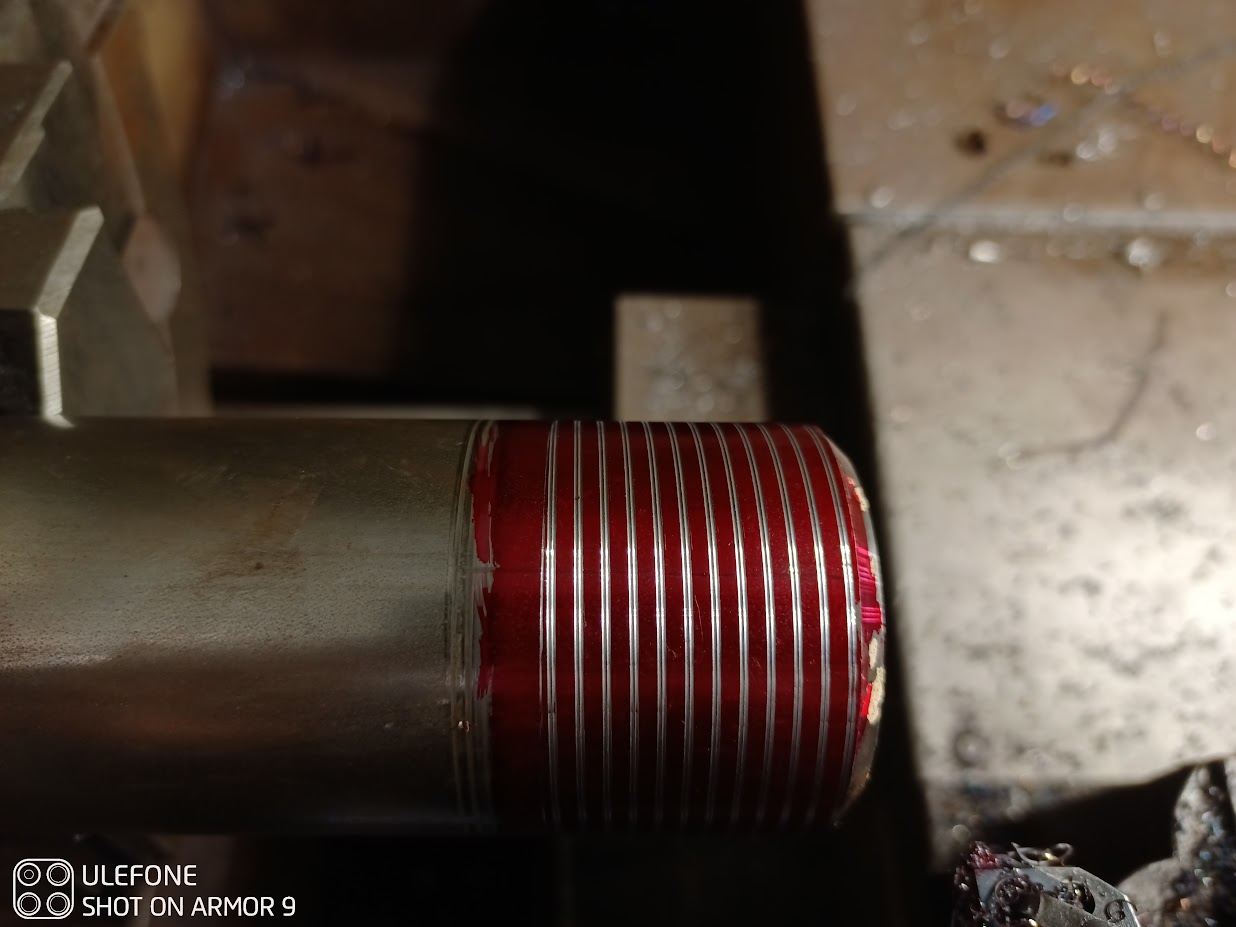
last time I tried to fix existing thread I set rpm to 0 and turned lathe chuck by hand to line up the threading tool and it looked good but when I run the program it just mangled the thread but I though I messed up something
so today I did the test with 100, 200rpm 266 and 300 and none of them line up with each other
this is so funny to me, it's just like stupid fanuc
my lathe is analog servo motors
photo with 100 nad 200rpm 
  • TomAlborough
  • TomAlborough's Avatar
01 Jan 2025 06:46 - 01 Jan 2025 06:46
Replied by TomAlborough on topic LinuxCNC on Raspberry Pi 5

LinuxCNC on Raspberry Pi 5

Category: Installing LinuxCNC

Hello cornholio,

I get your point.

I would like to buy (some kind of a) Raspberry Pi 5 and the electrical hardware needed to make a CNC machine. The reason I'm writing to you is to ask you this: What should I buy? I'm not looking for a configuration that works. I'm interested in a configuration that people want to work. What hardware do the readers want to load software on and run without any hitches?

Thanks,
Tom Alborough
  • epineh
  • epineh
01 Jan 2025 06:41

LinuxCNC-RIO - RealtimeIO for LinuxCNC based on FPGA (ICE40 / ECP5)

Category: Computers and Hardware

Very cool, will check that out.
For now I have a very weird issue, I'm not convinced its a riocore issue and not a general linuxcnc issue but here we go..

I cannot set G54 offsets, I've included a screenshot of the problem, as you can see the cutter is within the machine soft limits, and there are values in the G54 in the DRO but the toolpath preview is outside the machine limits. I've copied all machine specific parameters from the MESA config it was running previously, machine homes, enables etc and it is all working as it should. No matter what I do the toolpath remains outside of the bounding box.

Its like the machine is in absolute mode and ignoring the G54, so the origin of the gcode is at machine home and G54 has no effect.

I ran the default Sim (mm) config shipped with the live install and the issue doesn't happen, the toolpath jumps to the relative position to the cutter as normal.

Only thing I've done after the GUI riocore configuration is to add a linuxcnc.var file to the Output/TangNano9K/LinuxCNC folder as it wasn't generated. I copied one from the Sim folder after it generated one.

Other than that its a clean install that I ran docker on to program the FPGA and run Linuxcnc.
  • ihavenofish
  • ihavenofish
01 Jan 2025 06:15
Replied by ihavenofish on topic mixing 5v and 24v on mesa cards

mixing 5v and 24v on mesa cards

Category: General LinuxCNC Questions
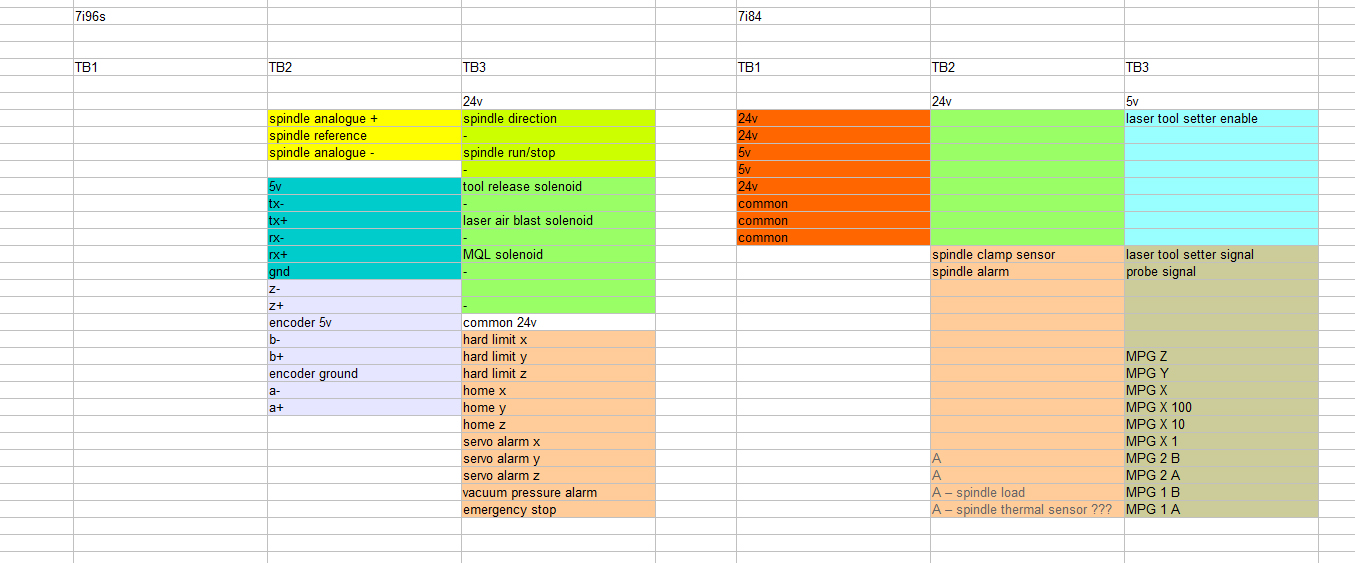
Hmm. I think this will work fine. the MPG occupies most of the 5V inputs anyway. Should have enough IO left for the ATC mechanism.

 
  • Cant do this anymore bye all
  • Cant do this anymore bye all's Avatar
01 Jan 2025 05:37 - 01 Jan 2025 05:37
Replied by Cant do this anymore bye all on topic LinuxCNC on Raspberry Pi 5

LinuxCNC on Raspberry Pi 5

Category: Installing LinuxCNC

If you want true "as easy as an installing an app on your cell phone" buy a commercial cnc machine from one of the Big Boys.

This is all I have left to say on the matter.
Displaying 21046 - 21060 out of 21690 results.
Time to create page: 4.737 seconds
Powered by Kunena Forum