Advanced Search

Search Results (Searched for: )

  • trackwhack
  • trackwhack
02 Oct 2026 09:20
Replied by trackwhack on topic Perpetual License CAM

Perpetual License CAM

Category: Show Your Stuff

Danke Juergen, wir werden es uns ansehen.
  • trackwhack
  • trackwhack
02 Oct 2026 09:11
Replied by trackwhack on topic Perpetual License CAM

Perpetual License CAM

Category: Show Your Stuff

Hi @dbtayl. Thank you for the observations. Here are some thoughts on the ODD and Bad.

The Odd

1) Both Z43 and Mouse behaviour can be set in preferences.
2) Updates will be available for upto 24 months from a product launch. After that the product works as is forever. We expect to release a new product that keeps up with changes in OS and tech. You can continue using the old one forever.
3) We use Paddle - a UK based MOR. We are adding Paypal directly to the options soon to make it easier.
4) Let us know if you face any specific bugs and we can address it. We have a community hub website. We track all bugs live there and currently the queue is clean.

The Bad

1) Yes you can, the op specific parameters allow you to choose between sihouette and Bounding box
2) We will refine the strategy in the coming weeks. Thank you for the input
3) Understood, this is a likely bug where the face picker may be masking the edge picker. We will investigate and fix
4) Ramps for pocket is scheduled as a 1.0.10 update. About 3 weeks out from today.
5) Yes, we limited it to the operations we thought needed it. Can you kindly tell us which other ops you find it useful and missing
6) Our website states that collision detection is available only for 3D Ops and Complex Rotary Ops. Never oversold. If some literature miscommunicated the same, kindly let us know.
7) We have pick start in the op config section for the ops that we thought needed it. Once again, if you can help us identify other ops you think qualify for it, we'd be happy to take a look at it.

Your comment on AFR being a hit or miss is especially worrying to us as this is the first time we received this as feedback. All other customers are very happy with it and have not reported any false positives yet. Can you tell us how bad the miss was?

In process stock is scheduled for 1.0.12, which is about 5 weeks off.

Overall we thank you for an unbiased critical view of our app and we are certain we can improve all of these to meet your expectations.
  • tuxcnc
  • tuxcnc
02 Oct 2026 08:49
  • tuxcnc
  • tuxcnc
02 Oct 2026 07:52

Would you use a feed rate for rotary axes in mm/min (surface speed)?

Category: General LinuxCNC Questions

First of all, GIGO, i.e. processing incorrect data, gives incorrect results.
You can also say that if you ask the wrong question, all the answers will be wrong...
Questions like who would like to do it and whether to do it are the wrong questions, especially when asking a small and non-representative group of a few active users of this forum.

The real question is: HOW NOT TO DO THIS?

And here we know the right answer - NOT like in Mach3.
Mach3 is commercial software, which means that nothing is done to make it work good, but to make the users like it, because the company's income depends on the users' satisfaction.

It works differently in free software - if someone has the time and inclination, they add a new utility, and if someone doesn't like it, they don't use it.
The only problem here is not to break anything and not to let a program with a twenty-year history suddenly start working in a way that is unpredictable for the user.

But let's get back to Mach3.
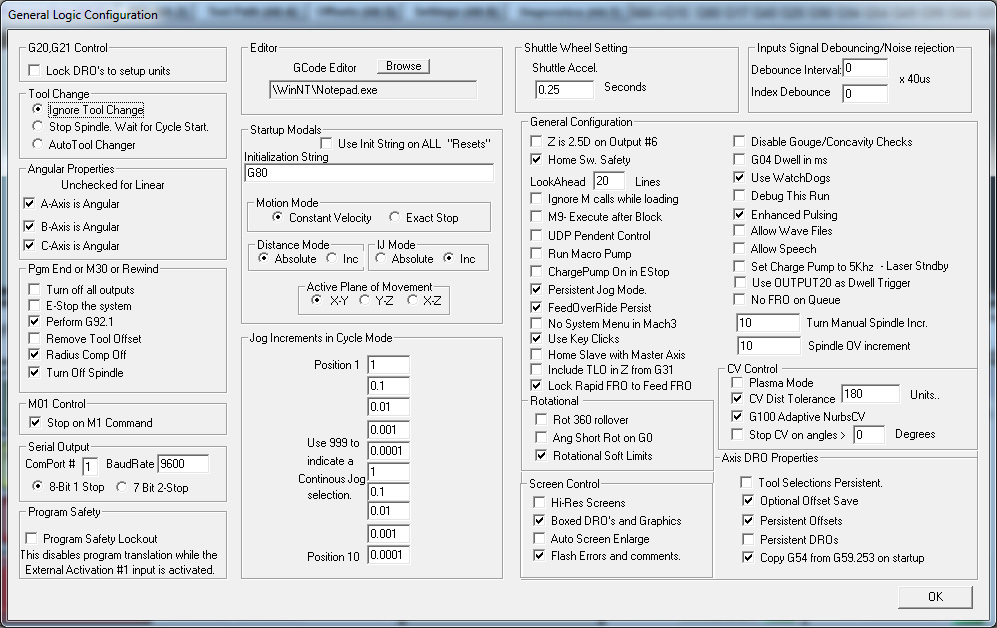
I don't have the time or inclination to look for better examples, but what I quickly found is completely enough. Here is one of the many screens for changing Mach3 settings:

Notice the "G04 dwell ms" entry in the upper right corner.
The way it works is that depending on whether this item is selected or deselected, the G04 code is interpreted in a different way. There is no need to explain the difference between 3 seconds and 3 milliseconds, and the g-code author may have no idea how his code will be executed.
Let's ignore the sobbing of the operator when his disk goes bad and he has to recreate all the windows and buttons, because that would be offtopic.
The utility we are talking about here is implemented in Mach3. AI writes about it this way:
To set up the rotation radius for your rotary (A-axis) in Mach3, enter the distance from the center of rotation to your material surface in the Settings tab.
Step-by-Step Configuration
• Enable Toolpath Settings: Go to Config > Toolpath in the top menu. Check the options for A-Rotations Enabled and use radius/feedrate correction if available. Click Save Settings.
• Set Angular Properties: Go to Config > General Config, look for Angular Properties on the left side, and check A Axis is Angular. Click OK and restart Mach3.
• Enter the Rotation Radius: Navigate to the Settings tab on the main screen. Look for the Rotation Radius (or A-radius/diameter DRO) field near the top right.
• Input Your Measurement: Type the exact radius (or half-diameter) of your current workpiece material into the A-axis box and press ENTER. For example, if your stock is 2 inches across, enter 1.0. (If your Z-zero is set directly at the center of rotation, enter a very small nominal value like 0.001).
• Verify the Setup: Return to the Program Run tab. Check that the Radius Correct LED indicator next to the A-axis display turns lit/yellow, which confirms Mach3 is properly using the radius to calculate coordinated feedrates and graphics. Remember to update this value whenever you change stock sizes.
Basically everything is true.
Let's not do the same in LinuxCNC.
The definition of g-code is that it is a description of the tool path and let's stick to it.
The same g-code should be executed in the same way on different machines, and not on each machine differently because the operator changed something in settings...
  • grandixximo
  • grandixximo's Avatar
02 Oct 2026 07:36
Replied by grandixximo on topic Re-designing the Gmoccapy DRO

Re-designing the Gmoccapy DRO

Category: Gmoccapy
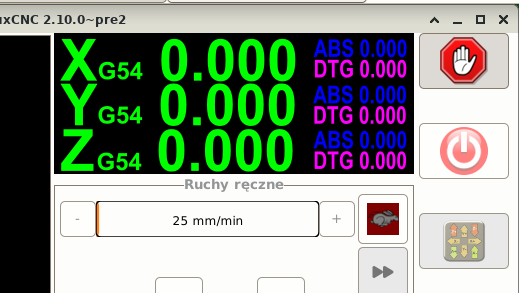
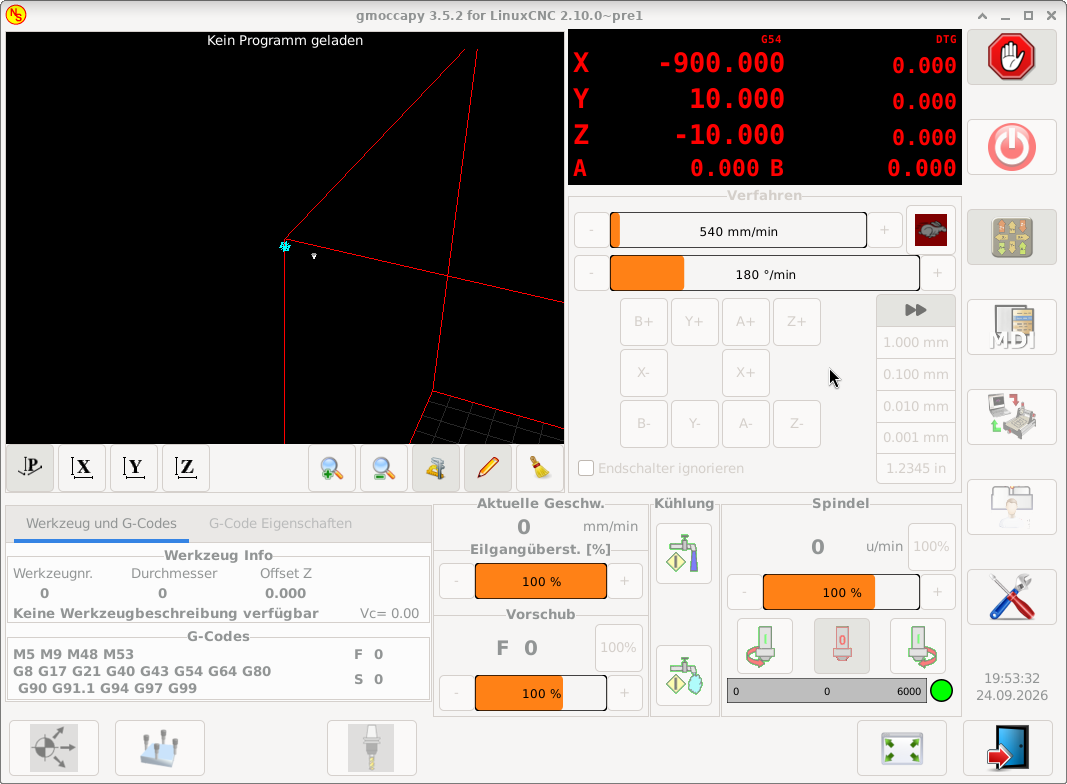
I think the A 0.000 should align right with the numbers above Z-10,000, where the last two zeros are on top of each other, maybe the dtgs could get a slightly less bright red to distinguish them more visibly.

Not sure why A and B needs the smaller text size, but looks ok.

You are removing information though, the Abs might deserve a switch, maybe on click/tap? maybe with some kind of hint, clicking on dtg changes it to abs?

Food for thoughts, not implementation requests ;-)
  • HansU
  • HansU's Avatar
02 Oct 2026 07:02
Re-designing the Gmoccapy DRO was created by HansU

Re-designing the Gmoccapy DRO

Category: Gmoccapy

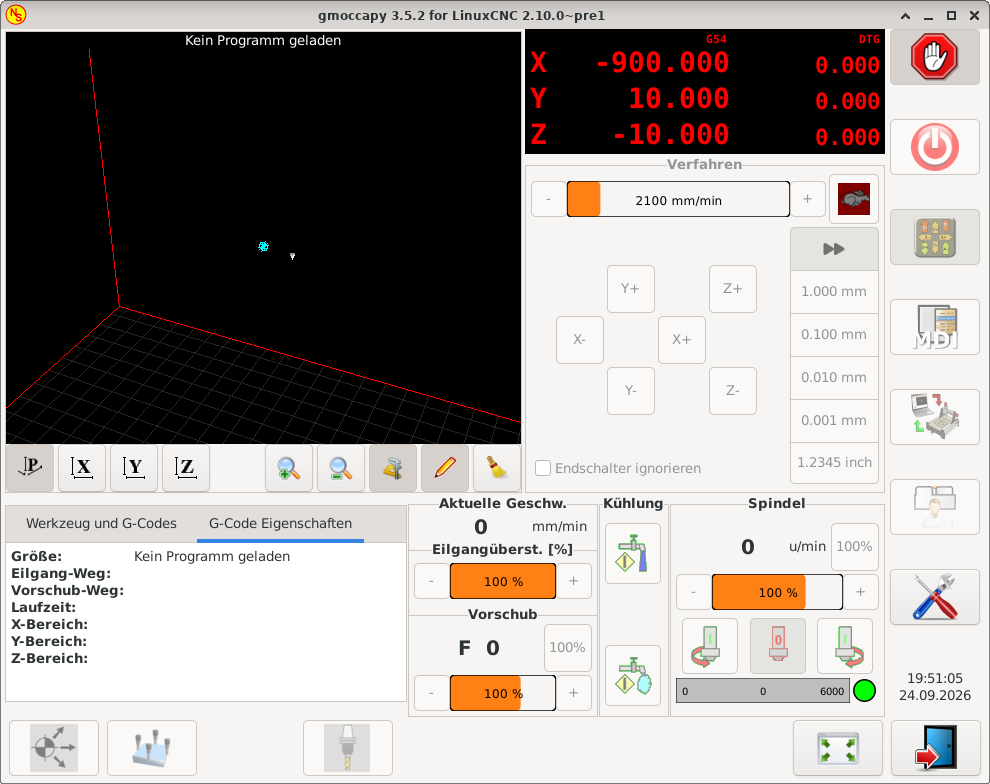
Currently there is much (unused) space between the axis letter and the value:


I thought the space could be used more effectively, so I moved one of the tiny sized values to the right and display the labels only at the top. 


And I would display the current coordinate system (G5x) fixed at this position and only toggle the display of the right part.

For more than 4 axes I would only display the main value:


What do you think about that new design?

 
  • grandixximo
  • grandixximo's Avatar
02 Oct 2026 03:40 - 02 Oct 2026 03:42

Would you use a feed rate for rotary axes in mm/min (surface speed)?

Category: General LinuxCNC Questions

Yes, I will try to make the least assumptions as possible, you could be working from Z0 center, or not, you could be working on a lathe or a mill, the spindle could be spinning or the table, you might want the feed to match the tip the side or half way trough the shaft of a tool, I think we need some flexibility, but I'd also compare with what other controllers do, and what a CAM or someone hand writing a gcode would expect...
  • spumco
  • spumco
02 Oct 2026 03:34

Would you use a feed rate for rotary axes in mm/min (surface speed)?

Category: General LinuxCNC Questions

Just thinking about this a bit...

I wonder if a new non-modal gcode could be created that didn't use any INI settings, and simple calculated the appropriate angular feedrate based on the Z0 being at the center of rotation.

In my CAM I have to set A-axis CoR to Z0 for it to work properly, even for simple indexing work.  I wonder if other users are 'used to' programming a rotary axis - at least a 4th axis - with CoR as Z0?

I also wonder if this is going to be more complicated... what if the tool is not just cutting on the rotational axis centerline?  Will the new Gcode/Mcode change (or work with) the trajectory planner to determine the 'real' radius based on rotational axis offset, plus tool diameter?

Sounds like it might get interesting.
  • grandixximo
  • grandixximo's Avatar
02 Oct 2026 03:13 - 02 Oct 2026 03:17

Would you use a feed rate for rotary axes in mm/min (surface speed)?

Category: General LinuxCNC Questions

Problem is if "stupidly slow" was a behavior anyone relied upon, or already based something on, tuxcnc has a point there, there could be subs out there that fixed this issue in gcode, and we might not what to change their behavior with a new default, is just something we have to account for, we have enough users where these seemingly rare occurrences might bite quite a few ppl...
A new INI to force a sensible default, and leaving old configs unchanged seems the right balance.

---

And replying "G93 works for me" is totally fine, this was more of a census to see how many users actually would use the feature, and who already had it covered, one doesn't detract from the other, but give me a rough idea of who looked at it, and who I can ping for testing once it's built :-)
  • djdelorie
  • djdelorie
01 Oct 2026 23:31

Would you use a feed rate for rotary axes in mm/min (surface speed)?

Category: General LinuxCNC Questions

These are mathematical heresies

Sure, but as I noted, sometimes I forget to use G93 and happen to include an A move in something innocuous, and it would be nice if the resulting motion was at least within an order of magnitude of correct instead of the default of stupidly slow.
Also, my third option gave the machine the math it needed to calculate the correct speeds.
  • dbtayl
  • dbtayl
01 Oct 2026 23:29 - 02 Oct 2026 22:51
Replied by dbtayl on topic Perpetual License CAM

Perpetual License CAM

Category: Show Your Stuff

So far a mixed bag for me. For context, I normally use FreeCAD's CAM, which is honestly really good most of the time... except for occasionally breaking in seemingly incredibly dumb ways (ie, simple contour operations have gotten broken multiple times). That's been frustrating enough I was willing to try throwing some money at the problem- looking for a stop-gap "works" solution until FreeCAD stabilizes enough to stop driving me up the wall. No matter how good a standalone CAM package gets, not being integrated with your CAD is a hindrance.

Most of the stuff I do is multiple tools, generally "2.5D" (ie, very little surfacing), but operations on multiple sides and undercuts are common. Normally I'll use adaptive to rough the inside and outside- sometimes different areas w/ different stepdowns to optimize MRR- then add some contours/finishing passes to clean up edges/corners. Drill, undercut, chamfer/deburr, then cut off and flip for the other side.

The below is a "review" of version 1.0.7. Full disclosure I've only messed with it for a couple hours, so I may be wrong about some of these things! It's possible I just haven't figured out how to do stuff yet. 

My current take is that it's a nice teaser/tech demo, but doesn't have nearly enough control to make parts in practice. Everything I listed in the "bad" section below is pretty much a breaking issue for me (YMMV!). That said, I really don't want to be too negative here- the core (actual toolpath generation) seems to work really well! It "just"- fully recognizing that may be a huge task- needs maybe 2-3x as many options for controlling the details of those paths to make it actually useful. (again, for me- YMMV)

If it looks like progress is being made a couple weeks from now I'll probably think it's worth gambling the $200 that it'll get usable for me someday, otherwise I'll be considering the 30-day refund policy.

The good:
  • Runs on Linux, perpetual license- want to encourage that!
  • Speed seems good, both in general use and generating toolpaths (though have only tried small models)- again, very nice in a world full of (eg) node.js burn-your-cpu-to-render-1-fps nonsense.
  • Not mysteriously 10 GB for reasons I can't comprehend!
  • Adaptive toolpaths!!!
  • Actually runs offline- Wireshark confirms that (only ran it for a few minutes, so hardly a conclusive test), manual is offline as well
  • Supported 3Dconnexion mouse out of the box


The odd:
  • Defaults: G43 disabled, 3D mouse Z inverted
  • Output includes "2026-09-30T20:03:01-0500 INFO frontend.licensing.gate: [LICENCE] active, licence_id=xxxxxxxx... updates until 2029-09-27", maybe just a placeholder ETA for when this major version will be done
  • Payment tripped fraud alert, made 3-4 authorizations, though only one of them turned into a real charge
  • UI/workflow is definitely different from FreeCAD and Fusion 360. It seems buggy to me (creating/deleting operations, notably), but I'm trying to withhold judgement until I've used it more.


The bad (a lot of these boil down to "not enough control"):
  • Adaptive ONLY appears to machine the inside of your part- if you want to rough the outside, too bad, I guess?
  • Adaptive has no option to force specific depths- it has a stepdown setting, but will always do Z plane detection and cut any depth it finds one. Really breaks the high-DOC-low-WOC idea of adaptive in practice- especially since it cuts top-down, instead of cutting the bulk out from the bottom, then rest-machining the next layer up, and so on.
  • Chamfer operation is real rough. Sometimes it works when you select a top or bottom face (to chamfer all edges of said face), sometimes it doesn't. Manually selecting edges kinda works, but the hit box for edges is tiny, and the closed loop detection seems to only sometimes work. You can't seem to de-select edges by clicking on them in the model, you need to find them in the list. Some edges it seems to entirely refuse to recognize.
  • No option I can find for ramping into pockets- helix or plunge only. Problematic if you have a long, narrow pocket that you want to ease into, but no space for a helix. Literally the only time I accept a plunge entry is drilling.
  • Lead-in/-out options are limited- you can pick a lead-in radius on some operations, but not others, and you can't add a slight overlap between the lead-in and -out points on closed contours
  • Collision detection seems over-sold- eg, the chamfer operation will happily crash into a wall where the edge you're chamfering meets another face. See below- I misinterpreted the website, my fault.
    • I'm also not seeing a way to control where an operation starts or to add offsets to start/stop points to manually work around that. Looks like it only does collision detection for 3D operations


I haven't tried a lot of stuff (surfacing, tapping, drilling, actually posting g-code, ...). I tried the automatic feature recognition a bit, and it was hit-and-miss. (Issues with the AFR do not appear to be with AFR itself, but rather things I selected after that showing up in the AFR list. So of course me selecting nonsense looked like bad AFR. Still a problem, just a very different one, and not AFR itself) I have not tried the tool library functionality enough to know how good a job it does of remembering speeds/feeds for different materials/operations/etc.

I somehow thought there was a simulator included, but on further inspection it looks like I made that up based on the collision detection feature, so that's on me. Can always use Camotics, but bouncing between 3 programs while making a model is more obnoxious than just 2.

 
  • PCW
  • PCW's Avatar
01 Oct 2026 21:31 - 01 Oct 2026 21:49
Replied by PCW on topic Servo Driver Plasma Retrofit

Servo Driver Plasma Retrofit

Category: Plasmac

This can likely be fixed in a couple of different ways:

1. Adjust the input zero on the analog servo drive till the static following
error is near zero.

2. Set the PID bias pin to a small value (say somewhere between -.020 to +.020),
again, till the static following error is near zero
(#1 or #2 have equivalent effects, minimizing any small offsets)

3. Add some integral (I)  term to the PID loop
This will zero any static error.

Best option is probably to do 1 or 2  first to eliminate any offset errors
then do 3 (you cannot set 1 or 2 unless the I term is 0)
  • spumco
  • spumco
01 Oct 2026 21:30

Would you use a feed rate for rotary axes in mm/min (surface speed)?

Category: General LinuxCNC Questions

"G93 is fine for me" means nothing.


"G93 is fine for me" means

Inverse-time feedrate generated by CAM is sufficient for my needs.

The OP indicated a simple response would be sufficient.  I gave one of the requested responses.

If your provocative post was not directed at me, disregard.

And, as usual, thank you grandixximo for all the work on LCNC.
  • tommylight
  • tommylight's Avatar
01 Oct 2026 21:19
Replied by tommylight on topic Servo Driver Plasma Retrofit

Servo Driver Plasma Retrofit

Category: Plasmac

15in/s2 is 380mm/s2, from pictures the gantry seems really heavy, so you might want to tr 10 or eve 7in/s2.
This does not limit the cutting speed, it just limits the speed on corners, so you might have to also adjust the VAD to 80 or 90%, depending on the amount of dross remaining in the corners.
  • tommylight
  • tommylight's Avatar
01 Oct 2026 21:13

New LinuxCNC Multi-Channel System – Looking for Testers & Feedback

Category: Show Your Stuff

Thank you very much, this is a huge addition to the project, but i have to ask, is this going to be open source?
Or maybe i missed it from a quick glance....
Displaying 361 - 375 out of 12318 results.
Time to create page: 0.533 seconds
Powered by Kunena Forum