
- Posts: 161
- Thank you received: 9
Gmoccapy - A new screen for linuxcnc
- jlviloria
- Offline
- Elite Member
-

Less
More
13 years 6 months ago #33397
by jlviloria
Replied by jlviloria on topic Gmoccapy - A new screen for linuxcnc
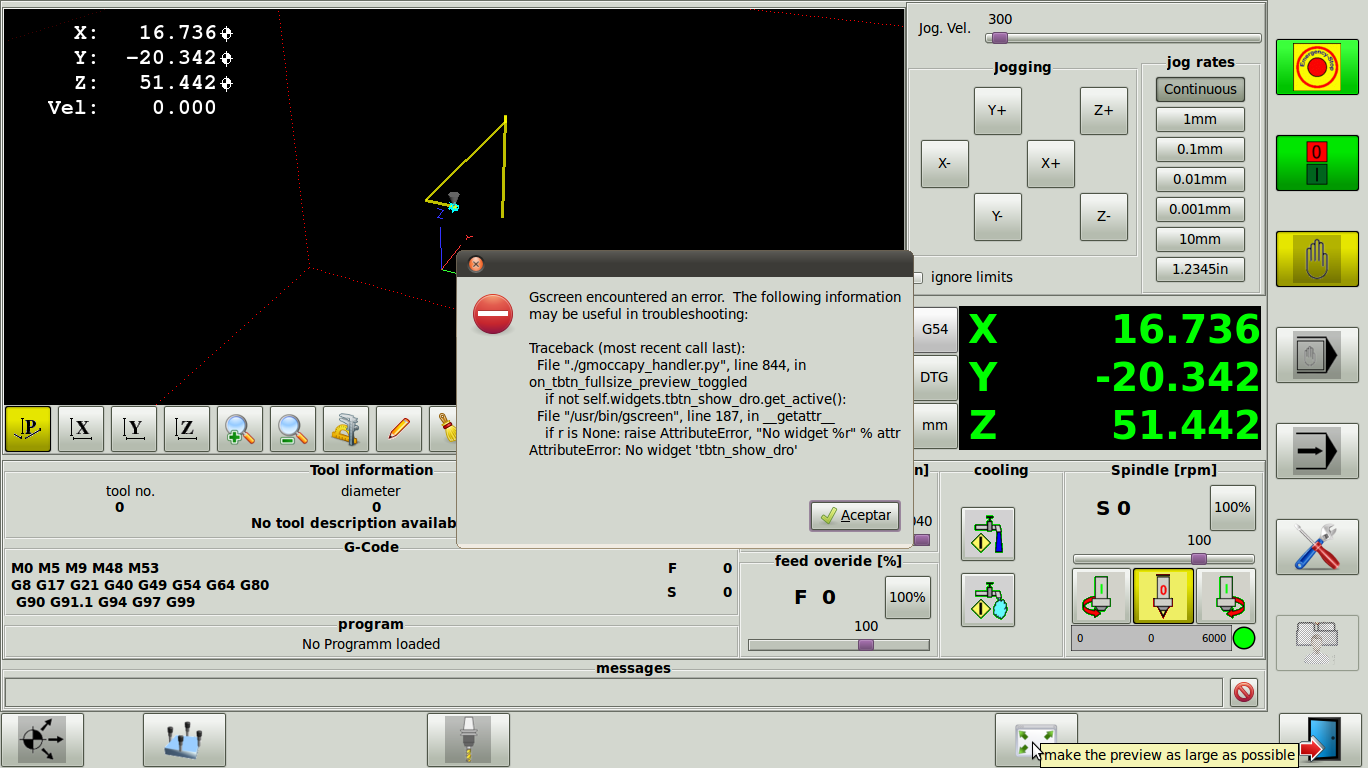
Norbert good job, look who is coming out this error when we give in full screen gremlin
Jorge Viloria
Jorge Viloria
Please Log in or Create an account to join the conversation.
- newbynobi
- Offline
- Moderator
-

Less
More
- Posts: 1931
- Thank you received: 394
13 years 6 months ago #33398
by newbynobi
Replied by newbynobi on topic Gmoccapy - A new screen for linuxcnc
Oh I mist renaming one widget.
Please open gmoccapy_handler.py
and edit line 844
change:
to
I missed that.
Will make a patch very soon
Norbert
Please open gmoccapy_handler.py
and edit line 844
change:
Code:
if not self.widgets.tbtn_show_dro.get_active():
Code:
if not self.widgets.chk_show_dro.get_active():
I missed that.
Will make a patch very soon
Norbert
The following user(s) said Thank You: jlviloria
Please Log in or Create an account to join the conversation.
- jj89074
- Offline
- Senior Member
-

Less
More
- Posts: 42
- Thank you received: 0
13 years 6 months ago #33405
by jj89074
Replied by jj89074 on topic Gmoccapy - A new screen for linuxcnc
Norbert,
Thank you so much for this GUI...I really like the format! The thank you also extends to Chris and all his work too!
One thing I noticed is my keyboard PageUp and PageDown keys work the Z axis backwards. It works fine for the X & Y and my MPG works OK.
Keep up the excellent work.
Jim
Thank you so much for this GUI...I really like the format! The thank you also extends to Chris and all his work too!
One thing I noticed is my keyboard PageUp and PageDown keys work the Z axis backwards. It works fine for the X & Y and my MPG works OK.
Keep up the excellent work.
Jim
Please Log in or Create an account to join the conversation.
- newbynobi
- Offline
- Moderator
-
Less
More
- Posts: 1931
- Thank you received: 394
13 years 5 months ago #33479
by newbynobi
Replied by newbynobi on topic Gmoccapy - A new screen for linuxcnc
The above mentioned bug has been fixed.
Please update to gmoccapy 0.9.1.1
Norbert
Please update to gmoccapy 0.9.1.1
Norbert
Please Log in or Create an account to join the conversation.
- jlviloria
- Offline
- Elite Member
-
Less
More
- Posts: 161
- Thank you received: 9
13 years 5 months ago - 13 years 5 months ago #33571
by jlviloria
Replied by jlviloria on topic Gmoccapy - A new screen for linuxcnc
Norbert, a problem in the tooleditor, I spend as in industrial-GScreen.
I can not change my tooleditor manually. and the problem is generated by the (return True) at the end of the commands (up, down, left, right)
but if you remove the (return True) faders (Slider) start moving when you press the arrow keys (up, down, left, right)
For me it's bad, because I use the style tool fanuc pacth change. I change the hand tool wear.
in industrial-gscreen can not edit the program
thanks.
Jorge Viloria
I can not change my tooleditor manually. and the problem is generated by the (return True) at the end of the commands (up, down, left, right)
but if you remove the (return True) faders (Slider) start moving when you press the arrow keys (up, down, left, right)
For me it's bad, because I use the style tool fanuc pacth change. I change the hand tool wear.
in industrial-gscreen can not edit the program
thanks.
Jorge Viloria
Last edit: 13 years 5 months ago by jlviloria.
Please Log in or Create an account to join the conversation.
- newbynobi
- Offline
- Moderator
-
Less
More
- Posts: 1931
- Thank you received: 394
13 years 5 months ago - 13 years 5 months ago #33869
by newbynobi
Replied by newbynobi on topic Gmoccapy - A new screen for linuxcnc
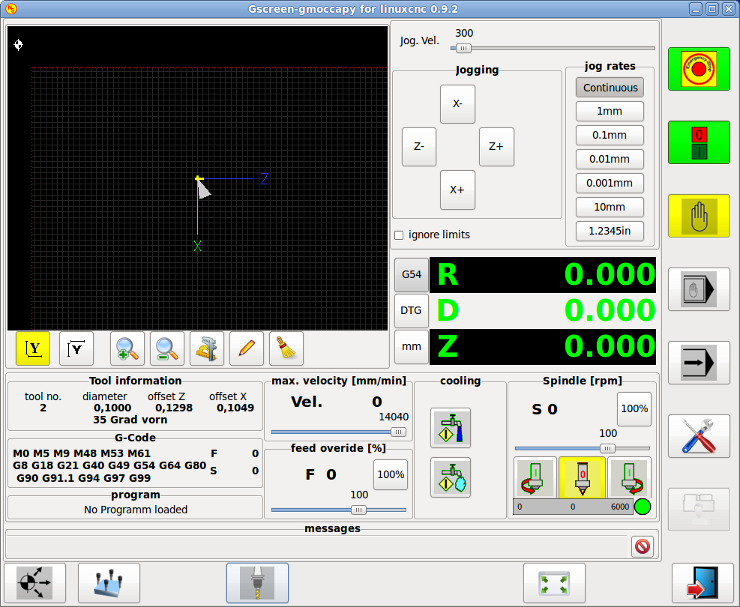
gmoccapy 0.9.2 has been released
Now gmoccapy does support also lathes.
Just include in your INI in
[DISPLAY]
LATHE = 1
as usual and you get the lathe layout.
Second new function is tool touch off.
You will find 2 button on the tooleditor page to touch off Z and X axis, while in mill mode you will not see the X touch off button.
The button will emit an MDI command like "G10 L10 P3 X2.356" where P3 represents the tool in spindle and X2.356 the value to set in X.
It is an error if Cutter Compensation is on
The DRO background from D and R DRO will change its color according to active G Code G7 / G8 the active one has an black background, the other one is gray.
There are also some minor changes in keyhandling, as the keyboard keys are different for lathe and mill:
Lathe:
arrow left = Z minus
arrow right = Z plus
arow up = X minus
arrow down = X plus
page up = no action
page down = no action
ESC = emc aboard (stop riunning program)
F1 = estop
F2 = machine on/off
Mill:
arrow left = X minus
arrow right = X plus
arow up = Y plus
arrow down = Y minus
page up = Z plus
page down = Z minus
ESC = emc aboard (stop riunning program)
F1 = estop
F2 = machine on/off
Please test and let me know what you miss.
Norbert
Now gmoccapy does support also lathes.
Just include in your INI in
[DISPLAY]
LATHE = 1
as usual and you get the lathe layout.
Second new function is tool touch off.
You will find 2 button on the tooleditor page to touch off Z and X axis, while in mill mode you will not see the X touch off button.
The button will emit an MDI command like "G10 L10 P3 X2.356" where P3 represents the tool in spindle and X2.356 the value to set in X.
It is an error if Cutter Compensation is on
The DRO background from D and R DRO will change its color according to active G Code G7 / G8 the active one has an black background, the other one is gray.
There are also some minor changes in keyhandling, as the keyboard keys are different for lathe and mill:
Lathe:
arrow left = Z minus
arrow right = Z plus
arow up = X minus
arrow down = X plus
page up = no action
page down = no action
ESC = emc aboard (stop riunning program)
F1 = estop
F2 = machine on/off
Mill:
arrow left = X minus
arrow right = X plus
arow up = Y plus
arrow down = Y minus
page up = Z plus
page down = Z minus
ESC = emc aboard (stop riunning program)
F1 = estop
F2 = machine on/off
Please test and let me know what you miss.
Norbert
Last edit: 13 years 5 months ago by newbynobi.
The following user(s) said Thank You: jlviloria, emcPT
Please Log in or Create an account to join the conversation.
Moderators: newbynobi, HansU
Time to create page: 0.341 seconds