
- Posts: 3981
- Thank you received: 994
Gmoccapy - A new screen for linuxcnc
- BigJohnT
- Offline
- Administrator
-

Less
More
13 years 6 months ago #32962
by BigJohnT
Replied by BigJohnT on topic Gmoccapy - A new screen for linuxcnc
Thanks
John
John
Please Log in or Create an account to join the conversation.
- jlviloria
- Offline
- Elite Member
-

Less
More
- Posts: 161
- Thank you received: 9
13 years 6 months ago #33223
by jlviloria
Replied by jlviloria on topic Gmoccapy - A new screen for linuxcnc
Hallo Norbert
first congratulate you on your great achievement ... they work great.
I have a lathe cincinnati, I am working with AXIS GUI, I had some problems with tooledit, because they use the patch-change-tool-fanuc-style.
I have not mpg, or physical buttons, only the emergency stop. Industrial GScreen I really like, but I think it is designed for machines with buttons and mpg.
after all this introduction, my question is how hard would it be to use your GUI with a lathe, is that going to work in your next release in lathe do so.
as I can integrate your GUI industrial lathe so if you have, I mean jog increments. I hope not to bother or be reckless. but I need gmoccapy mixed industry,
thanks in advance.
greetings,
Jorge Viloria.
first congratulate you on your great achievement ... they work great.
I have a lathe cincinnati, I am working with AXIS GUI, I had some problems with tooledit, because they use the patch-change-tool-fanuc-style.
I have not mpg, or physical buttons, only the emergency stop. Industrial GScreen I really like, but I think it is designed for machines with buttons and mpg.
after all this introduction, my question is how hard would it be to use your GUI with a lathe, is that going to work in your next release in lathe do so.
as I can integrate your GUI industrial lathe so if you have, I mean jog increments. I hope not to bother or be reckless. but I need gmoccapy mixed industry,
thanks in advance.
greetings,
Jorge Viloria.
Please Log in or Create an account to join the conversation.
- newbynobi
- Offline
- Moderator
-

Less
More
- Posts: 1931
- Thank you received: 394
13 years 6 months ago #33227
by newbynobi
Replied by newbynobi on topic Gmoccapy - A new screen for linuxcnc
Hola Jorge,
que placer de ver que mi GUI también tiene aceptación en Latino America!
Si, gmoccapy también va a soportar tornos, pero no en el próximo release pero dentro de muy poco tiempo.
También voy a traducir la GUI en otros idiomas.
To all others:
it is a pleasure to see, that my GUI also find acceptance in Latin America!
Yes, gmoccapy will also be available in a lathe version, but not in the next release, but in very short future.
I will also translate gmoccapy in other languages.
Norbert
que placer de ver que mi GUI también tiene aceptación en Latino America!
Si, gmoccapy también va a soportar tornos, pero no en el próximo release pero dentro de muy poco tiempo.
También voy a traducir la GUI en otros idiomas.
To all others:
it is a pleasure to see, that my GUI also find acceptance in Latin America!
Yes, gmoccapy will also be available in a lathe version, but not in the next release, but in very short future.
I will also translate gmoccapy in other languages.
Norbert
Please Log in or Create an account to join the conversation.
- emcPT
- Offline
- Platinum Member
-

Less
More
- Posts: 424
- Thank you received: 95
13 years 6 months ago #33228
by emcPT
Replied by emcPT on topic Gmoccapy - A new screen for linuxcnc
This is also waiting for the lathe mode screen:
www.linuxcnc.org/index.php/english/forum...tatus?start=90#32882
www.linuxcnc.org/index.php/english/forum...mesa-5i20--5i44-7i73
www.linuxcnc.org/index.php/english/forum...tatus?start=90#32882
www.linuxcnc.org/index.php/english/forum...mesa-5i20--5i44-7i73
Please Log in or Create an account to join the conversation.
- newbynobi
- Offline
- Moderator
-
Less
More
- Posts: 1931
- Thank you received: 394
13 years 6 months ago #33229
by newbynobi
Replied by newbynobi on topic Gmoccapy - A new screen for linuxcnc
So I will have to speed up 
2 of my German testers are also waiting.
There are still some things to implement, before beginning the lathe mode.
At the moment I am reworking the complete Settings Page:
I introduced o lot of user defined settings, so a need to get a better layout.
And to be complete I need to implement "reload tool on start up",
After that Lathe will start!
Please give me some more time.
Norbert
2 of my German testers are also waiting.
There are still some things to implement, before beginning the lathe mode.
At the moment I am reworking the complete Settings Page:
I introduced o lot of user defined settings, so a need to get a better layout.
And to be complete I need to implement "reload tool on start up",
After that Lathe will start!
Please give me some more time.
Norbert
The following user(s) said Thank You: jtc
Please Log in or Create an account to join the conversation.
- newbynobi
- Offline
- Moderator
-
Less
More
- Posts: 1931
- Thank you received: 394
13 years 6 months ago - 13 years 6 months ago #33393
by newbynobi
Replied by newbynobi on topic Gmoccapy - A new screen for linuxcnc
gmoccapy now in ver. 0.9.1
ver 0.9.1
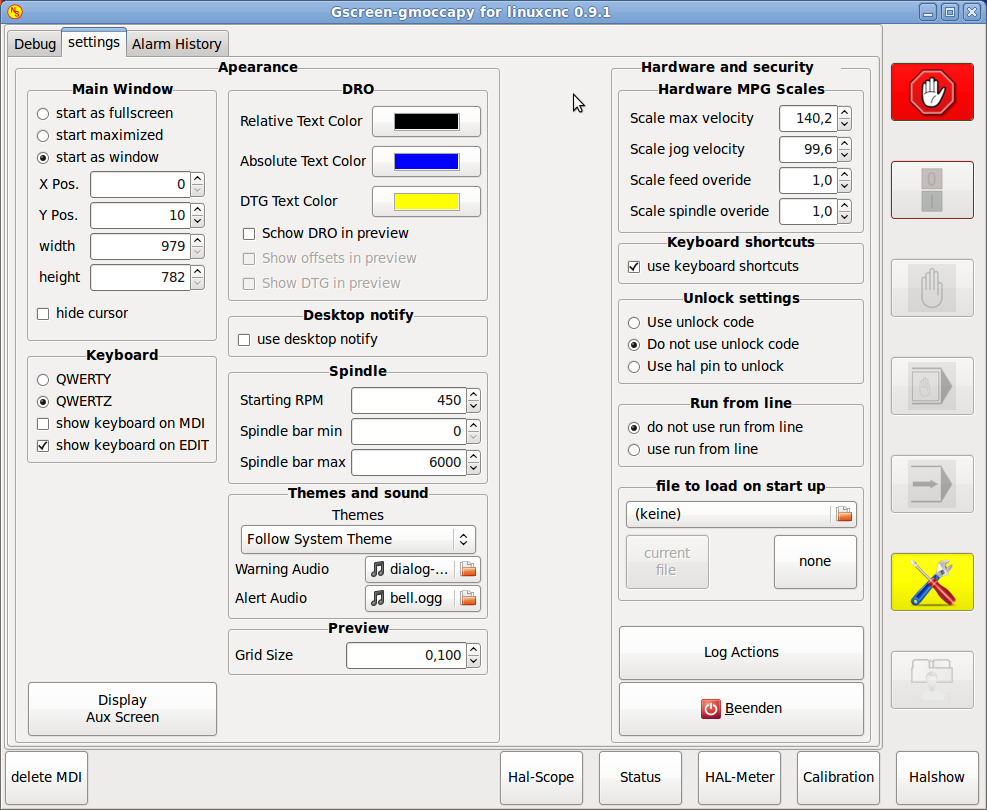
I mainly reworked the complete settings page and solved some smaller bugs-
In detail:
New settings page:
- show offsets and show dtg for gremlin are only sensitive if show gremlin DRO
is active, other behavior makes no sense
- settings page can be reached now also in estop state
- desktop notify can be disabled in settings page, makes the gui faster
- file to load on start up can be selected on settings page
- added a checkbox to select the use of keyboard shortcuts
- spindle settings moved from INI to the settings page and preference file
- DRO settings changed in settings page, checkboxes instead of toggle button
and all settings related to DRO in one frame
- added scale settings for the hardware mpg encoders to move the sliders,
otherwise for max vel being 14000 the changes was to small, counting one by one
- hardware keyboard now works also in settings page and debug page
- Screen2 can be shown now, but I noticed, that if the screen is very complex,
the application will crash!
And some other changes:
- in init_file_to_load added a selection of filters given in INI File
- button save and run has now a tool tip text,
- check on macro execution for errors before starting the macro
- reconnected the sim spindle to gmoccapy
- in MDI Mode giving S0 now switch the spindle off
- from INI [DISPLAY] min_spindle_overide is used to set the slider limits
- def init_gremlin now in gmoccapy, to avoid widget name conflicts
the WIKI has been updated allready!
I strongly recommend an update!
Now I will begin to work on the lathe version!
Norbert
ver 0.9.1
I mainly reworked the complete settings page and solved some smaller bugs-
In detail:
New settings page:
- show offsets and show dtg for gremlin are only sensitive if show gremlin DRO
is active, other behavior makes no sense
- settings page can be reached now also in estop state
- desktop notify can be disabled in settings page, makes the gui faster
- file to load on start up can be selected on settings page
- added a checkbox to select the use of keyboard shortcuts
- spindle settings moved from INI to the settings page and preference file
- DRO settings changed in settings page, checkboxes instead of toggle button
and all settings related to DRO in one frame
- added scale settings for the hardware mpg encoders to move the sliders,
otherwise for max vel being 14000 the changes was to small, counting one by one
- hardware keyboard now works also in settings page and debug page
- Screen2 can be shown now, but I noticed, that if the screen is very complex,
the application will crash!
And some other changes:
- in init_file_to_load added a selection of filters given in INI File
- button save and run has now a tool tip text,
- check on macro execution for errors before starting the macro
- reconnected the sim spindle to gmoccapy
- in MDI Mode giving S0 now switch the spindle off
- from INI [DISPLAY] min_spindle_overide is used to set the slider limits
- def init_gremlin now in gmoccapy, to avoid widget name conflicts
the WIKI has been updated allready!
I strongly recommend an update!
Now I will begin to work on the lathe version!
Norbert
Last edit: 13 years 6 months ago by newbynobi.
The following user(s) said Thank You: emcPT
Please Log in or Create an account to join the conversation.
Moderators: newbynobi, HansU
Time to create page: 1.253 seconds