
- Posts: 1931
- Thank you received: 394
Gmoccapy - A new screen for linuxcnc
- newbynobi
- Offline
- Moderator
-

Less
More
12 years 10 months ago #41978
by newbynobi
Replied by newbynobi on topic Gmoccapy - A new screen for linuxcnc
I wish to all gmoccapy users and persons interested in that GUI
Merry Christmas!!
Norbert
Merry Christmas!!
Norbert
Please Log in or Create an account to join the conversation.
- jbunch
- Offline
- Senior Member
-

Less
More
- Posts: 79
- Thank you received: 3
12 years 10 months ago - 12 years 10 months ago #41999
by jbunch
Replied by jbunch on topic Gmoccapy - A new screen for linuxcnc
Hello Norbert,
having a problem with the data entry box for ngcgui.
In start as full screen mode if you click outside the data enty box it is placed behind the screen.
The only way to get it back is to use alt+tab or change to start maximized.
Have a great and Merry Christmas.........
Jim
having a problem with the data entry box for ngcgui.
In start as full screen mode if you click outside the data enty box it is placed behind the screen.
The only way to get it back is to use alt+tab or change to start maximized.
Have a great and Merry Christmas.........
Jim
Last edit: 12 years 10 months ago by jbunch.
Please Log in or Create an account to join the conversation.
- mariusl
- Offline
- Platinum Member
-

12 years 10 months ago #42000
by mariusl
Regards
Marius
www.bluearccnc.com
Replied by mariusl on topic Gmoccapy - A new screen for linuxcnc
Hi Jim
There is a button on the bottom towards the right hand side that is used to maximize the preview display area. If you press that you will see the whole lot.
If you look at the ngc stuff you will see that there is a header file that is either metric or imperial. You have to setup the ngc to use the correct header file.
There is a button on the bottom towards the right hand side that is used to maximize the preview display area. If you press that you will see the whole lot.
If you look at the ngc stuff you will see that there is a header file that is either metric or imperial. You have to setup the ngc to use the correct header file.
Regards
Marius
www.bluearccnc.com
Please Log in or Create an account to join the conversation.
- jbunch
- Offline
- Senior Member
-
Less
More
- Posts: 79
- Thank you received: 3
12 years 10 months ago #42004
by jbunch
Replied by jbunch on topic Gmoccapy - A new screen for linuxcnc
Marius,
That is not the problem.
The problem has to do with the popup keypad for editing (pyngcgui_popupkeyboard.ui).
When gmoccapy is in full screen mode if you hit outside the keypad area linux moves the
keypad behind gmoccapy. and you can no longer access it.
Also if you use (pyngcgui.ui) without the popup keyboard the keypad on your keyboard
does not work so you have no way to enter data into the fields. You get an error in the terminal window
that that key has not been implemented yet.
Jim
That is not the problem.
The problem has to do with the popup keypad for editing (pyngcgui_popupkeyboard.ui).
When gmoccapy is in full screen mode if you hit outside the keypad area linux moves the
keypad behind gmoccapy. and you can no longer access it.
Also if you use (pyngcgui.ui) without the popup keyboard the keypad on your keyboard
does not work so you have no way to enter data into the fields. You get an error in the terminal window
that that key has not been implemented yet.
Jim
Please Log in or Create an account to join the conversation.
- mariusl
- Offline
- Platinum Member
-
12 years 10 months ago #42008
by mariusl
Regards
Marius
www.bluearccnc.com
Replied by mariusl on topic Gmoccapy - A new screen for linuxcnc
Jim
I found that problem a long time ago when I first tested pyngcgui. I was under the impression that it was fixed. The keypad is supposed to keep focus until closed.
I am busy implementing Gmoccapy with pyngcgui on my desktop router. I will test it soon as I want to implement a tool change macro.
Can I suggest that you report your problem on the pyngcgui thread. It might help to get it fixed soon.
I found that problem a long time ago when I first tested pyngcgui. I was under the impression that it was fixed. The keypad is supposed to keep focus until closed.
I am busy implementing Gmoccapy with pyngcgui on my desktop router. I will test it soon as I want to implement a tool change macro.
Can I suggest that you report your problem on the pyngcgui thread. It might help to get it fixed soon.
Regards
Marius
www.bluearccnc.com
Please Log in or Create an account to join the conversation.
- mariusl
- Offline
- Platinum Member
-
12 years 10 months ago #42024
by mariusl
Regards
Marius
www.bluearccnc.com
Replied by mariusl on topic Gmoccapy - A new screen for linuxcnc
Norbert
I seem to have a problem loading any macro file. It works in the sim config but not in any of my live configs.
I tried it on my new desktop mill as well as the plasma config. The error says
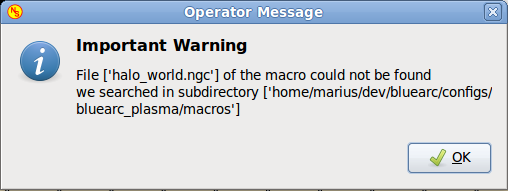
I seem to have a problem loading any macro file. It works in the sim config but not in any of my live configs.
I tried it on my new desktop mill as well as the plasma config. The error says
Regards
Marius
www.bluearccnc.com
Please Log in or Create an account to join the conversation.
Moderators: newbynobi, HansU
Time to create page: 0.364 seconds