
- Posts: 1931
- Thank you received: 394
Gmoccapy - A new screen for linuxcnc
- newbynobi
- Offline
- Moderator
-

Less
More
12 years 10 months ago #42039
by newbynobi
Replied by newbynobi on topic Gmoccapy - A new screen for linuxcnc
Hallo Jim,
I see the problem! It is because you have activated keyboard usage. Please go to the settings page to the hardware tab and see what says keyboard usage, if you uncheck that one, you will be able to enter values.
Pyngcgui is not my work, and as I am going to include a much more profesional gcode generator (Rene is doing that one), I will not invest any work on pyngcgui. I hope to be able to show first results in summer 2014.
Norbert
I see the problem! It is because you have activated keyboard usage. Please go to the settings page to the hardware tab and see what says keyboard usage, if you uncheck that one, you will be able to enter values.
Pyngcgui is not my work, and as I am going to include a much more profesional gcode generator (Rene is doing that one), I will not invest any work on pyngcgui. I hope to be able to show first results in summer 2014.
Norbert
Please Log in or Create an account to join the conversation.
- newbynobi
- Offline
- Moderator
-
Less
More
- Posts: 1931
- Thank you received: 394
12 years 10 months ago #42040
by newbynobi
Replied by newbynobi on topic Gmoccapy - A new screen for linuxcnc
Halo Marius,
have you checked, that there is a file called "helo_world.ngc" in the mentioned folder?
It seems you did not copy the macros folder to your config or your subroutine path from INI point to somewhere else.
Norbert
have you checked, that there is a file called "helo_world.ngc" in the mentioned folder?
It seems you did not copy the macros folder to your config or your subroutine path from INI point to somewhere else.
Norbert
Please Log in or Create an account to join the conversation.
- mariusl
- Offline
- Platinum Member
-

12 years 10 months ago #42042
by mariusl
Regards
Marius
www.bluearccnc.com
Replied by mariusl on topic Gmoccapy - A new screen for linuxcnc
Hi Norbert
As you can see from the picture, the path is set correctly. The macros directory is under my config directory and the files are in there. I have created some of my own files as well. It does not see anything.
Out of desperation I started to write some subs to use with V buttons but I would rather use the macros if I could.
I have set the path up any way possible but it still does not pick up the files.
As you can see from the picture, the path is set correctly. The macros directory is under my config directory and the files are in there. I have created some of my own files as well. It does not see anything.
Out of desperation I started to write some subs to use with V buttons but I would rather use the macros if I could.
I have set the path up any way possible but it still does not pick up the files.
Regards
Marius
www.bluearccnc.com
Please Log in or Create an account to join the conversation.
- newbynobi
- Offline
- Moderator
-
Less
More
- Posts: 1931
- Thank you received: 394
12 years 10 months ago - 12 years 10 months ago #42043
by newbynobi
Replied by newbynobi on topic Gmoccapy - A new screen for linuxcnc
Hallo Marius,
check:
- What is in your [MACRO] section?
- What is under [RS274NGC] ; SUBROUTINE_PATH
- What files are in that path?
- do the files fit the following needs?
The name of the file must be exactly the same as the name given in the MACRO line.
So the macro i_am_lost will call the file i_am_lost.ngc.
The macro files must follow some rules:
- the name of the file need to be the same as the name mentioned in the macro line, just with the ngc extension
- The file must contain a subroutine like so: O<i_am_lost> sub, where the name of the sub must match exactly the name of the macro (case sensitive)
- the file must end with an endsub command O<i_am_lost> endsub followed by an M2 command
- the files need to be placed in a folder specified in your INI file in the RS274NGC section (see [RS274NGC]:
I tested that just now on my test machine, and it does work fine.
Norbert
check:
- What is in your [MACRO] section?
- What is under [RS274NGC] ; SUBROUTINE_PATH
- What files are in that path?
- do the files fit the following needs?
The name of the file must be exactly the same as the name given in the MACRO line.
So the macro i_am_lost will call the file i_am_lost.ngc.
The macro files must follow some rules:
- the name of the file need to be the same as the name mentioned in the macro line, just with the ngc extension
- The file must contain a subroutine like so: O<i_am_lost> sub, where the name of the sub must match exactly the name of the macro (case sensitive)
- the file must end with an endsub command O<i_am_lost> endsub followed by an M2 command
- the files need to be placed in a folder specified in your INI file in the RS274NGC section (see [RS274NGC]:
I tested that just now on my test machine, and it does work fine.
Norbert
Last edit: 12 years 10 months ago by newbynobi.
Please Log in or Create an account to join the conversation.
- mariusl
- Offline
- Platinum Member
-
12 years 10 months ago #42044
by mariusl
Regards
Marius
www.bluearccnc.com
Replied by mariusl on topic Gmoccapy - A new screen for linuxcnc
Norbert
# for details see nc_files/subroutines/maco_instructions.txt
[MACROS]
MACRO = goto_tc
MACRO = halo_world
MACRO = jog_around
MACRO = increment xinc yinc
MACRO = go_to_position X-pos Y-pos Z-pos
MACRO = set_tc
SUBROUTINE_PATH = home/marius/dev/bluearc/configs/bluearc_plasma/macros
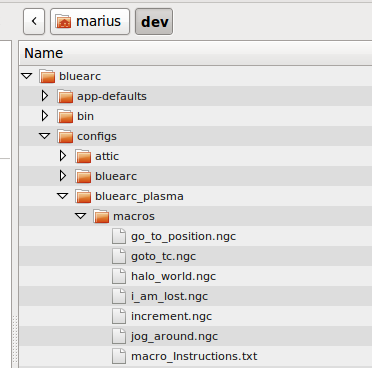
As you can see I am using the original files to test with.
- What is in your [MACRO] section?
# for details see nc_files/subroutines/maco_instructions.txt
[MACROS]
MACRO = goto_tc
MACRO = halo_world
MACRO = jog_around
MACRO = increment xinc yinc
MACRO = go_to_position X-pos Y-pos Z-pos
MACRO = set_tc
- What is under [RS274NGC] ; SUBROUTINE_PATH
SUBROUTINE_PATH = home/marius/dev/bluearc/configs/bluearc_plasma/macros
- What files are in that path?
As you can see I am using the original files to test with.
Regards
Marius
www.bluearccnc.com
Please Log in or Create an account to join the conversation.
- newbynobi
- Offline
- Moderator
-
Less
More
- Posts: 1931
- Thank you received: 394
12 years 10 months ago #42046
by newbynobi
Replied by newbynobi on topic Gmoccapy - A new screen for linuxcnc
Hallo Marius,
I do think the problem is you path:
Try:
SUBROUTINE_PATH = ~/dev/bluearc/configs/bluearc_plasma/macros
or even better try relative path like:
SUBROUTINE_PATH = macros
if your ini file is under: configs/bluearc_plasma/
Norbert
I do think the problem is you path:
Try:
SUBROUTINE_PATH = ~/dev/bluearc/configs/bluearc_plasma/macros
or even better try relative path like:
SUBROUTINE_PATH = macros
if your ini file is under: configs/bluearc_plasma/
Norbert
Please Log in or Create an account to join the conversation.
Moderators: newbynobi, HansU
Time to create page: 0.531 seconds