
- Posts: 457
- Thank you received: 124
LinuxCNC Features - a kind of NGCGUI
- FernV
- Offline
- Platinum Member
-

Less
More
11 years 7 months ago #56405
by FernV
Replied by FernV on topic LinuxCNC Features - a kind of NGCGUI
Hi Martin,
It raises an exception and give you a message, what it does not with G40
it does not check if your code is right, Linux CNC does it when it is reloaded.
Features is just an assembler of the code you pass to it.
You can create gcode for ANY kind of machine controller with Features. Even Mach3.
I do not know if all 'import' are available in MS Windows but if so it could be run under Windows with few modifications.
However, I think it could not be embeded, just run stand alone.
To create gcode for another CNC controller, you just modify YOUR ini files and gcode.
Best regards
Fern]
LinuxCNC checks this automatically and will NOT run the program if it can not do it.turbospeedskater wrote: I am normally not using tool correction from GCode. I am calculating
offsets in my subroutines. The big advantage I see is, that I can check
if the next operation is possible with that tool. (e.g. you can not mill a 3mm
radius if you have a 10mm tool....).
I am not sure what will happen if you use G41/G42 and mill a structure
too small for the diameter. I never tried... Any idea?
It raises an exception and give you a message, what it does not with G40
Features does generate gcode with what you give it.turbospeedskater wrote: ... I think it would be nice if Gcode from Features is not limited to LinuxCNC use.
it does not check if your code is right, Linux CNC does it when it is reloaded.
Features is just an assembler of the code you pass to it.
You can create gcode for ANY kind of machine controller with Features. Even Mach3.
I do not know if all 'import' are available in MS Windows but if so it could be run under Windows with few modifications.
However, I think it could not be embeded, just run stand alone.
To create gcode for another CNC controller, you just modify YOUR ini files and gcode.
Again, it does not depend on Features. It just helps to set the parameters to YOUR gcodeturbospeedskater wrote: Maybe it would be an option to have two different "styles" of programming:
One with only one tool and the tool diameter as a parameter, and another
where you select the tool via it's number as a parameter and then get the
tool diameter from the #5410 variable....
What do you think?
Best regards
Fern]
Please Log in or Create an account to join the conversation.
- FernV
- Offline
- Platinum Member
-
Less
More
- Posts: 457
- Thank you received: 124
11 years 7 months ago #56491
by FernV
Replied by FernV on topic LinuxCNC Features - a kind of NGCGUI
Hi Nick and Martin
Progress report
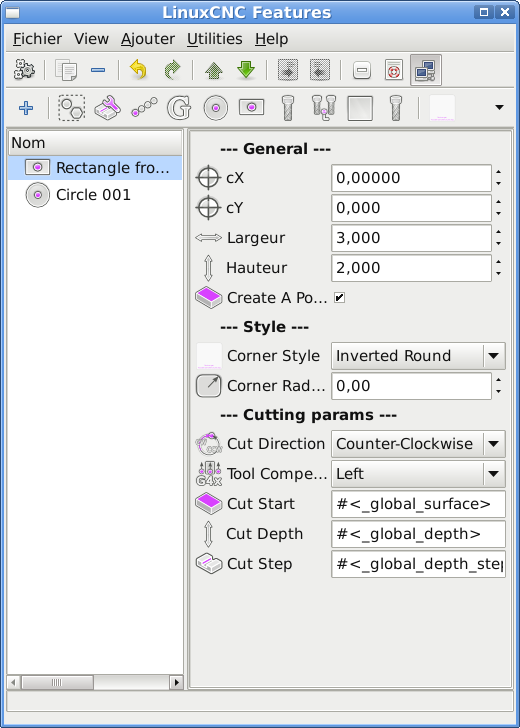
I still have a few bugs to correct, I do not want to publish a product someone will have difficulty to use.
It works pretty well as is and I also want to implement a few things like a configuration window, a message dialog that shows
why something goes wrong (like the path to their files is not right), etc.
The only reason your ini and ngc would not run is because I restrutured the folders to make it easier to maintain.
That would be very easy to fix by users.
To take advantages of all the improvement I added, you only need to add properties to ini. Types supported are :
int, bool, string, float, combo, header
To use a combo, write simply
type = combo
options = Counter-Clockwise:Clockwise
or for compensation
options = None:Left:Right
returned values are in the same order starting with 0
Best Regards
Fern
Progress report
I still have a few bugs to correct, I do not want to publish a product someone will have difficulty to use.
It works pretty well as is and I also want to implement a few things like a configuration window, a message dialog that shows
why something goes wrong (like the path to their files is not right), etc.
The only reason your ini and ngc would not run is because I restrutured the folders to make it easier to maintain.
That would be very easy to fix by users.
To take advantages of all the improvement I added, you only need to add properties to ini. Types supported are :
int, bool, string, float, combo, header
To use a combo, write simply
type = combo
options = Counter-Clockwise:Clockwise
or for compensation
options = None:Left:Right
returned values are in the same order starting with 0
Best Regards
Fern
Please Log in or Create an account to join the conversation.
- turbospeedskater
- Offline
- New Member
-

Less
More
- Posts: 16
- Thank you received: 0
11 years 7 months ago #56495
by turbospeedskater
Replied by turbospeedskater on topic LinuxCNC Features - a kind of NGCGUI
Hi Fern,
yesterday I found something to check and improve (if you have not already done in your new version):
I found out, that a program (the saved xml-file) can not be used on another machine,
if the location of features.py and the subroutines folder is different on both machines.
Background:
I have my milling machines with LinuxCNC package installed from the CD/DVD.
There I have installed the features.py etc. to /home/<user>/bin/Features....
On my office machines (where it is nicer to sit and write software/GCode/etc),
I have installed LinuxCNC from source. There I have installed features.py to
/home/<user>/src/Features/...
When I write a "program.xml" on my office machine, and try to open it with features.py
on my machine shop computer, then it will not work. I think, there are absolute paths
inside the "program.xml" and that will not work on another machine with different
install locations....
BTW: I am waiting for you to finish everything, and then we can talk about the subroutines.
In the meantime I have written some "universal G-Code" that can be easy used to make
pockets, holes and discs with different geometry with minimum adjustments needed.
That may be used as a base for all subroutines to have the internal gcode structure
being the same except the geometry information itself.
Also I think I will do some german translation for the interface if somebody wants that.
I personally prefer english, but may be there are some user who prefer german.
So a question to the world: Is there anyone who wants german interface???
And maybe a german manual?
best regards,
Martin
yesterday I found something to check and improve (if you have not already done in your new version):
I found out, that a program (the saved xml-file) can not be used on another machine,
if the location of features.py and the subroutines folder is different on both machines.
Background:
I have my milling machines with LinuxCNC package installed from the CD/DVD.
There I have installed the features.py etc. to /home/<user>/bin/Features....
On my office machines (where it is nicer to sit and write software/GCode/etc),
I have installed LinuxCNC from source. There I have installed features.py to
/home/<user>/src/Features/...
When I write a "program.xml" on my office machine, and try to open it with features.py
on my machine shop computer, then it will not work. I think, there are absolute paths
inside the "program.xml" and that will not work on another machine with different
install locations....
BTW: I am waiting for you to finish everything, and then we can talk about the subroutines.
In the meantime I have written some "universal G-Code" that can be easy used to make
pockets, holes and discs with different geometry with minimum adjustments needed.
That may be used as a base for all subroutines to have the internal gcode structure
being the same except the geometry information itself.
Also I think I will do some german translation for the interface if somebody wants that.
I personally prefer english, but may be there are some user who prefer german.
So a question to the world: Is there anyone who wants german interface???
And maybe a german manual?
best regards,
Martin
Please Log in or Create an account to join the conversation.
- Nick
- Offline
- Premium Member
-

Less
More
- Posts: 125
- Thank you received: 11
11 years 7 months ago #56499
by Nick
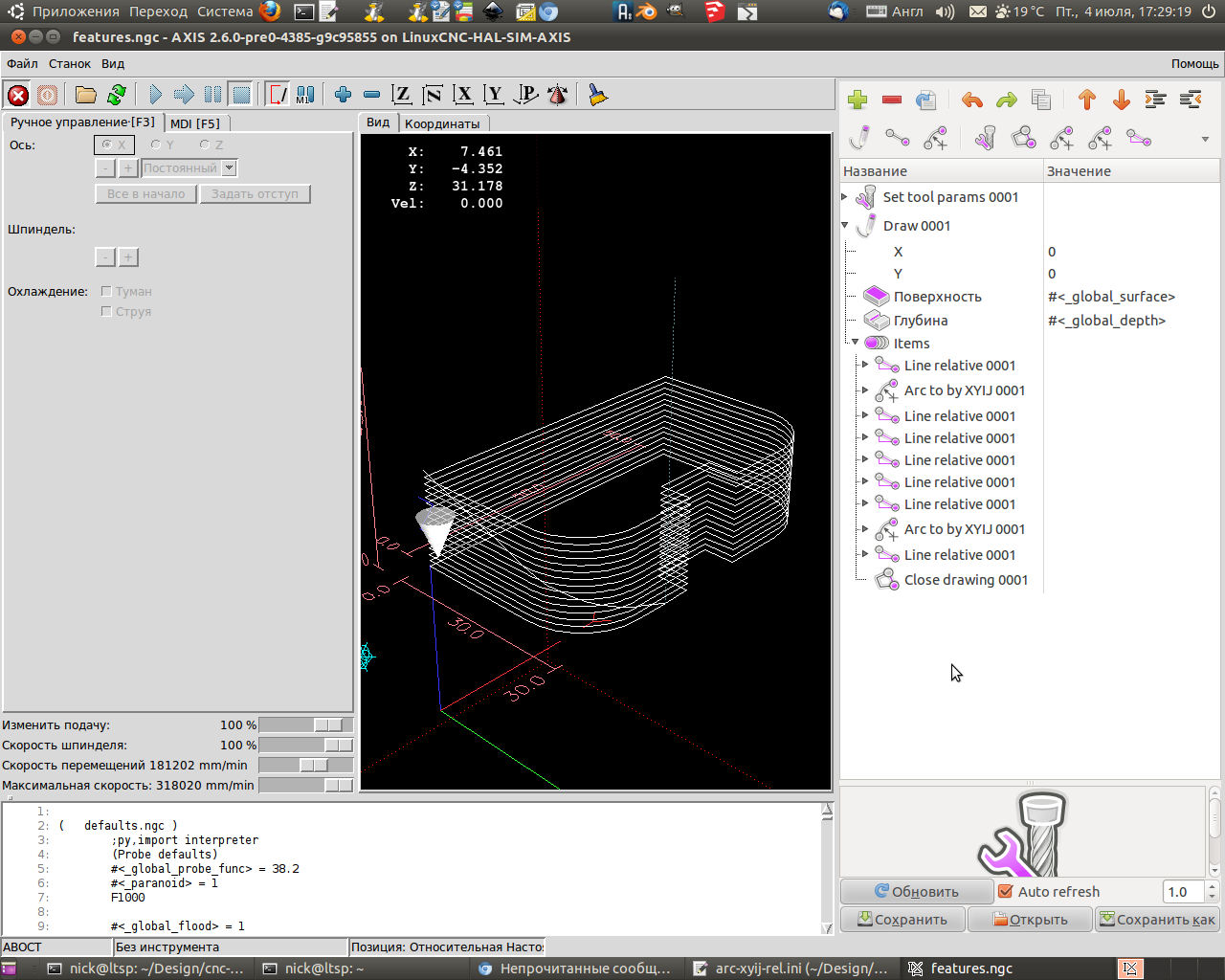
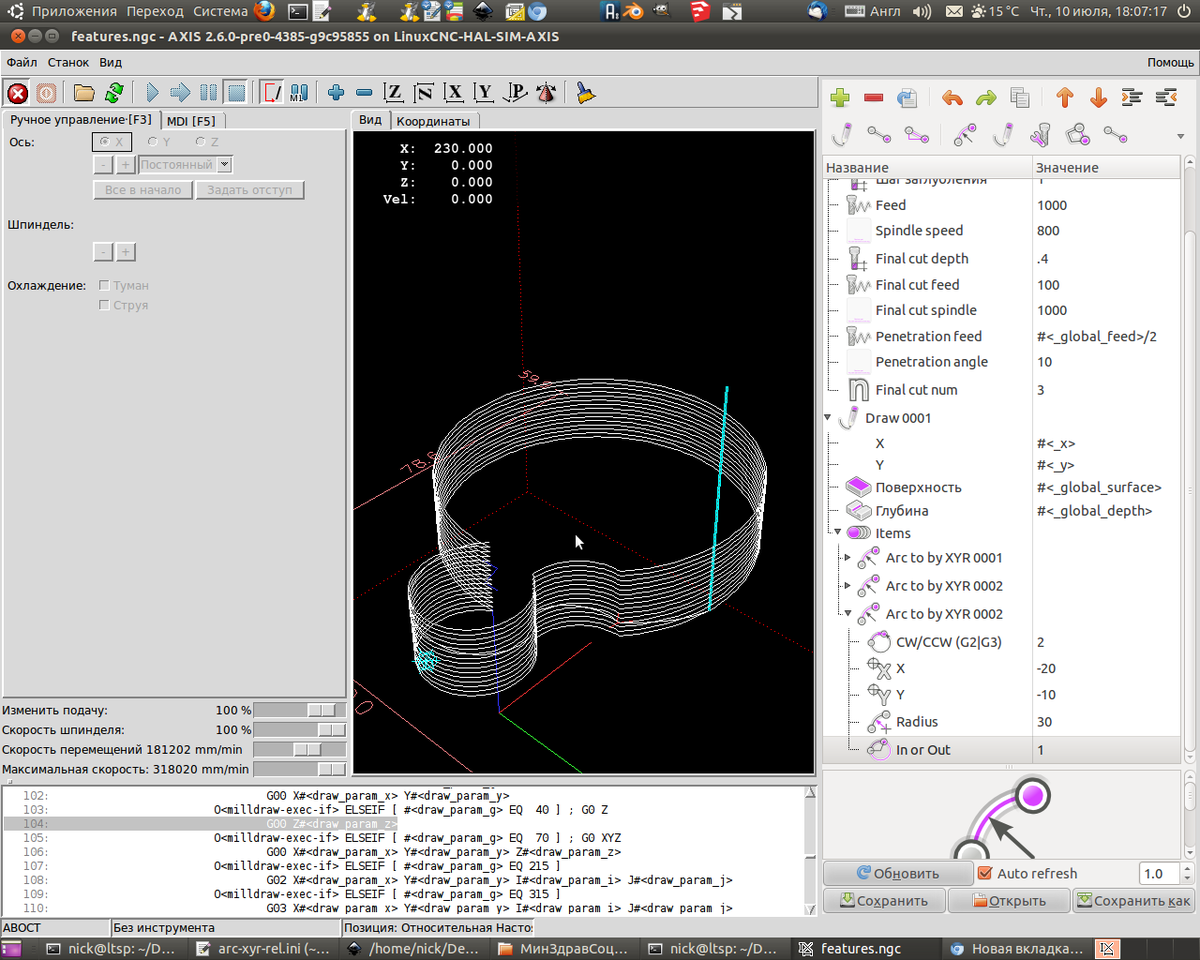
The very important thing for the machining is Penetration angle.
Some mills cannot penetrate material straight down and have to do it angled to the surface - so we will have a zig-zag, saw or spiral trajectory...
I do not know how is it called in English.
See the screenshots - there's a line which connects every layer and it's not vertical.
Replied by Nick on topic LinuxCNC Features - a kind of NGCGUI
I am waiting for you to finish everything, and then we can talk about the subroutines.
In the meantime I have written some "universal G-Code" that can be easy used to make
pockets, holes and discs with different geometry with minimum adjustments needed.
The very important thing for the machining is Penetration angle.
Some mills cannot penetrate material straight down and have to do it angled to the surface - so we will have a zig-zag, saw or spiral trajectory...
I do not know how is it called in English.
See the screenshots - there's a line which connects every layer and it's not vertical.
Please Log in or Create an account to join the conversation.
- turbospeedskater
- Offline
- New Member
-
Less
More
- Posts: 16
- Thank you received: 0
11 years 7 months ago #56501
by turbospeedskater
Replied by turbospeedskater on topic LinuxCNC Features - a kind of NGCGUI
Hi Nick,
that is one thing you can adjust with a parameter in my "universal GCode" .
Either you can go down in one place before you do the nect circle, or you can go down while doing the next circle.
Same is for pockets: You can adjust with a flag if you want to step out (for clearing the inner space) on one position,
or if you go out during the next circle.
Also adjustable via flags is, if you want to make a hole, a pocket, or a disc. SO you have to write everything for
geometry handling only once.
My idea behind was, to separate the handling of where to go down and/ or out and if the inner space should be cleared or not
from doing the geometrycal things (e.g. if we do a circle or a rectangle or whatever).
That is not 100% possile in GCode, but at least I have only 3 parts in the GCode (two suberotines and one embedded part),
where the geometry is important. The rest of the GCode is allways identical, no matter what kind of geometry has to be milled.
I will use that as a base for all of my milling subroutines (or features if we talk about his project).
I have to do some more testing, but that is nearly done. Then I will post the code here with some kind of description.
best regards,
Martin.
that is one thing you can adjust with a parameter in my "universal GCode" .
Either you can go down in one place before you do the nect circle, or you can go down while doing the next circle.
Same is for pockets: You can adjust with a flag if you want to step out (for clearing the inner space) on one position,
or if you go out during the next circle.
Also adjustable via flags is, if you want to make a hole, a pocket, or a disc. SO you have to write everything for
geometry handling only once.
My idea behind was, to separate the handling of where to go down and/ or out and if the inner space should be cleared or not
from doing the geometrycal things (e.g. if we do a circle or a rectangle or whatever).
That is not 100% possile in GCode, but at least I have only 3 parts in the GCode (two suberotines and one embedded part),
where the geometry is important. The rest of the GCode is allways identical, no matter what kind of geometry has to be milled.
I will use that as a base for all of my milling subroutines (or features if we talk about his project).
I have to do some more testing, but that is nearly done. Then I will post the code here with some kind of description.
best regards,
Martin.
Please Log in or Create an account to join the conversation.
- FernV
- Offline
- Platinum Member
-
Less
More
- Posts: 457
- Thank you received: 124
11 years 7 months ago - 11 years 7 months ago #56617
by FernV
Replied by FernV on topic LinuxCNC Features - a kind of NGCGUI
Hi Martin,
Hi Nick
I suggest you first verify your ini files, the calls to "include" or "include_once".
Btw, I recommend "include_once" unless you want to disallow the program to execute by including twice the
same file/subroutine
So anyone could easily translate the application with/without their ini file,
then submit their work to be included in the distribution
The application itself has about 200 strings to translate. You could start with 'gedit' to translate most lines
then finish with 'poedit'. Poedit will check that everything is right and when you save your work,
it will create the '.mo' language file used by the application
To make it intuitive, I think you should use a combo with options like : "Plunge while moving to X,Y" OR "Plunge first then move to X,Y"
I think the first option should be the default.
Next screenshot will show spinButtons and comboBoxes used IN the treeview.
I will also do checkButtons but at first sight I prefer the use of a comboBox, the options list make it more intuitive
We want to have re-usable code so a good idea is to start from there. Mentionned files do a perfect job
Best Regards
Fern
Hi Nick
You are right, absolute path is not a good idea. I think every file should be relative to Features root folder.turbospeedskater wrote: I found out, that a program (the saved xml-file) can not be used on another machine,
if the location of features.py and the subroutines folder is different on both machines.
I think, there are absolute paths
inside the "program.xml" and that will not work on another machine with different
install locations....
I suggest you first verify your ini files, the calls to "include" or "include_once".
Btw, I recommend "include_once" unless you want to disallow the program to execute by including twice the
same file/subroutine
Excellent. All code/snippets should be re-usable.turbospeedskater wrote: ...I have written some "universal G-Code" that can be easy used to make
pockets, holes and discs with different geometry with minimum adjustments needed.
That may be used as a base for all subroutines to have the internal gcode structure
being the same except the geometry information itself.
I would answer that it should be available. I already made a menu option to export strings for translation.turbospeedskater wrote: Also I think I will do some german translation for the interface if somebody wants that.
I personally prefer english, but may be there are some user who prefer german.
So a question to the world: Is there anyone who wants german interface???
And maybe a german manual?
So anyone could easily translate the application with/without their ini file,
then submit their work to be included in the distribution
The application itself has about 200 strings to translate. You could start with 'gedit' to translate most lines
then finish with 'poedit'. Poedit will check that everything is right and when you save your work,
it will create the '.mo' language file used by the application
Thanks for clarifying this, I had no idea what this was about.Nick wrote: The very important thing for the machining is Penetration angle.
Some mills cannot penetrate material straight down and have to do it angled to the surface - so we will have a zig-zag, saw or spiral trajectory...
I do not know how is it called in English.
To make it intuitive, I think you should use a combo with options like : "Plunge while moving to X,Y" OR "Plunge first then move to X,Y"
I think the first option should be the default.
Next screenshot will show spinButtons and comboBoxes used IN the treeview.
I will also do checkButtons but at first sight I prefer the use of a comboBox, the options list make it more intuitive
Have you looked at ngcgui_lib/utilitysubs files ? Specialy entry.ngc, line.ngc, dir.ngc and move.ngcturbospeedskater wrote: ... My idea behind was, to separate the handling of where to go down and/ or out and if the inner space should be cleared or not
from doing the geometrycal things (e.g. if we do a circle or a rectangle or whatever).
That is not 100% possile in GCode, but at least I have only 3 parts in the GCode (two suberotines and one embedded part),
where the geometry is important. The rest of the GCode is allways identical, no matter what kind of geometry has to be milled.
I will use that as a base for all of my milling subroutines (or features if we talk about his project).
We want to have re-usable code so a good idea is to start from there. Mentionned files do a perfect job
Best Regards
Fern
Last edit: 11 years 7 months ago by FernV.
Please Log in or Create an account to join the conversation.
Time to create page: 6.171 seconds