
- Posts: 457
- Thank you received: 124
LinuxCNC Features - a kind of NGCGUI
- FernV
- Offline
- Platinum Member
-

Less
More
11 years 4 months ago #60088
by FernV
Replied by FernV on topic LinuxCNC Features - a kind of NGCGUI
Hi Tom
To use it stand alone, you can open a terminal in features directory and type : ./features.py --catalog=catalogs/lathe.xml
You must first make sure that linuxCNC is configured OK for "PROGRAM_PREFIX" and "SUBROUTINE_PATH"
If you plan to always use lathe.xml you can make it the default catalog by changing features.py at line 359
Change
self.catalog_src = "catalogs/mill.xml"
for
self.catalog_src = "catalogs/lathe.xml"
This version does not use a menu and most features in lathe option use milldraw.py. I was never able to make it run neither in my home or work computers. Also there is not much error message, so you do not know much why it is not working. Watch carefully what prints in the terminal window. My lathe is not converted to CNC but I may try to make good ini and ngc files after I release my update for linuncnc-features which is almost a complete rewrite.
Also make sure your mouse double click is set at about 600ms
Good luck
Fern
To use it stand alone, you can open a terminal in features directory and type : ./features.py --catalog=catalogs/lathe.xml
You must first make sure that linuxCNC is configured OK for "PROGRAM_PREFIX" and "SUBROUTINE_PATH"
If you plan to always use lathe.xml you can make it the default catalog by changing features.py at line 359
Change
self.catalog_src = "catalogs/mill.xml"
for
self.catalog_src = "catalogs/lathe.xml"
This version does not use a menu and most features in lathe option use milldraw.py. I was never able to make it run neither in my home or work computers. Also there is not much error message, so you do not know much why it is not working. Watch carefully what prints in the terminal window. My lathe is not converted to CNC but I may try to make good ini and ngc files after I release my update for linuncnc-features which is almost a complete rewrite.
Also make sure your mouse double click is set at about 600ms
Good luck
Fern
Please Log in or Create an account to join the conversation.
- tome
- Offline
- Premium Member
-

Less
More
- Posts: 116
- Thank you received: 11
11 years 4 months ago - 11 years 4 months ago #60092
by tome
Thanks Fern (and Nick)! What should "PROGRAM_PREFIX" and "SUBROUTINE_PATH" be set to? Also I noticed that ../catalogs/lathe.xml is empty (just has a single line in it). Is that normal? I don't know why, I just git cloned the branch but it doesn't look anything like the mill.xml file.... Oh, and how do I set my mouse click speed?
Is your rewrite going to do lathe and mill? Or are you just rewriting the lathe portion?
-Tom
ps: These are the errors I get when I start features.py I set line 359 to point to lathe.xml and I now see the lathe features. The last set of lines was generated when I clicked the refresh button...
Replied by tome on topic LinuxCNC Features - a kind of NGCGUI
FernV wrote: Hi Tom
To use it stand alone, you can open a terminal in features directory and type : ./features.py --catalog=catalogs/lathe.xml
You must first make sure that linuxCNC is configured OK for "PROGRAM_PREFIX" and "SUBROUTINE_PATH"
If you plan to always use lathe.xml you can make it the default catalog by changing features.py at line 359
Change
self.catalog_src = "catalogs/mill.xml"
for
self.catalog_src = "catalogs/lathe.xml"
This version does not use a menu and most features in lathe option use milldraw.py. I was never able to make it run neither in my home or work computers. Also there is not much error message, so you do not know much why it is not working. Watch carefully what prints in the terminal window. My lathe is not converted to CNC but I may try to make good ini and ngc files after I release my update for linuncnc-features which is almost a complete rewrite.
Also make sure your mouse double click is set at about 600ms
Good luck
Fern
Thanks Fern (and Nick)! What should "PROGRAM_PREFIX" and "SUBROUTINE_PATH" be set to? Also I noticed that ../catalogs/lathe.xml is empty (just has a single line in it). Is that normal? I don't know why, I just git cloned the branch but it doesn't look anything like the mill.xml file.... Oh, and how do I set my mouse click speed?
Is your rewrite going to do lathe and mill? Or are you just rewriting the lathe portion?
-Tom
ps: These are the errors I get when I start features.py I set line 359 to point to lathe.xml and I now see the lathe features. The last set of lines was generated when I clicked the refresh button...
Code:
tom@EMCO-120P:~/linuxcnc-features$ ./features.py --ini=/home/tom/linuxcnc/configs/EMCOturn120p-glade/EMCOturn120pGlade.ini
Warning! Failed to load catalog icon from: images/import.png at path /home/tom/linuxcnc-features/subroutines:!
Feature ini file draw/goto.ini not found in /home/tom/linuxcnc-features/subroutines:!
Warning: Error while parsing <sub name="Goto" icon="images/goto.png" src="draw/goto.ini"/>
...
File not found
Feature ini file draw/line-to.ini not found in /home/tom/linuxcnc-features/subroutines:!
Warning: Error while parsing <sub name="Line to" icon="images/line-to.png" src="draw/line-to.ini"/>
...
File not found
Feature ini file draw/arc-to-xyr.ini not found in /home/tom/linuxcnc-features/subroutines:!
Warning: Error while parsing <sub name="Arc to (X,Y),R" icon="images/arc-to-xyr.png" src="draw/arc-to-xyr.ini"/>
...
File not found
Feature ini file draw/arc-to.ini not found in /home/tom/linuxcnc-features/subroutines:!
Warning: Error while parsing <sub name="Arc to (X,Y),(I,J)" icon="images/arc-to.png" src="draw/arc-to.ini"/>
...
File not found
Feature ini file lathe/lathe-multipass.ini not found in /home/tom/linuxcnc-features/subroutines:!
Warning: Error while parsing <sub name="Lathe multipass" src="lathe/lathe-multipass.ini"/>
...
File not found
Feature ini file array.ini not found in /home/tom/linuxcnc-features/subroutines:!
Warning: Error while parsing <sub name="Array" icon="images/array.png" src="array.ini"/>
...
File not found
Feature ini file circular-array.ini not found in /home/tom/linuxcnc-features/subroutines:!
Warning: Error while parsing <sub name="Circular array" icon="images/circular-array.png" src="circular-array.ini"/>
...
File not found
Feature ini file set-probing-params.ini not found in /home/tom/linuxcnc-features/subroutines:!
Warning: Error while parsing <sub name="Set probing params" icon="images/probe.png" src="set-probing-params.ini"/>
...
File not found
Feature ini file draw/goto.ini not found in /home/tom/linuxcnc-features/subroutines:!
Feature ini file draw/line-to.ini not found in /home/tom/linuxcnc-features/subroutines:!
Feature ini file draw/arc-to-xyr.ini not found in /home/tom/linuxcnc-features/subroutines:!
Feature ini file draw/arc-to.ini not found in /home/tom/linuxcnc-features/subroutines:!
Feature ini file lathe/lathe-multipass.ini not found in /home/tom/linuxcnc-features/subroutines:!
Feature ini file array.ini not found in /home/tom/linuxcnc-features/subroutines:!
Feature ini file circular-array.ini not found in /home/tom/linuxcnc-features/subroutines:!
Feature ini file set-probing-params.ini not found in /home/tom/linuxcnc-features/subroutines:!
./features.py:816: GtkWarning: Failed to set text from markup due to error parsing markup: Error on line 3 char 10: Element 'markup' was closed, but the currently open element is 'D0'
self.help_text.set_markup( _(f.get_attr("help")) )
Traceback (most recent call last):
File "./features.py", line 916, in refresh
f.write(self.to_gcode())
File "./features.py", line 898, in to_gcode
g,d = self.refresh_recursive(iter)
File "./features.py", line 875, in refresh_recursive
gcode_def += f.get_definitions()
File "./features.py", line 257, in get_definitions
s = self.process(self.attr["definitions"])
File "./features.py", line 324, in process
s = re.sub(r"(?i)(<eval>(.*?)</eval>)", eval_callback, s)
File "/usr/lib/python2.7/re.py", line 151, in sub
return _compile(pattern, flags).sub(repl, string, count)
File "./features.py", line 287, in eval_callback
return str( eval(m.group(2), globals(),{"self":self}) )
File "<string>", line 1, in <module>
File "./features.py", line 274, in include_once
return self.include(src)
File "./features.py", line 265, in include
f = open(search_path(SUBROUTINES_PATH,src))
TypeError: coercing to Unicode: need string or buffer, NoneType found
Last edit: 11 years 4 months ago by BigJohnT. Reason: add code tags
Please Log in or Create an account to join the conversation.
- FernV
- Offline
- Platinum Member
-
Less
More
- Posts: 457
- Thank you received: 124
11 years 4 months ago #60103
by FernV
Replied by FernV on topic LinuxCNC Features - a kind of NGCGUI
Hi Tom
"PROGRAM_PREFIX" should point to the directory that linuxCNC selects when you want to open a file. This is where 'features.ngc' is saved usually when you press on 'Refresh' or it auto-refreshes.
"SUBROUTINE_PATH" should point to the directory where are all required files (*.ngc usually) to execute your lathe job (features.ngc) In your case it should be : '/home/tom/linuxcnc-features/subroutines'. You could have more than 1 path by separating them with ':'.
Those values are stored in '/home/tom/linuxcnc/configs/EMCOturn120p-glade/EMCOturn120pGlade.ini' in your case. It you cannot see them, please post this file so I can help
How do you set your mouse click speed? It is a mouse property you set in the system when you setup the computer. Debian Wheezy had it in the beginning at ~200ms and nothing happenned then when double clicking until I set to ~450ms then later at ~600ms
What is the web address where you git cloned linuxcnc-features?
What I rewrote is the application. I started editing to debug, then added so many options and modified the code so much that Nick will have a hard time to find himself in it. But it is really based on his work.
Is it mill or lathe ? It only depends in the *.ini files that it loads. Linuxcnc-features is just an 'assembler' of what you write in those ini files.
When you read your result in the terminal window, you see that there are still many bugs and the last line shows you why it stopped. I remember I had this message in the beginning but I solved it and I do not remember how. I will see what I can do for you if I can not publish in the next few days.
Regards,
Fern
"PROGRAM_PREFIX" should point to the directory that linuxCNC selects when you want to open a file. This is where 'features.ngc' is saved usually when you press on 'Refresh' or it auto-refreshes.
"SUBROUTINE_PATH" should point to the directory where are all required files (*.ngc usually) to execute your lathe job (features.ngc) In your case it should be : '/home/tom/linuxcnc-features/subroutines'. You could have more than 1 path by separating them with ':'.
Those values are stored in '/home/tom/linuxcnc/configs/EMCOturn120p-glade/EMCOturn120pGlade.ini' in your case. It you cannot see them, please post this file so I can help
How do you set your mouse click speed? It is a mouse property you set in the system when you setup the computer. Debian Wheezy had it in the beginning at ~200ms and nothing happenned then when double clicking until I set to ~450ms then later at ~600ms
What is the web address where you git cloned linuxcnc-features?
What I rewrote is the application. I started editing to debug, then added so many options and modified the code so much that Nick will have a hard time to find himself in it. But it is really based on his work.
Is it mill or lathe ? It only depends in the *.ini files that it loads. Linuxcnc-features is just an 'assembler' of what you write in those ini files.
When you read your result in the terminal window, you see that there are still many bugs and the last line shows you why it stopped. I remember I had this message in the beginning but I solved it and I do not remember how. I will see what I can do for you if I can not publish in the next few days.
Regards,
Fern
Please Log in or Create an account to join the conversation.
- tome
- Offline
- Premium Member
-
Less
More
- Posts: 116
- Thank you received: 11
11 years 4 months ago #60109
by tome
I got the branch from here: github.com/cnc-club/linuxcnc-features
Thanks Fern! I look forward to trying out your modifications.
-Tom
Replied by tome on topic LinuxCNC Features - a kind of NGCGUI
FernV wrote: What is the web address where you git cloned linuxcnc-features?
I got the branch from here: github.com/cnc-club/linuxcnc-features
FernV wrote: I will see what I can do for you if I can not publish in the next few days.
Thanks Fern! I look forward to trying out your modifications.
-Tom
Please Log in or Create an account to join the conversation.
- FernV
- Offline
- Platinum Member
-
Less
More
- Posts: 457
- Thank you received: 124
11 years 4 months ago - 11 years 4 months ago #60144
by FernV
Replied by FernV on topic LinuxCNC Features - a kind of NGCGUI
Hi,
You can now download and test a new advanced version of Linuxcnc-features at
fernv.github.io/linuxcnc-features
Just follow the instruction to use stand alone.
Please report here if you have problems using it.
Some screen shots (stand alone)
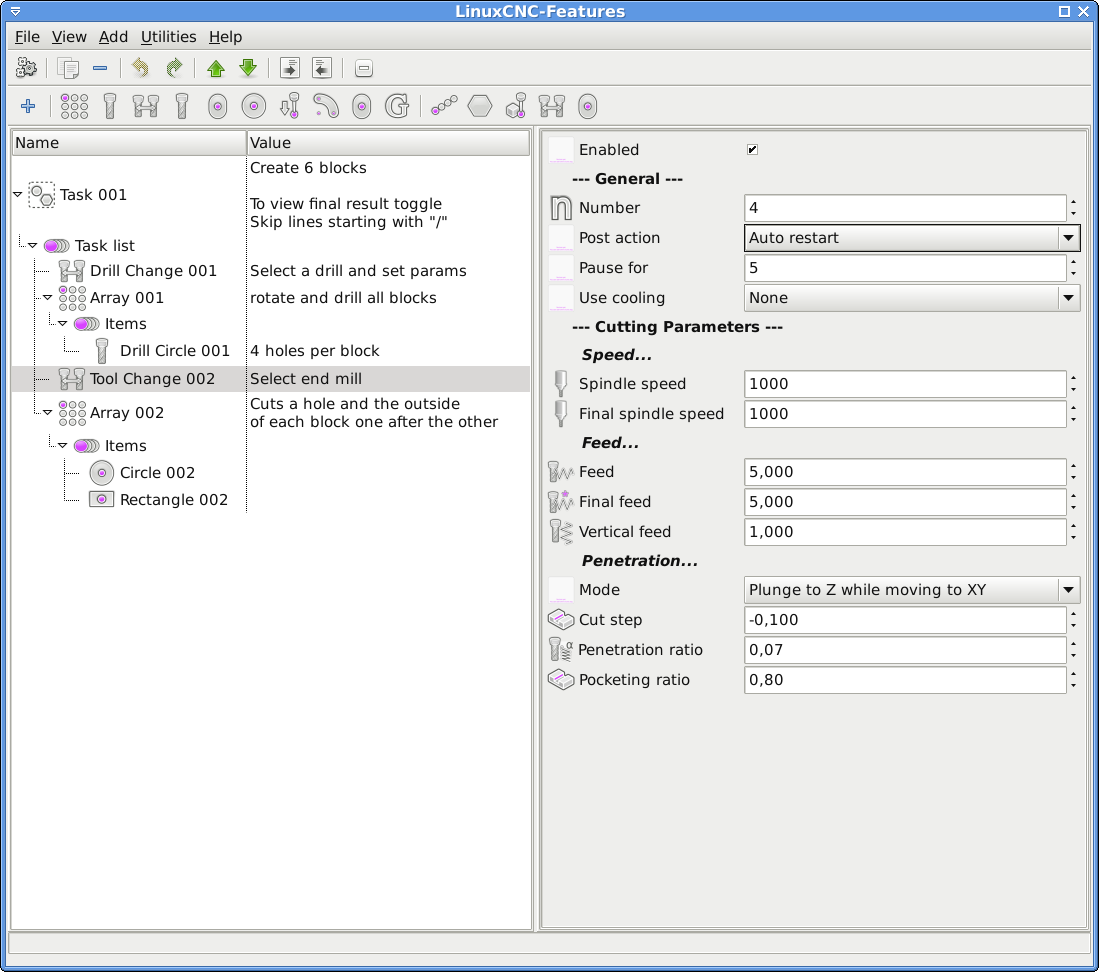
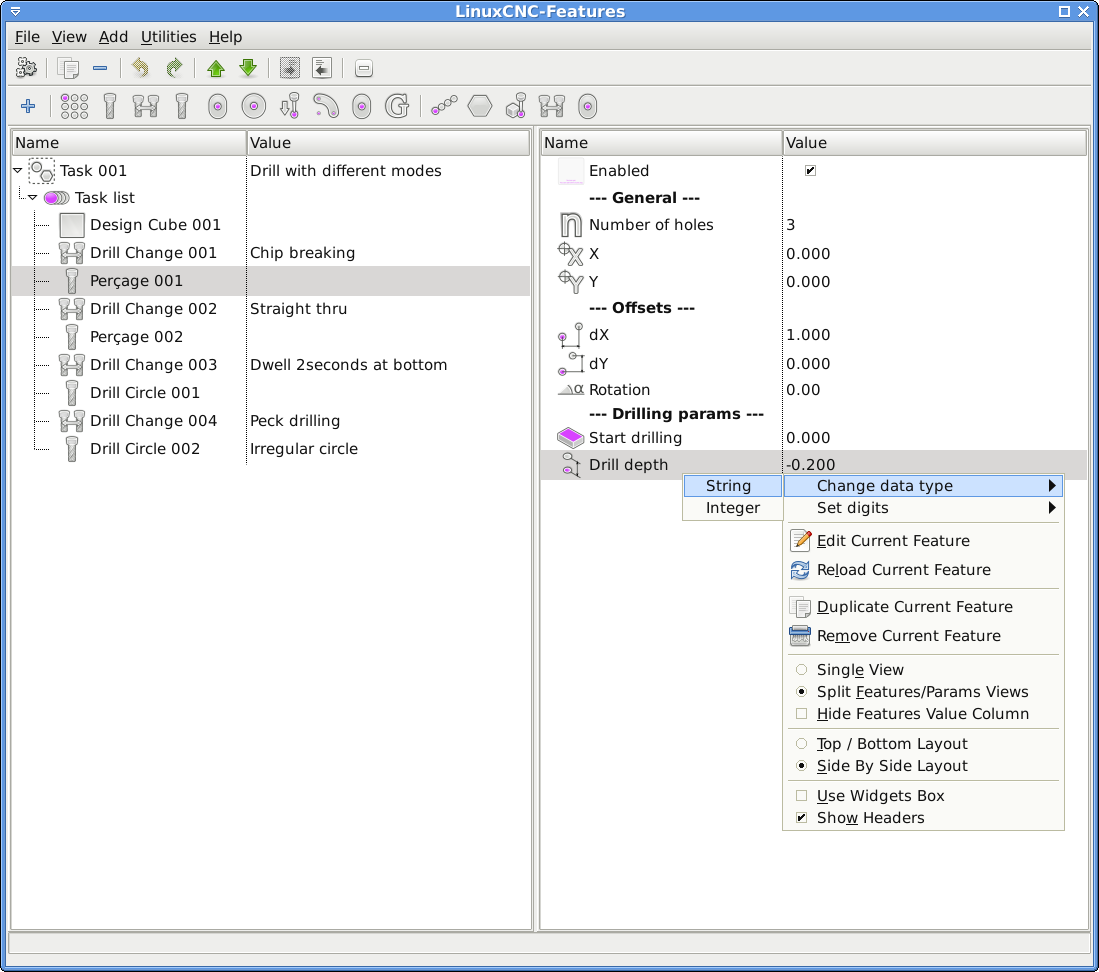
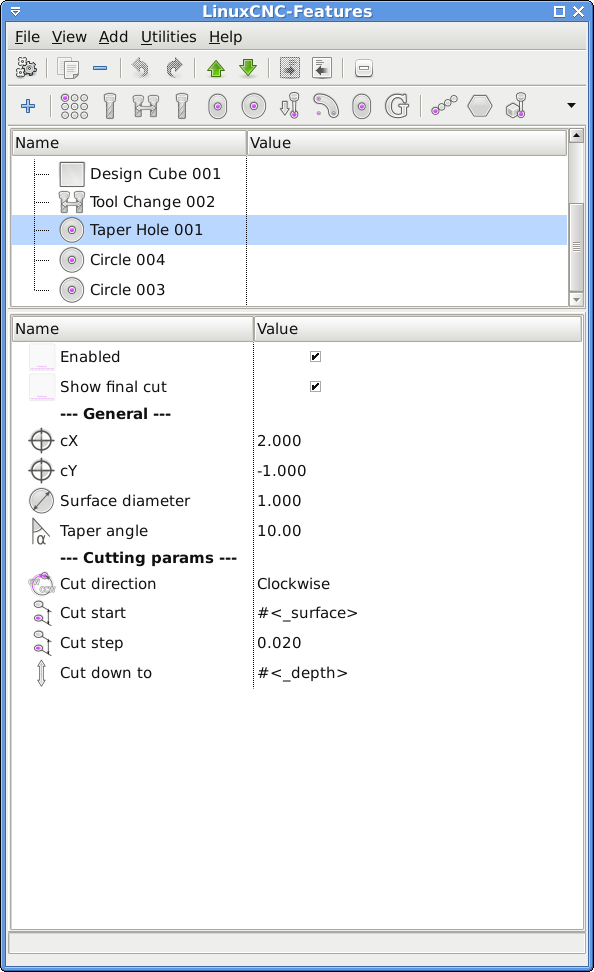
Embedded
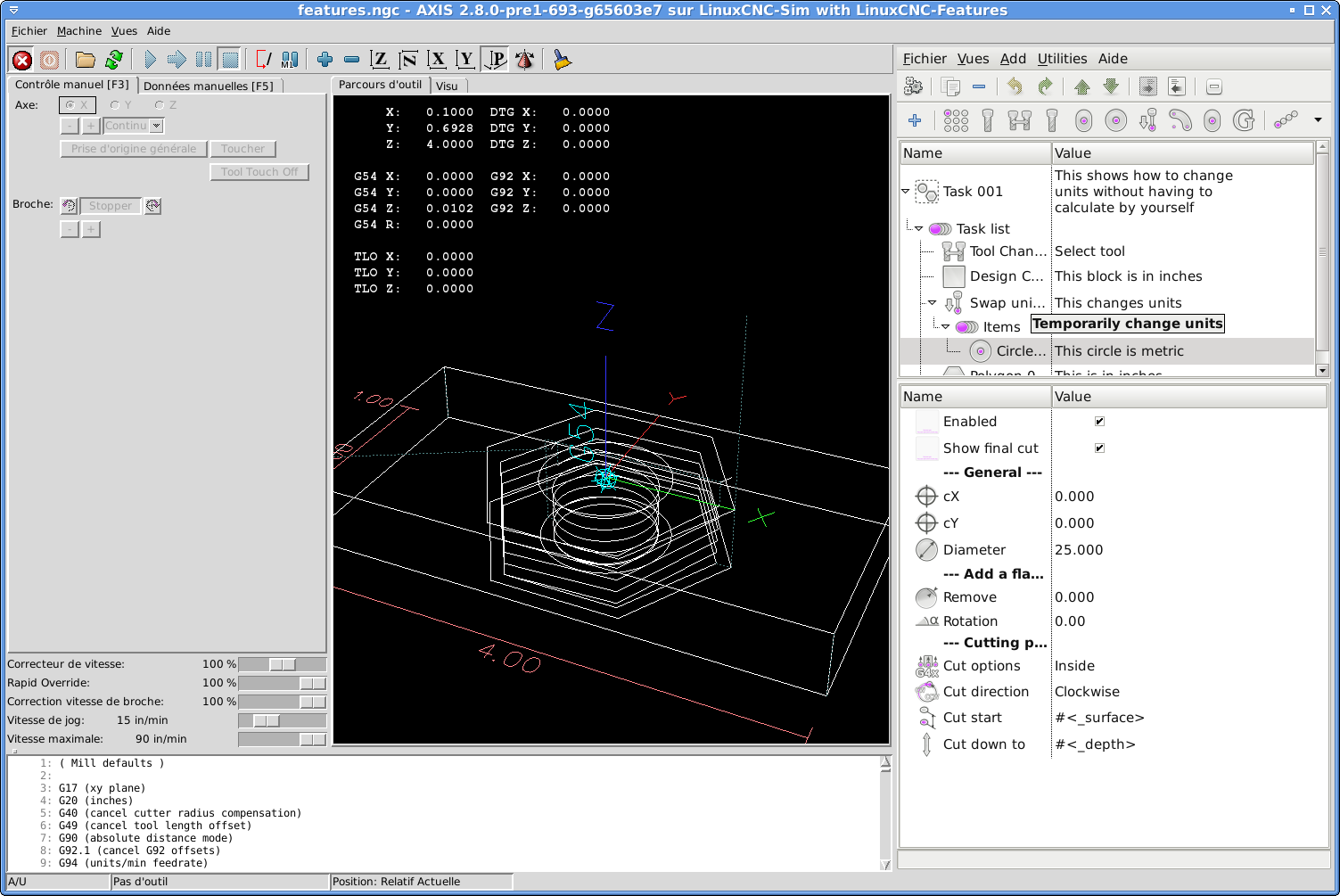
Best regards
Fern
You can now download and test a new advanced version of Linuxcnc-features at
fernv.github.io/linuxcnc-features
Just follow the instruction to use stand alone.
Please report here if you have problems using it.
Some screen shots (stand alone)
Embedded
Best regards
Fern
Last edit: 11 years 4 months ago by FernV. Reason: Added embedded screen shot
Please Log in or Create an account to join the conversation.
- mariusl
- Offline
- Platinum Member
-
11 years 4 months ago - 11 years 4 months ago #60165
by mariusl
Regards
Marius
www.bluearccnc.com
Replied by mariusl on topic LinuxCNC Features - a kind of NGCGUI
Hi Fern
I loaded the new stuff into a Gmoccapy sim and the features did not load. You posted a features_gmoccapy.glade file earlier. Is this still the file to use for gmoccapy?
I loaded the new stuff into a Gmoccapy sim and the features did not load. You posted a features_gmoccapy.glade file earlier. Is this still the file to use for gmoccapy?
Regards
Marius
www.bluearccnc.com
Last edit: 11 years 4 months ago by mariusl.
Please Log in or Create an account to join the conversation.
Time to create page: 0.292 seconds