
- Posts: 247
- Thank you received: 30
NativeCAM is Features renamed
- eFalegname
- Offline
- Elite Member
-

Less
More
9 years 3 months ago #95371
by eFalegname
Replied by eFalegname on topic NativeCAM is Features renamed
Hi Fern,
I have some gcode files with trochoidal operations that I am trying to insert as items into linear arrays, I try to pass some parameters to them, but NativeCam does not allow adding the parameters to the start of the subroutine, I have tried to do it also at the beginning of the file using the Gcode function but it always gives me the same error. Could you tell me how I can do it?
Thank you!
Floris
I have some gcode files with trochoidal operations that I am trying to insert as items into linear arrays, I try to pass some parameters to them, but NativeCam does not allow adding the parameters to the start of the subroutine, I have tried to do it also at the beginning of the file using the Gcode function but it always gives me the same error. Could you tell me how I can do it?
Thank you!
Floris
Please Log in or Create an account to join the conversation.

9 years 3 months ago #95372
by FernV
It is possible to include a g-code file and define up to 6 parameters, but it is not best for an array.
The turner-cube examples show how to add parameters that will change at each loop of an array. You first define initial values and at the beginning (or end) of the group of items in your array, you re-calculate new values as needed.
Could it work for you ?
Fern
Replied by FernV on topic NativeCAM is Features renamed
eFalegname wrote: Hi Fern,
I have some gcode files with trochoidal operations that I am trying to insert as items into linear arrays, I try to pass some parameters to them, but NativeCam does not allow adding the parameters to the start of the subroutine, I have tried to do it also at the beginning of the file using the Gcode function but it always gives me the same error. Could you tell me how I can do it?
It is possible to include a g-code file and define up to 6 parameters, but it is not best for an array.
The turner-cube examples show how to add parameters that will change at each loop of an array. You first define initial values and at the beginning (or end) of the group of items in your array, you re-calculate new values as needed.
Could it work for you ?
Fern
Please Log in or Create an account to join the conversation.
- eFalegname
- Offline
- Elite Member
-
Less
More
- Posts: 247
- Thank you received: 30
9 years 3 months ago - 9 years 3 months ago #95380
by eFalegname
Replied by eFalegname on topic NativeCAM is Features renamed
Good morning Fern.
Sorry I did not explain well what I want to achieve, I'm trying to pass a parameter to my inserted gcode, here's the possibilities I have tried so far but without a positive result:
A ) Parameteres at begining of array
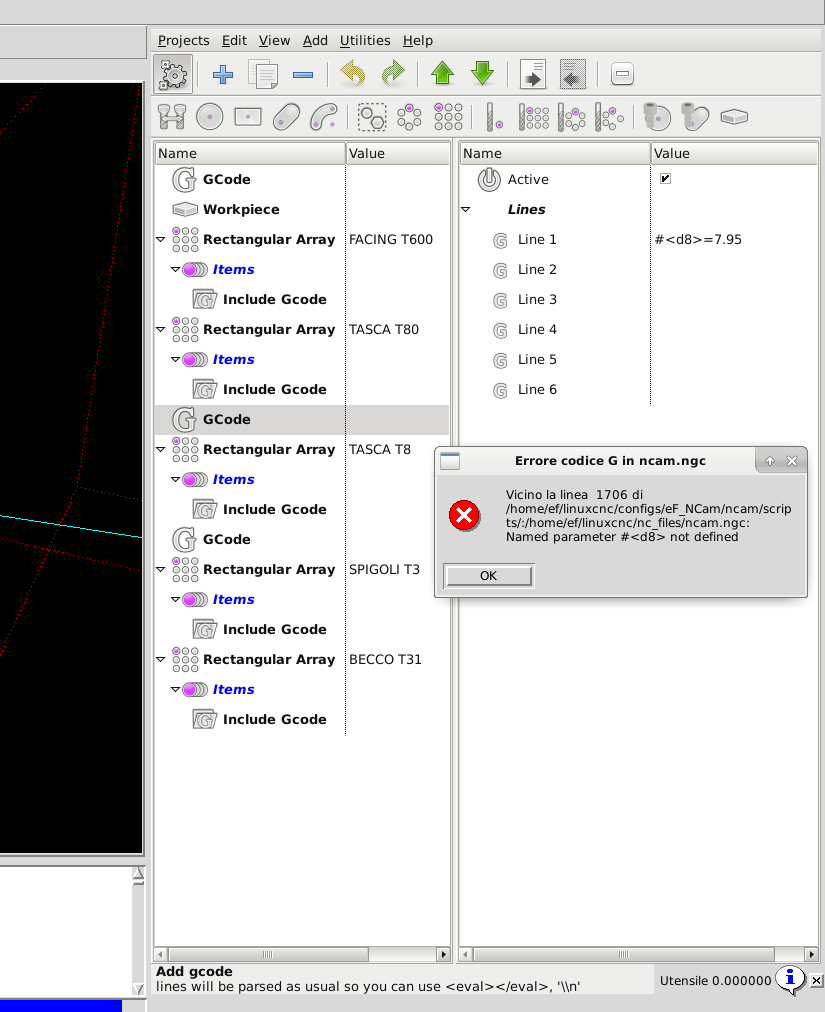
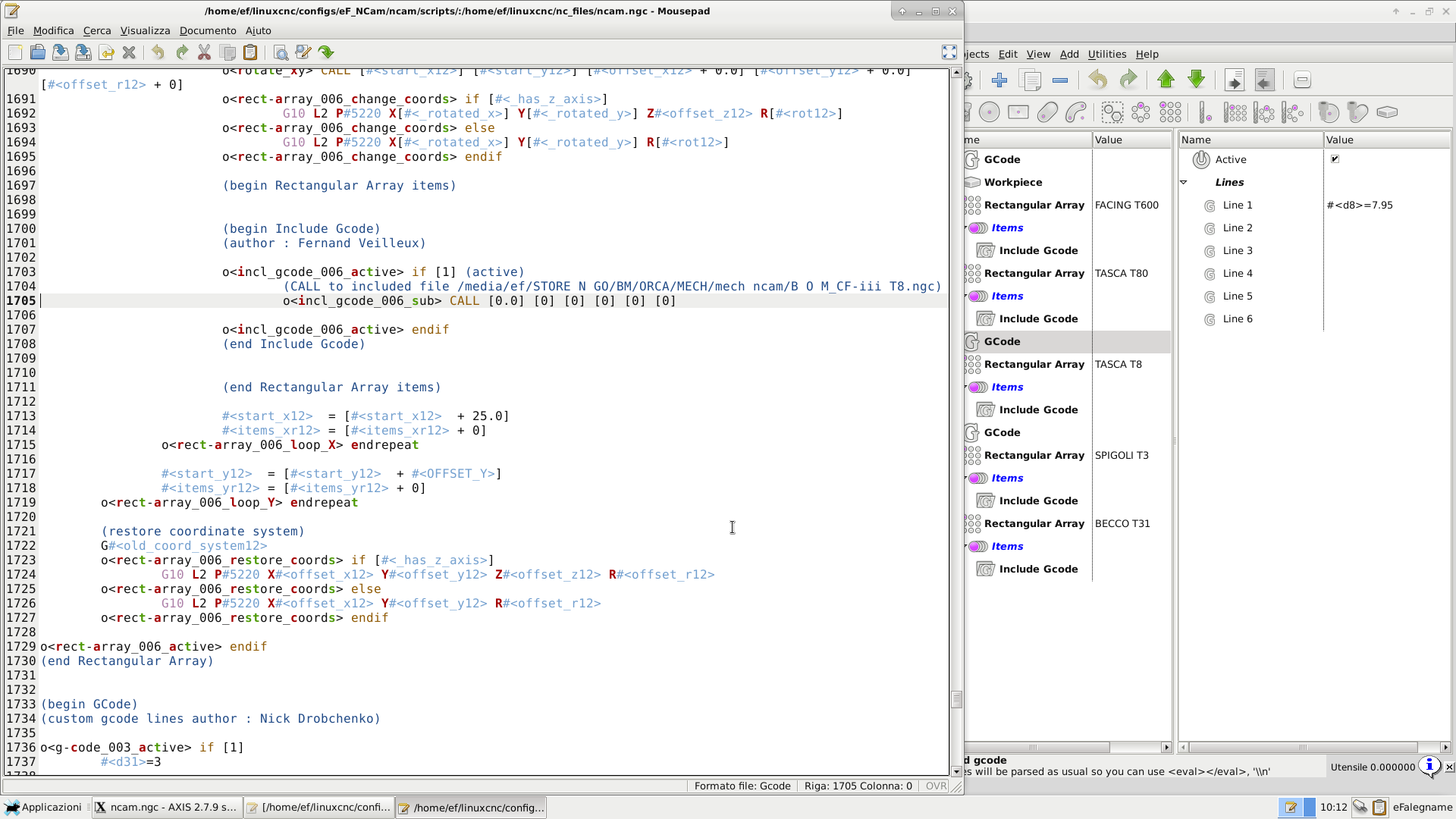
B ) Using inserted Gcode parameters
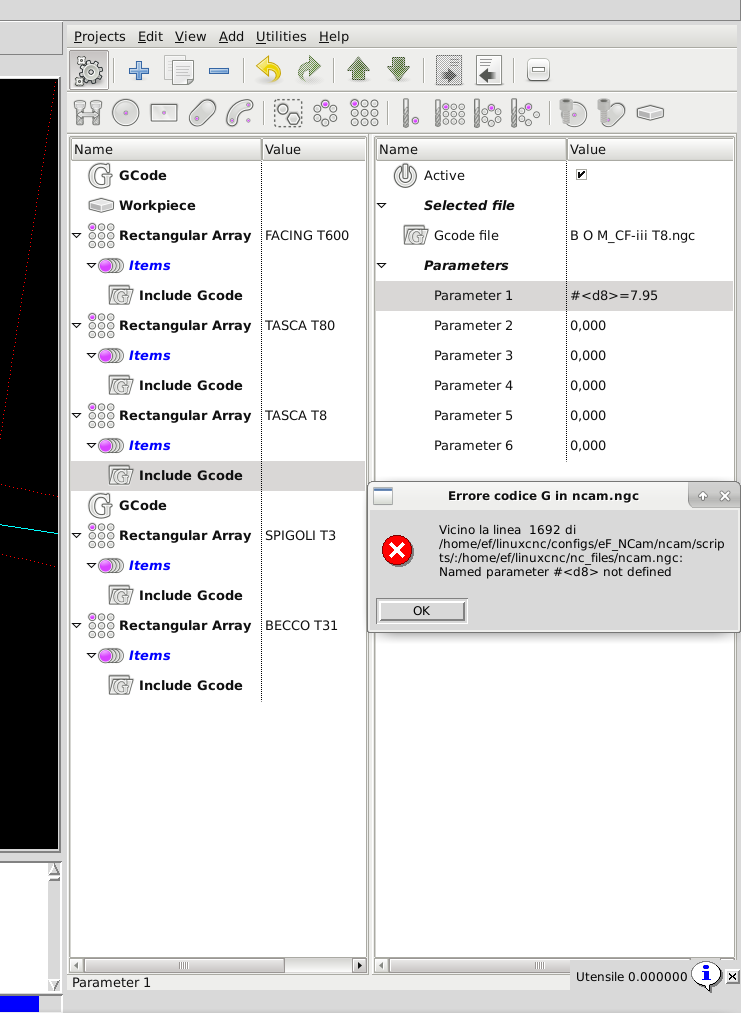
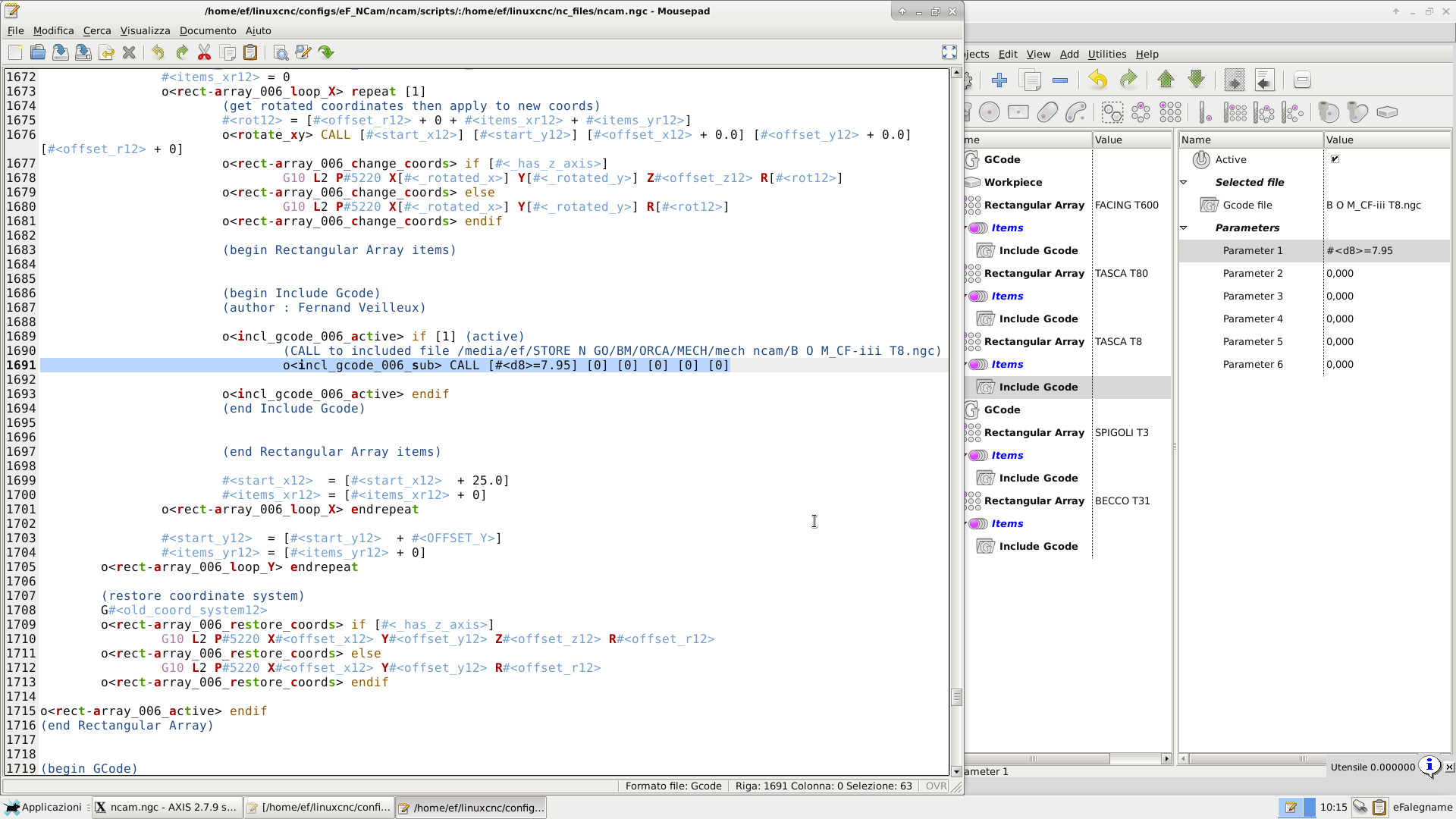
C ) Parameters at the begining of Gcode file
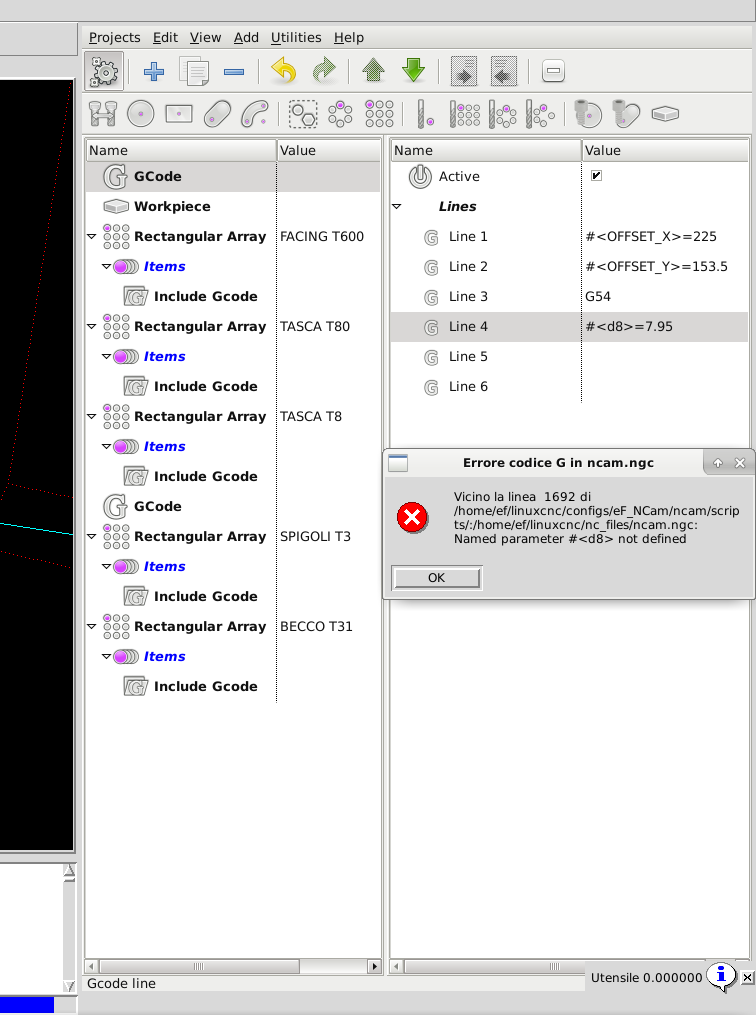
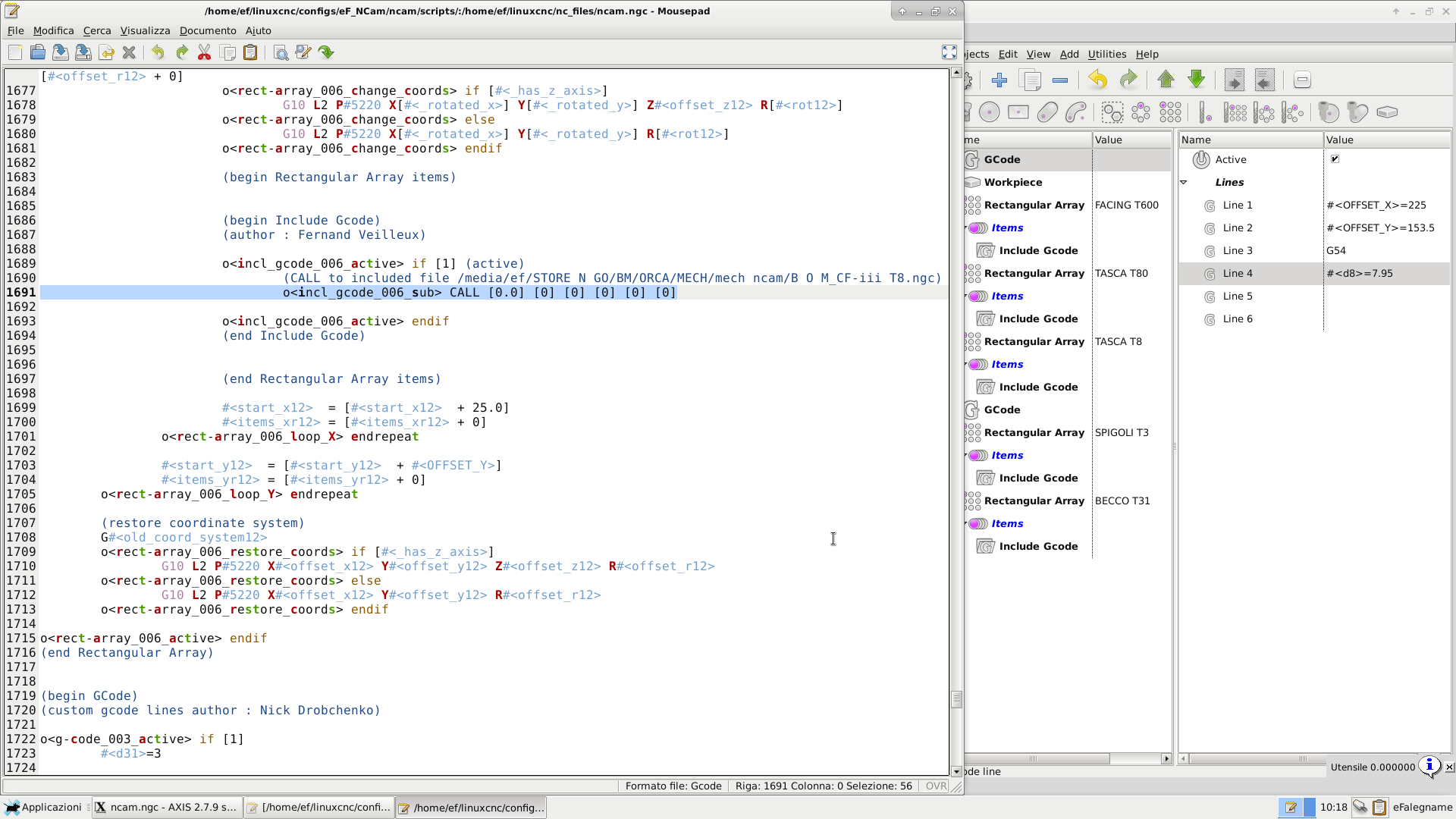
D ) Including custom G Code into the array doesn't work either
It may be that the inserted gcode should respect a certain format or simply do not need to write the name of the variable on NativeCam but follow a logical order of appearance when listing the variables?
Thak you!
Floris
Sorry I did not explain well what I want to achieve, I'm trying to pass a parameter to my inserted gcode, here's the possibilities I have tried so far but without a positive result:
A ) Parameteres at begining of array
B ) Using inserted Gcode parameters
C ) Parameters at the begining of Gcode file
D ) Including custom G Code into the array doesn't work either
It may be that the inserted gcode should respect a certain format or simply do not need to write the name of the variable on NativeCam but follow a logical order of appearance when listing the variables?
Thak you!
Floris
Last edit: 9 years 3 months ago by eFalegname.
Please Log in or Create an account to join the conversation.
9 years 3 months ago #95393
by FernV
Replied by FernV on topic NativeCAM is Features renamed
Hi Floris
#<d8> is a local parameter to 'ncam.ngc' while it is needed in the sub-routine 'o<incl_gcode_006_sub>' defined in the included file 'B O M_CF-iii T8.ngc'. Included files are always placed at the beginning of 'ncam.ngc' with a call to them in the code with a parameter list (1 to 6). Including those files elsewhere in the code would create a mess if placed in an IF, REPEAT or WHILE condition
You will have to edit 'B O M_CF-iii T8.ngc' in one of these 2 ways :
Fern
#<d8> is a local parameter to 'ncam.ngc' while it is needed in the sub-routine 'o<incl_gcode_006_sub>' defined in the included file 'B O M_CF-iii T8.ngc'. Included files are always placed at the beginning of 'ncam.ngc' with a call to them in the code with a parameter list (1 to 6). Including those files elsewhere in the code would create a mess if placed in an IF, REPEAT or WHILE condition
You will have to edit 'B O M_CF-iii T8.ngc' in one of these 2 ways :
- Use a global parameter like #<_d8> then modify GCode Line to #<_d8> = 7.95.
This is simple and quick but I prefer keeping a local param like the next option. - Pass the value to 'Include GCode' to a Param (1 to 6) either #<d8> OR 7.95 (not the equation)
assign the value at the beginning of 'B O M_CF-iii T8.ngc' like
#<d8> = #(param number)
Fern
The following user(s) said Thank You: eFalegname
Please Log in or Create an account to join the conversation.
- eFalegname
- Offline
- Elite Member
-
Less
More
- Posts: 247
- Thank you received: 30
9 years 3 months ago - 9 years 3 months ago #95426
by eFalegname
Replied by eFalegname on topic NativeCAM is Features renamed
Hi Fern!
I agree with you, the second option is more appropriate because using global variables include the danger of being able to forget them around. And it works, it works great!!
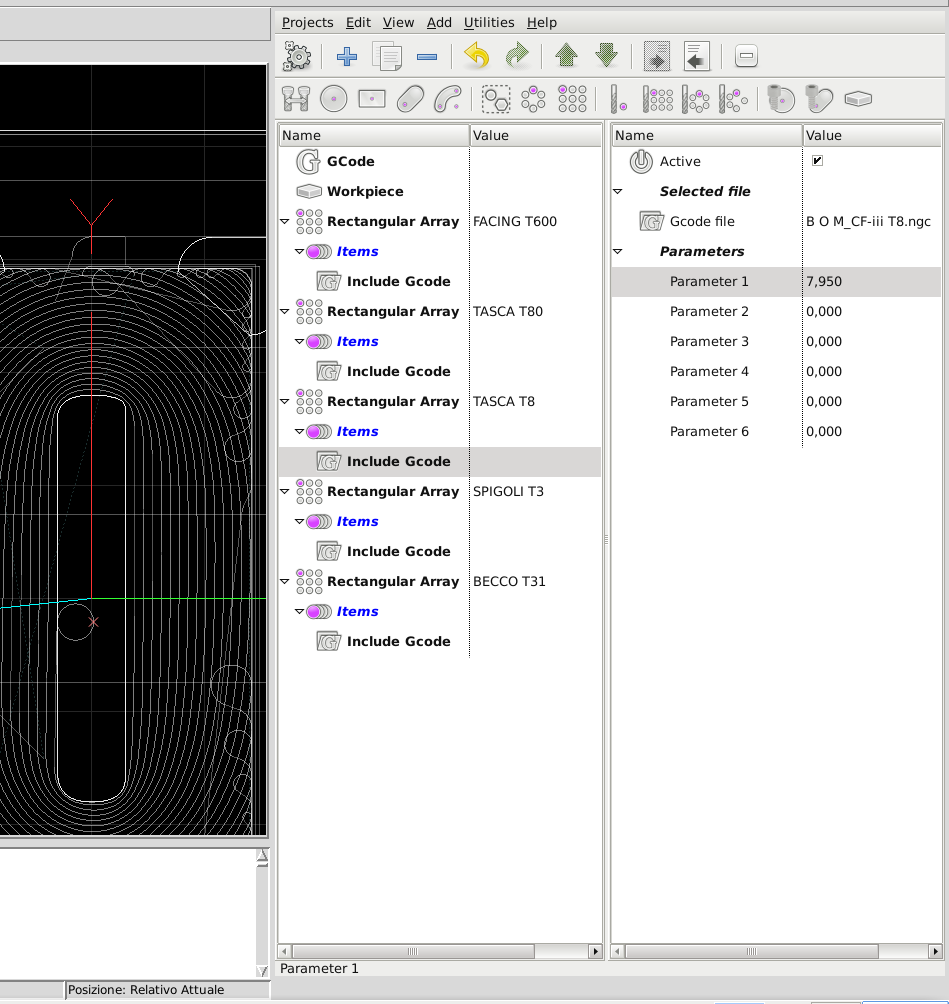
I have assigned the numerical value 7.95 to the first "# 1" parameter of the Gcode in NativeCAM, then I modified the Gcode to define in the first line the equation that passes the value of the NativeCam parameter to the Gcode:

Thank you so much for your precious time and valuable advices!
Cheers,
Floris
I agree with you, the second option is more appropriate because using global variables include the danger of being able to forget them around. And it works, it works great!!
I have assigned the numerical value 7.95 to the first "# 1" parameter of the Gcode in NativeCAM, then I modified the Gcode to define in the first line the equation that passes the value of the NativeCam parameter to the Gcode:
Thank you so much for your precious time and valuable advices!
Cheers,
Floris
Last edit: 9 years 3 months ago by eFalegname.
Please Log in or Create an account to join the conversation.
- eFalegname
- Offline
- Elite Member
-
Less
More
- Posts: 247
- Thank you received: 30
9 years 3 months ago - 9 years 3 months ago #95604
by eFalegname
Replied by eFalegname on topic NativeCAM is Features renamed
Hi Fern,
I have an annoying effect after the last tool change, just inside the last array (always with the "insert Gcode" OP) starting from the second element, the Z is reset a few mm higher, linuxcnc manages to mill the first element of the last serie and the remainder of the array is not milled. This only happens in the last array and regardless of the number of tools used in the file.
Any idea what I missed this time?
Thanks,
Floris
note: Since the last tool is shorter than the previous one I think maybe the last tool change does not set the tool length on the G57 work offset.
I have an annoying effect after the last tool change, just inside the last array (always with the "insert Gcode" OP) starting from the second element, the Z is reset a few mm higher, linuxcnc manages to mill the first element of the last serie and the remainder of the array is not milled. This only happens in the last array and regardless of the number of tools used in the file.
Any idea what I missed this time?
Thanks,
Floris
note: Since the last tool is shorter than the previous one I think maybe the last tool change does not set the tool length on the G57 work offset.
Last edit: 9 years 3 months ago by eFalegname.
Please Log in or Create an account to join the conversation.
Time to create page: 0.415 seconds