

- Posts: 2
- Thank you received: 0
NativeCAM is Features renamed
9 years 3 months ago #96638
by tom3p
Replied by tom3p on topic NativeCAM is Features renamed
re: "unable to open file<>"
I encountered same with linuxcnc 2.7.10 when adding a rectangle in ncam
I did not have errors adding circle
The linuxcnc team issued linuxcnc 2.7.11 on 28july2017,
I installed this version and retried adding a rect to a project...
the error is gone ( as far as i have tested )
--
more testing shows a well defined error in 2.7.11
IF the rectangle is added out of sequence
meaning, while 'workpiece' is highlighted,or as soon as a new project is opened
THEN the error occurs "named parameter #<_tool_usage> not defined"
mark this up to operator error
thanks
tomp tjtr33
I encountered same with linuxcnc 2.7.10 when adding a rectangle in ncam
I did not have errors adding circle
The linuxcnc team issued linuxcnc 2.7.11 on 28july2017,
I installed this version and retried adding a rect to a project...
the error is gone ( as far as i have tested )
--
more testing shows a well defined error in 2.7.11
IF the rectangle is added out of sequence
meaning, while 'workpiece' is highlighted,or as soon as a new project is opened
THEN the error occurs "named parameter #<_tool_usage> not defined"
mark this up to operator error
thanks
tomp tjtr33
Please Log in or Create an account to join the conversation.

9 years 3 months ago #96644
by FernV
Hi,
Follow the right sequence
If you inserted a shape before Tool Change, just move that shape with the Down button or hold down Ctrl key while pressing down arrow
Open the examples to learn more
Fern
Replied by FernV on topic NativeCAM is Features renamed
tom3p wrote: ...
IF the rectangle is added out of sequence
meaning, while 'workpiece' is highlighted,or as soon as a new project is opened
THEN the error occurs "named parameter #<_tool_usage> not defined"
Hi,
Follow the right sequence
- Workpiece and Tool Change (order does not matter)
- Shapes
If you inserted a shape before Tool Change, just move that shape with the Down button or hold down Ctrl key while pressing down arrow
Open the examples to learn more
Fern
Please Log in or Create an account to join the conversation.
9 years 3 months ago #96645
by FernV
Hi,
It was explained 2 posts before your's
forum.linuxcnc.org/40-subroutines-and-ng...amed?start=390#96228
but here are screen shots :
To change for g-code
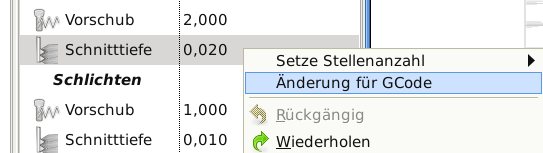
To revert

Fern
Replied by FernV on topic NativeCAM can't change Engagement Value
BigDo wrote: I try to change the cutting depth in NativeCAM but apparently this is not possible
the default value is 0,508
and if i change it for example to 0,270
It changes automatically to 2,54
How can I fix this?
Hi,
It was explained 2 posts before your's
forum.linuxcnc.org/40-subroutines-and-ng...amed?start=390#96228
but here are screen shots :
To change for g-code
To revert
Fern
Please Log in or Create an account to join the conversation.
9 years 2 months ago #97782
by orpheus
Replied by orpheus on topic NativeCAM can't change Engagement Value
Hi Fern,
I just recently upgraded NativeCAM, and noticed this limit. When I wrote the thread-milling module, one of the first things I used it for was thread-milling Hastelloy c276, which I would most definitely not want to cut at more than 0.5mm a pass. I'm just curious why you set this minimum value in the configuration?
I just recently upgraded NativeCAM, and noticed this limit. When I wrote the thread-milling module, one of the first things I used it for was thread-milling Hastelloy c276, which I would most definitely not want to cut at more than 0.5mm a pass. I'm just curious why you set this minimum value in the configuration?
Please Log in or Create an account to join the conversation.
9 years 2 months ago #97791
by FernV
I suppose Hastelloy c276 is a hard material and you want to cut less than 0.5mm. I has been changed for anything larger than 0.0 and will be available on the next update.
In the meantime, you may use the method noted in the previous post to change it then save as custom default. New type and new value will be saved and used anytime you want to use it. Or maybe you have already changed the default thread-milling.cfg file.
You can also save the edited thread-milling.cfg file to my-stuff directory, then edit menu.xml to use it instead of the default one.
Fern
Replied by FernV on topic NativeCAM can't change Engagement Value
orpheus wrote: Hi Fern,
I just recently upgraded NativeCAM, and noticed this limit. When I wrote the thread-milling module, one of the first things I used it for was thread-milling Hastelloy c276, which I would most definitely not want to cut at more than 0.5mm a pass. I'm just curious why you set this minimum value in the configuration?
I suppose Hastelloy c276 is a hard material and you want to cut less than 0.5mm. I has been changed for anything larger than 0.0 and will be available on the next update.
In the meantime, you may use the method noted in the previous post to change it then save as custom default. New type and new value will be saved and used anytime you want to use it. Or maybe you have already changed the default thread-milling.cfg file.
You can also save the edited thread-milling.cfg file to my-stuff directory, then edit menu.xml to use it instead of the default one.
Fern
Please Log in or Create an account to join the conversation.
- eFalegname
- Offline
- Elite Member
-

Less
More
- Posts: 247
- Thank you received: 30
9 years 2 months ago #98012
by eFalegname
Replied by eFalegname on topic Native CAM array macro update request
Hi Fern!
Please Log in or Create an account to join the conversation.
Time to create page: 0.105 seconds