NativeCAM is Features renamed

More
9 years 3 weeks ago #100123 by vmihalca
Hi guys,

I am at the VERY BEGINNER level with Gcode, lathe programming, etc so I might ask some stupid questions for some of you.
I have a lathe converted to with spindle encoder and all that it needs.
I am using axis interface on 2.7.11 version with embedded native cam
can someone of you explain in a step by step operation (or video) how can I:
1. do the setup for 2 tools, (touch off and how to memorize their x and z coordinates in the tool table)
2. how to do a simple turning operation that reduces the diameter from 15mm to 10mm lets say in multiple passes
3. change the tool and do a parting operation.

I might be asking too much...but I would like to know if nativecam capable of doing these in the way it is now.
Any input would be appreciated.
If my topic is out of the scope of this thread, please tell me where to relocate it.

Thanks,
Vasi

Please Log in or Create an account to join the conversation.

More
9 years 3 weeks ago #100186 by andypugh
I can answer with one way to do part of your task.

Decide that one of your tools is a "master" tool. That will always have offsets of zero in the tool table.
Load that tool. (I use tool 1)
Then make a test-cut on diameter. Back off. and return to the starting diameter on the DRO. Touch of your Coordinate System (not tool table) to that diameter.
Do the same with a facing cut.
Now, load your second tool and repeat, But this time touch-off into the Tool Table instead.
Now the tool table contains the difference between tool1 and tool2. (and you can then touch-off the work with either tool, as long as you have done the M6T2G43 thing. Never forget the G43. Unless you have remapped Tnn to do it automatically, which many lathe users do.
The following user(s) said Thank You: eFalegname, vmihalca

Please Log in or Create an account to join the conversation.

More
9 years 2 weeks ago #100257 by vmihalca
Hi Andy,

I was able to do it and I have tested with two tools and it works fine. Thanks for your input! :)

Please Log in or Create an account to join the conversation.

More
9 years 2 hours ago #101162 by vmihalca
Hi Fern,

I have played today with NativeCam and discovered two issues.
1. I can't set spindle direction. My lathe is manual and I need an M4 code. In the tool_change.cfg, i saw that the spindle dir option is hidden. Can you please make that unhidden? Or tell me how I can edit that file...currently I don't have permissions where its stored after the deb install
2. It doesn't seem to consider the tool offsets. After I homed the machine, I've loaded tool 1 using M6 T1 G43, then I jogged the tool on Z and X and set the ToolTouchOff. After this I jogged away form the part then issues an G0 X0 Z0 and the tool moved into the correct position. After I've tried to run a simple turning using native cam, in the tool change routine, I've selected tool 1, in the Tool Number section. When I hit run, it moves on Z about -40mm from where the zero should be.

If you have time to fix these issues, can you please push an update? I saw that you received some beautiful icons that would be very intuitive.

Thanks! :)
Vasi

Please Log in or Create an account to join the conversation.

More
9 years 2 hours ago #101163 by vmihalca
Hi BigDo

I'm very happy that you've made these icons. They look awesome! Can't wait to get an update.
I see that you're running NativeCam as a tab. Can you help me do that? Mine is not a tab and occupies half of the screen all the time.

Thanks! :)

Please Log in or Create an account to join the conversation.

More
9 years 1 hour ago - 9 years 43 minutes ago #101165 by FernV
Replied by FernV on topic NativeCAM is Features renamed

vmihalca wrote: 1. I can't set spindle direction. My lathe is manual and I need an M4 code. In the tool_change.cfg, i saw that the spindle dir option is hidden. Can you please make that unhidden? Or tell me how I can edit that file...currently I don't have permissions where its stored after the deb install

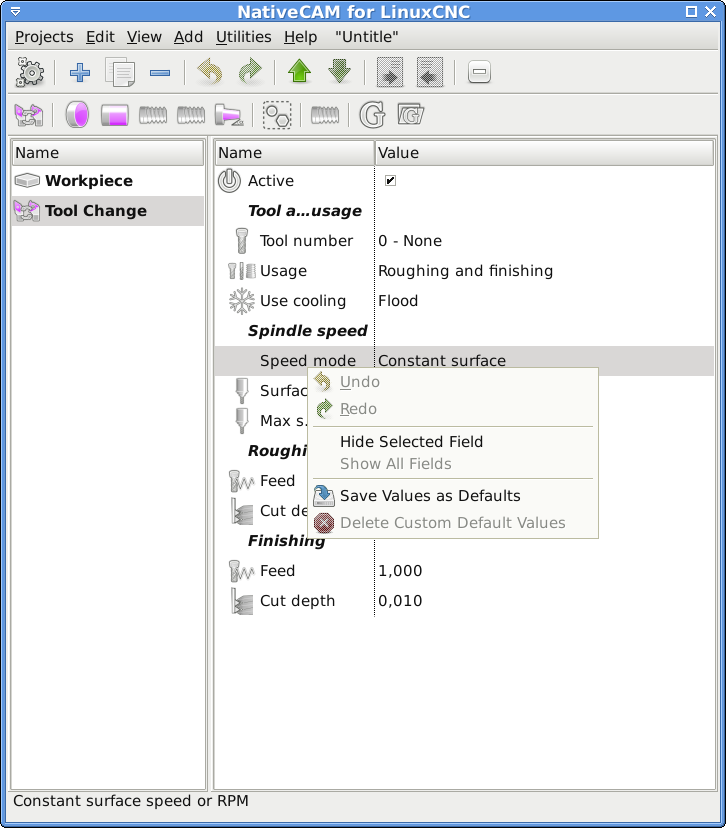
  1. Right click on a parameter in Tool Change
  2. If 'Show All Fields' is grayed, then hide one of the fields
  3. Right click again and select 'Show All Fields'
  4. 'Save as Default Template' or you will have to redo it until I update

2. It doesn't seem to consider the tool offsets. After I homed the machine, I've loaded tool 1 using M6 T1 G43, then I jogged the tool on Z and X and set the ToolTouchOff. After this I jogged away form the part then issues an G0 X0 Z0 and the tool moved into the correct position. After I've tried to run a simple turning using native cam, in the tool change routine, I've selected tool 1, in the Tool Number section. When I hit run, it moves on Z about -40mm from where the zero should be.


I just started testing the subroutines on my lathe and I have some that are OK now. Your issue is probably due to one of the bugs I fixed. I think next week, I will have enough fixes for an update.

Fern

P.S. to learn how to install in a tab execute $ ncam -h
Last edit: 9 years 43 minutes ago by FernV.
The following user(s) said Thank You: vmihalca

Please Log in or Create an account to join the conversation.

Time to create page: 0.081 seconds
Powered by Kunena Forum
