

- Posts: 96
- Thank you received: 2
Useful Plasma Thread
8 years 1 month ago #117369
by scubawarm
Replied by scubawarm on topic Useful Plasma Thread
I thought it was just the negative...
What if I don't want it in that order?
What if I don't want it in that order?
Please Log in or Create an account to join the conversation.
- Todd Zuercher
- Offline
- Platinum Member
-

Less
More
- Posts: 4737
- Thank you received: 1480
8 years 1 month ago - 8 years 1 month ago #117376
by Todd Zuercher
Replied by Todd Zuercher on topic Useful Plasma Thread
The joints are homed in the order of their absolute values. For example if you wanted the order to be z,x,y1-y2 you could give the z joint value of 1, x=2, y1 and y2 -3. Another option, if you wanted all of the axis to home at the same time, you could give all of the indevidual ones the value 1 and the slaved ones -1.
Last edit: 8 years 1 month ago by Todd Zuercher.
Please Log in or Create an account to join the conversation.

8 years 1 month ago #117379
by rodw
Replied by rodw on topic Useful Plasma Thread
Just be careful you are getting the right info here as the homing configuration changed from V 2.7 to 2.8. If you are on this thread, you should be using 2.8 (master branch) so the docs apply here:
linuxcnc.org/docs/devel/html/config/ini-homing.html
Just to be clear the homing order is determined by the HOME_SEQUENCE ini file setting for each joint.
Whilst you may have other geometry, normally Y is the gantry joint axis and X & Z are single axes.
If you follow this config, you would normally set it up
where Y axis joints have
HOME_SEQUENCE = -1
Z axis has
HOME_SEQUENCE = 0
X axis has
HOME_SEQUENCE = 1
With this configuration the Z axis will lift up to clear anything on the table, then X will home and then finally the 2 Y axis motors will home and align the gantry. I learnt it was wise to home the Z first
linuxcnc.org/docs/devel/html/config/ini-homing.html
Just to be clear the homing order is determined by the HOME_SEQUENCE ini file setting for each joint.
Whilst you may have other geometry, normally Y is the gantry joint axis and X & Z are single axes.
If you follow this config, you would normally set it up
where Y axis joints have
HOME_SEQUENCE = -1
Z axis has
HOME_SEQUENCE = 0
X axis has
HOME_SEQUENCE = 1
With this configuration the Z axis will lift up to clear anything on the table, then X will home and then finally the 2 Y axis motors will home and align the gantry. I learnt it was wise to home the Z first
Please Log in or Create an account to join the conversation.
8 years 1 month ago - 8 years 1 month ago #117411
by Grotius
Replied by Grotius on topic Useful Plasma Thread
@Scuba,
The standard parport configuration when loading the Grotius gui is standard for double motor's on x axis. Homing procedure is commented (home) and outcommented (no_home needed) in the ini file. So it's easy to switch. You can look
at the file's how the homing is done. The homing procedure took me i think 1 or 2 day's at that time to make.
Maybe start your test config without homing procedure. And enable this later on.
-
When your Mesa config is working save your ini and hal files.
Provide them here please with your type of Mesa Card's. I can upload then the config to the git channel, so next time you can compile the linuxcnc version and select your own Mesa configuration directly from startup panel.
I will call this config the mesa card + your scuba reference name.
I have modified the glade screen to fit for : 1280*1024 / 1680*1050 / 1600*1200 / 1920*1200 resolution's
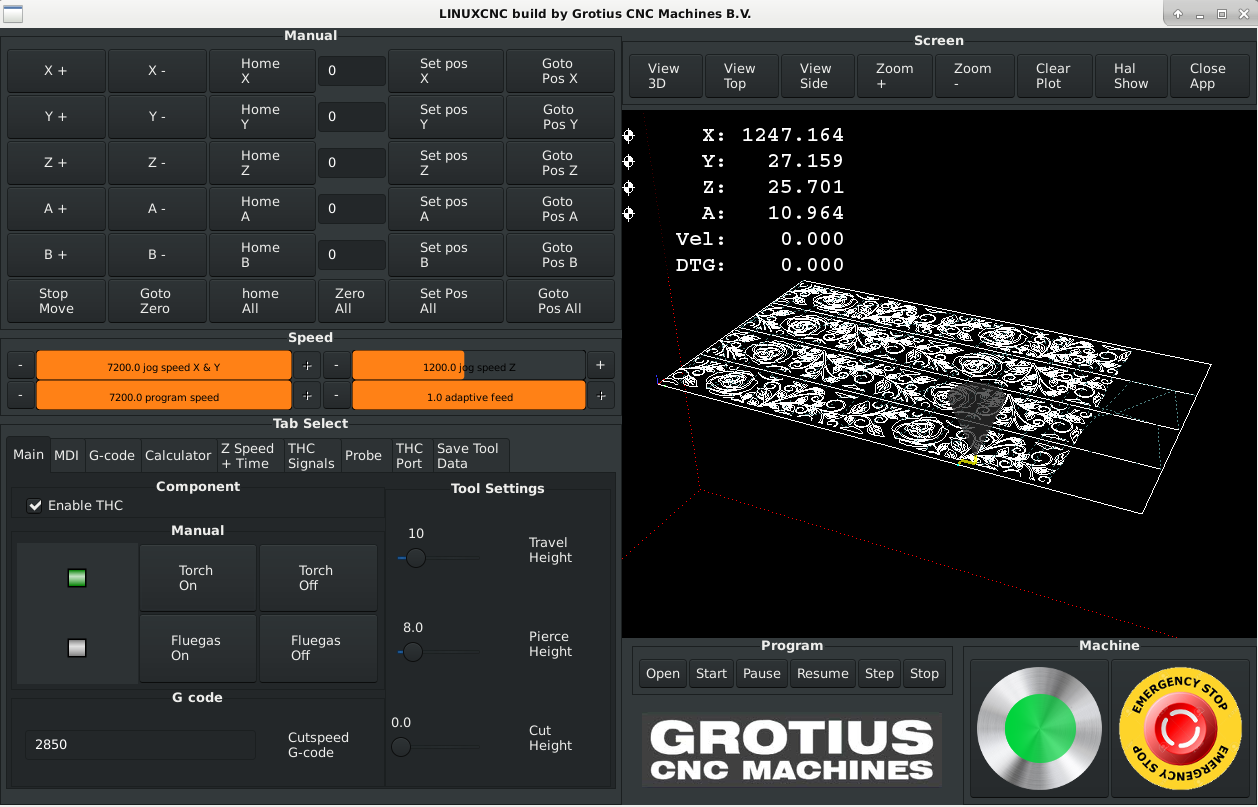
Yesterday i made some update's to the git channel.
I have made own widget's and keybinding's files, simplyfied the widget file a little bit.
github.com/michelwijnja/external_offsets...r/lib/python/grotius
Now we are separeted from gscreen and gmocappy update's.
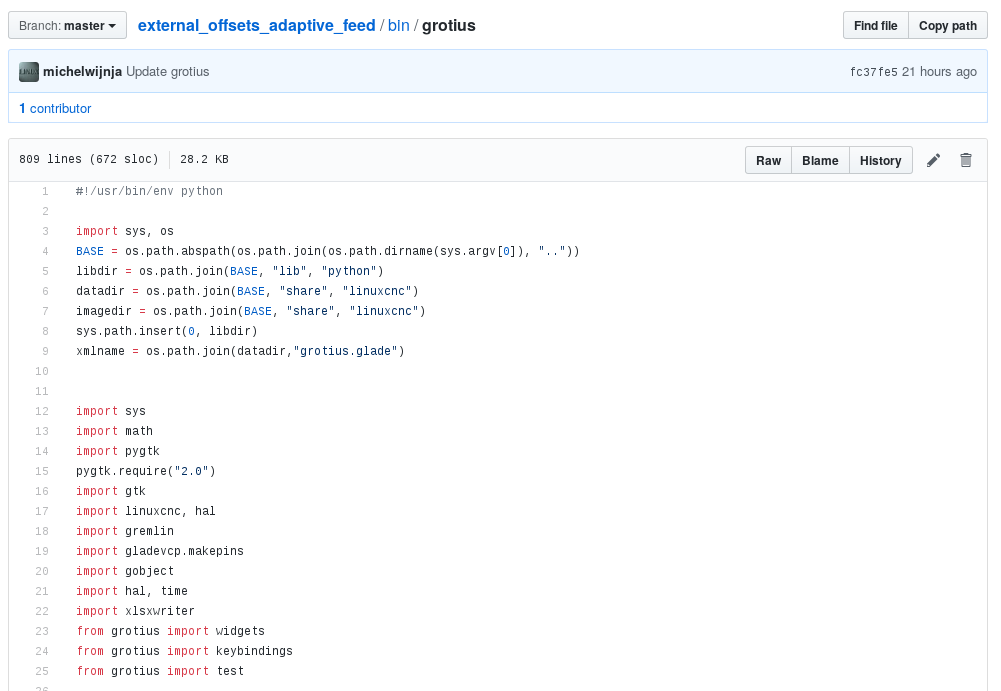
I have seen some coding in Gmocappy who is strange :
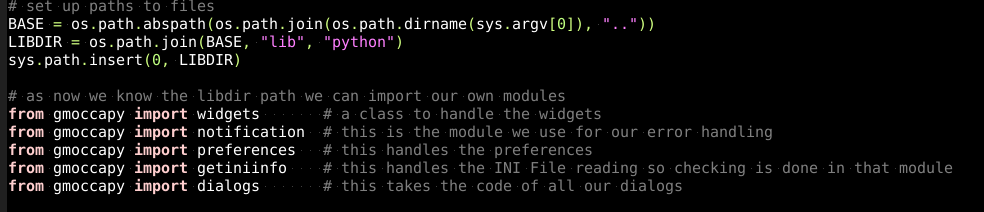
If you don't use the Libdir it is also working.
In the code there is a comment :
A short todo list for the Grotius gui :
- saving and loading all tool data in text file's. It's working only for travelheight at this moment.
- saving and loading all tool data in excel file's. Saving is working, loading todo.
- anti dive delay in component, testing and coding at the same time on real machine.
- auto restart times in component, testing and coding at the same time on real machine.
- git channel : grotius.py in bin folder, must be compiled as executable file, have already done some test in makefile, but no succes.
the makefile has some strange programming language. @...$@... Is this C# ?
The standard parport configuration when loading the Grotius gui is standard for double motor's on x axis. Homing procedure is commented (home) and outcommented (no_home needed) in the ini file. So it's easy to switch. You can look
at the file's how the homing is done. The homing procedure took me i think 1 or 2 day's at that time to make.
Maybe start your test config without homing procedure. And enable this later on.
-
Here please.Not sure if you want these types of things here or private messages.
When your Mesa config is working save your ini and hal files.
Provide them here please with your type of Mesa Card's. I can upload then the config to the git channel, so next time you can compile the linuxcnc version and select your own Mesa configuration directly from startup panel.
I will call this config the mesa card + your scuba reference name.
I have modified the glade screen to fit for : 1280*1024 / 1680*1050 / 1600*1200 / 1920*1200 resolution's
Yesterday i made some update's to the git channel.
I have made own widget's and keybinding's files, simplyfied the widget file a little bit.
github.com/michelwijnja/external_offsets...r/lib/python/grotius
Now we are separeted from gscreen and gmocappy update's.
I have seen some coding in Gmocappy who is strange :
If you don't use the Libdir it is also working.
In the code there is a comment :
This is not True so far i tested. So maybe Norbert has used existing code that he thinks was needed.# as now we know the libdir path we can import our own modules
A short todo list for the Grotius gui :
- saving and loading all tool data in text file's. It's working only for travelheight at this moment.
- saving and loading all tool data in excel file's. Saving is working, loading todo.
- anti dive delay in component, testing and coding at the same time on real machine.
- auto restart times in component, testing and coding at the same time on real machine.
- git channel : grotius.py in bin folder, must be compiled as executable file, have already done some test in makefile, but no succes.
the makefile has some strange programming language. @...$@... Is this C# ?
Last edit: 8 years 1 month ago by Grotius.
The following user(s) said Thank You: scubawarm
Please Log in or Create an account to join the conversation.
8 years 1 month ago - 8 years 1 month ago #117427
by rodw
Replied by rodw on topic Useful Plasma Thread
Great to see ongoing progress. I had a bit of a play at the Python command line and it seems you need to import the sys and os libraries before defining BASE (tested in WIndows). Maybe Norbert imports those libraries elsewhere.
Make has its own syntax and there are many tutorials on how to use it. The documentation is here
www.gnu.org/software/make/manual/make.html
>>> import sys
>>> import os
>>> BASE = os.path.abspath(os.path.join(os.path.dirname(sys.argv[0]), ".."))
>>> BASE
'C:\\Users'
Make has its own syntax and there are many tutorials on how to use it. The documentation is here
www.gnu.org/software/make/manual/make.html
Last edit: 8 years 1 month ago by rodw.
The following user(s) said Thank You: Grotius
Please Log in or Create an account to join the conversation.
8 years 1 month ago - 8 years 1 month ago #117472
by scubawarm
Replied by scubawarm on topic Useful Plasma Thread
My table is close to 30 to get around... to me that is definitely the X axis... 
Was that way before too. To me would depend on your operators perspective. You operate yours from the end I take it?
The control moves with the gantry on this setup.
But, not sure about your two with -1 and 1... to me they will all home at the same time, just the -1 ones will home in sync. From what I understand anyways. Docs all say absolute value.
Was that way before too. To me would depend on your operators perspective. You operate yours from the end I take it?
The control moves with the gantry on this setup.
But, not sure about your two with -1 and 1... to me they will all home at the same time, just the -1 ones will home in sync. From what I understand anyways. Docs all say absolute value.
Last edit: 8 years 1 month ago by scubawarm.
Please Log in or Create an account to join the conversation.
Moderators: snowgoer540
Time to create page: 0.073 seconds