
- Posts: 196
- Thank you received: 128
MonoKrom - QtPyVCP GUI for PlasmaC and Mill
- pinder
- Offline
- Elite Member
-

Less
More
6 years 1 month ago - 6 years 1 month ago #183863
by pinder
Replied by pinder on topic QTPYVCP GUI for plasmac
hi @rodw i started a separate thread for control panel design. Check
here
pinder wrote: Hi everyone, I designed GUI for plasma machines and @KCJ is doing a great work developing the QTPYVCP for that. You can check that out here
Now, I wanted to share the idea for a physical controller along with the touch GUI.
I will share here design files, and specially sheet designs so that you can cut and make one.
I'll update the github links here.
Suggestions and criticisms are welcome.
Want any change just ask.
checkout the render
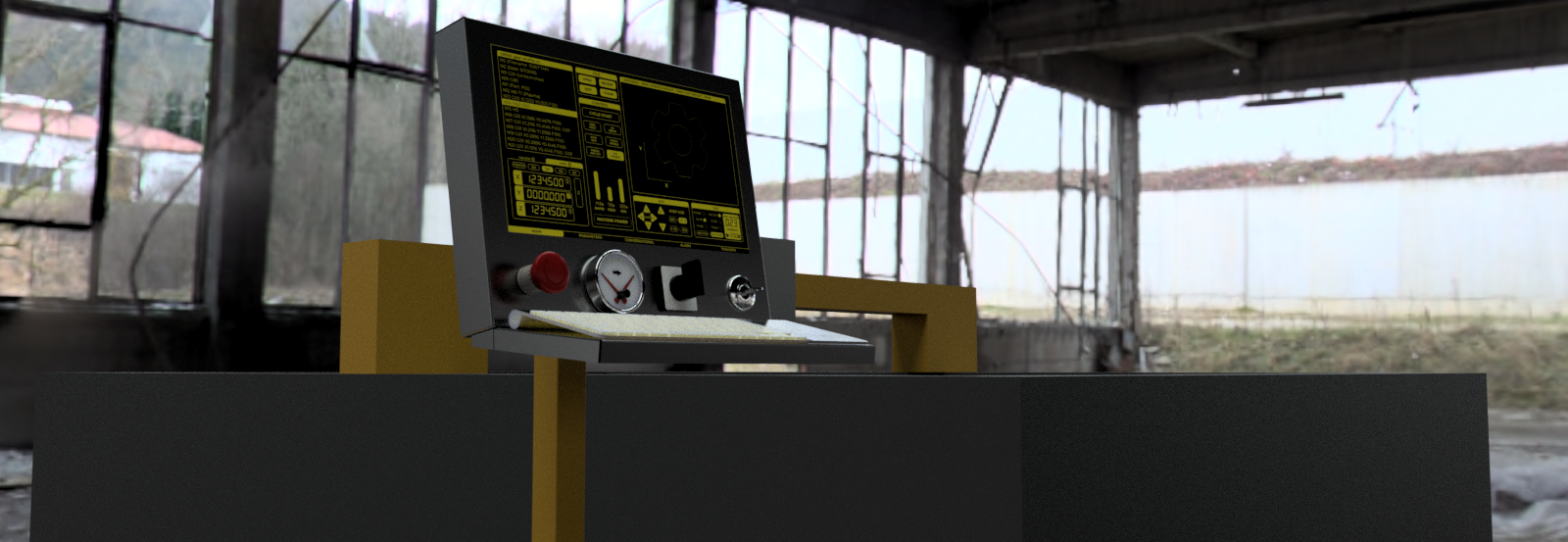
Last edit: 6 years 1 month ago by pinder.
Please Log in or Create an account to join the conversation.
- pinder
- Offline
- Elite Member
-
Less
More
- Posts: 196
- Thank you received: 128
6 years 1 month ago #183869
by pinder
Replied by pinder on topic QTPYVCP GUI for plasmac
pinder wrote: hi @rodw i started a separate thread for control panel design. Check here
pinder wrote: Hi everyone, I designed GUI for plasma machines and @KCJ is doing a great work developing the QTPYVCP for that. You can check that out here
Now, I wanted to share the idea for a physical controller along with the touch GUI.
I will share here design files, and specially sheet designs so that you can cut and make one.
I'll update the github links here.
Suggestions and criticisms are welcome.
Want any change just ask.
checkout the render

Please Log in or Create an account to join the conversation.
- rodw
- Offline
- Platinum Member
-

Less
More
- Posts: 12170
- Thank you received: 4153
6 years 1 month ago #183876
by rodw
I've my console posted briefly on Pinder's other thread. I did not want Kurt to miss this request!
Replied by rodw on topic QTPYVCP GUI for plasmac
rodw wrote: I have done some work on a console in Fusion 360 with 15" screen (ASUS VT168H) Still very rough.
Kurt, A pin in the GUI so the Feed override and Arc Voltage override knobs can override the GUI settings to give dual control would be fantastic. I think Gmocappy does this.
I'm not sure if the overrides will be MPG's or just a Potentiometer on a 7i76e analog input. The MPG's lend themselves to a 7i73
I've my console posted briefly on Pinder's other thread. I did not want Kurt to miss this request!
The following user(s) said Thank You: KCJ
Please Log in or Create an account to join the conversation.
- KCJ
- Offline
- Moderator
-

Less
More
- Posts: 328
- Thank you received: 267
6 years 1 month ago #183882
by KCJ
Replied by KCJ on topic QTPYVCP GUI for plasmac
Definitely possible to add some HAL pins for overrides, but I think it's better to tie any physical overrides into HALUI, rather than the GUI. QtPyVCP monitors and can set the feed, speed and rapid overrides over the NML interface, so the GUI widgets will always reflect the setting of any physical inputs.
Am I missing something about why Gmoccapy provides it's own HAL pins? It seems redundant.
I assume arc voltage override would be an I/O HAL signal connected to a slider in the GUI?
Am I missing something about why Gmoccapy provides it's own HAL pins? It seems redundant.
I assume arc voltage override would be an I/O HAL signal connected to a slider in the GUI?
The following user(s) said Thank You: tommylight, pinder
Please Log in or Create an account to join the conversation.
- rodw
- Offline
- Platinum Member
-
Less
More
- Posts: 12170
- Thank you received: 4153
6 years 1 month ago #183891
by rodw
When Islander261 and I started our plasma journey pre plasmac, we wanted to be able to use M67/M68 and the GUI to set desired voltage and other settings. To do this, we had the GUI publish another pin for the analog input which then overrode the gui settings in the screen handler.
During the week, I was cutting some material that I had not cut much of before and clearly the book cutting speed was too high so the cut did not penetrate. So I wanted to knock it back to 80% with feed override to prevent the shower of sparks. My current Plasmac GUI was not easy to do this quickly. So when I was designing the console, I thought it might be good to provide a dedicated control for this that would work the same way. Not everybody is going to build a console with the hardware I was suggesting so the screen needs to allow control.
Anyway, its now clear to me that it has to be an MPG becasue an analog input would not let the setting to be changed by the screen control. I don't mind writing a component to handle the MPG scaling etc.
Replied by rodw on topic QTPYVCP GUI for plasmac
KCJ wrote: Definitely possible to add some HAL pins for overrides, but I think it's better to tie any physical overrides into HALUI, rather than the GUI. QtPyVCP monitors and can set the feed, speed and rapid overrides over the NML interface, so the GUI widgets will always reflect the setting of any physical inputs.
Am I missing something about why Gmoccapy provides it's own HAL pins? It seems redundant.
I assume arc voltage override would be an I/O HAL signal connected to a slider in the GUI?
When Islander261 and I started our plasma journey pre plasmac, we wanted to be able to use M67/M68 and the GUI to set desired voltage and other settings. To do this, we had the GUI publish another pin for the analog input which then overrode the gui settings in the screen handler.
During the week, I was cutting some material that I had not cut much of before and clearly the book cutting speed was too high so the cut did not penetrate. So I wanted to knock it back to 80% with feed override to prevent the shower of sparks. My current Plasmac GUI was not easy to do this quickly. So when I was designing the console, I thought it might be good to provide a dedicated control for this that would work the same way. Not everybody is going to build a console with the hardware I was suggesting so the screen needs to allow control.
Anyway, its now clear to me that it has to be an MPG becasue an analog input would not let the setting to be changed by the screen control. I don't mind writing a component to handle the MPG scaling etc.
Please Log in or Create an account to join the conversation.
- KCJ
- Offline
- Moderator
-
Less
More
- Posts: 328
- Thank you received: 267
6 years 1 month ago #183907
by KCJ
Replied by KCJ on topic QTPYVCP GUI for plasmac
I have published the VCP to GitHub:
github.com/KurtJacobson/plasma-flat
Install instructions are in the readme. Once installed set the display in the INI to Plasma Flat (for lack of a better name)
To update the VCP as it progresses simply rerun the pip install command for plasma-flat.
I ran my RF45 clone mill with the VCP today, and it worked great on my 1024x768 touch screen!
Cheers,
Kurt
github.com/KurtJacobson/plasma-flat
Install instructions are in the readme. Once installed set the display in the INI to Plasma Flat (for lack of a better name)
Code:
[DISPLAY]
DISPLAY=plasma-flat
To update the VCP as it progresses simply rerun the pip install command for plasma-flat.
I ran my RF45 clone mill with the VCP today, and it worked great on my 1024x768 touch screen!
Cheers,
Kurt
The following user(s) said Thank You: TurBoss, tommylight, pinder
Please Log in or Create an account to join the conversation.
Moderators: KCJ, Lcvette
Time to create page: 0.784 seconds