
- Posts: 12170
- Thank you received: 4153
MonoKrom - QtPyVCP GUI for PlasmaC and Mill
- rodw
- Offline
- Platinum Member
-

Less
More
6 years 1 month ago #183701
by rodw
@pinder , looks great . My idea was not to over power the screen with too much data and that does it perfectly.
I don't think a popup wolud work as nice.
Kurt, looks perfect thanks. I knew you could do it!
You guys are really powering ahead. I'm loving the no nonsense approach where feedback is evaluated and incorporated at warp speed.
I did a bit of research on best practice HMI's for both industry and CNC. Boring monochrome is good. Just use colour to highlight exceptions. At first the yellow did not do it for me either but as you say when you see it come together, it grows on you!
Replied by rodw on topic qtpyvcp Gui for plasmac
or we can place a popup[/quote]pinder wrote: @AgentWD40, @rodw Check if thats all right
@pinder , looks great . My idea was not to over power the screen with too much data and that does it perfectly.
I don't think a popup wolud work as nice.
KCJ wrote: This evening's progress.
Got the of the DROs functional and homing working.
The DROs are automatically added to suit the axes configured in the INI.
@rodw Type in DRO to define current position just for you
The design is growing on me as I bring it to life.
At this point I'm just trying to get close to what you have mocked up, will worry about matching font sizes etc. exactly later.
Cheers,
Kurt

Kurt, looks perfect thanks. I knew you could do it!
You guys are really powering ahead. I'm loving the no nonsense approach where feedback is evaluated and incorporated at warp speed.
I did a bit of research on best practice HMI's for both industry and CNC. Boring monochrome is good. Just use colour to highlight exceptions. At first the yellow did not do it for me either but as you say when you see it come together, it grows on you!
The following user(s) said Thank You: pinder
Please Log in or Create an account to join the conversation.
- pinder
- Offline
- Elite Member
-

Less
More
- Posts: 196
- Thank you received: 128
6 years 1 month ago - 6 years 1 month ago #183702
by pinder
Kurt is doing a great job here.
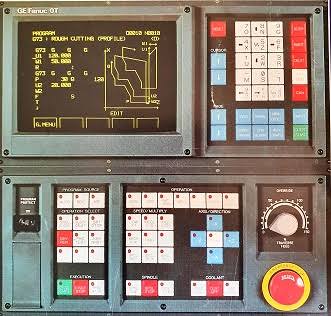
This is my inspiration
Replied by pinder on topic qtpyvcp Gui for plasmac
Thankyou @rodwrodw wrote:
Kurt, looks perfect thanks. I knew you could do it!
You guys are really powering ahead. I'm loving the no nonsense approach where feedback is evaluated and incorporated at warp speed.
I did a bit of research on best practice HMI's for both industry and CNC. Boring monochrome is good. Just use colour to highlight exceptions. At first the yellow did not do it for me either but as you say when you see it come together, it grows on you!
Kurt is doing a great job here.
This is my inspiration
Last edit: 6 years 1 month ago by pinder.
The following user(s) said Thank You: rodw
Please Log in or Create an account to join the conversation.
- AgentWD40
- Offline
- Platinum Member
-
Less
More
- Posts: 339
- Thank you received: 96
6 years 1 month ago - 6 years 1 month ago #183722
by AgentWD40
Replied by AgentWD40 on topic qtpyvcp Gui for plasmac
@pinder, I don't know if it was your intention but you've just about talked me into getting a touchscreen monitor :laugh:
You mentioned earlier you're designing around a 1366x768 resolution. What's a comfortable minimum size for a touchscreen?
You mentioned earlier you're designing around a 1366x768 resolution. What's a comfortable minimum size for a touchscreen?
Last edit: 6 years 1 month ago by AgentWD40.
Please Log in or Create an account to join the conversation.
- pinder
- Offline
- Elite Member
-
Less
More
- Posts: 196
- Thank you received: 128
6 years 1 month ago - 6 years 1 month ago #183734
by pinder
i think minimum would be 1366x768
or you can get capacitive touch panels from aliexpress/ebay for monitors
between 50-80$
you can add get good quality touchscreen from amazon for 190$
Replied by pinder on topic qtpyvcp Gui for plasmac
AgentWD40 wrote: @pinder, I don't know if it was your intention but you've just about talked me into getting a touchscreen monitor :laugh:
You mentioned earlier you're designing around a 1366x768 resolution. What's a comfortable minimum size for a touchscreen?
i think minimum would be 1366x768
or you can get capacitive touch panels from aliexpress/ebay for monitors
between 50-80$
you can add get good quality touchscreen from amazon for 190$
Last edit: 6 years 1 month ago by pinder.
Please Log in or Create an account to join the conversation.
- pinder
- Offline
- Elite Member
-
Less
More
- Posts: 196
- Thank you received: 128
6 years 1 month ago - 6 years 1 month ago #183736
by pinder
Replied by pinder on topic qtpyvcp Gui for plasmac
as I asked earlier.
Default and only option to open gcode files should be USB, and no-one said anything.
Should I assume it is Ok.
This in view that user should get smooth experience. Like OEM solutions.
Network location can also be an option.
Default and only option to open gcode files should be USB, and no-one said anything.
Should I assume it is Ok.
This in view that user should get smooth experience. Like OEM solutions.
Network location can also be an option.
Last edit: 6 years 1 month ago by pinder.
Please Log in or Create an account to join the conversation.
- tommylight
- Away
- Moderator
-

Less
More
- Posts: 22011
- Thank you received: 7491
6 years 1 month ago #183738
by tommylight
Replied by tommylight on topic qtpyvcp Gui for plasmac
Not ideal but i can live with that.pinder wrote: as I asked earlier.
Default and only option to open gcode files should be USB, and no-one said anything.
The following user(s) said Thank You: pinder
Please Log in or Create an account to join the conversation.
Moderators: KCJ, Lcvette
Time to create page: 0.159 seconds