
- Posts: 7368
- Thank you received: 2181
qtvcp issues
- cmorley
- Offline
- Moderator
-

Less
More
7 years 10 months ago #121740
by cmorley
The HAL pins from widgets were never intended to be manipulated directly.
That said it is possible, but likely the code would be slightly different for each widget.
eg for push buttons:
state = self.BUTTONNAME.hal_pin.get()
You wouldn't want to set a button pin as then it wouldn't match the button state.
I don't understand why Versa probe uses HAL pins. In my widget version I removed that.
Chris M
Replied by cmorley on topic qtvcp issues
auto-mation-assist wrote: Great. I worked 12 hour days for a great number of years alternating between day and night shift about monthly.
I would have to see what would be needed to push what I have been working on. Its running on my actual machine controller for testing and uses its .ini and hal files. I will need to see if it will run in sim mode.
Can you tell me how to write and read to the hal pins that qtvcp makes, not the ones that I make in the handler? The ones I generate in the handler files are ok and I can read and write to them but I don’t how the format to to access the others. The ones that qtvcp makes all have the prefix of the gui name which right now is 1xMill_P_xxxx . P meaning that probing is included inside the handler file.
The HAL pins from widgets were never intended to be manipulated directly.
That said it is possible, but likely the code would be slightly different for each widget.
eg for push buttons:
state = self.BUTTONNAME.hal_pin.get()
You wouldn't want to set a button pin as then it wouldn't match the button state.
I don't understand why Versa probe uses HAL pins. In my widget version I removed that.
Chris M
Please Log in or Create an account to join the conversation.
- cmorley
- Offline
- Moderator
-
Less
More
- Posts: 7368
- Thank you received: 2181
7 years 10 months ago #121741
by cmorley
Replied by cmorley on topic qtvcp issues
I can not replicate your button observations.
Can you modify your sim screen to cause the error and push to your repo?
Can you modify your sim screen to cause the error and push to your repo?
Please Log in or Create an account to join the conversation.
- auto-mation-assist
- Offline
- Platinum Member
-

Less
More
- Posts: 425
- Thank you received: 81
7 years 10 months ago - 7 years 10 months ago #121763
by auto-mation-assist
Replied by auto-mation-assist on topic qtvcp issues
Chris,
Ok I will try to do that today but may not have the time. I suspect now this may only be a local problem here and that I need to do a little more work to try to figure this out.
I like the fact that you were able to eliminate the need for pins in the Versa code. If I can figure out the changes required I would like to built a version of that also. I Will push the latest changes to the probing gui soon but this may not help you a lot since I use different names for buttons and displays to clarify those items just a bit. It will likely need a lot of search and replace work for the names.
On the use of pins:
I think the use of pins gives an easy way to code things and offers a great deal lot of flexibility for the user. Flexibility in my mind is very important since many LinuxCnc users will always want to add special functions in a fast and easy way without involving the programmer and asking for modifications to the main code. I consider pins to be similar to global variables. It offers a way to route data to suit the users requirements.
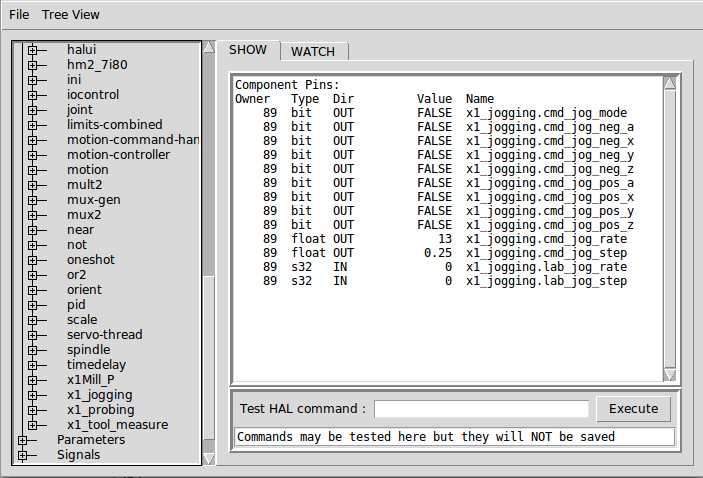
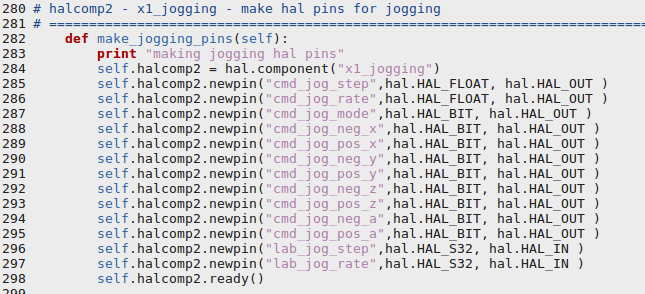
In looking at the hal components I generated within my handler file I noticed that they never enter a ready state. I wonder if they need to be placed in the 'bin' folder somehow so they can be found. There was some mention of something like that in my internet search for a answer as to why 'ready' never occurs. I have added some pictures of how I generate the pins are below in the hope of solving the never ready problem. Adding the below to the postgui hal file does not help.
loadusr -W x1_jogging
loadusr -W x1_tool_measure
loadusr -W x1_probing
In your file 'qtvcp' located in the bin folder there is:
##############
# Build ui
##############
#if there was no component name specified use the xml file name
if opts.component is None:
opts.component = PATH.BASENAME
I would like to enter a name here but have no idea of where to put such a name.

My editorial comment: I think we all know that LinuxCnc is lacking a modern network interface and that this has resulted in everyone being forced to find ways to interface modern methods to poorly documented ancient code that relies on NML.
Ok I will try to do that today but may not have the time. I suspect now this may only be a local problem here and that I need to do a little more work to try to figure this out.
I like the fact that you were able to eliminate the need for pins in the Versa code. If I can figure out the changes required I would like to built a version of that also. I Will push the latest changes to the probing gui soon but this may not help you a lot since I use different names for buttons and displays to clarify those items just a bit. It will likely need a lot of search and replace work for the names.
On the use of pins:
I think the use of pins gives an easy way to code things and offers a great deal lot of flexibility for the user. Flexibility in my mind is very important since many LinuxCnc users will always want to add special functions in a fast and easy way without involving the programmer and asking for modifications to the main code. I consider pins to be similar to global variables. It offers a way to route data to suit the users requirements.
In looking at the hal components I generated within my handler file I noticed that they never enter a ready state. I wonder if they need to be placed in the 'bin' folder somehow so they can be found. There was some mention of something like that in my internet search for a answer as to why 'ready' never occurs. I have added some pictures of how I generate the pins are below in the hope of solving the never ready problem. Adding the below to the postgui hal file does not help.
loadusr -W x1_jogging
loadusr -W x1_tool_measure
loadusr -W x1_probing
In your file 'qtvcp' located in the bin folder there is:
##############
# Build ui
##############
#if there was no component name specified use the xml file name
if opts.component is None:
opts.component = PATH.BASENAME
I would like to enter a name here but have no idea of where to put such a name.
My editorial comment: I think we all know that LinuxCnc is lacking a modern network interface and that this has resulted in everyone being forced to find ways to interface modern methods to poorly documented ancient code that relies on NML.
Last edit: 7 years 10 months ago by auto-mation-assist. Reason: Changed wording on ready state
Please Log in or Create an account to join the conversation.
- auto-mation-assist
- Offline
- Platinum Member
-
Less
More
- Posts: 425
- Thank you received: 81
7 years 10 months ago #121764
by auto-mation-assist
Replied by auto-mation-assist on topic qtvcp issues
Chris,
You mentioned,
"The HAL pins from widgets were never intended to be manipulated directly.
That said it is possible, but likely the code would be slightly different for each widget.
eg for push buttons:
state = self.BUTTONNAME.hal_pin.get()
You wouldn't want to set a button pin as then it wouldn't match the button state."
Since things like true state text and true state cmd are writeable from self.w.'button name'. xxx in the handler can those be pulled out by commands similar to:
state = self.BUTTONNAME.hal_pin.get_true_python_command()
Or is it only for True/False states for the buttons.
You mentioned,
"The HAL pins from widgets were never intended to be manipulated directly.
That said it is possible, but likely the code would be slightly different for each widget.
eg for push buttons:
state = self.BUTTONNAME.hal_pin.get()
You wouldn't want to set a button pin as then it wouldn't match the button state."
Since things like true state text and true state cmd are writeable from self.w.'button name'. xxx in the handler can those be pulled out by commands similar to:
state = self.BUTTONNAME.hal_pin.get_true_python_command()
Or is it only for True/False states for the buttons.
Please Log in or Create an account to join the conversation.
- auto-mation-assist
- Offline
- Platinum Member
-
Less
More
- Posts: 425
- Thank you received: 81
7 years 10 months ago - 7 years 10 months ago #121770
by auto-mation-assist
Replied by auto-mation-assist on topic qtvcp issues
I have found something interesting that is potentially a problem that needs to be looked into.
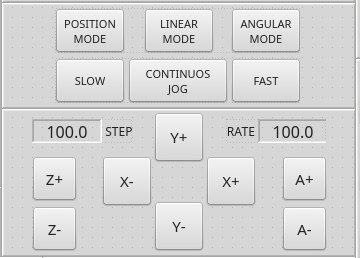
If I modify the x1Mill_P gui to look like this and save it and making sure it goes into the folder where my .ini file is:
When running I get back:
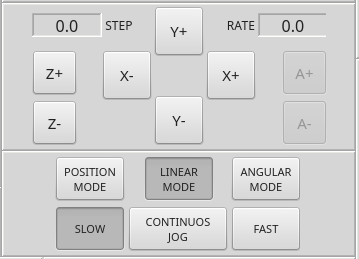
So there is a path determination error in that the gui file being used is not the one in the folder that .ini is in.
Here is what I have for a gui path and this is expected to route correctly and likely the source of my problem.
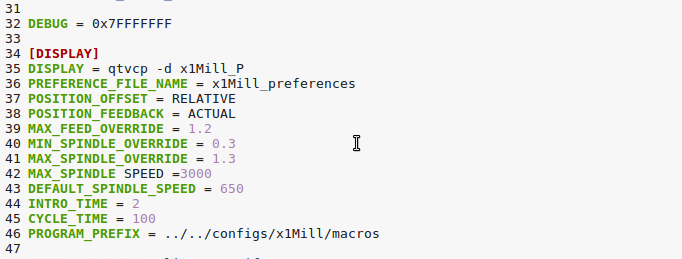
If I modify the x1Mill_P gui to look like this and save it and making sure it goes into the folder where my .ini file is:
When running I get back:
So there is a path determination error in that the gui file being used is not the one in the folder that .ini is in.
Here is what I have for a gui path and this is expected to route correctly and likely the source of my problem.
Last edit: 7 years 10 months ago by auto-mation-assist. Reason: corrected : not the one in the folder that .ini is in.
Please Log in or Create an account to join the conversation.
- auto-mation-assist
- Offline
- Platinum Member
-
Less
More
- Posts: 425
- Thank you received: 81
7 years 10 months ago - 7 years 10 months ago #121777
by auto-mation-assist
Replied by auto-mation-assist on topic qtvcp issues
To determine the actual file location of my .INI file and to use it as a base location for all other file locations for my x1Mill gui. I have some code in my handler file that I use to do this. Right now it only has determination for my preference file but other files or paths to files can be added easily from this base location.
I plan on having everything that the gui requires within the folder that the .ini file is in, including folders for icons, macros, or whatever. I do not like scattering these items all over the place. I want to be able to grab the entire folder for backup and have everything it needs.
Attached is the code I use in my handler that for right now only has my preference file added. Perhaps this will aid in properly locating the .ui file under all conditions when its name is added.
I plan on having everything that the gui requires within the folder that the .ini file is in, including folders for icons, macros, or whatever. I do not like scattering these items all over the place. I want to be able to grab the entire folder for backup and have everything it needs.
Attached is the code I use in my handler that for right now only has my preference file added. Perhaps this will aid in properly locating the .ui file under all conditions when its name is added.
Last edit: 7 years 10 months ago by auto-mation-assist. Reason: when its name is added.
Please Log in or Create an account to join the conversation.
Moderators: cmorley
Time to create page: 0.345 seconds