
- Posts: 7368
- Thank you received: 2181
qtvcp issues
- cmorley
- Offline
- Moderator
-

Less
More
7 years 11 months ago #121123
by cmorley
Replied by cmorley on topic qtvcp issues
Excellent. That looks much better.
Chris
Chris
Please Log in or Create an account to join the conversation.
- andypugh
- Offline
- Moderator
-
Less
More
- Posts: 19899
- Thank you received: 4655
7 years 11 months ago #121125
by andypugh
That only shows that the probe is switching, not that the computer is seeing it switch. A repeater in the GUI is a nice thing to have even if the probe itself has an led.
Replied by andypugh on topic qtvcp issues
auto-mation-assist wrote: All the probes that I have built for my self have such an led built in which has proved to be very useful.
That only shows that the probe is switching, not that the computer is seeing it switch. A repeater in the GUI is a nice thing to have even if the probe itself has an led.
Please Log in or Create an account to join the conversation.
- auto-mation-assist
- Offline
- Platinum Member
-

Less
More
- Posts: 425
- Thank you received: 81
7 years 11 months ago #121165
by auto-mation-assist
Replied by auto-mation-assist on topic qtvcp issues
That is true, an echo back is always nice.
In thinking about adding features. I use dedicated socket that a spindle mounted probe plugs into which disables the spindle motor when a probe is plugged into it. As long as proper procedures are followed it gives a bit of added protection against potential probe or cable damage.
In thinking about adding features. I use dedicated socket that a spindle mounted probe plugs into which disables the spindle motor when a probe is plugged into it. As long as proper procedures are followed it gives a bit of added protection against potential probe or cable damage.
Please Log in or Create an account to join the conversation.
- cmorley
- Offline
- Moderator
-
Less
More
- Posts: 7368
- Thank you received: 2181
7 years 11 months ago #121193
by cmorley
Replied by cmorley on topic qtvcp issues
Do you use the plug to physically lock out the spindle or use it to set spindle-inhibit?
Chris M
Chris M
Please Log in or Create an account to join the conversation.
- auto-mation-assist
- Offline
- Platinum Member
-
Less
More
- Posts: 425
- Thank you received: 81
7 years 11 months ago - 7 years 11 months ago #121195
by auto-mation-assist
Replied by auto-mation-assist on topic qtvcp issues
The plug that is on the cable coming from the probe provides a ground signal (True/False) to a hall pin that disables the spindle run function so that the spindle can not be turned on as long as the probe is plugged in. The connectors on all my probes are multi pin XLR types. This provides a logic interlock for added safety.
I have pushed a change for the verser-probe panel to get the probe function check led into the panel and gave the three led's that hal can use.
This change can be found in my git hub: x1Mill_branch/lib/python/qtvcp/widgets/
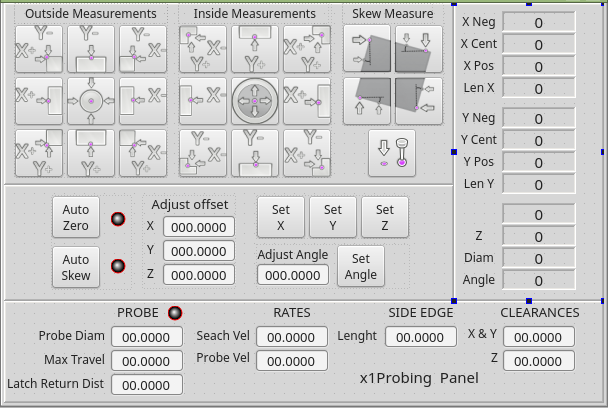
I have pushed a change for the verser-probe panel to get the probe function check led into the panel and gave the three led's that hal can use.
This change can be found in my git hub: x1Mill_branch/lib/python/qtvcp/widgets/
Last edit: 7 years 11 months ago by auto-mation-assist. Reason: corrected spindle spelling error
The following user(s) said Thank You: tommylight
Please Log in or Create an account to join the conversation.
- auto-mation-assist
- Offline
- Platinum Member
-
Less
More
- Posts: 425
- Thank you received: 81
7 years 11 months ago #121205
by auto-mation-assist
Replied by auto-mation-assist on topic qtvcp issues
Chris,
I have pushed the panel and handler for probe screen version 2.
The x1Probe_v2 handler has everything that was in the latest x1Probe handler plus the additions for the five extra buttons and two date inputs for the entries for tool probe height and the work piece height.
The update is in the sim folder for x1mill/x1Probing/x1Probe_v2.
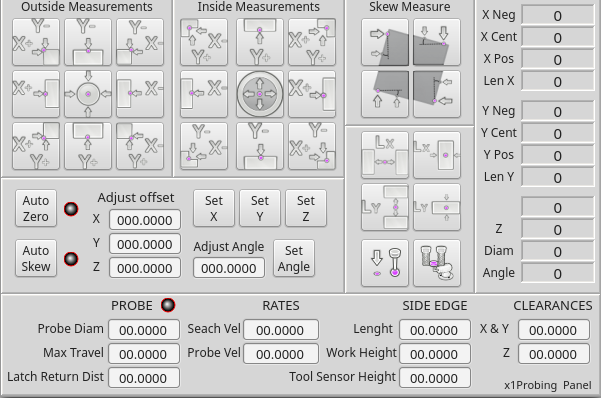
I have pushed the panel and handler for probe screen version 2.
The x1Probe_v2 handler has everything that was in the latest x1Probe handler plus the additions for the five extra buttons and two date inputs for the entries for tool probe height and the work piece height.
The update is in the sim folder for x1mill/x1Probing/x1Probe_v2.
The following user(s) said Thank You: tommylight
Please Log in or Create an account to join the conversation.
Moderators: cmorley
Time to create page: 0.226 seconds