
- Posts: 425
- Thank you received: 81
qtvcp issues
- auto-mation-assist
- Offline
- Platinum Member
-

Less
More
7 years 11 months ago #120964
by auto-mation-assist
Replied by auto-mation-assist on topic qtvcp issues
Yesterday I pushed my most recent update that I have for the x1probe version. It is mostly working in the simulator but needs more work for accessing the preference file and history. The items that are related to those have been commented out in the handler file. The handler file has some items in it that are likely not needed so those have to be cleaned up. I did see some errors in some of my note files.
I have been thinking a bit about the additional features offered in version 2 of the server probing code and have come out with a layout for those that I can work on later for qtvcp. A snap shot of that is below.
I have not had a chance to read the latest posts so I will need to do that today. for some reason I have not been getting notifications of new posts that are related to qtvcp.
My latest updates can be found at: github.com/auto-mation-assist/x1Mill_bra...h/configs/sim/x1Mill
/x1Probing
Version 2 snapshot:

I have been thinking a bit about the additional features offered in version 2 of the server probing code and have come out with a layout for those that I can work on later for qtvcp. A snap shot of that is below.
I have not had a chance to read the latest posts so I will need to do that today. for some reason I have not been getting notifications of new posts that are related to qtvcp.
My latest updates can be found at: github.com/auto-mation-assist/x1Mill_bra...h/configs/sim/x1Mill
/x1Probing
Version 2 snapshot:
Please Log in or Create an account to join the conversation.
- auto-mation-assist
- Offline
- Platinum Member
-
Less
More
- Posts: 425
- Thank you received: 81
7 years 11 months ago #120966
by auto-mation-assist
Replied by auto-mation-assist on topic qtvcp issues
Chris,
Can you look at this and see if i have everything that you show on your end.
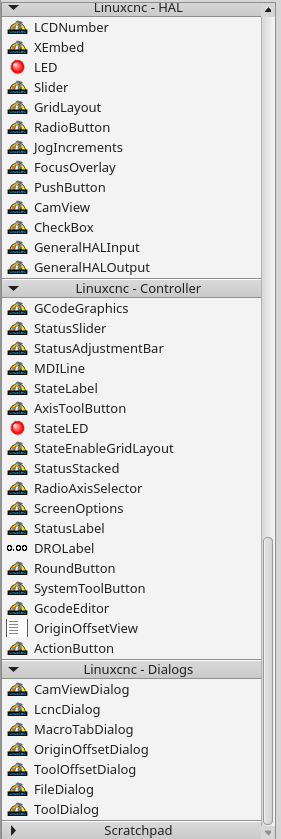
Can you look at this and see if i have everything that you show on your end.
Please Log in or Create an account to join the conversation.
- cmorley
- Offline
- Moderator
-

Less
More
- Posts: 7368
- Thank you received: 2181
7 years 11 months ago #120970
by cmorley
Replied by cmorley on topic qtvcp issues
no you are missing 6 widgets in 'linuxcnc controller'
versaProbe, fileManager and ToolOffset are three I see right away..
Chris M
versaProbe, fileManager and ToolOffset are three I see right away..
Chris M
Please Log in or Create an account to join the conversation.
- cmorley
- Offline
- Moderator
-
Less
More
- Posts: 7368
- Thank you received: 2181
7 years 11 months ago #120971
by cmorley
Replied by cmorley on topic qtvcp issues
I also found versa probe requires alot more internal work then i realized.
I pushed work that now at least calls a Oword subroutine for hole probing.
It still fails as it seems the Oword requires parameters from HAL pins but I will look at that tomorrow after work.
Chris M
I pushed work that now at least calls a Oword subroutine for hole probing.
It still fails as it seems the Oword requires parameters from HAL pins but I will look at that tomorrow after work.
Chris M
Please Log in or Create an account to join the conversation.
- cmorley
- Offline
- Moderator
-
Less
More
- Posts: 7368
- Thank you received: 2181
7 years 11 months ago #120972
by cmorley
Replied by cmorley on topic qtvcp issues
I'll need to update my versa-probe ui file to match yours.
Maybe I should just work on what I got and get it functional then get you to go from there. I don't want to waste your time on a widget that I need to rework to fit in the system.
Though your work saved me a lot of time to get this (semi) functional.
Chris M
Maybe I should just work on what I got and get it functional then get you to go from there. I don't want to waste your time on a widget that I need to rework to fit in the system.
Though your work saved me a lot of time to get this (semi) functional.
Chris M
Please Log in or Create an account to join the conversation.
- auto-mation-assist
- Offline
- Platinum Member
-
Less
More
- Posts: 425
- Thank you received: 81
7 years 11 months ago #120975
by auto-mation-assist
Replied by auto-mation-assist on topic qtvcp issues
I will happy to help in anyway I can. Usually my biggest problem is finding the right formats to use with self.w. types for putting data in a pulling data out, but I can usually get them figured out. There are not a of samples for this.
To check out my probing work and assuming that I can get it interfaced to linuxcnc I will need to make a qtvcp configuration on my milling machine computer. I have been controlling the machine remotely using a network connection into its mesa FPGA controller for some testing that is not to risky and using a video link to watch the machine.
In the handler for x1probe i need to get the two leds to come on and possibly blink when auto zero or auto skew is active. My attempts are in the def's for those two buttons. I think they may only show up as hal pins that need to feed back to the gui. They were not picked up by signal/slots for some reason and self.w. --- cmds for these do not work with the cmd formats I have tried.
I have not checked to see if all the required hall pins for probing are being generated or if the macro files are executing. Since there are no error messages I assume that they are.
As far as the reading normal .ini file for the preferences file location and reading and writing to the preferences file to it still needs work. I think it should store the default or last used start up probing settings so they do not have to be re-entered each time. These are likely the items I have commented in each probe button def statement.
To check out my probing work and assuming that I can get it interfaced to linuxcnc I will need to make a qtvcp configuration on my milling machine computer. I have been controlling the machine remotely using a network connection into its mesa FPGA controller for some testing that is not to risky and using a video link to watch the machine.
In the handler for x1probe i need to get the two leds to come on and possibly blink when auto zero or auto skew is active. My attempts are in the def's for those two buttons. I think they may only show up as hal pins that need to feed back to the gui. They were not picked up by signal/slots for some reason and self.w. --- cmds for these do not work with the cmd formats I have tried.
I have not checked to see if all the required hall pins for probing are being generated or if the macro files are executing. Since there are no error messages I assume that they are.
As far as the reading normal .ini file for the preferences file location and reading and writing to the preferences file to it still needs work. I think it should store the default or last used start up probing settings so they do not have to be re-entered each time. These are likely the items I have commented in each probe button def statement.
Please Log in or Create an account to join the conversation.
Moderators: cmorley
Time to create page: 6.327 seconds