
- Posts: 7368
- Thank you received: 2181
qtvcp issues
- cmorley
- Offline
- Moderator
-

Less
More
7 years 11 months ago #120354
by cmorley
Replied by cmorley on topic qtvcp issues
The MDIHistory widget has a soft-keyboard property that can be changed.
Chris M
Chris M
Please Log in or Create an account to join the conversation.
- cmorley
- Offline
- Moderator
-
Less
More
- Posts: 7368
- Thank you received: 2181
7 years 11 months ago #120355
by cmorley
I meant that as multiple ! Both of you, and the others that contribute to everything here.[/quote]
It's excellent to work with someone with a vision and lots of patients.
It's just what I needed to finish the project.
Thanks.
Chris M
Replied by cmorley on topic qtvcp issues
tommylight wrote: [quote="auto-mation-assist" post=120320
I want to add that Chris is fantastic and the amount of work he has put into qtvcp should not be overlooked. He is an absolute and tremendous asset to the linuxcnc community.
I meant that as multiple ! Both of you, and the others that contribute to everything here.[/quote]
It's excellent to work with someone with a vision and lots of patients.
It's just what I needed to finish the project.
Thanks.
Chris M
The following user(s) said Thank You: tommylight
Please Log in or Create an account to join the conversation.
- auto-mation-assist
- Offline
- Platinum Member
-

Less
More
- Posts: 425
- Thank you received: 81
7 years 11 months ago - 7 years 11 months ago #120364
by auto-mation-assist
Replied by auto-mation-assist on topic qtvcp issues
I took a little break from my planned work to work on closing the onboard keyboard when not being displayed. Thus I was thinking about handling that with the keyboard toggle button but that will not work since it appear that the keyboard is called up by the embedded process as soon as it is started.
It may be beneficial to look some kind of status to see if the user wants the keyboard displayed if it does not take to long to pull it up.
In any case below is the code I have been using for killing the keyboard at gui shut down so it does not keep on adding up icons on the bottom of my display when I do a lot of starting and stopping during verification work. I think we need to find a good place to insert it.
import psutil # used for killing embedded processes
process = filter(lambda p: p.name() == "onboard", psutil.process_iter())
for i in process:
print i.name
parent_pid = i.pid
parent = psutil.Process(parent_pid)
parent.kill()
Looks like it did not keep the indentations
It may be beneficial to look some kind of status to see if the user wants the keyboard displayed if it does not take to long to pull it up.
In any case below is the code I have been using for killing the keyboard at gui shut down so it does not keep on adding up icons on the bottom of my display when I do a lot of starting and stopping during verification work. I think we need to find a good place to insert it.
import psutil # used for killing embedded processes
process = filter(lambda p: p.name() == "onboard", psutil.process_iter())
for i in process:
print i.name
parent_pid = i.pid
parent = psutil.Process(parent_pid)
parent.kill()
Looks like it did not keep the indentations
Last edit: 7 years 11 months ago by auto-mation-assist. Reason: added: Looks like it did not keep the indentations
Please Log in or Create an account to join the conversation.
- cmorley
- Offline
- Moderator
-
Less
More
- Posts: 7368
- Thank you received: 2181
7 years 11 months ago #120370
by cmorley
Replied by cmorley on topic qtvcp issues
So the onboard closing problem seems to be a product of embedding.
I believe this is going to be a difficult problem to fix.. so I'm stalling.
IIRC matchbox-keyboard closes properly.
For the current time I would add your code (nice work there by the way) in your handler file
This will be called when qtvcp closes
Chris M
I believe this is going to be a difficult problem to fix.. so I'm stalling.
IIRC matchbox-keyboard closes properly.
For the current time I would add your code (nice work there by the way) in your handler file
Code:
###########################
# **** closing event **** #
###########################
def closing_cleanup__(self):
# put your code here
This will be called when qtvcp closes
Chris M
Please Log in or Create an account to join the conversation.
- cmorley
- Offline
- Moderator
-
Less
More
- Posts: 7368
- Thank you received: 2181
7 years 11 months ago #120371
by cmorley
Replied by cmorley on topic qtvcp issues
I pushed versa's probe images to qtvcp, so you can 'overlay' your buttons.
They would be found in /share/qtvcp/images/probe_icons
In the abstractButton's heading, The property 'icon' can be set to an image filename.
You need to remove the text from the button and probably set the size from 24x24 to 48x48
Chris M
They would be found in /share/qtvcp/images/probe_icons
In the abstractButton's heading, The property 'icon' can be set to an image filename.
You need to remove the text from the button and probably set the size from 24x24 to 48x48
Chris M
Please Log in or Create an account to join the conversation.
- cmorley
- Offline
- Moderator
-
Less
More
- Posts: 7368
- Thank you received: 2181
7 years 11 months ago #120372
by cmorley
Replied by cmorley on topic qtvcp issues
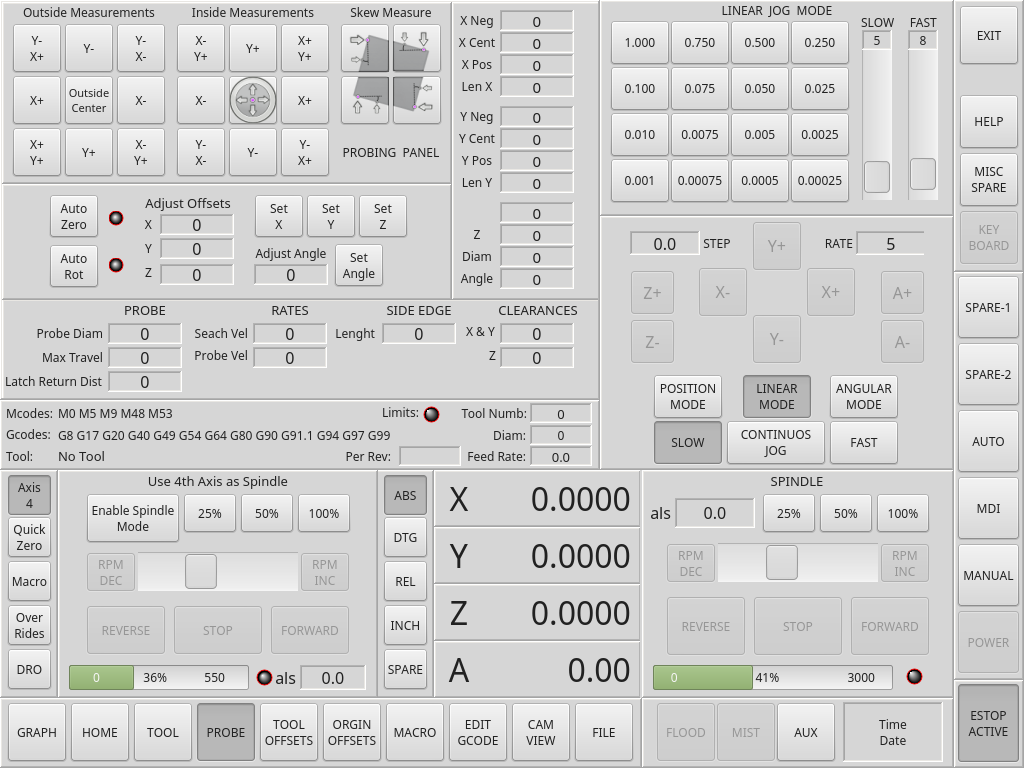
A couple probe buttons:
Please Log in or Create an account to join the conversation.
Moderators: cmorley
Time to create page: 0.235 seconds