
- Posts: 425
- Thank you received: 81
qtvcp issues
- auto-mation-assist
- Offline
- Platinum Member
-

Less
More
7 years 11 months ago #120247
by auto-mation-assist
Replied by auto-mation-assist on topic qtvcp issues
What do you mean by overlays?
Overlaying a button with a picture. Or putting picture on top of a button.
Overlay may not be the right word for QT.
Overlaying a button with a picture. Or putting picture on top of a button.
Overlay may not be the right word for QT.
Please Log in or Create an account to join the conversation.
- cmorley
- Offline
- Moderator
-

Less
More
- Posts: 7368
- Thank you received: 2181
7 years 11 months ago #120288
by cmorley
Replied by cmorley on topic qtvcp issues
That was my guess but I didn't want to assume again 
Icons are small images representing function. That would be the best parallel.
Chris M
Icons are small images representing function. That would be the best parallel.
Chris M
Please Log in or Create an account to join the conversation.
- auto-mation-assist
- Offline
- Platinum Member
-
Less
More
- Posts: 425
- Thank you received: 81
7 years 11 months ago - 7 years 11 months ago #120303
by auto-mation-assist
Replied by auto-mation-assist on topic qtvcp issues
I have loaded the mdi history but have not been able to check it out because it appears to disabled for for input. You can see it in the picture I have attached for the updated probing panel. I believe the bottom is the input area for it and that should be raised up just a bit.
I have updated my initial panel layout for the probing interface. I think it includes everything that it needs for now and will allow coding to begin by using the verser version 1 .py as a a base to work with. The panel uses the same buttons although they have names that are renamed to be more compatible with the naming convention used in the x1Mill gui.
I will be making links to the probing related buttons and labels in the .ui and handler files in the next few days.
I have not been able to get any output from the onboard keyboard to display in a text label, or the mdi input and need a bit of help with that. Also when the panel is closed that the onboard keyboard is in, that need a keyboard kill or close cmd.
Her are a few pictures that show the current probing panel and mdi history off to its right. there are no images on the probing panel buttons right now.
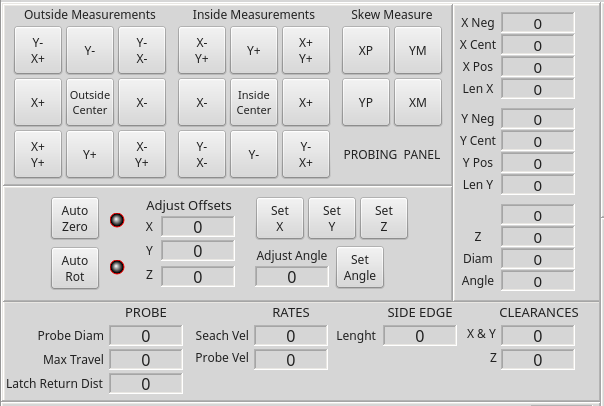
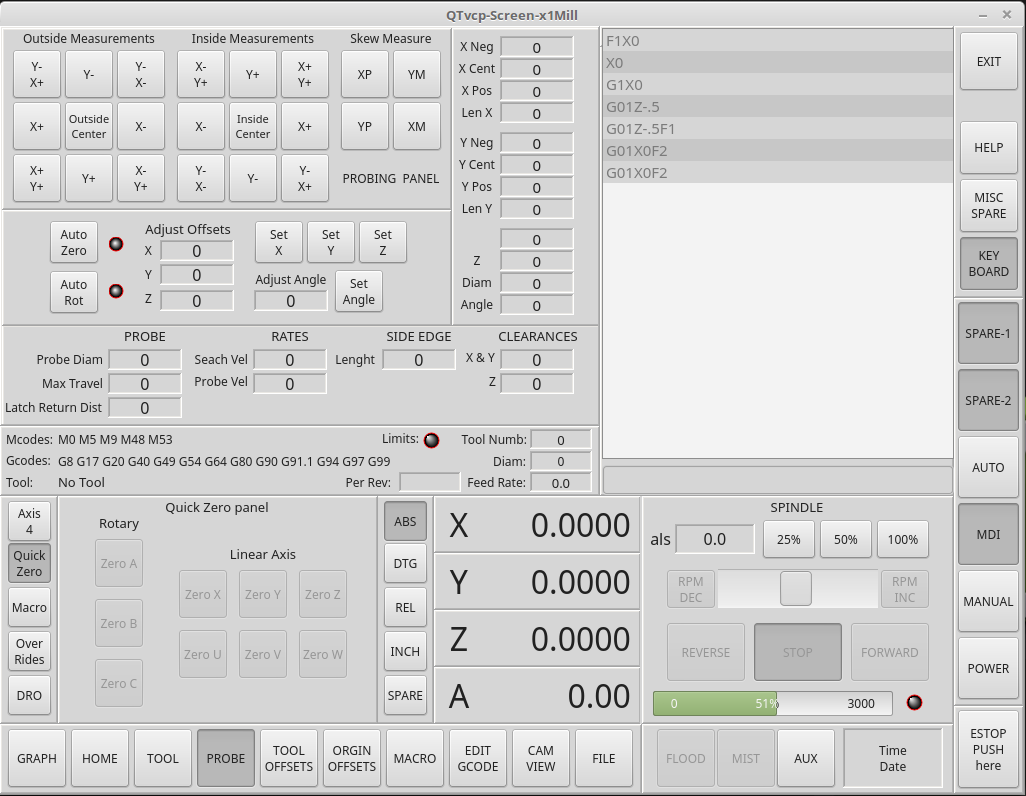
I have updated my initial panel layout for the probing interface. I think it includes everything that it needs for now and will allow coding to begin by using the verser version 1 .py as a a base to work with. The panel uses the same buttons although they have names that are renamed to be more compatible with the naming convention used in the x1Mill gui.
I will be making links to the probing related buttons and labels in the .ui and handler files in the next few days.
I have not been able to get any output from the onboard keyboard to display in a text label, or the mdi input and need a bit of help with that. Also when the panel is closed that the onboard keyboard is in, that need a keyboard kill or close cmd.
Her are a few pictures that show the current probing panel and mdi history off to its right. there are no images on the probing panel buttons right now.
Last edit: 7 years 11 months ago by auto-mation-assist. Reason: added note about probing button pictures
The following user(s) said Thank You: tommylight
Please Log in or Create an account to join the conversation.
- auto-mation-assist
- Offline
- Platinum Member
-
Less
More
- Posts: 425
- Thank you received: 81
7 years 11 months ago #120305
by auto-mation-assist
Replied by auto-mation-assist on topic qtvcp issues
Chris,
On labels, by convention those that have the ability to take a text input from a keyboard always have a light background while those used for info output only have a darker background. Can you make a suggestion on the best way do that? Does qt have a definition to declare these as input or output?
On labels, by convention those that have the ability to take a text input from a keyboard always have a light background while those used for info output only have a darker background. Can you make a suggestion on the best way do that? Does qt have a definition to declare these as input or output?
Please Log in or Create an account to join the conversation.
- cmorley
- Offline
- Moderator
-
Less
More
- Posts: 7368
- Thank you received: 2181
7 years 11 months ago #120306
by cmorley
Replied by cmorley on topic qtvcp issues
the MDIHistory widget is disabled until linuxcnc is homed - do you have a homing button yet?
Can you push your work to your github again, maybe I'll get a change to work with your probe screen
Chris M
Can you push your work to your github again, maybe I'll get a change to work with your probe screen
Chris M
Please Log in or Create an account to join the conversation.
- cmorley
- Offline
- Moderator
-
Less
More
- Posts: 7368
- Thank you received: 2181
7 years 11 months ago #120308
by cmorley
QLineEdits are used for text entry.
Labels are just for output.
Chris M
Replied by cmorley on topic qtvcp issues
auto-mation-assist wrote: Chris,
On labels, by convention those that have the ability to take a text input from a keyboard always have a light background while those used for info output only have a darker background. Can you make a suggestion on the best way do that? Does qt have a definition to declare these as input or output?
QLineEdits are used for text entry.
Labels are just for output.
Chris M
Please Log in or Create an account to join the conversation.
Moderators: cmorley
Time to create page: 0.305 seconds