
- Posts: 7368
- Thank you received: 2181
qtvcp issues
- cmorley
- Offline
- Moderator
-

Less
More
7 years 11 months ago #120375
by cmorley
Replied by cmorley on topic qtvcp issues
I think having the probe screen as a widget is a better idea.
Then it can be used in other ui designs or even embedded into AXIS etc.
So I pushed the beginning of the widget based on your screen work.
If you don't mind could you do your work on the widget rather then your screen?
You can add the widget to your screen immediately of course.
The two files are versa_probe.py and versa_probe.ui
They would be in lib/python/qtvcp/widgets
I just have the buttons with images print the button name when clicked for now.
Chris M
Then it can be used in other ui designs or even embedded into AXIS etc.
So I pushed the beginning of the widget based on your screen work.
If you don't mind could you do your work on the widget rather then your screen?
You can add the widget to your screen immediately of course.
The two files are versa_probe.py and versa_probe.ui
They would be in lib/python/qtvcp/widgets
I just have the buttons with images print the button name when clicked for now.
Chris M
Please Log in or Create an account to join the conversation.
- auto-mation-assist
- Offline
- Platinum Member
-

Less
More
- Posts: 425
- Thank you received: 81
7 years 11 months ago - 7 years 11 months ago #120401
by auto-mation-assist
Replied by auto-mation-assist on topic qtvcp issues
I have suspected that the onboard keyboard is causing other issues even when it has been closed. I noticed that editing of items displayed in text editor or even a terminal window starts to have a mind of its own at times. It almost like its changing the normal keyboard to go into some special mode. The fact that the onboard keyboard has a preferences pop up can become problematic since the configuration can be changed from the home window and may not be what is expected by linuxcnc.
I think that using the probe as a widget is a better way to implement it and makes it a lot more flexible. Not sure of what exactly I need to do to make this change other than just leaving that panel blank so the widget can be placed there. I can separate the probing panel into a separate .ui and place the images on the buttons if that is needed.
I ran into a spelling error in the keybindings.py file. "Key_Retuen" should likely be
"Key_Return".
Error Msg:
no function name conversion for QT Event: 'Key_Retuen' (keybindings.py:235)
Also this warning that is not part of it:
Gtk-Message: GtkDialog mapped without a transient parent. This is discouraged.
I think that using the probe as a widget is a better way to implement it and makes it a lot more flexible. Not sure of what exactly I need to do to make this change other than just leaving that panel blank so the widget can be placed there. I can separate the probing panel into a separate .ui and place the images on the buttons if that is needed.
I ran into a spelling error in the keybindings.py file. "Key_Retuen" should likely be
"Key_Return".
Error Msg:
no function name conversion for QT Event: 'Key_Retuen' (keybindings.py:235)
Also this warning that is not part of it:
Gtk-Message: GtkDialog mapped without a transient parent. This is discouraged.
Last edit: 7 years 11 months ago by auto-mation-assist. Reason: Added warning msg
Please Log in or Create an account to join the conversation.
- auto-mation-assist
- Offline
- Platinum Member
-
Less
More
- Posts: 425
- Thank you received: 81
7 years 11 months ago #120403
by auto-mation-assist
Replied by auto-mation-assist on topic qtvcp issues
Chris,
"If you don't mind could you do your work on the widget rather then your screen?"
Yes I will do that.
"If you don't mind could you do your work on the widget rather then your screen?"
Yes I will do that.
Please Log in or Create an account to join the conversation.
- auto-mation-assist
- Offline
- Platinum Member
-
Less
More
- Posts: 425
- Thank you received: 81
7 years 11 months ago #120464
by auto-mation-assist
Replied by auto-mation-assist on topic qtvcp issues
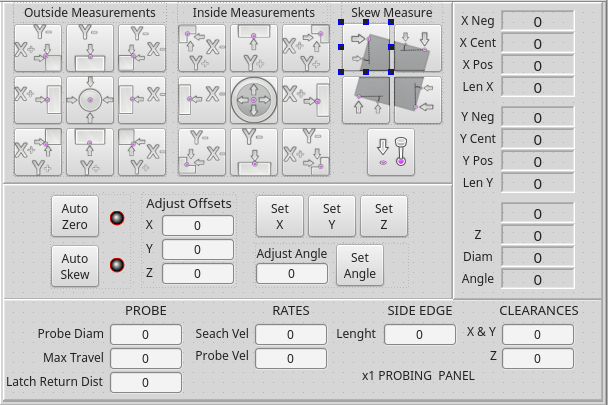
I'm still working on the stand alone probing panel widget and re-organizing some of its python code. The below is a snap shot of the panel.
The following user(s) said Thank You: tommylight
Please Log in or Create an account to join the conversation.
- cmorley
- Offline
- Moderator
-
Less
More
- Posts: 7368
- Thank you received: 2181
7 years 11 months ago #120470
by cmorley
Replied by cmorley on topic qtvcp issues
Looking good! I'm just working some weird hours but will be back on the project soon.
Chris M
Chris M
Please Log in or Create an account to join the conversation.
- auto-mation-assist
- Offline
- Platinum Member
-
Less
More
- Posts: 425
- Thank you received: 81
7 years 11 months ago #120474
by auto-mation-assist
Replied by auto-mation-assist on topic qtvcp issues
Chris,
I have not seen an icon to load the probing panel widget. I can see that it is listed in qtvcp_plugin.py and it has versa_probe_plugin.py. I just don’t see an Icon to grab to drag it in if that is the only reason.
I have been ignoring this because there was so many other things to do and a lot remaining still but I would like get it loaded so I can start eliminating errors.
I have not seen an icon to load the probing panel widget. I can see that it is listed in qtvcp_plugin.py and it has versa_probe_plugin.py. I just don’t see an Icon to grab to drag it in if that is the only reason.
I have been ignoring this because there was so many other things to do and a lot remaining still but I would like get it loaded so I can start eliminating errors.
Please Log in or Create an account to join the conversation.
Moderators: cmorley
Time to create page: 1.936 seconds