
- Posts: 425
- Thank you received: 81
qtvcp issues
- auto-mation-assist
- Offline
- Platinum Member
-

Less
More
7 years 11 months ago #121093
by auto-mation-assist
Replied by auto-mation-assist on topic qtvcp issues
It is always nice to be able to verify that a probe is working properly before using it. So a test led is a good idea. All the probes that I have built for my self have such an led built in which has proved to be very useful.
Please Log in or Create an account to join the conversation.
- auto-mation-assist
- Offline
- Platinum Member
-
Less
More
- Posts: 425
- Thank you received: 81
7 years 11 months ago #121095
by auto-mation-assist
Replied by auto-mation-assist on topic qtvcp issues
Chris,
I have verified that you last fix cured the problem I was seeing with the state of the hal pins.
In relation to hal pins there will be time when a user like myself will want to add custom functions that are not needed by everyone and thus may need to be able to generate hal pins in a handler. Can you provide some input on the best way to do that and give a sample of the required code?
I have verified that you last fix cured the problem I was seeing with the state of the hal pins.
In relation to hal pins there will be time when a user like myself will want to add custom functions that are not needed by everyone and thus may need to be able to generate hal pins in a handler. Can you provide some input on the best way to do that and give a sample of the required code?
Please Log in or Create an account to join the conversation.
- auto-mation-assist
- Offline
- Platinum Member
-
Less
More
- Posts: 425
- Thank you received: 81
7 years 11 months ago - 7 years 11 months ago #121096
by auto-mation-assist
Replied by auto-mation-assist on topic qtvcp issues
I have also been trying to resolve to problem with your work on the versa-probe widget not showing up for me. There are three files that are never called and not compiling.
/qtvcp/plugins/qtvcp_plugin.py
/qtvcp/plugins/versa_probe_plugin.py
/qtvcp/widgets/versa_probe.py
I have manually compiled all three and each is able to be compiled without errors. It seems to me that the last item in the list within qtvcp_plugin.py that worked correctly was for the macro widget. Thus in order for that to add macro widget it would have been able to run the /qtvcp/plugins/qtvcp_plugin.py file in order for that to happen. I recall that one of the files may have had /usr/bin/env python3 on its top entry.
I'm not sure yet what is supposed to wake up the /qtvcp/plugins/qtvcp_plugin.py file and execute it but will try to find some text in some file that relates to that. I will need to copy the qt5vcp_py2 folder to one of my windows based computers to use a search routine that may work for such a search.
/qtvcp/plugins/qtvcp_plugin.py
/qtvcp/plugins/versa_probe_plugin.py
/qtvcp/widgets/versa_probe.py
I have manually compiled all three and each is able to be compiled without errors. It seems to me that the last item in the list within qtvcp_plugin.py that worked correctly was for the macro widget. Thus in order for that to add macro widget it would have been able to run the /qtvcp/plugins/qtvcp_plugin.py file in order for that to happen. I recall that one of the files may have had /usr/bin/env python3 on its top entry.
I'm not sure yet what is supposed to wake up the /qtvcp/plugins/qtvcp_plugin.py file and execute it but will try to find some text in some file that relates to that. I will need to copy the qt5vcp_py2 folder to one of my windows based computers to use a search routine that may work for such a search.
Last edit: 7 years 11 months ago by auto-mation-assist.
Please Log in or Create an account to join the conversation.
- cmorley
- Offline
- Moderator
-

Less
More
- Posts: 7368
- Thank you received: 2181
7 years 11 months ago #121097
by cmorley
Replied by cmorley on topic qtvcp issues
Qtvcp_plugin is actually the first file to be called.
There should be a link to it from...
Usr/....../designer/....plugin/python plug in.
Sorry I'm at work so can,t be specific.
There is a README in
Lib/qtvcp/designer I think that explains things better.
Chris
There should be a link to it from...
Usr/....../designer/....plugin/python plug in.
Sorry I'm at work so can,t be specific.
There is a README in
Lib/qtvcp/designer I think that explains things better.
Chris
Please Log in or Create an account to join the conversation.
- auto-mation-assist
- Offline
- Platinum Member
-
Less
More
- Posts: 425
- Thank you received: 81
7 years 11 months ago - 7 years 11 months ago #121099
by auto-mation-assist
Replied by auto-mation-assist on topic qtvcp issues
Ok I see now that all the plugin files are compiled by qt designer.
I should say the files are compiled when the designer is started.
I should say the files are compiled when the designer is started.
Last edit: 7 years 11 months ago by auto-mation-assist. Reason: I should say the files are compiled when the designer is started.
Please Log in or Create an account to join the conversation.
- auto-mation-assist
- Offline
- Platinum Member
-
Less
More
- Posts: 425
- Thank you received: 81
7 years 11 months ago - 7 years 11 months ago #121102
by auto-mation-assist
Replied by auto-mation-assist on topic qtvcp issues
I have success now as show in the picture. It turns out that the link was there but likely invalid and unusable because the libpyqt5_py2.so file was missing. I don’t know how the file libpyqt5_py2 was removed. Perhaps is was done when I installed the full version of qt which I likely do not need and is very large and time consuming to down load. I don’t think the file was removed by a make clean operation for linuxcnc which is unlikely since this file has to placed there manually as root.
Perhaps the below info will be helpful in some way for others. The examples I have listed below are the paths in my development computer, yours will be different.
The tar.gz for this file can be found in /qt5vcp_py2/lib/python/qtvcp/designer/x86_64/ one of the folders there (qt5.5 or qt5.7). Use which ever is required by your system. I use Linux Mint so I use the qt5.5 version. You should just have to double click on the file to start the extraction process which will result in file creation with the name for either version of: libpyqt5_py2.so
This extracted file needs to be copied to the below location using root privilege. If the complete file path is not there such as a missing python folder you will need to create it.
/usr/lib/x86_64-linux-gnu/qt5/plugins/designer/python
After this ihas been completed a sim link has to be added to that folder as root. In my case I used the below but your path will not be the same to the location of the /lib/python/qtvcp/plugins folder.
# ln -s ///home/cnc/qt5vcp_py2/lib/python/qtvcp/plugins/qtvcp_plugin.py qtvcp_plugin.py
On the date of this note the items in the picture should display in the qt designer.
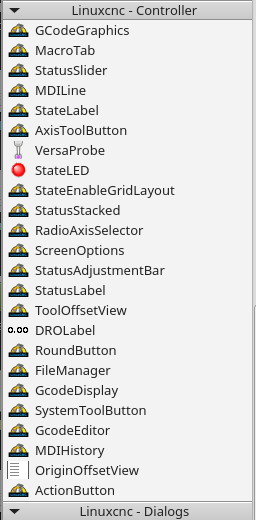
Perhaps the below info will be helpful in some way for others. The examples I have listed below are the paths in my development computer, yours will be different.
The tar.gz for this file can be found in /qt5vcp_py2/lib/python/qtvcp/designer/x86_64/ one of the folders there (qt5.5 or qt5.7). Use which ever is required by your system. I use Linux Mint so I use the qt5.5 version. You should just have to double click on the file to start the extraction process which will result in file creation with the name for either version of: libpyqt5_py2.so
This extracted file needs to be copied to the below location using root privilege. If the complete file path is not there such as a missing python folder you will need to create it.
/usr/lib/x86_64-linux-gnu/qt5/plugins/designer/python
After this ihas been completed a sim link has to be added to that folder as root. In my case I used the below but your path will not be the same to the location of the /lib/python/qtvcp/plugins folder.
# ln -s ///home/cnc/qt5vcp_py2/lib/python/qtvcp/plugins/qtvcp_plugin.py qtvcp_plugin.py
On the date of this note the items in the picture should display in the qt designer.
Last edit: 7 years 11 months ago by auto-mation-assist.
Please Log in or Create an account to join the conversation.
Moderators: cmorley
Time to create page: 0.509 seconds