
- Posts: 7368
- Thank you received: 2181
qtvcp issues
- cmorley
- Offline
- Moderator
-

Less
More
7 years 11 months ago #121026
by cmorley
Replied by cmorley on topic qtvcp issues
The MACRO error is expected and relatively normal. It just didn't find an INI setting for macro subroutines - because there is no INI for a widget in deaigner.
I fired up one of my computers and pulled in the new changes. This is a computer I don't used for development so is pretty clean -codewise.
It showed all widgets no problem.
can you post the file qtvcp_plugin.py.
there should be an entry 'from qtvcp.plugins.versa_probe_plugin import VersaProbePlugin'
If there is then this file isn't being called for some reason.
Then I would look at your designer plugin link to see what it is linked to.
Chris M
I fired up one of my computers and pulled in the new changes. This is a computer I don't used for development so is pretty clean -codewise.
It showed all widgets no problem.
can you post the file qtvcp_plugin.py.
there should be an entry 'from qtvcp.plugins.versa_probe_plugin import VersaProbePlugin'
If there is then this file isn't being called for some reason.
Then I would look at your designer plugin link to see what it is linked to.
Chris M
Please Log in or Create an account to join the conversation.
- cmorley
- Offline
- Moderator
-
Less
More
- Posts: 7368
- Thank you received: 2181
7 years 11 months ago #121028
by cmorley
Hmm maybe I'm not understanding... PHP file?
I don't know PP's file structure, I know it's a little different from linuxcnc.
QtVCP touches (and requires) some python modules such as HAL and hal_glib - I'm not sure if PP even has these files.
It would take a little effort to get it working I think - not huge but it would take some experience - hard for me to say as I have done nothing with PP other then look in an old file structure.
Chris M
Replied by cmorley on topic qtvcp issues
racedirector wrote: Thanks Chris
My thinking was to just design a new screen to sit over the top of the already coded PHP file, I would use the same control names that Torch does. I was originally going to to do this in glade but seeing as you guys are making brilliant progress with QT I thought I might give that a go instead.
Cheers
Hmm maybe I'm not understanding... PHP file?
I don't know PP's file structure, I know it's a little different from linuxcnc.
QtVCP touches (and requires) some python modules such as HAL and hal_glib - I'm not sure if PP even has these files.
It would take a little effort to get it working I think - not huge but it would take some experience - hard for me to say as I have done nothing with PP other then look in an old file structure.
Chris M
Please Log in or Create an account to join the conversation.
- racedirector
- Offline
- Elite Member
-

Less
More
- Posts: 231
- Thank you received: 42
7 years 11 months ago #121031
by racedirector
Replied by racedirector on topic qtvcp issues
Whoops, I meant python file, not php.
Please Log in or Create an account to join the conversation.
- auto-mation-assist
- Offline
- Platinum Member
-

Less
More
- Posts: 425
- Thank you received: 81
7 years 11 months ago #121032
by auto-mation-assist
Replied by auto-mation-assist on topic qtvcp issues
Chris,
I have been working on getting some things copied to the computer that actually controls my machine.
I commented out all the hal pins that are not available yet so that it would load. Now working on eliminating some minor errors.
A file is attached with the errors I need to resolve. It is finding the macros now.
In my original post I had listed the qtvcp_plugin.py file as not compiling by error. I later removed it from my post.
I have attached it just in case and the versa_probe_plugin.py which does not compile. I can also try to figure why that is.
I have been working on getting some things copied to the computer that actually controls my machine.
I commented out all the hal pins that are not available yet so that it would load. Now working on eliminating some minor errors.
A file is attached with the errors I need to resolve. It is finding the macros now.
In my original post I had listed the qtvcp_plugin.py file as not compiling by error. I later removed it from my post.
I have attached it just in case and the versa_probe_plugin.py which does not compile. I can also try to figure why that is.
Please Log in or Create an account to join the conversation.
- auto-mation-assist
- Offline
- Platinum Member
-
Less
More
- Posts: 425
- Thank you received: 81
7 years 11 months ago #121039
by auto-mation-assist
Replied by auto-mation-assist on topic qtvcp issues
I was able to get my error messages cleared and able to home the machine. Its progress.
I found my missing change files and added the on_abort.ngc file from the sim area. I think I pulled it out of axis but there are multiple locations to obtain it.
I found my missing change files and added the on_abort.ngc file from the sim area. I think I pulled it out of axis but there are multiple locations to obtain it.
Please Log in or Create an account to join the conversation.
- auto-mation-assist
- Offline
- Platinum Member
-
Less
More
- Posts: 425
- Thank you received: 81
7 years 11 months ago - 7 years 11 months ago #121042
by auto-mation-assist
Replied by auto-mation-assist on topic qtvcp issues
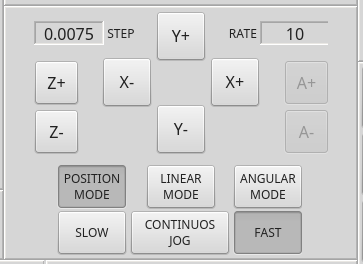
I'm running into a problem that is slowing down my progress a bit. Its a problem between logic states for the created hal pins within qtvcp and those developed in the handler directly from actual state of the buttons.
In my handler I have this code but the only important thing is that the button is either pushed in or not pushed in. I have added some print statements for testing. The print statements show that the button states are correctly determined, as does the logic that uses this function.
The problem with the hal pins is that they do not remain in the proper state. The hal pins will flash the correct 'pushed' in state and then clear to the 'not' pushed in state. As long as the mouse button is held down the states of the hal pins is correct. Thus the pins appear to clear on mouse button release. The buttons are checkable and autoExclusive.
Code:
def pbtn_jog_mode_position_toggle(self,pressed):
if pressed:
print "Pressed"
self.jog_mode=1 #position
self.w.stackedWidget_5.setCurrentIndex(1)
if self.jog_slow_fast==0: # slow jog
self.jog_rate_selected_out=self.jograte_slow_position_value
if self.jog_slow_fast==1: # fast jog
self.jog_rate_selected_out=self.jograte_fast_position_value
else:
print "Not Pressed"
Button state 'darker color is 'pushed in':
Hal show for these two buttons show that the state is incorrect.

In my handler I have this code but the only important thing is that the button is either pushed in or not pushed in. I have added some print statements for testing. The print statements show that the button states are correctly determined, as does the logic that uses this function.
The problem with the hal pins is that they do not remain in the proper state. The hal pins will flash the correct 'pushed' in state and then clear to the 'not' pushed in state. As long as the mouse button is held down the states of the hal pins is correct. Thus the pins appear to clear on mouse button release. The buttons are checkable and autoExclusive.
Code:
def pbtn_jog_mode_position_toggle(self,pressed):
if pressed:
print "Pressed"
self.jog_mode=1 #position
self.w.stackedWidget_5.setCurrentIndex(1)
if self.jog_slow_fast==0: # slow jog
self.jog_rate_selected_out=self.jograte_slow_position_value
if self.jog_slow_fast==1: # fast jog
self.jog_rate_selected_out=self.jograte_fast_position_value
else:
print "Not Pressed"
Button state 'darker color is 'pushed in':
Hal show for these two buttons show that the state is incorrect.
Last edit: 7 years 11 months ago by auto-mation-assist.
Please Log in or Create an account to join the conversation.
Moderators: cmorley
Time to create page: 0.456 seconds