
- Posts: 319
- Thank you received: 90
Error in tool_offsetview.py
- MarkoPolo
- Offline
- Elite Member
-

Less
More
3 years 10 months ago #259771
by MarkoPolo
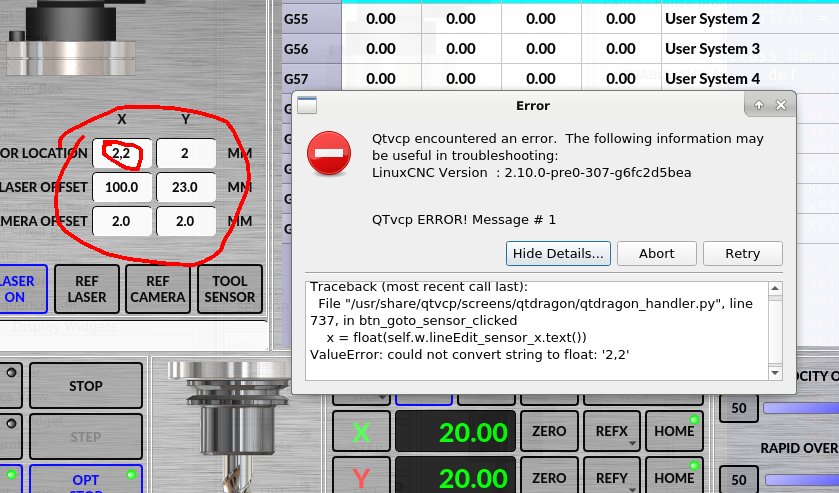
If these fields should be editable then the problem is that you can't enter a period. If you enter a comma, an error occurs. It is the same in the fields of the "utils" and "settings" tabs, in the probe tab, only two fields can be entered with a dot, in "probe tool" and "max z dist"
Marek
Replied by MarkoPolo on topic Error in tool_offsetview.py
If these fields should be editable then the problem is that you can't enter a period. If you enter a comma, an error occurs. It is the same in the fields of the "utils" and "settings" tabs, in the probe tab, only two fields can be entered with a dot, in "probe tool" and "max z dist"
Marek
- cmorley
- Offline
- Moderator
-

Less
More
- Posts: 7368
- Thank you received: 2181
3 years 10 months ago #259772
by cmorley
Replied by cmorley on topic Error in tool_offsetview.py
What are you using to enter data - external keyboard or virtual one?
In my testing I can use either. Comma will give an error - I should see if I can trap that.
In my testing I can use either. Comma will give an error - I should see if I can trap that.
- MarkoPolo
- Offline
- Elite Member
-
Less
More
- Posts: 319
- Thank you received: 90
3 years 10 months ago #259811
by MarkoPolo
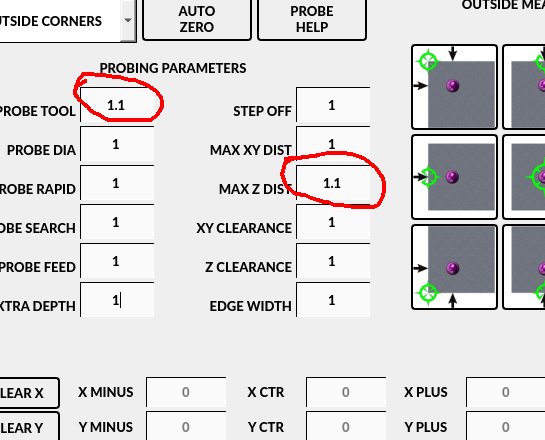
I am entering data with a normal keyboard. I did tests on a virtual machine but also on a normal computer with a normal keyboard, everywhere the same problem. I opened fresh qtdragon configurations and it's the same. It's strange that in "probe basic" you can enter a dot in two fields, as in the screenshot.
Replied by MarkoPolo on topic Error in tool_offsetview.py
I am entering data with a normal keyboard. I did tests on a virtual machine but also on a normal computer with a normal keyboard, everywhere the same problem. I opened fresh qtdragon configurations and it's the same. It's strange that in "probe basic" you can enter a dot in two fields, as in the screenshot.
- cmorley
- Offline
- Moderator
-
Less
More
- Posts: 7368
- Thank you received: 2181
3 years 10 months ago #259855
by cmorley
Replied by cmorley on topic Error in tool_offsetview.py
is this new or you just noticed it? Do you have an customization in the handler file?
- hottabich
- Offline
- Platinum Member
-

Less
More
- Posts: 574
- Thank you received: 96
3 years 10 months ago - 3 years 10 months ago #259856
by hottabich
Replied by hottabich on topic Error in tool_offsetview.py
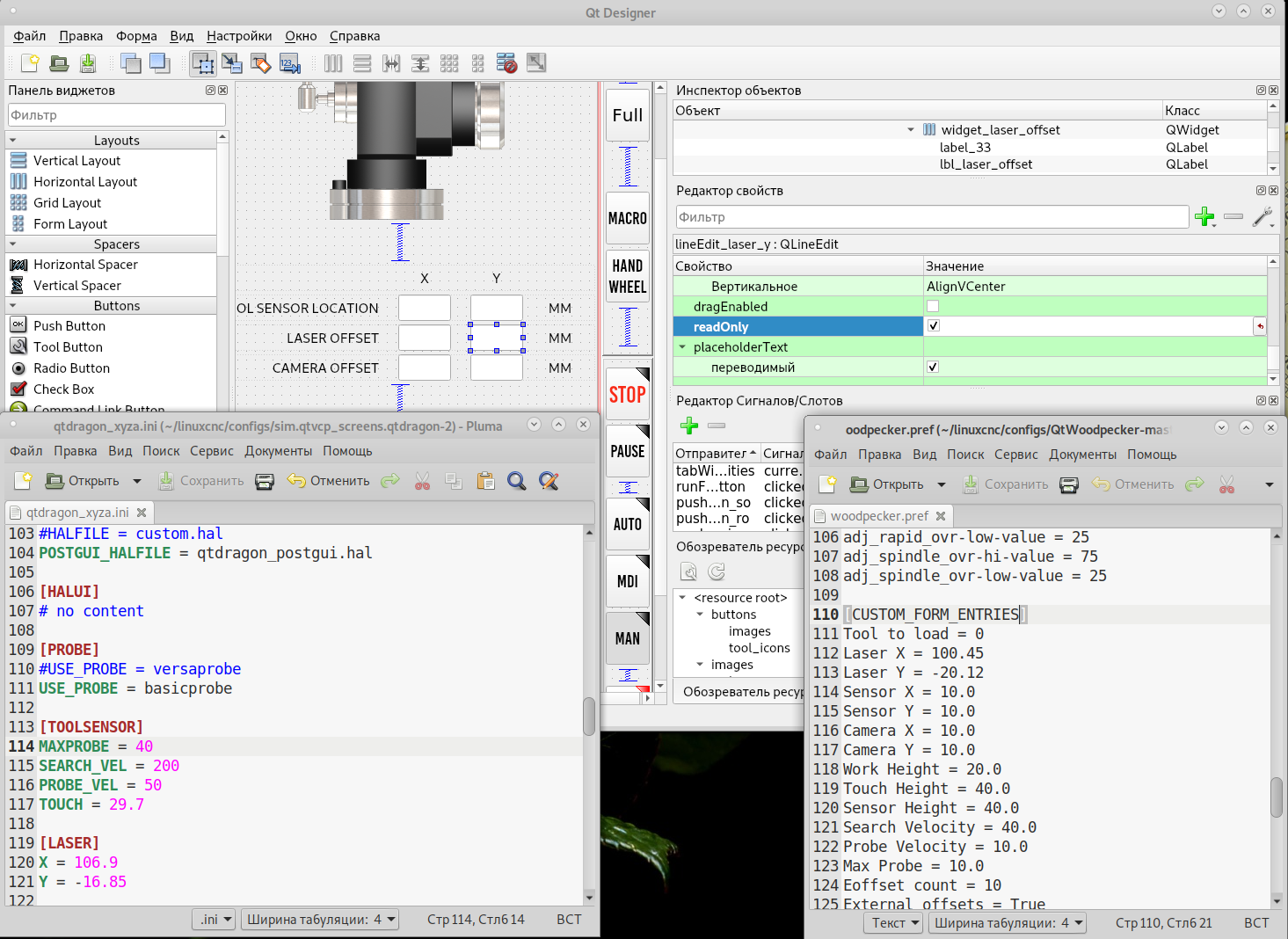
16. Laser buttonsThe LASER ON/OFF button in intended to turn an output on or off which is connected to a small laser crosshair projector. When the crosshair is positioned over a desired reference point on the workpiece, the REF LASER button can be pushed which then sets the X and Y offsets to the values indicated by the LASER OFFSET fields in the Settings page and the INI file.Doesn't match description.
Doesn't match description. Once fixed the laser or camera is registered in pref/ CUSTOM_FORM_ENTRIES, and there is no need to edit.
Doesn't match description. Once fixed the laser or camera is registered in pref/ CUSTOM_FORM_ENTRIES, and there is no need to edit.
Last edit: 3 years 10 months ago by hottabich.
- MarkoPolo
- Offline
- Elite Member
-
Less
More
- Posts: 319
- Thank you received: 90
3 years 10 months ago #259862
by MarkoPolo
Replied by MarkoPolo on topic Error in tool_offsetview.py
The problem has been around for a long time. The support file and all the files are factory, this is the version for testing the latest version of linuxcnc. I also have another installation version 2.9.0-pre0-6931-g228dc1a79 , but there is an identical problem.
hottabich, is dot typing allowed on your qtdragon installation? Because it's not just about the laser and camera settings, the problem is in all tabs, "settings", "utils", only in "probe" in two fields you can enter a dot, as in the previous screenshot.
hottabich, is dot typing allowed on your qtdragon installation? Because it's not just about the laser and camera settings, the problem is in all tabs, "settings", "utils", only in "probe" in two fields you can enter a dot, as in the previous screenshot.
Moderators: cmorley
Time to create page: 0.149 seconds