
- Posts: 297
- Thank you received: 31
Error in tool_offsetview.py
- Roguish
- Offline
- Elite Member
-

Less
More
3 years 9 months ago #261117
by Roguish
Replied by Roguish on topic Error in tool_offsetview.py
quick reply, thanks.
Saw the button. It was showing on X.... would it be on all axes? x,y,z??? and work appropriately for the axis selected, like Z?
can you shove it up to 2.10?
I don't want an 'embed' panel I would like a seperate panel. I found a good example in qttouchy. the example calls the sim_panel via a call in the postgui.hal file.
loadusr -Wn sim_panel qtvcp -a -d sim_panel.ui
show pin sim_panel
if I create my-panel.ui, where does it go? does it need a seperate handler (I only call for existing stuff- ferror and joint velocity pin)
what does the 'show pin' command do? is it necessary?
thanks
Saw the button. It was showing on X.... would it be on all axes? x,y,z??? and work appropriately for the axis selected, like Z?
can you shove it up to 2.10?
I don't want an 'embed' panel I would like a seperate panel. I found a good example in qttouchy. the example calls the sim_panel via a call in the postgui.hal file.
loadusr -Wn sim_panel qtvcp -a -d sim_panel.ui
show pin sim_panel
if I create my-panel.ui, where does it go? does it need a seperate handler (I only call for existing stuff- ferror and joint velocity pin)
what does the 'show pin' command do? is it necessary?
thanks
- cmorley
- Offline
- Moderator
-

Less
More
- Posts: 7368
- Thank you received: 2181
3 years 9 months ago #261137
by cmorley
Replied by cmorley on topic Error in tool_offsetview.py
Yes all axes
Almost ready to push.
A separate panel is easier. (You can also use gladevcp or pyvcp if you would rather)
put the .ui file in your configuration folder
You shouldn't need a handler file but there is a bug - soon to push fix.
loadusr -Wn my_panel qtvcp -a my-panel
show pin is not necessary - it prints the panels pins in the termnal
Chris
Almost ready to push.
A separate panel is easier. (You can also use gladevcp or pyvcp if you would rather)
put the .ui file in your configuration folder
You shouldn't need a handler file but there is a bug - soon to push fix.
loadusr -Wn my_panel qtvcp -a my-panel
show pin is not necessary - it prints the panels pins in the termnal
Chris
The following user(s) said Thank You: Roguish, tommylight
- Roguish
- Offline
- Elite Member
-
Less
More
- Posts: 297
- Thank you received: 31
3 years 9 months ago - 3 years 9 months ago #261143
by Roguish
Replied by Roguish on topic Error in tool_offsetview.py
the reason I asked this is that it makes mods to the standard screen unnecssary. I actually have one on my big BridgePort that runs with axis. Made it in qtpyvcp, about 2 years ago.....
thanks again. let me know back here when you get everything pushed..
don't forget the docs.
thanks again. let me know back here when you get everything pushed..
don't forget the docs.
Last edit: 3 years 9 months ago by Roguish.
- cmorley
- Offline
- Moderator
-
Less
More
- Posts: 7368
- Thank you received: 2181
3 years 9 months ago #261144
by cmorley
Replied by cmorley on topic Error in tool_offsetview.py
pushed - no docs yet
The following user(s) said Thank You: Roguish
- Roguish
- Offline
- Elite Member
-
Less
More
- Posts: 297
- Thank you received: 31
3 years 9 months ago - 3 years 9 months ago #261375
by Roguish
Replied by Roguish on topic Error in tool_offsetview.py
Chris. I see it got pushed to master. I grabbed one of Seb's new debs.
making progress.
I may need some design help...... at least some css assistance.
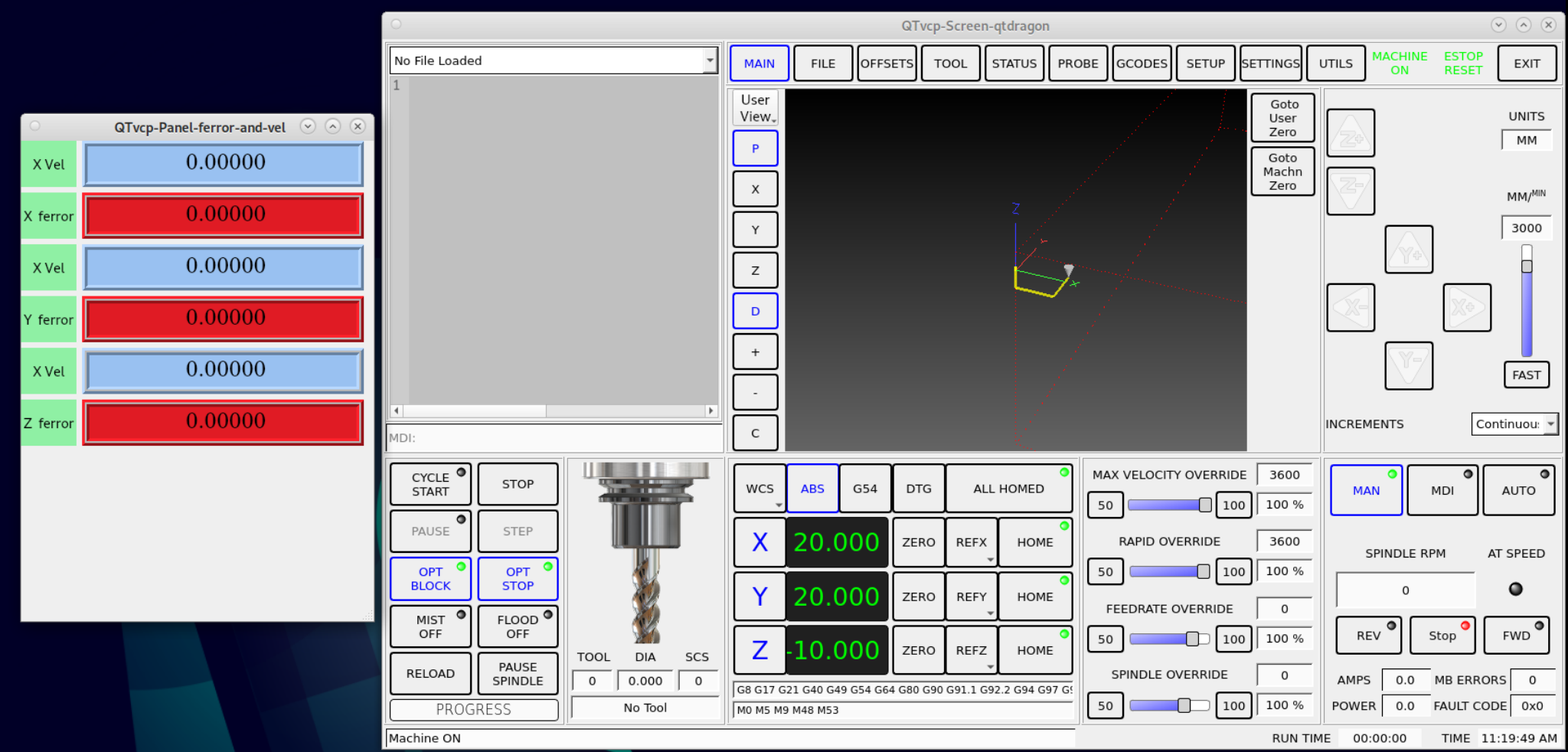
making progress.
I may need some design help...... at least some css assistance.
Last edit: 3 years 9 months ago by Roguish.
- Roguish
- Offline
- Elite Member
-
Less
More
- Posts: 297
- Thank you received: 31
3 years 9 months ago #261381
by Roguish
Replied by Roguish on topic Error in tool_offsetview.py
OK,
little help please. I have looked through all the docs I can find.....
where and how can I specify the size and location of each screen?
in the .ini ?
in the .pref ?
thanks in advance....
little help please. I have looked through all the docs I can find.....
where and how can I specify the size and location of each screen?
in the .ini ?
in the .pref ?
thanks in advance....
Moderators: cmorley
Time to create page: 0.851 seconds