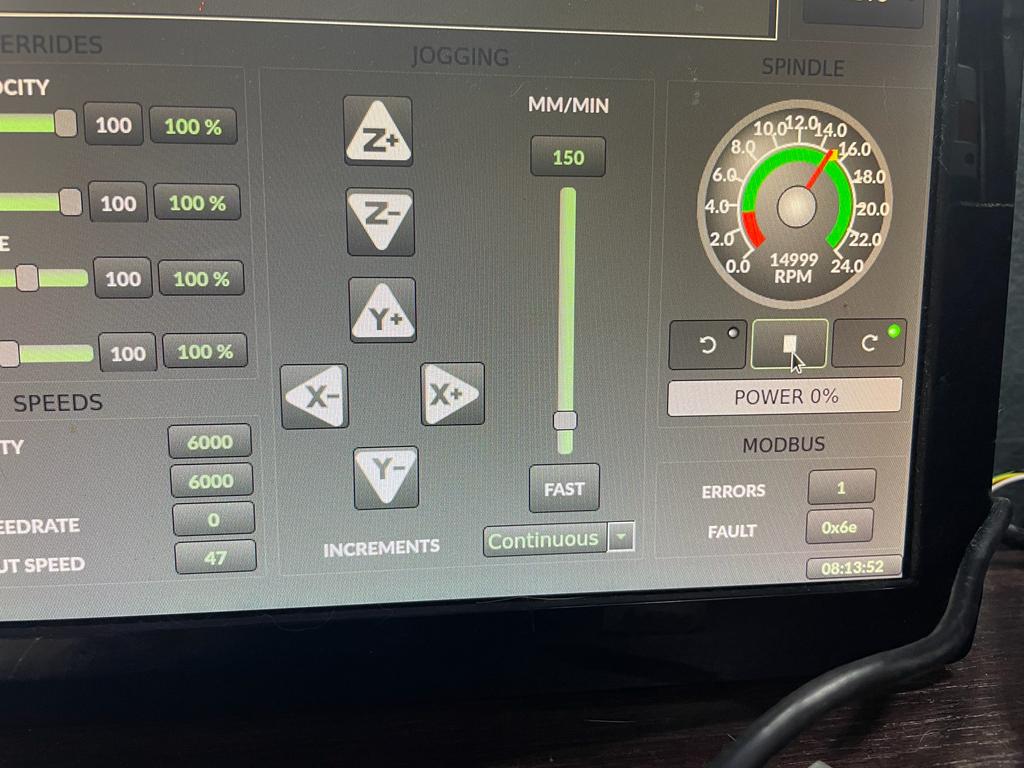
Atm everything works except the power bar and error/fault display underneath the spindle gauge.I still get a s32/u32 error even if I edit the handler.py located at /usr/share/qtvcp/screens/gtdragon_hd/ when trying to display error/faults.
Also I think some pins need to be connected differently in the vfd.hal to have the power bar displayed.
When everything works correctly I would like to edit the first post of this thread with the correct solution.
This is what I have done till now to get the YL620 VFD to work with qtdragon_hd . Bellow the links as a reference because this is not my work. I’m just trying to gather it all together in one place so life should be easier for someone else with the same setup.
forum.linuxcnc.org/qtvcp/42161-qtdragon-pins-rpm-and-docs
github.com/aekhv/vfdmod/wiki
github.com/xsnoopy/LinuxCNC-Yalang-yl620...s485-Modbus---VFDmod
linuxcnc.org/docs/devel/html/gui/qtdragon.html#_spindle
Using LinuxCNC 2.9 on Debian Buster.
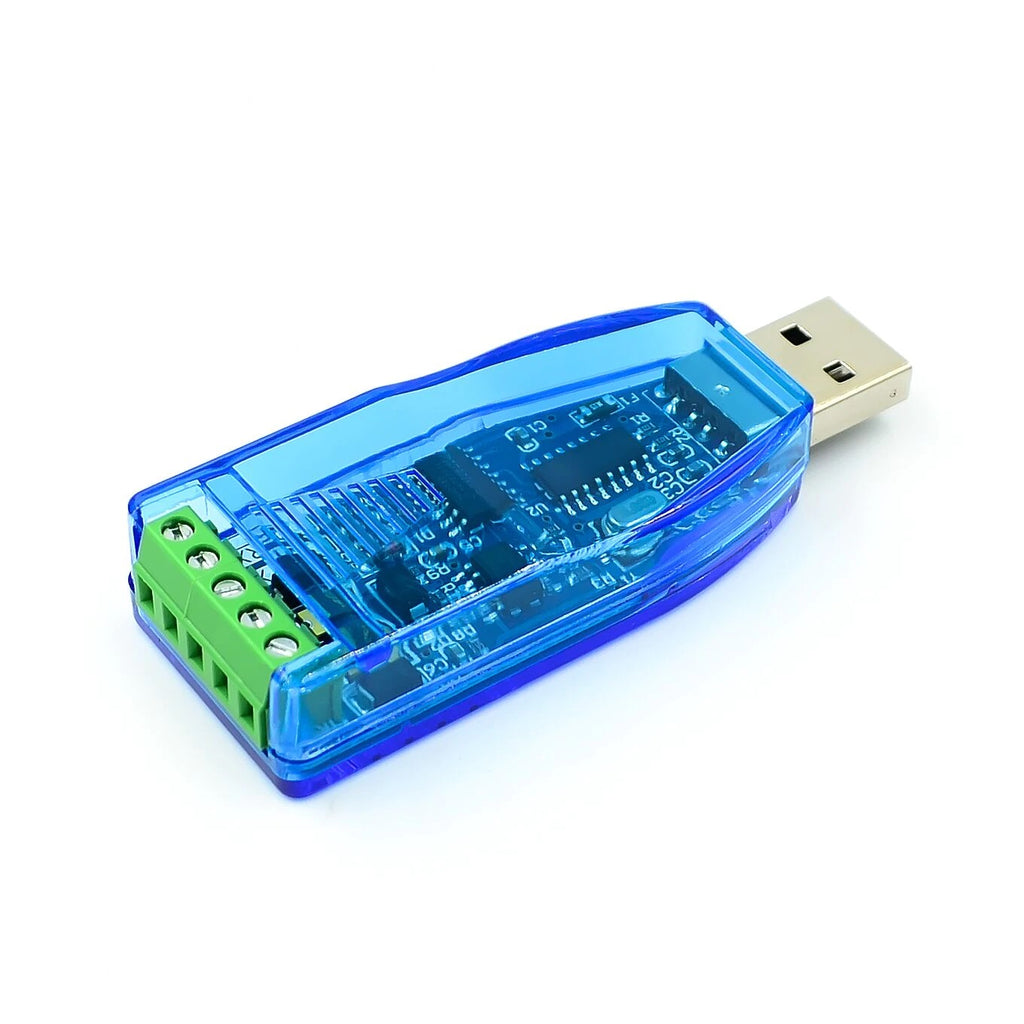
This solution is based arround VFDMod and Modbus RS485 communication with a Yalang YL620 Variable Frequency Drive. I am using a RS485 usb adapter as the one in the picture bellow
#1 Set up the Yalang YL620 VFD to drive to receive signals via Modbus.
P00.01 = 3 Start/Stop command source RS485
P03.00 = 4 for 19200Bps
P03.01 = 1 RS485 slave address 1
P03.02 = 2 Data transfer format 8 bit data, 1 stop bit, no parity
P07.08 = 5 Frequency source selection RS 485
#2 Install VFDMod from here
github.com/aekhv/vfdmod/releases
#3 Create the vfd.hal and vfd.ini files in your linuxcnc/config/”your_machine_name” folder
vfd.hal
Code:
# yl_vfd speed feedback is given in RPM, while some pins need it in
# RPS, so we use a scale
loadrt scale names=scale_to_rpm
net spindle-speed spindle.0.speed-out => vfdmod.spindle.rpm-in
net spindle-cw spindle.0.forward => vfdmod.control.run-forward
net spindle-ccw spindle.0.reverse => vfdmod.control.run-reverse
net spindle-speed-fb <= vfdmod.spindle.rpm-out
net spindle-current <= vfdmod.parameters.OutputCurent
net spindle-frequency <= vfdmod.parameters.TargetFrequency
net spindle-voltage <= vfdmod.parameters.OutputVoltage
net spindle-comm-ok <= vfdmod.rs485.is-connected
net spindle-at-speed vfdmod.spindle.at-speed => spindle.0.at-speed
net spindle-current => qtdragon.spindle-amps
net spindle-voltage => qtdragon.spindle-volts
addf scale_to_rpm servo-thread
setp scale_to_rpm.gain 0.01666666
net spindle-speed-fb => scale_to_rpm.in
net spindle-speed-in spindle.0.speed-in <= scale_to_rpm.out
vfd.ini
Code:
# **********************************************************
#
# Predefined (required) groups start here! These groups are:
#
# [Common]
# [RS485]
# [Control]
# [SpindleRpmIn]
# [SpindleRpmOut]
#
# **********************************************************
[Common]
# HAL component name. Default value is 'vfdmod'.
;ComponentName=vfdmod
# A maximum spindle speed shall be greater than zero.
MaxSpeedRPM=24000
# A minimum spindle speed shall be greater than zero
# and lower than (or equal to) MaxSpeedRPM.
MinSpeedRPM=4000
# A maximum allowed difference between command speed and output speed
# to set HAL 'at-speed' output to TRUE.
# 0.00 = 0%
# 1.00 = 100%
# Default value is 0.05 (5%).
;AtSpeedThreshold=0.05
[RS485]
# VFD slave address.
SlaveAddress=1
# Serial device system path.
SerialDevice=/dev/ttyUSB0
# Communication speed.
BaudRate=19200
# Data bits: always 8.
DataBits=8
# Parity: 'N' for none (default), 'E' for even, 'O' for odd.
Parity=N
# Stop bits: 1 (default) or 2.
StopBits=1
# Loop delay in milliseconds, default value is 200 ms.
# Range: 0 ... 10000.
;LoopDelay=200
# Delay in characters at front of every MODBUS request.
# MODBUS specification recommends at least 3.5 characters,
# so default value must be 4.
# Increase this value if communication errors happen.
# Range: 0 ... 100.
;ProtocolDelay=4
# A minimum count of successfull requests to set HAL 'is-connected' output
# to TRUE. Default value is 10. Range: 1 ... 100.
;IsConnectedDelay=10
# Comma separated critical errors that call reconnection event.
# For example: error code 5 occures when SerialDevice has been
# physically disconnected.
;ConnectionErrorList=5
# Delay in milliseconds between reconnection attempts, this parameter
# is active when ConnectionErrorList is not empty. Default value is 1000 ms.
# Range: 0 ... 10000.
;ConnectionDelay=1000
[Control]
# Function code:
# 0x06 - write single register (default).
# 0x10 - write multiple registers.
# 0x05 - write single coil.
# 0x0F - write multiple coils.
;FunctionCode=0x06
# **********************************************************
# Values below are active when FunctionCode is 0x06 or 0x10.
# **********************************************************
# An address of the control register.
Address=0x2000
# A value to run spindle forward.
RunForwardValue=0x0012
# A value to run spindle reverse.
RunReverseValue=0x0022
# A value to reset a fault state.
# If this parameter is commented then fault reset feature will be disabled.
;FaultResetValue=0x?????
#Sollte 0x0080
# FaultResetValue=0x0080
# A value to stop spindle.
StopValue=0x0001
# **********************************************************
# Values below are active when FunctionCode is 0x05 or 0x0F.
# **********************************************************
# An address of the coil that turns spindle on.
;RunCoil=0x????
# An address of the coil that sets spindle direction.
;DirectionCoil=0x????
# An address of the coil that resets a fault state.
# If this parameter is commented then fault reset feature will be disabled.
;FaultResetCoil=0x????
[SpindleRpmIn]
# Function code:
# 0x06 - write single register (default).
# 0x10 - write multiple registers.
;FunctionCode=0x06
# An address of the command speed (or frequency) register.
Address=0x2001
# Multiplier and Divider are integer values to correct command speed value
# before it will be written to command speed register.
# Corrected command speed = (command speed) x Multiplier / Divider.
# Use both (Multiplier & Divider) to reach float coefficient.
Multiplier=1
Divider=6
[SpindleRpmOut]
# An address of the output speed (or frequency) register.
Address=0x200B
# Multiplier and Divider are integer values to correct output speed value
# after it has been read from output speed register.
# Corrected output speed = (output speed) x Multiplier / Divider.
# Use both (Multiplier & Divider) to reach float coefficient.
Multiplier=6
Divider=1
# **********************************************************
#
# User defined groups start here!
#
# Each user group can be named at user choice, spaces are
# allowed. For example:
# [User parameter 5]
# [123]
# [DC bus voltage]
# [output-current]
#
# Please note: group names are case insensitive, it means
# [My-Parameter] and [my-parameter] are the same.
#
# **********************************************************
[TargetFrequency]
FunctionCode=0x03
Address=0x200A
PinType=float
Multiplier=1
Divider=10
PinName=TargetFrequency
[OutputCurrent]
FunctionCode=0x03
Address=0x200C
PinType=float
Multiplier=1
Divider=1
PinName=OutputCurent
[OutputVoltage]
FunctionCode=0x03
Address=0x200D
PinType=float
Multiplier=1
Divider=1
PinName=OutputVoltage
[MainLineVoltage]
FunctionCode=0x03
Address=0x200E
PinType=float
Multiplier=1
Divider=1
PinName=MainLineVoltage
[CurrentAccelerationTime]
FunctionCode=0x03
Address=0x2011
PinType=float
Multiplier=1
Divider=10
PinName=CurrentAccelerationTime
[CurrentDeAccelerationTime]
FunctionCode=0x03
Address=0x2012
PinType=float
Multiplier=1
Divider=10
PinName=CurrentDeAccelerationTime
[P00.00]
FunctionCode=0x03
Address=0x0000
PinType=float
Multiplier=1
Divider=10
PinName=P00.00
[P00.01]
FunctionCode=0x03
Address=0x0001
PinType=u32
Multiplier=1
Divider=1
PinName=P00.01
[P00.24]
functionCode=0x06
Address=0x0018
PinType=u32
Multiplier=1
Divider=1
PinName=P00.24
[P06.00]
FunctionCode=0x03
Address=0x0600
PinType=float
Multiplier=1
Divider=10
PinName=P06.00
[P06.01]
FunctionCode=0x03
Address=0x0601
PinType=float
Multiplier=1
Divider=10
PinName=P06.01
[P06.02]
FunctionCode=0x03
Address=0x0602
PinType=float
Multiplier=1
Divider=10
PinName=P06.02
[P11.00]
functionCode=0x06
Address=0x0B00
PinType=u32
Multiplier=1
Divider=1
PinName=P11.00
[P11.01]
functionCode=0x06
Address=0x0B01
PinType=u32
Multiplier=1
Divider=1
PinName=P11.01
[P11.02]
functionCode=0x06
Address=0x0B02
PinType=u32
Multiplier=1
Divider=1
PinName=P11.02
[P11.03]
functionCode=0x06
Address=0x0B03
PinType=u32
Multiplier=1
Divider=1
PinName=P11.03
[P11.04]
functionCode=0x06
Address=0x0B04
PinType=u32
Multiplier=1
Divider=1
PinName=P11.04
#[User parameter 1]
# Function code:
# 0x01 - read coils.
# 0x03 - read holding registers (default).
#;FunctionCode=0x03
# An address of the user parameter register or coil.
#Address=0x????
# HAL pin type: 'bit', 'float', 's32' or 'u32'.
# This parameter is active when FunctionCode is 0x03.
#PinType=float
# See above.
# These parameters are active when PinType is not 'bit'.
#;Multiplier=1
#;Divider=1
# Bit mask value, default is 0xFFFF.
# This parameter is active when PinType is 'bit'.
#;BitMask=0xFFFF
# HAL pin name.
#PinName=user-float-parameter
#[User parameter 2]
#Address=0x????
#;Multiplier=1
#;Divider=1
#PinType=s32
#PinName=user-s32-parameter
#[User parameter 3]
#Address=0x????
#;Multiplier=1
#;Divider=1
#PinType=u32
#PinName=user-u32-parameter
#[User parameter 4]
#Address=0x????
#PinType=bit
#;BitMask=0xFFFF
#PinName=user-bit-parameter
#[User parameter 5]
#FunctionCode=0x01
#Address=0x????
#PinName=user-coil-parameter
#4 Make qtdragon_hd correctly display the spindle gauge division
In the .ini file of your machine under [DISPLAY] add
Code:
#Spindle
MIN_SPINDLE_OVERRIDE = 0.5
MAX_SPINDLE_OVERRIDE = 1.5
DEFAULT_SPINDLE_0_SPEED = 3500
SPINDLE_INCREMENT = 200
MIN_SPINDLE_0_SPEED = 3500
MAX_SPINDLE_0_SPEED = 24000
MAX_SPINDLE_POWER = 1500
#5 Add
Code:
loadusr -W vfdmod vfd.ini
to the custom.hal file.
#6 Add
to the postgui_call_list.hal file.


.... I'm putting together a pseudo guide of what I have done hoping it might help someone else with the same setup. The only thing I still have to get working is the power display and error report underneath the spindle gauge but it seems that @MarkoPolo has a solution for that problem also.