
- Posts: 4793
- Thank you received: 1480
Servo Wiring and Tuning detailed How To example Mesa 7i77.
- Todd Zuercher
- Offline
- Platinum Member
-

Less
More
7 years 2 months ago #141928
by Todd Zuercher
Replied by Todd Zuercher on topic Servo Wiring and Tuning detailed How To example Mesa 7i77.
The following user(s) said Thank You: Type_Zero_Design
Please Log in or Create an account to join the conversation.
- Type_Zero_Design
- Offline
- Premium Member
-

Less
More
- Posts: 133
- Thank you received: 7
7 years 2 months ago - 7 years 2 months ago #142014
by Type_Zero_Design
Replied by Type_Zero_Design on topic Servo Wiring and Tuning detailed How To example Mesa 7i77.
Todd,
I noticed that you have this portion in your .Hal that mine dose not have.
**** Edit looks like I have everything starting at net x-pos-fb just under a different title. I'm assuming I need all the prefix setup lines as well?***
# ---Encoder feedback signals/setup---
setp hm2_5i25.0.encoder.00.counter-mode 0
setp hm2_5i25.0.encoder.00.filter 1
setp hm2_5i25.0.encoder.00.index-invert 0
setp hm2_5i25.0.encoder.00.index-mask 0
setp hm2_5i25.0.encoder.00.index-mask-invert 0
setp hm2_5i25.0.encoder.00.scale [AXIS_0]ENCODER_SCALE
net x-pos-fb <= hm2_5i25.0.encoder.00.position
net x-vel-fb <= hm2_5i25.0.encoder.00.velocity
net x-pos-fb => axis.0.motor-pos-fb
net x-index-enable axis.0.index-enable <=> hm2_5i25.0.encoder.00.index-enable
net x-pos-rawcounts <= hm2_5i25.0.encoder.00.rawcounts
Do I need to have this in my .Hal for each axis?
Also I'm assuming that my encoders counts should be moving positive when the axis is moving positive correct? If not where is that correction made?
Sorry for all the questions.
I noticed that you have this portion in your .Hal that mine dose not have.
**** Edit looks like I have everything starting at net x-pos-fb just under a different title. I'm assuming I need all the prefix setup lines as well?***
# ---Encoder feedback signals/setup---
setp hm2_5i25.0.encoder.00.counter-mode 0
setp hm2_5i25.0.encoder.00.filter 1
setp hm2_5i25.0.encoder.00.index-invert 0
setp hm2_5i25.0.encoder.00.index-mask 0
setp hm2_5i25.0.encoder.00.index-mask-invert 0
setp hm2_5i25.0.encoder.00.scale [AXIS_0]ENCODER_SCALE
net x-pos-fb <= hm2_5i25.0.encoder.00.position
net x-vel-fb <= hm2_5i25.0.encoder.00.velocity
net x-pos-fb => axis.0.motor-pos-fb
net x-index-enable axis.0.index-enable <=> hm2_5i25.0.encoder.00.index-enable
net x-pos-rawcounts <= hm2_5i25.0.encoder.00.rawcounts
Do I need to have this in my .Hal for each axis?
Also I'm assuming that my encoders counts should be moving positive when the axis is moving positive correct? If not where is that correction made?
Sorry for all the questions.
Last edit: 7 years 2 months ago by Type_Zero_Design. Reason: Found mistake
Please Log in or Create an account to join the conversation.
- tommylight
- Offline
- Moderator
-

Less
More
- Posts: 22011
- Thank you received: 7491
7 years 2 months ago #142029
by tommylight
Replied by tommylight on topic Servo Wiring and Tuning detailed How To example Mesa 7i77.
I do think that you need that for each axis, plus you need another line with pid in it to the encoder, and the stepgens should be changed to mode 1 i think or velocity mode, not position mode as they usually are.
As for encoder counting in the correct direction, just change the scale or encoder_scale by adding a " - " in front of the number.
Later on you might also need to add that minus to any or all of the axis outputs for it to corelate to the correct motion direction.
As for encoder counting in the correct direction, just change the scale or encoder_scale by adding a " - " in front of the number.
Later on you might also need to add that minus to any or all of the axis outputs for it to corelate to the correct motion direction.
The following user(s) said Thank You: Type_Zero_Design
Please Log in or Create an account to join the conversation.
- Todd Zuercher
- Offline
- Platinum Member
-
Less
More
- Posts: 4793
- Thank you received: 1480
7 years 2 months ago #142077
by Todd Zuercher
Replied by Todd Zuercher on topic Servo Wiring and Tuning detailed How To example Mesa 7i77.
The encoder scale (and the matching line in the INI file that the variable references) are very important. the other setp lines I think are all default values and may not be nessisary.
The net line for raw counts isn't necessary and is not used in my config. and the index-enable is only needed if you are using the encoder index for homing purposes.
The other net lines should match up with ones you already have for the most part. (your existing signal names may differ)
The net line for raw counts isn't necessary and is not used in my config. and the index-enable is only needed if you are using the encoder index for homing purposes.
The other net lines should match up with ones you already have for the most part. (your existing signal names may differ)
The following user(s) said Thank You: Type_Zero_Design
Please Log in or Create an account to join the conversation.
- andypugh
- Offline
- Moderator
-
Less
More
- Posts: 19899
- Thank you received: 4655
7 years 2 months ago #142110
by andypugh
Possibly the PID is not connected to the feedback?
Replied by andypugh on topic Servo Wiring and Tuning detailed How To example Mesa 7i77.
Todd Zuercher wrote: If the DRO is working, the joint.N.f-error will be working as well, They are calculated from the same input..
Possibly the PID is not connected to the feedback?
The following user(s) said Thank You: Type_Zero_Design
Please Log in or Create an account to join the conversation.
- Type_Zero_Design
- Offline
- Premium Member
-
Less
More
- Posts: 133
- Thank you received: 7
7 years 2 months ago #142470
by Type_Zero_Design
Replied by Type_Zero_Design on topic Servo Wiring and Tuning detailed How To example Mesa 7i77.
Ok Guys, Good News!
I finnally got the opportunity to get back on the machine again and with all your help I think I got my .HAL and .INI straightened out.
So DRO seems to be working appropriately (shows movement when moved by hand w/o drive enabled) , table movement on indicator matches the DRO movement on screen.
So now opening halscope, Ive run into a few things.
1. How do you get the the display to be bigger in the grid? You can see in my attached photo that the channels are very small and hardly visible.
2. I dont seem to have the lines similar to yours but i'm not sure if thats related to the view in hal scope.
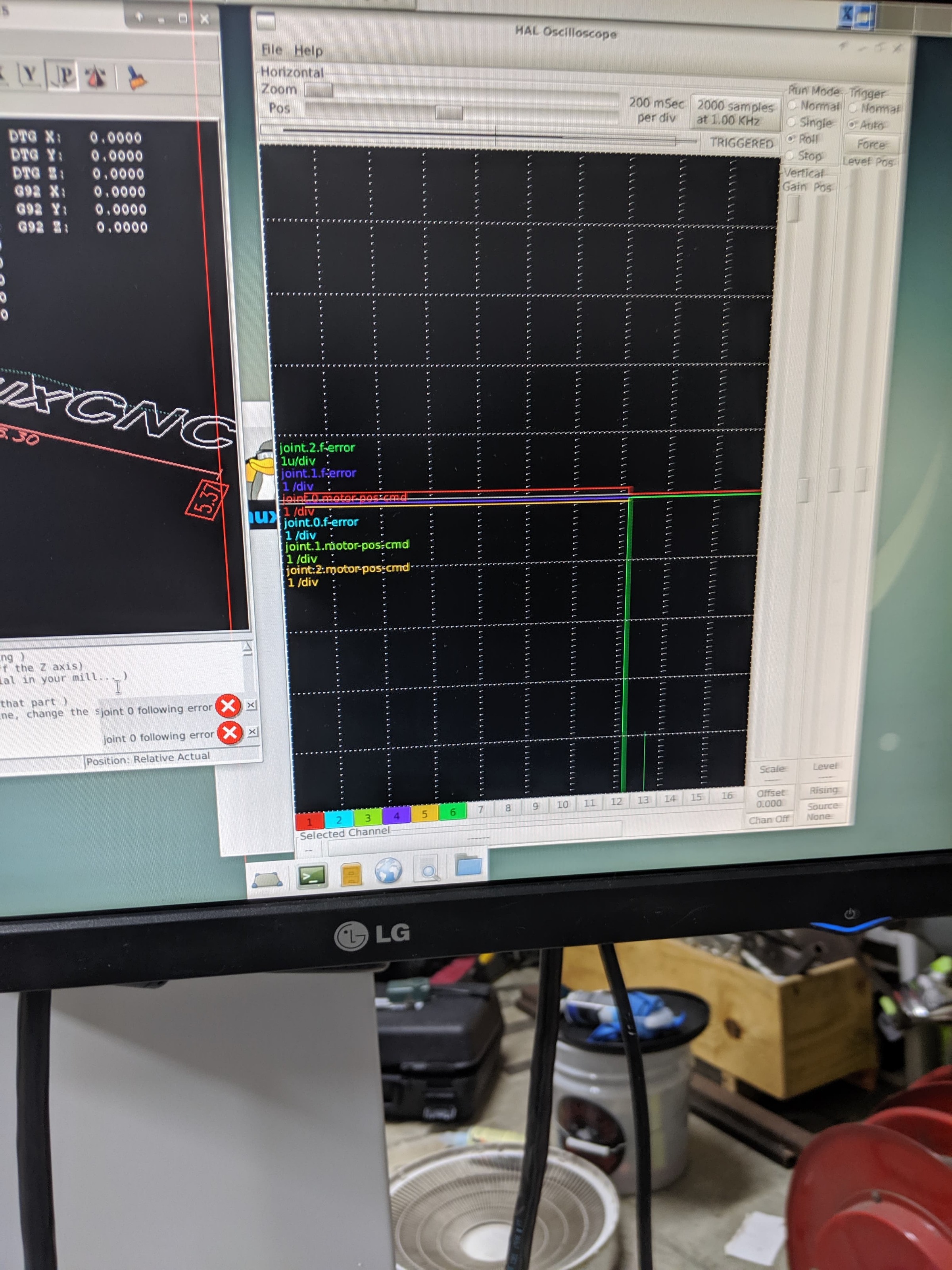
I finnally got the opportunity to get back on the machine again and with all your help I think I got my .HAL and .INI straightened out.
So DRO seems to be working appropriately (shows movement when moved by hand w/o drive enabled) , table movement on indicator matches the DRO movement on screen.
So now opening halscope, Ive run into a few things.
1. How do you get the the display to be bigger in the grid? You can see in my attached photo that the channels are very small and hardly visible.
2. I dont seem to have the lines similar to yours but i'm not sure if thats related to the view in hal scope.
Please Log in or Create an account to join the conversation.
Time to create page: 0.266 seconds