
- Posts: 711
- Thank you received: 9
Prototrak Plus Retrofit with Mesa 7i77 & 5i25 cards
- new2linux
- Offline
- Platinum Member
-

Less
More
9 years 8 months ago - 9 years 8 months ago #88390
by new2linux
Replied by new2linux on topic Prototrak Plus Retrofit with Mesa 7i77 & 5i25 cards
Todd & andypung many thanks to you guys for your help!!
If all the lights work (on the card) is that the ok or is there a way to test cards to see if the card has issues?
many thanks for all
If all the lights work (on the card) is that the ok or is there a way to test cards to see if the card has issues?
many thanks for all
Last edit: 9 years 8 months ago by new2linux. Reason: tweek
Please Log in or Create an account to join the conversation.
- tommylight
- Offline
- Moderator
-

Less
More
- Posts: 22011
- Thank you received: 7491
9 years 8 months ago #88391
by tommylight
Replied by tommylight on topic Prototrak Plus Retrofit with Mesa 7i77 & 5i25 cards
setp hm2_5i25.0.7i77.0.3. <==== you can not change that, that is a mesa board sserial address. They have to be the same in your hal file.
You can change the analogout.0 and encoder.0 respectively.
You can change the analogout.0 and encoder.0 respectively.
The following user(s) said Thank You: new2linux
Please Log in or Create an account to join the conversation.
- andypugh
- Offline
- Moderator
-
Less
More
- Posts: 19899
- Thank you received: 4655
9 years 8 months ago #88423
by andypugh
You can read the inputs and drive the outputs manually.
Wire an MPG or even a motor + encoder to one of your encoder terminal blocks.
Power up the cards.
Start the PC, but not LinuxCNC, and open a terminal window.
Start a HAL session
You can now type the usual HAL commands and make changes to the live system
The commands below can use tab-completion. I suggest that you actively do this, to ensure the correct spelling of the HAL pins, which I am guessing from memory.
At this point I would expect to see some LEDs on the cards, and maybe a slow-flashing "heartbeat", But without a 7i77 to test with, I can't say for sure.
Get a list of all the HAL pins and parameters Copy this from the terminal and put it in a text file for later reference
Now open a halmeter to display the encoder counts.
You can now select encoder.0.counts in the halmeter selection dialog. Plug the physical encoder into the relevant TB, and rotate it, the numbers hould change.
Repeat for the other encoder plug positions.
And exercise the analogue outputss. (I really don't know what these are called for sure, but you should, by this point)
Test them with a multimeter.
You should be able to test the 7i77 GPIO the same way too. Look at the HAL pin list for the names, and use the "setp" command to set them to 0 or 1. Test with a multimeter.
Replied by andypugh on topic Prototrak Plus Retrofit with Mesa 7i77 & 5i25 cards
new2linux wrote: Todd & andypung many thanks to you guys for your help!!
If all the lights work (on the card) is that the ok or is there a way to test cards to see if the card has issues?
You can read the inputs and drive the outputs manually.
Wire an MPG or even a motor + encoder to one of your encoder terminal blocks.
Power up the cards.
Start the PC, but not LinuxCNC, and open a terminal window.
Start a HAL session
Code:
halrun
The commands below can use tab-completion. I suggest that you actively do this, to ensure the correct spelling of the HAL pins, which I am guessing from memory.
Code:
loadrt hostmot2
loadrt hm2_pci
loadrt threads
addf hm2_5i25.0.read thread1
addf hm2_5i25.0.write thread1
start
Get a list of all the HAL pins and parameters Copy this from the terminal and put it in a text file for later reference
Code:
show pin
show param
Now open a halmeter to display the encoder counts.
Code:
loadusr halmeter
Repeat for the other encoder plug positions.
And exercise the analogue outputss. (I really don't know what these are called for sure, but you should, by this point)
Test them with a multimeter.
Code:
setp hm2_5i25.0.7i77.0.0.analogout0 10
setp hm2_5i25.0.7i77.0.0.analogout0 5
setp hm2_5i25.0.7i77.0.0.analogout0 1
.... (and so on)
You should be able to test the 7i77 GPIO the same way too. Look at the HAL pin list for the names, and use the "setp" command to set them to 0 or 1. Test with a multimeter.
The following user(s) said Thank You: new2linux
Please Log in or Create an account to join the conversation.
- new2linux
- Offline
- Platinum Member
-
Less
More
- Posts: 711
- Thank you received: 9
9 years 8 months ago #88426
by new2linux
Replied by new2linux on topic Prototrak Plus Retrofit with Mesa 7i77 & 5i25 cards
andypugh, many, many thanks! for the correct way to test encoders, the encoders show motion in both of the configurations of (TB3 & TB4) ENCODER 2 & ENCODER 3 with (TB5) DRV 2 & DRV 3; and the preferred 00 and 01 for "x" "y".
This screen shot is of the "show pin and parm" set of files.
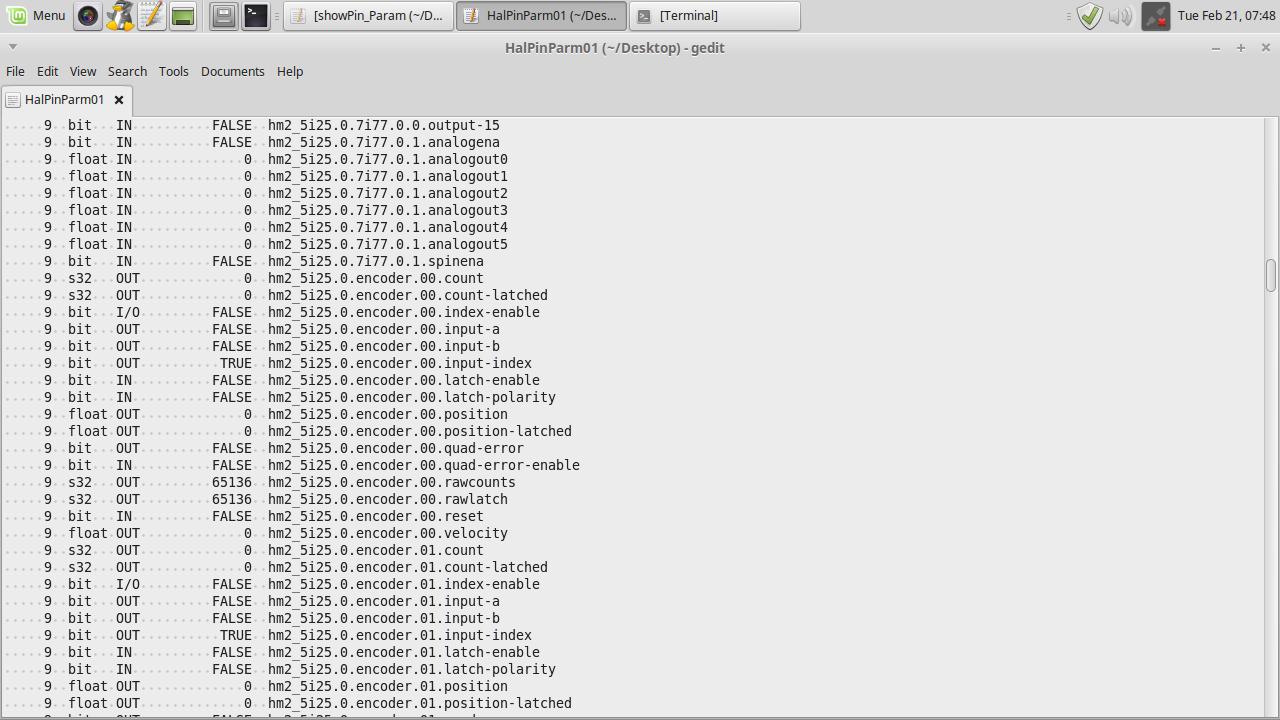
If you look at the top you can see the files in question:
hm2. analogout0 etc. to analogout5
I am not completely shore if using "halrun" to gain access to the "setp"? Do I "copy" or "key in" the files as shown, starting with the "hm2", preceded with the "setp" command? Then use the "start" command to "setp" and then measure with multimeter, where the voltage to drives. or low voltage at the TB5 connections? Just a bit shy about not having more confidence in this area, and the need to get it correct.
Many Thanks to each of you, for being so very, very helpful!
This screen shot is of the "show pin and parm" set of files.
If you look at the top you can see the files in question:
hm2. analogout0 etc. to analogout5
I am not completely shore if using "halrun" to gain access to the "setp"? Do I "copy" or "key in" the files as shown, starting with the "hm2", preceded with the "setp" command? Then use the "start" command to "setp" and then measure with multimeter, where the voltage to drives. or low voltage at the TB5 connections? Just a bit shy about not having more confidence in this area, and the need to get it correct.
Many Thanks to each of you, for being so very, very helpful!
Please Log in or Create an account to join the conversation.
- andypugh
- Offline
- Moderator
-
Less
More
- Posts: 19899
- Thank you received: 4655
9 years 8 months ago #88427
by andypugh
Replied by andypugh on topic Prototrak Plus Retrofit with Mesa 7i77 & 5i25 cards
Just type the commands in as shown (and in sequence).
I forgot to say, use "exit" to end the HAL session.
Do the testing with the cards not connected to the actual machine.
I forgot to say, use "exit" to end the HAL session.
Do the testing with the cards not connected to the actual machine.
The following user(s) said Thank You: new2linux
Please Log in or Create an account to join the conversation.
- new2linux
- Offline
- Platinum Member
-
Less
More
- Posts: 711
- Thank you received: 9
9 years 8 months ago #88428
by new2linux
Replied by new2linux on topic Prototrak Plus Retrofit with Mesa 7i77 & 5i25 cards
andy many thanks! I am seeing after the "setp hm2_5i25.0.7i77.0.1.analogout0" is keyed in, the return key entered, the line reads: "<stdin>:2: setp requires 2 arguments, 1 given" then screen is at: halcmd:.
I have keyed "all in" (from analogout0 to analogout5 ) and tried "start", no good.
I have keyed "all in" (from analogena to analogout5 ) and tried "start", no good.
I reviewed the HAL tutorial, not shore what I am missing.
Where do I try the multimeter at, please?
I have keyed "all in" (from analogout0 to analogout5 ) and tried "start", no good.
I have keyed "all in" (from analogena to analogout5 ) and tried "start", no good.
I reviewed the HAL tutorial, not shore what I am missing.
Where do I try the multimeter at, please?
Please Log in or Create an account to join the conversation.
Time to create page: 0.899 seconds