
- Posts: 1635
- Thank you received: 595
Retrofitting a 1986 Maho MH400E
- RotarySMP
- Offline
- Platinum Member
-

Less
More
7 years 6 months ago - 7 years 6 months ago #130550
by RotarySMP
Replied by RotarySMP on topic Retrofitting a 1986 Maho MH400E
I'll make a video of my start and shut down sequences.
Start up
I set bios to power up automatically, as Tommylight suggested.
I turn on the big main power switch on the back of the cabinet. The PC boots, as do the MESA cards (only one of three 24V DC buses is powered at initially power on. The Mesa cards need to be hung on that bus).
Sergei set Linux to autostart LinuxCNC, but I have a timing issue there, as it sometimes errors out, and I have to start it manually.
Once LinuxCNC is up and Gmoccapy running, I push the top soft key to release E-Stop, and at the same time, the second from top button to latch it on.
Then use Gmoccapy soft keys to home all axis.
Shut down.
The top soft key of Gmoccapy drops the machine into E-Stop, powering off the drives etc.
Then I push the Exit softkey in Gmoccapy, which shuts down LinuxCNC.
Then I use the standard Debian shut down button to shut down the PC (no need for a Physical PC off switch)
Finally I switch off the main power switch on the back of the cabinet.
For testing I did connect a momentary switch on the MoBo's reset pinhead, but haven't seen any need to have a PC on/off switch like the Haas has.
Photos or it isn't happening 
I don't think CNC controls need much processor power. My 400E's Phillips 432 only had an 8088, not even an x86 processor (although it was only 2.5D). It seems to me that any Celeron or more has than sufficient processing power for LinuxCNC. You choose the PC more for latency performance than for processing grunt. The ITX board I use had pretty good latency numbers.
I just bought a tiny Gigabyte Brix BRACE-3150 which will be the brain of my lathes controller.
I have also come around to Glemigobles point that packing the PC into the original MAHO user control module could be a great solution. You'd need a monitor smaller than the 15" I used, but I really don't think you need anything bigger than 13" for gmoccapy. There is plenty of space in that MAHO user module. If you do it that way, you should really add a 7i73 to interface the user panel buttons. I am short of shed space (who isnt?) and figured I could make the user module more compact.
Mark0
Start up
I set bios to power up automatically, as Tommylight suggested.
I turn on the big main power switch on the back of the cabinet. The PC boots, as do the MESA cards (only one of three 24V DC buses is powered at initially power on. The Mesa cards need to be hung on that bus).
Sergei set Linux to autostart LinuxCNC, but I have a timing issue there, as it sometimes errors out, and I have to start it manually.
Once LinuxCNC is up and Gmoccapy running, I push the top soft key to release E-Stop, and at the same time, the second from top button to latch it on.
Then use Gmoccapy soft keys to home all axis.
Shut down.
The top soft key of Gmoccapy drops the machine into E-Stop, powering off the drives etc.
Then I push the Exit softkey in Gmoccapy, which shuts down LinuxCNC.
Then I use the standard Debian shut down button to shut down the PC (no need for a Physical PC off switch)
Finally I switch off the main power switch on the back of the cabinet.
For testing I did connect a momentary switch on the MoBo's reset pinhead, but haven't seen any need to have a PC on/off switch like the Haas has.
Code:
Bob wrote: So it would be a 6 axis control-- XYZ = 3 and spindle =1 and B an C axis = 2 . Plus a 20 tool tool changer for me!
I don't think CNC controls need much processor power. My 400E's Phillips 432 only had an 8088, not even an x86 processor (although it was only 2.5D). It seems to me that any Celeron or more has than sufficient processing power for LinuxCNC. You choose the PC more for latency performance than for processing grunt. The ITX board I use had pretty good latency numbers.
I just bought a tiny Gigabyte Brix BRACE-3150 which will be the brain of my lathes controller.
I have also come around to Glemigobles point that packing the PC into the original MAHO user control module could be a great solution. You'd need a monitor smaller than the 15" I used, but I really don't think you need anything bigger than 13" for gmoccapy. There is plenty of space in that MAHO user module. If you do it that way, you should really add a 7i73 to interface the user panel buttons. I am short of shed space (who isnt?) and figured I could make the user module more compact.
Mark0
Last edit: 7 years 6 months ago by RotarySMP.
Please Log in or Create an account to join the conversation.
- pl7i92
- Offline
- Platinum Member
-
Less
More
- Posts: 1872
- Thank you received: 358
7 years 6 months ago #130558
by pl7i92
Replied by pl7i92 on topic Retrofitting a 1986 Maho MH400E
like we do at school at the moment
5a+atc
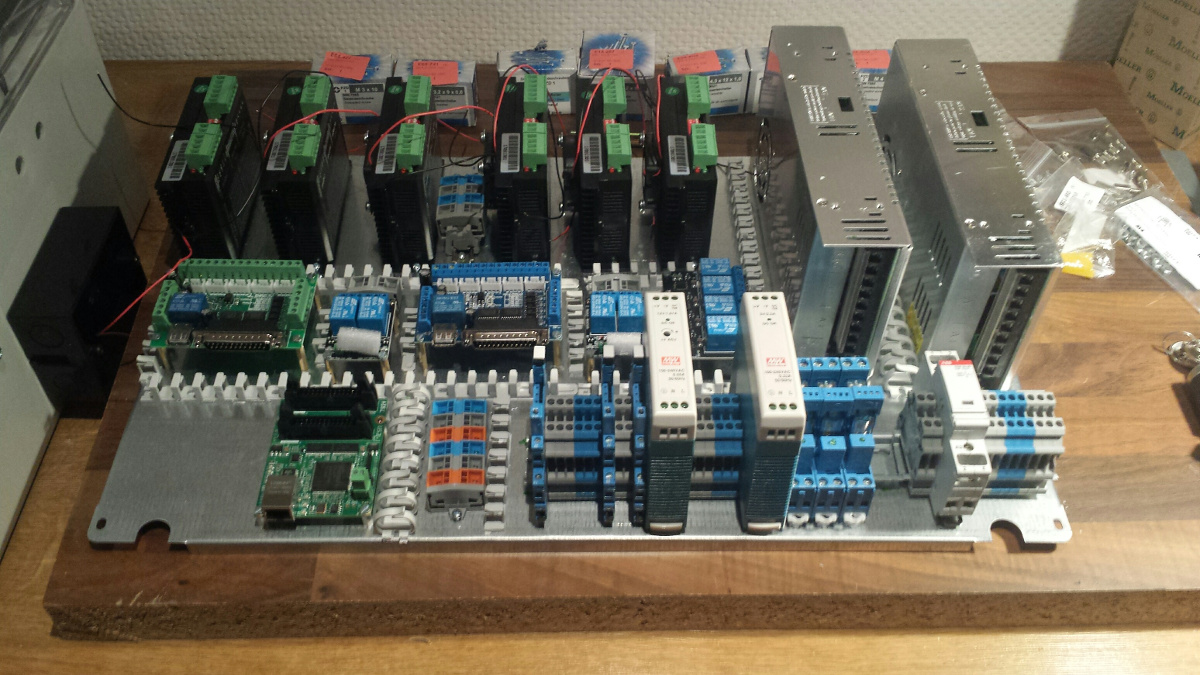
5a+atc
Please Log in or Create an account to join the conversation.
- pl7i92
- Offline
- Platinum Member
-
Less
More
- Posts: 1872
- Thank you received: 358
7 years 6 months ago #130559
by pl7i92
Replied by pl7i92 on topic Retrofitting a 1986 Maho MH400E
isent the USB post from the HAS control under the ROUND CAP at the side
Please Log in or Create an account to join the conversation.
- drimaropoylos
- Offline
- Elite Member
-

Less
More
- Posts: 265
- Thank you received: 40
7 years 6 months ago #130564
by drimaropoylos
Replied by drimaropoylos on topic Retrofitting a 1986 Maho MH400E
Please Log in or Create an account to join the conversation.
- drimaropoylos
- Offline
- Elite Member
-
Less
More
- Posts: 265
- Thank you received: 40
7 years 6 months ago #130565
by drimaropoylos
Replied by drimaropoylos on topic Retrofitting a 1986 Maho MH400E
No eBay APP ID and/or Cert ID defined in Kunena configurationSomething like this, I thing is more practical.
Please Log in or Create an account to join the conversation.
- RotarySMP
- Offline
- Platinum Member
-
Less
More
- Posts: 1635
- Thank you received: 595
7 years 6 months ago #130567
by RotarySMP
Replied by RotarySMP on topic Retrofitting a 1986 Maho MH400E
Here is the start/stop procedure for my machine...
The following user(s) said Thank You: Glemigobles
Please Log in or Create an account to join the conversation.
Time to create page: 2.022 seconds