
- Posts: 22011
- Thank you received: 7491
Fehlmann Picomax 100 Retrofit
- tommylight
- Offline
- Moderator
-

Less
More
4 years 11 months ago #226455
by tommylight
Replied by tommylight on topic Fehlemann Picomax 100 Retrofit
Intel works with irq coalescence set at 0, Marwel were really good but i do not see them in use anymore, Realtek works OK.
The following user(s) said Thank You: anfänger
Please Log in or Create an account to join the conversation.
- anfänger
- Offline
- Platinum Member
-

Less
More
- Posts: 647
- Thank you received: 267
4 years 11 months ago - 4 years 11 months ago #226457
by anfänger
Replied by anfänger on topic Fehlemann Picomax 100 Retrofit
Thanks,
If anyone uses
linuxcnc.org/docs/2.8/html/getting-start...th_preempt_rt_kernel
to install linuxcnc, use another key server:
sudo apt-key adv --keyserver hkp://pgpkeys.eu --recv-key 3CB9FD148F374FEF
Worked for me linuxcnc is installing, an I am preparing for latency tests
 [/url]
If anyone uses
linuxcnc.org/docs/2.8/html/getting-start...th_preempt_rt_kernel
to install linuxcnc, use another key server:
sudo apt-key adv --keyserver hkp://pgpkeys.eu --recv-key 3CB9FD148F374FEF
Worked for me linuxcnc is installing, an I am preparing for latency tests
Last edit: 4 years 11 months ago by anfänger.
Please Log in or Create an account to join the conversation.
- anfänger
- Offline
- Platinum Member
-
Less
More
- Posts: 647
- Thank you received: 267
4 years 11 months ago #226556
by anfänger
Replied by anfänger on topic Fehlemann Picomax 100 Retrofit
Who needs Cad, when you can have cardboard:

The following user(s) said Thank You: tommylight
Please Log in or Create an account to join the conversation.
- tommylight
- Offline
- Moderator
-
Less
More
- Posts: 22011
- Thank you received: 7491
4 years 11 months ago #226567
by tommylight
Replied by tommylight on topic Fehlemann Picomax 100 Retrofit
Nice! 
Please Log in or Create an account to join the conversation.
- anfänger
- Offline
- Platinum Member
-
Less
More
- Posts: 647
- Thank you received: 267
4 years 11 months ago #227233
by anfänger
Replied by anfänger on topic Fehlemann Picomax 100 Retrofit
Before assembly there has to be chaos. I removed the unused 24v ac circuit and the 6v ac circuit for the machine light. Also removes the 12 dc circuit for the microscope I don’t have including the power supplies.

also moved the encoder lines and the analog servo control to the place where Mesa boards will be. Did this after I removed the old control completely.

I decided to use a wireless mpg, so I removed everything including the connectors. This way I was able to reuse the hole for the connector for the Ethernet connector.

did I mention it was one of the best ideas to use the parapet channel in the shop. So it was a quick job to route an additional Ethernet connection to the machine.
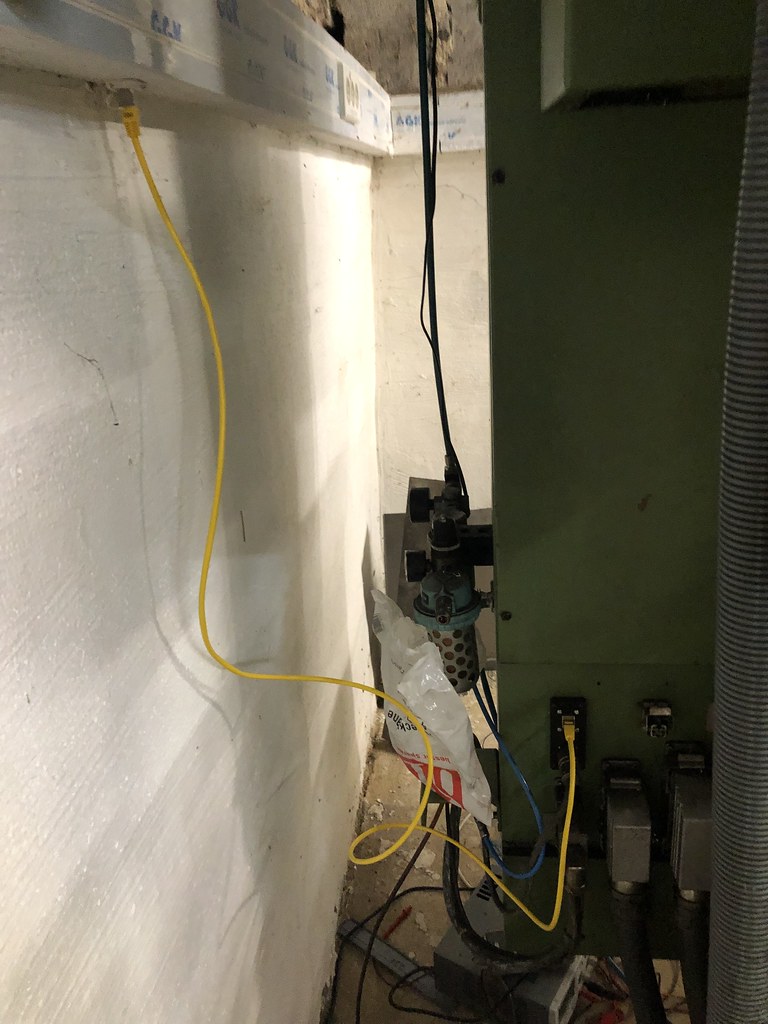
it was the first step towards reassembly. Next ist to tinker around how to mount the computer
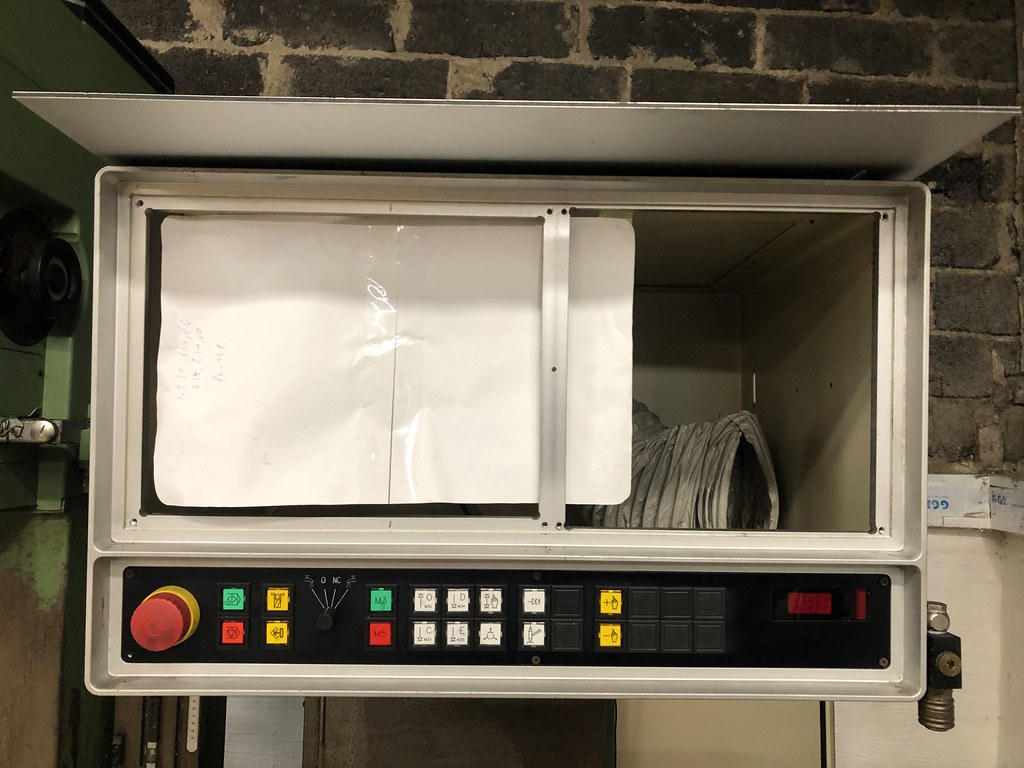 [/url]
the front alloy frame is really beefy so I can use it for mounting the computer.
also moved the encoder lines and the analog servo control to the place where Mesa boards will be. Did this after I removed the old control completely.
I decided to use a wireless mpg, so I removed everything including the connectors. This way I was able to reuse the hole for the connector for the Ethernet connector.
did I mention it was one of the best ideas to use the parapet channel in the shop. So it was a quick job to route an additional Ethernet connection to the machine.
it was the first step towards reassembly. Next ist to tinker around how to mount the computer
the front alloy frame is really beefy so I can use it for mounting the computer.
The following user(s) said Thank You: tommylight
Please Log in or Create an account to join the conversation.
- anfänger
- Offline
- Platinum Member
-
Less
More
- Posts: 647
- Thank you received: 267
4 years 11 months ago #227412
by anfänger
Replied by anfänger on topic Fehlemann Picomax 100 Retrofit
At the moment the Z column can go to three (five if you include top and bottom) heights automatically. The positions are set by moving the cams for the position switches. YOu you’ll always move the column manually to any Pictionary within its travel. There is no real feedback from the column on what height it is. I wonder If I could / should change that.
First thing I had in mind was to treat it as an axis and add Glas scale.
But the motor to move the column can only get the signals up, down and Pos 1-5. And has an brake amplifier, so setting up an axis with pid doesn’t seam to be an good idea. And I have to deal with the kinematics of the column and the quill moving the Z axis.
Second thought was using a glas scale and external offsets. This looks for a damn simple solution for me. Only two question come to my mind. Soft limits I read the manual, but didn’t get it. I want soft limits for the quill travel and could calculate theoretical limits for the whole Z axis which would be 0 and -730mm. This way the Quill won’t ram itself on to the table (which it could when moving the column down).
Can this be done? Are external offsets stored on shutdown (I susially store machine coordinates)? Does it male sense? Are there some better solutions out there?
Thanks Patrick
First thing I had in mind was to treat it as an axis and add Glas scale.
But the motor to move the column can only get the signals up, down and Pos 1-5. And has an brake amplifier, so setting up an axis with pid doesn’t seam to be an good idea. And I have to deal with the kinematics of the column and the quill moving the Z axis.
Second thought was using a glas scale and external offsets. This looks for a damn simple solution for me. Only two question come to my mind. Soft limits I read the manual, but didn’t get it. I want soft limits for the quill travel and could calculate theoretical limits for the whole Z axis which would be 0 and -730mm. This way the Quill won’t ram itself on to the table (which it could when moving the column down).
Can this be done? Are external offsets stored on shutdown (I susially store machine coordinates)? Does it male sense? Are there some better solutions out there?
Thanks Patrick
Please Log in or Create an account to join the conversation.
Time to create page: 0.150 seconds