
- Posts: 1111
- Thank you received: 114
Kinematics... again:/
- bkt
- Offline
- Platinum Member
-

Less
More
9 years 5 months ago #93474
by bkt
Replied by bkt on topic Kinematics... again:/
Parallelogram: not so hard to do .... but on scara robot i think is under patent (for sure in certain country...non in all world).
About robokins: i read only the attachment on andy 1th or 2th post, so I understand the kins was write by Andy. And Not understand that you would reply somethins of similar and not reply the same.
Any how In your case tool tip have a Dy on Y axis from J3 centerline and a Dx on X axis, but working on Z axis. So some calculation on kins you need for. If you use J4 or not, because tooltip have Dy and Dx. It seems to put D3 = 0 (so not Dx) and so all J1 and J2 and j3 work on same 2d plane. At these point you need a Dy only or in real world tool tips leght & Dy. As I see (reading now 2th time robokins) inverse and foward kins have no calc for these.... because it's simply scarakins modified for J0/x linear axis as I see.
So your study is concerned only z/y axis because D3=0. A triangle + rotation because J3 can rotate.
I'm not good at all, but I suggest you this:
Do we make a race to the one who solves it before?
regards
giorgio
About robokins: i read only the attachment on andy 1th or 2th post, so I understand the kins was write by Andy. And Not understand that you would reply somethins of similar and not reply the same.
Any how In your case tool tip have a Dy on Y axis from J3 centerline and a Dx on X axis, but working on Z axis. So some calculation on kins you need for. If you use J4 or not, because tooltip have Dy and Dx. It seems to put D3 = 0 (so not Dx) and so all J1 and J2 and j3 work on same 2d plane. At these point you need a Dy only or in real world tool tips leght & Dy. As I see (reading now 2th time robokins) inverse and foward kins have no calc for these.... because it's simply scarakins modified for J0/x linear axis as I see.
So your study is concerned only z/y axis because D3=0. A triangle + rotation because J3 can rotate.
I'm not good at all, but I suggest you this:
Do we make a race to the one who solves it before?
regards
giorgio
Please Log in or Create an account to join the conversation.
- Boogie
- Offline
- Premium Member
-

Less
More
- Posts: 97
- Thank you received: 9
9 years 5 months ago #93552
by Boogie
Replied by Boogie on topic Kinematics... again:/
Giorgio The Kinematics Chellenge is great idea! Possibly is will lead us to the working kinematics module, and working examples of HAL and INI files.
However i'm not sure i understand your explainations on post #93474.
Let's assume the following kinematic model:
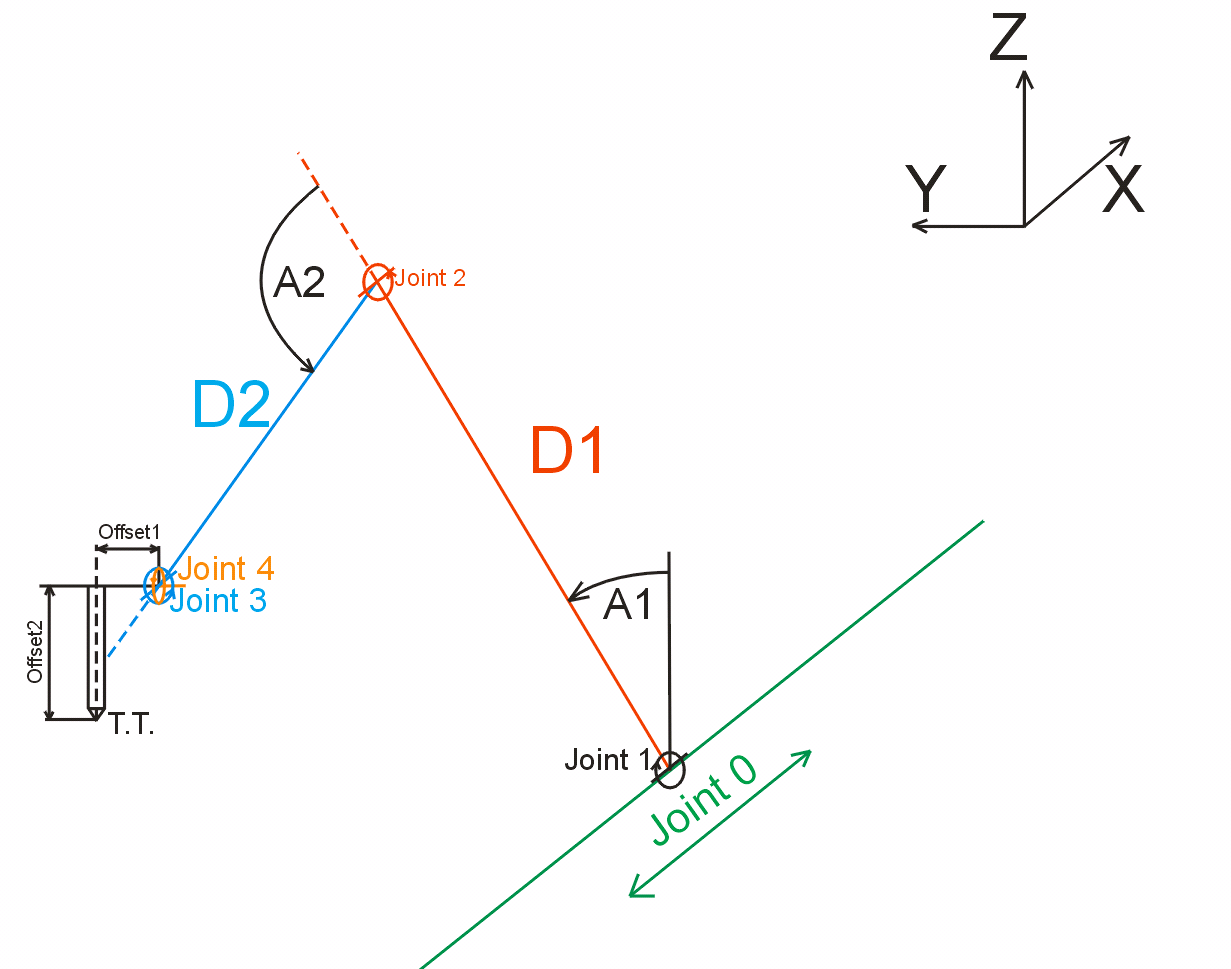
I believe many people will find it useful.
Assumptions:
Joint 0 - linear axis along X Cartesian axis
Joint 1 - angular axis. Rotation around axis parallel to X Cartesian axis
Joint 2 - angular axis. Rotation around axis parallel to X Cartesian axis and parallel to previous Joint 1.
Joint 3 - angular axis. Rotation around axis parallel to X Cartesian axis and parallel to previous Joint 2.
Joint 4 - angular axis. Rotation around axis perpendicular to previous axis.
Rotation axes of Joint 3 and Joint 4 intersect with each other and are perpendicular to each other.
D1 - arm lenght. The distance between Joint 1 and Joint 2 rotational axes.
D2 - elbow lenght. The distance between Joint 2 and Joint 3 rotational axes.
Offset 1 - the distance between Joint 3 rotational axis and spindle (tool) axis. Measured along Joint 4 rotational axis.
Offset 2 - the distance between Joint 4 rotational axis and spindle tool tip. Offset 2 vector is perpendicular to Offset 1 vector. Offset 2 have to take into account Tool Lenght Compensation from Tool Lenght Table (?).
Joints 0 thru 3 are used to move tool in Castesian X, Y, Z world. Joints 3 and 4 can be used to change tool angle U (around X axis) and V (around Y axis).
Are above assumptions correct?
Andy is it what your kinematics do?
I do not understand why there is no Offset 1 distance taken into account in robokins?
Possibly is will lead us to the working kinematics module, and working examples of HAL and INI files.However i'm not sure i understand your explainations on post #93474.
Let's assume the following kinematic model:
I believe many people will find it useful.
Assumptions:
Joint 0 - linear axis along X Cartesian axis
Joint 1 - angular axis. Rotation around axis parallel to X Cartesian axis
Joint 2 - angular axis. Rotation around axis parallel to X Cartesian axis and parallel to previous Joint 1.
Joint 3 - angular axis. Rotation around axis parallel to X Cartesian axis and parallel to previous Joint 2.
Joint 4 - angular axis. Rotation around axis perpendicular to previous axis.
Rotation axes of Joint 3 and Joint 4 intersect with each other and are perpendicular to each other.
D1 - arm lenght. The distance between Joint 1 and Joint 2 rotational axes.
D2 - elbow lenght. The distance between Joint 2 and Joint 3 rotational axes.
Offset 1 - the distance between Joint 3 rotational axis and spindle (tool) axis. Measured along Joint 4 rotational axis.
Offset 2 - the distance between Joint 4 rotational axis and spindle tool tip. Offset 2 vector is perpendicular to Offset 1 vector. Offset 2 have to take into account Tool Lenght Compensation from Tool Lenght Table (?).
Joints 0 thru 3 are used to move tool in Castesian X, Y, Z world. Joints 3 and 4 can be used to change tool angle U (around X axis) and V (around Y axis).
Are above assumptions correct?
Andy is it what your kinematics do?
I do not understand why there is no Offset 1 distance taken into account in robokins?
Please Log in or Create an account to join the conversation.
- andypugh
- Offline
- Moderator
-

Less
More
- Posts: 19899
- Thank you received: 4655
9 years 5 months ago #93555
by andypugh
Replied by andypugh on topic Kinematics... again:/
Have you seen this page, which writes a simple kinematics module?
linuxcnc.org/docs/2.7/html/motion/kinematics.html
You can ignore joint 1.
x2 = d1.sin(a1)
z2 = d1.cos(a1)
x3 = x2 + d2.sin(a1 + a2)
z3 = x2 + d2.cos(a1 + a2)
...
And so on.
linuxcnc.org/docs/2.7/html/motion/kinematics.html
You can ignore joint 1.
x2 = d1.sin(a1)
z2 = d1.cos(a1)
x3 = x2 + d2.sin(a1 + a2)
z3 = x2 + d2.cos(a1 + a2)
...
And so on.
The following user(s) said Thank You: Boogie
Please Log in or Create an account to join the conversation.
- Boogie
- Offline
- Premium Member
-
Less
More
- Posts: 97
- Thank you received: 9
9 years 5 months ago #93565
by Boogie
Replied by Boogie on topic Kinematics... again:/
I've seen it.
i can't find the answer why there is a difference between writing translation for x axis and a axis:
pos->tran.x = joints[0];
pos->a = joints[3];
instead of:
pos->x = joints[0];
pos->a = joints[3];
or
pos->tran.x = joints[0];
pos->tran.a = joints[3];
In all languages every sign, dash, slash has its own meaning...
how to read it? pos->tran.x? Does 'pos' mean position from g-code interpreter? Does '->' mean 'move' or what? Got my point? What kind of programming language is it? Without basic knowledge and understanding of language syntax it is so hard to write anything.
i can't find the answer why there is a difference between writing translation for x axis and a axis:
pos->tran.x = joints[0];
pos->a = joints[3];
instead of:
pos->x = joints[0];
pos->a = joints[3];
or
pos->tran.x = joints[0];
pos->tran.a = joints[3];
In all languages every sign, dash, slash has its own meaning...
how to read it? pos->tran.x? Does 'pos' mean position from g-code interpreter? Does '->' mean 'move' or what? Got my point? What kind of programming language is it? Without basic knowledge and understanding of language syntax it is so hard to write anything.
Please Log in or Create an account to join the conversation.
- Boogie
- Offline
- Premium Member
-
Less
More
- Posts: 97
- Thank you received: 9
9 years 5 months ago #93571
by Boogie
Replied by Boogie on topic Kinematics... again:/
What i did today:
- compiled robokins - no errors so should be ok. New file was created in modules: robokins.ko
- picked scara sample config from sim-axis-vismach-scara and modified main HAL, INI files as well as scara_postgui.hal (added one more joint) and scara.xml file (added one more 'clock' for joint[4] and changed dimensions and ranges.
- tried to run it... and LinuxCNC Error window appeared instead of AXIS UI:(
What is worse - i can't copy error log to gedit and put it here for you to try do debug it. How to do it? Is it something with super user privilages?
Modified files are attached.
Did i define D1, D2 and D3 parameters correctly in scara_sim_4.hal file?
The first error under 'Debug file information' header in LinuxCNC Error raport is:
'Error: could not insert module /usr/realtime-3.4-9-rtai-686-pae/modules/rtai_hal.ko: File exists
4942'
then stopping realtime threads, unloading components and so on... and then:
'Error: Module scarakins is not currently loaded'
This is strange as is commented out loadrt scarakins in hal file and put loadrt robokins...
Any ideas?
- compiled robokins - no errors so should be ok. New file was created in modules: robokins.ko
- picked scara sample config from sim-axis-vismach-scara and modified main HAL, INI files as well as scara_postgui.hal (added one more joint) and scara.xml file (added one more 'clock' for joint[4] and changed dimensions and ranges.
- tried to run it... and LinuxCNC Error window appeared instead of AXIS UI:(
What is worse - i can't copy error log to gedit and put it here for you to try do debug it. How to do it? Is it something with super user privilages?
Modified files are attached.
Did i define D1, D2 and D3 parameters correctly in scara_sim_4.hal file?
The first error under 'Debug file information' header in LinuxCNC Error raport is:
'Error: could not insert module /usr/realtime-3.4-9-rtai-686-pae/modules/rtai_hal.ko: File exists
4942'
then stopping realtime threads, unloading components and so on... and then:
'Error: Module scarakins is not currently loaded'
This is strange as is commented out loadrt scarakins in hal file and put loadrt robokins...
Any ideas?
Please Log in or Create an account to join the conversation.
- andypugh
- Offline
- Moderator
-
Less
More
- Posts: 19899
- Thank you received: 4655
9 years 5 months ago #93573
by andypugh
The XYZ and UVW linear axis triads are part of a structure that is useful for some manipulations (like hypotenuse length).
Just accept that this is how it is.
The programming language is C.
pos is a data structure that holds the current machine position.
It is passed to the kinematic module as a pointer, so instead of pos.a or pos.tran.x it uses pos->a and pos->tran.x
Just different ways to get to the various bits of data held in the "pos" structure.
But you don't need to know any of this to write a kins module. But you do have to follow C syntax.
Replied by andypugh on topic Kinematics... again:/
Boogie wrote: I've seen it.
i can't find the answer why there is a difference between writing translation for x axis and a axis:
pos->tran.x = joints[0];
pos->a = joints[3];
The XYZ and UVW linear axis triads are part of a structure that is useful for some manipulations (like hypotenuse length).
Just accept that this is how it is.
In all languages every sign, dash, slash has its own meaning...
how to read it? pos->tran.x? Does 'pos' mean position from g-code interpreter? Does '->' mean 'move' or what? Got my point? What kind of programming language is it?
The programming language is C.
pos is a data structure that holds the current machine position.
It is passed to the kinematic module as a pointer, so instead of pos.a or pos.tran.x it uses pos->a and pos->tran.x
Just different ways to get to the various bits of data held in the "pos" structure.
But you don't need to know any of this to write a kins module. But you do have to follow C syntax.
The following user(s) said Thank You: Boogie
Please Log in or Create an account to join the conversation.
Time to create page: 0.472 seconds