
- Posts: 62
- Thank you received: 30
ColorCNC Colorlight 5A-75E/5A-75B as FPGA controller board
- muvideo
- Offline
- Senior Member
-

Less
More
4 years 4 months ago - 4 years 4 months ago #244477
by muvideo
Replied by muvideo on topic ColorCNC Colorlight 5A-75E/5A-75B as FPGA controller board
Hi
Hope tomorrow to be able to test stepgens.
If you didnt touch anything on gpio I can anticipate you that the inputs are not being communicated from firmware.
It can be seen on the etherbone packet in wireshark, where the register field corresponding to gpio in Is stuck.
By the way, if you want to test yourself the capacity of the firmware to read an input, you can without modifying the board.
As a quick and dirty test you can probe the inputs of the buffers (side A, the ones that are connected to fpga) using a resistor,
a safe value can be 3k9 or 4k7 ohm, just connect one side of the resistor to 3V3 and GND alternatively, and with the other side
touch the right pin of the buffer, if the FPGA is configured correctly that pin will be input both from FPGA side and from Buffer side.
If it is configured as output from the FPGA then the resistor will avoid overloads. You have only to be careful touching only
one pin at time, pin pitch on buffers is tight, a magnifier will greatly help,
and connect the GND or 3V3 side of the resistor first, in order to avoid ESD.
If I remember right you have a 5A75E board, for the version 7 chubby75 github page has the listing of connections pins to buffer.
For version 8 (and 6) I can help you locating the right buffer in relation to pin.
Now I'm going to mod my 5A75E in the same way of my 75B.
Fabio
Hope tomorrow to be able to test stepgens.
If you didnt touch anything on gpio I can anticipate you that the inputs are not being communicated from firmware.
It can be seen on the etherbone packet in wireshark, where the register field corresponding to gpio in Is stuck.
By the way, if you want to test yourself the capacity of the firmware to read an input, you can without modifying the board.
As a quick and dirty test you can probe the inputs of the buffers (side A, the ones that are connected to fpga) using a resistor,
a safe value can be 3k9 or 4k7 ohm, just connect one side of the resistor to 3V3 and GND alternatively, and with the other side
touch the right pin of the buffer, if the FPGA is configured correctly that pin will be input both from FPGA side and from Buffer side.
If it is configured as output from the FPGA then the resistor will avoid overloads. You have only to be careful touching only
one pin at time, pin pitch on buffers is tight, a magnifier will greatly help,
and connect the GND or 3V3 side of the resistor first, in order to avoid ESD.
If I remember right you have a 5A75E board, for the version 7 chubby75 github page has the listing of connections pins to buffer.
For version 8 (and 6) I can help you locating the right buffer in relation to pin.
Now I'm going to mod my 5A75E in the same way of my 75B.
Fabio
Last edit: 4 years 4 months ago by muvideo.
Please Log in or Create an account to join the conversation.
- muvideo
- Offline
- Senior Member
-
Less
More
- Posts: 62
- Thank you received: 30
4 years 4 months ago #244528
by muvideo
Replied by muvideo on topic ColorCNC Colorlight 5A-75E/5A-75B as FPGA controller board
@TOLP2
I tried with new implementation of stepper, there is something I must be doing wrong,
I see only garbled numbers coming from counts and position feedback.
Did you had a chance to test the stepgen on your 5a75b board? If so can you share
your hal file?
Thanks!
I tried with new implementation of stepper, there is something I must be doing wrong,
I see only garbled numbers coming from counts and position feedback.
Did you had a chance to test the stepgen on your 5a75b board? If so can you share
your hal file?
Thanks!
Please Log in or Create an account to join the conversation.
- muvideo
- Offline
- Senior Member
-
Less
More
- Posts: 62
- Thank you received: 30
4 years 4 months ago - 4 years 4 months ago #244532
by muvideo
Replied by muvideo on topic ColorCNC Colorlight 5A-75E/5A-75B as FPGA controller board
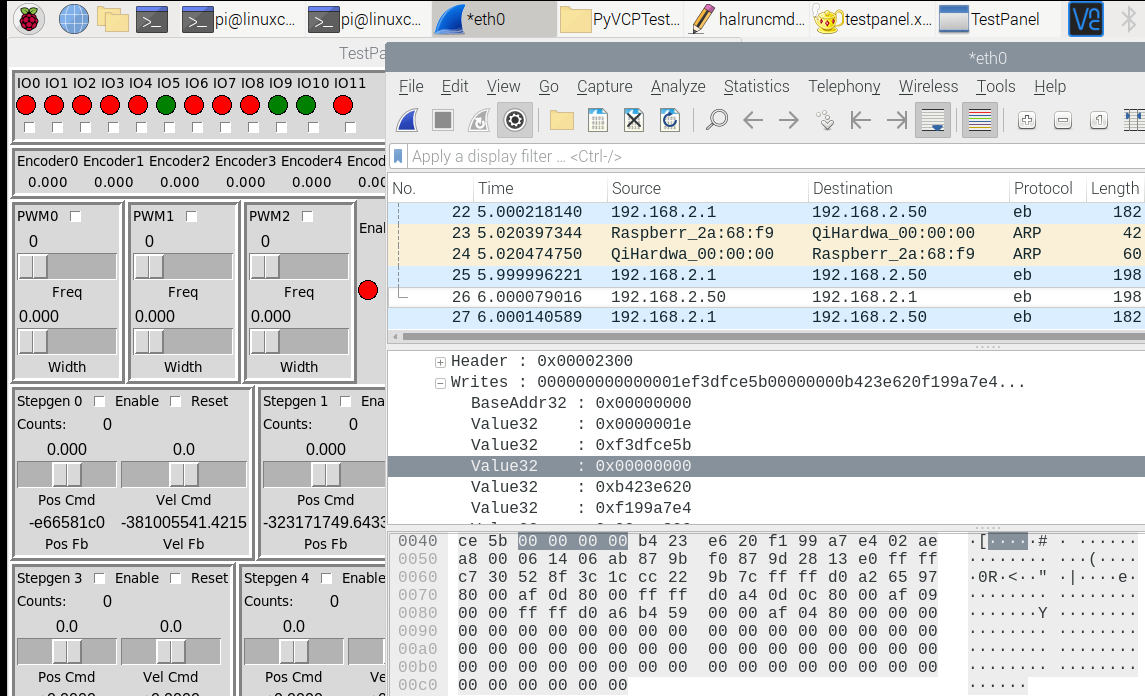
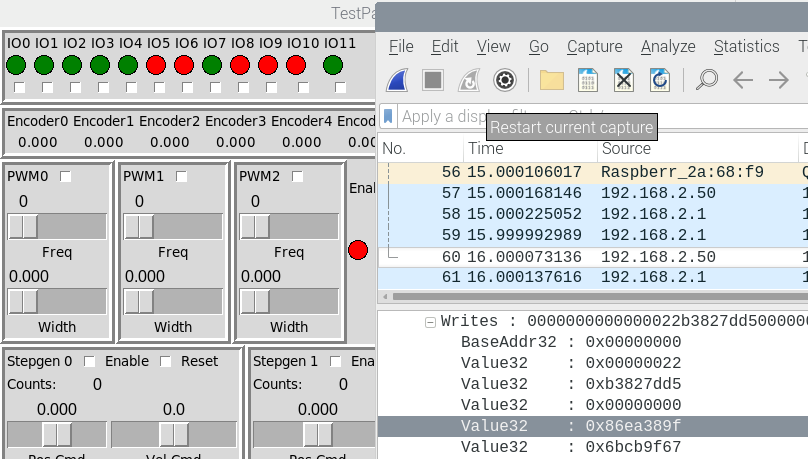
In my system (raspi pi4) with the latest driver, read is shifted by one register.
I'm attaching two examples here, as can be seen comparing input values
on top and register values on bottom, the gpio in is reporting the value of
the register at address 0x00000098 (MMIO_inst_stepgen_0_position)
instead of 0x00000094 (MMIO_inst_gpio_in).
Problem is 0x00000094 is still stuck at 0.
Read addresses:

Read values, input color, green is 1 red is 0 (top left)
here the value is 620, last 3 digits of address 98
the value is 89f, last 3 digits of address 98
I'm attaching two examples here, as can be seen comparing input values
on top and register values on bottom, the gpio in is reporting the value of
the register at address 0x00000098 (MMIO_inst_stepgen_0_position)
instead of 0x00000094 (MMIO_inst_gpio_in).
Problem is 0x00000094 is still stuck at 0.
Read addresses:
Read values, input color, green is 1 red is 0 (top left)
here the value is 620, last 3 digits of address 98
the value is 89f, last 3 digits of address 98
Last edit: 4 years 4 months ago by muvideo.
Please Log in or Create an account to join the conversation.
- TOLP2
- Offline
- Elite Member
-

Less
More
- Posts: 225
- Thank you received: 178
4 years 4 months ago #244563
by TOLP2
Replied by TOLP2 on topic ColorCNC Colorlight 5A-75E/5A-75B as FPGA controller board
That is strange. It looks like the write buffer is one too short, causing the read to start at the wrong address.
Can you share the following files, so I can reproduce:
- your config file;
- the csr.csv file describing all addresses;
- when adding the Fpga to the hall, the first few lines of the stdout. This describes the modules and memory buffers.
At this moment I only have a 5A-75E to experiment with. This error did not occur with my setup, although I don't think it is board related. Has to be solved.
Can you share the following files, so I can reproduce:
- your config file;
- the csr.csv file describing all addresses;
- when adding the Fpga to the hall, the first few lines of the stdout. This describes the modules and memory buffers.
At this moment I only have a 5A-75E to experiment with. This error did not occur with my setup, although I don't think it is board related. Has to be solved.
Please Log in or Create an account to join the conversation.
- muvideo
- Offline
- Senior Member
-
Less
More
- Posts: 62
- Thank you received: 30
4 years 4 months ago - 4 years 4 months ago #244565
by muvideo
Replied by muvideo on topic ColorCNC Colorlight 5A-75E/5A-75B as FPGA controller board
Hi
this is the console output, in attachment the files you requested, board is 5a75e host raspberry pi 4
this is the console output, in attachment the files you requested, board is 5a75e host raspberry pi 4
Code:
pi@linuxcnc:~/LiteX-CNC/fabio_hal/PyVCPTestPanel $ halrun -I halruncmds.hal
Note: Using POSIX realtime
litexcnc: Loading Litex CNC driver version 1.0.0
litexcnc: loading litexCNC etherbone driver version 0.02
litexcnc: Connecting to board at address: 192.168.2.50:1234
litexcnc: Setting up modules...
litexcnc: - Watchdog
litexcnc: - Wallclock
litexcnc: - GPIO
litexcnc: - PWM
litexcnc: - Stepgen
litexcnc: - Encoder
litexcnc: Creating read and write buffers...
litexcnc: - Write buffer: 124 bytes)
litexcnc: - Read buffer: 140 bytes)
litexcnc: Exporting functions...
litexcnc: Hello world
halcmd:
Last edit: 4 years 4 months ago by muvideo.
The following user(s) said Thank You: TOLP2
Please Log in or Create an account to join the conversation.
- svb
- Offline
- Senior Member
-
Less
More
- Posts: 44
- Thank you received: 10
4 years 4 months ago - 4 years 4 months ago #244579
by svb
Replied by svb on topic ColorCNC Colorlight 5A-75E/5A-75B as FPGA controller board
@muvideo
Hello. What 5a-75e board version you have?
I receive on this week 5a-75e v8.0 and 5a-75b v8.0
Hello. What 5a-75e board version you have?
I receive on this week 5a-75e v8.0 and 5a-75b v8.0
Last edit: 4 years 4 months ago by svb.
Please Log in or Create an account to join the conversation.
Moderators: PCW, jmelson
Time to create page: 0.265 seconds