Light Machine Corp. Benchman XTr (retrofit)

More
9 years 4 months ago #95134 by cncamateur
The drawings are great, it looks to me like the block diagram is just like my machine, I don't have the CAN connection. I got past the door and now I have no errors on the screen, but nothing moves. When I try to jog I can hear relays clicking, but no movement. The work light also doesn't work from the SW control, but if I push the button on the relay, it goes on. On the next move card, one of the LEDs, I think its S1 id blinking green, the other is blinking red. When I hit the home button, it says on the screen that the Z axis is at a limit. I can hear the relay when I try to jog any axis. I really appreciate the help.

Please Log in or Create an account to join the conversation.

More
9 years 4 months ago #95147 by x-Intelitek Engineer
I don't remember if the s/w shows the limit status.
Is there a z limit display before you try to home?

Try jogging the z-axis to the center of the axis and then try to home.
If it can't be jogged, then remove the z-axis motor cover, remove the z-axis brake and manually push it to the center of the axis and then try to home.

Please Log in or Create an account to join the conversation.

More
9 years 4 months ago #95173 by cncamateur
I made some major progress. I looked at the axes and was going to move things manually to get off the limits, but I was looking at the block diagram and I got to thinking. It really bothered me that the work light and the door didn't work, these seem so simple. I have a second Nextmove card that seems to stay in SW reset, but I swapped the PNP modules with the card I was using. Everything seems to work now except for two issues.

1. When facing the machine, if I jog the table, when I click on the right arrow, the table goes left, left arrow, table goes right, in arrow, table goes out, out arrow table goes in. The Z goes up with the up arrow and down with the down, so not sure if this behavior is normal.

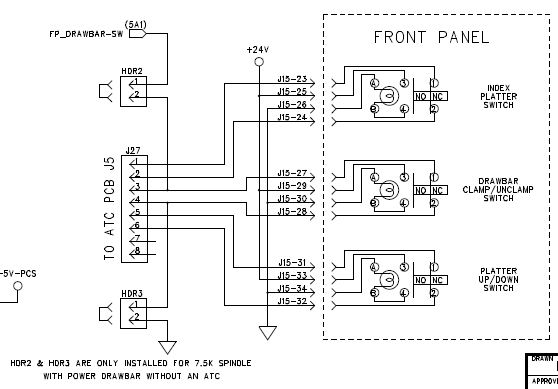
2. Second thing is that the tool changer buttons on the front panel don't seem to work. they light up when pushed, but nothing happens. I can manipulate the tool changer to all positions with the SW, including homing the spindle, clamp, unclamp etc, just the buttons don't work, seems like it could be an interface card issue.

Thanks

Please Log in or Create an account to join the conversation.
More
9 years 4 months ago #95174 by andypugh

cncamateur wrote: 1. When facing the machine, if I jog the table, when I click on the right arrow, the table goes left, left arrow, table goes right, in arrow, table goes out, out arrow table goes in. The Z goes up with the up arrow and down with the down, so not sure if this behavior is normals

That is normal. Jog buttons move the tool relative to the work.
Jog right, tool moves to the right of the work.
This initially looks wrong with a moving-table machine, but is correct.

Please Log in or Create an account to join the conversation.

More
9 years 4 months ago #95175 by cncamateur
Thanks, makes sense. I suspected that but wasn't sure.

Please Log in or Create an account to join the conversation.

More
9 years 4 months ago #95176 by x-Intelitek Engineer
I would check the J27 Connector on the main board and the J5 connector on the ATC card. Make sure they are fully seated.
I am attaching the wiring of the ATC front panel switches. Let me know if that solves it.

Please Log in or Create an account to join the conversation.

Time to create page: 0.528 seconds
Powered by Kunena Forum
