linuxcnc trajectory planner

More
2 years 1 week ago #312870 by Aciera
Replied by Aciera on topic linuxcnc trajectory planner

Are you using qt for it as viewer and editor? This should be the nice as you can load the cmakelists directly in qt.

No, I'm using Eclipse, mostly because I remember the headaches I had trying to get Qt installed and setup correctly.


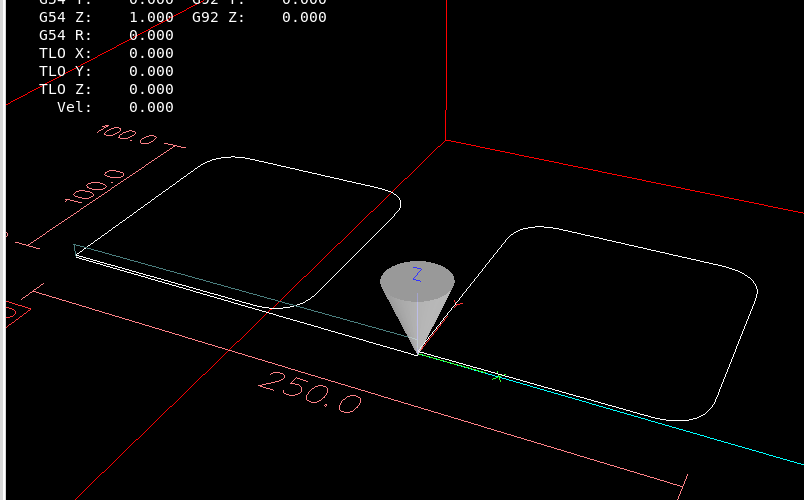
I played around a bit and moved the test for segment length vs trim_distance to 'trimCurves' which seems to work (although sometimes there is a problem with the first corner being falsely excluded apparently depending on where the tool is located at startup):

 
Code:
diff --git a/src/emc/motion/optimizer.cpp b/src/emc/motion/optimizer.cpp index 21898a1..230c8fe 100644 --- a/src/emc/motion/optimizer.cpp +++ b/src/emc/motion/optimizer.cpp @@ -62,7 +62,12 @@ int optimizer::trimCurves(vector& ptr_vector) {        // Trim all the curves back given the G64 P.. value.      for (std::size_t i = 0; i < ptr_vector.vec.size(); ++i) { - +        double trim_distance = G64P; /*seg.tag.fields_float[3];*/  // G64 P.. +        // Trim conditions. +        if(trim_distance<=0){ +            std::cout<<"no trim distance for segment id:"<<seg.id<<std::endl; +            return 0; +        }          int trim_front=0;          int trim_back=0;   @@ -74,18 +79,27 @@ int optimizer::trimCurves(vector& ptr_vector) {              trim_back=1;          }   -        // If next segment is colear, dont trim this end. Must be a line-line. +        // If next segment is colinear, dont trim this end. Must be a line-line.          if(i<ptr_vector.vec.size()-1){              const struct emcmot_segment &seg = ptr_vector.vec.at(i);              const struct emcmot_segment &seg_next = ptr_vector.vec.at(i+1); +            std::cout<<"segment: "<<seg.id<<std::endl; +            std::cout<<"trim_distance: "<<trim_distance<<std::endl; +            std::cout<<"segment length: "<<seg.length<<std::endl; +            std::cout<<"next segment length:"<<seg_next.length<<std::endl;                int res=isColinear(seg.start.tran, seg.end.tran, seg_next.end.tran);              if(seg.canon_motion_type!=3 && seg_next.canon_motion_type!=3 && res==1){                  trim_back=0;              } + +            if (trim_distance >= seg_next.length / 2.0 || trim_distance >= seg.length / 2.0) { +                std::cout<<"next segment or this segment too short, no trim_back for this segment:"<<seg.id<<std::endl; +                trim_back=0; +            }                      }   -        // If previous segment is colear, dont trim this start. Must be a line-line. +        // If previous segment is colinear, dont trim this start. Must be a line-line.          if(i>0){              const struct emcmot_segment &seg = ptr_vector.vec.at(i);              const struct emcmot_segment &seg_prev = ptr_vector.vec.at(i-1); @@ -94,11 +108,16 @@ int optimizer::trimCurves(vector& ptr_vector) {              if(seg.canon_motion_type!=3 && seg_prev.canon_motion_type!=3 && res==1){                  trim_front=0;              } -        }   -        if (0 != trimCurve(ptr_vector.vec.at(i),trim_front,trim_back)) { -            std::cerr << "Failed to trim curve at index " << i << std::endl; -            return -1; +            if (trim_distance >= seg_prev.length / 2.0 || trim_distance >= seg.length / 2.0) { +               std::cout<<"previous segment or this segment too short, no trim_front for this segment:"<<seg.id<<std::endl; +               trim_front=0; +            }      +     +            if (0 != trimCurve(ptr_vector.vec.at(i),trim_front,trim_back)) { +                std::cerr << "Failed to trim curve at index " << i << std::endl; +                return -1; +            }          }      }      std::cout<<"trim curves done."<<std::endl; @@ -311,9 +330,9 @@ int optimizer::trimCurve(emcmot_segment& seg, int& trim_front, int& trim_back) {          return 0;      }   -    if (trim_distance >= seg.length / 2.0) { -        trim_distance = (seg.length / 2.0)-1e-3; -    } +    //if (trim_distance >= seg.length / 2.0) { +    //    trim_distance = (seg.length / 2.0)-1e-3; +    //}        if(trim_distance<=1e-6){          std::cout<<"too short to trim, no trim is done for segment id:"<<seg.id<<std::endl;


Is there a particular reason for not handling one fillet after the other?
In a other function, we start with a list of segments. (gcode input) .
They then already have a flag if they may be trimmed front & back.
It this point the empty fillet segments are inserted inbetween. This is a vector insert operation.


Not sure I understand what you are saying. To me it seems that if we could pass on information about how much the segments of an intersection have been trimmed to the clothoid fitting function we could adjust the parameters of the clothoid such that we fit the larges possible fillet to that intersection. If you see a way to derive this information from the trimmed segments then I'm all for doing it your way :). 
The following user(s) said Thank You: Grotius

Please Log in or Create an account to join the conversation.
More
2 years 1 week ago #312872 by Grotius
Replied by Grotius on topic linuxcnc trajectory planner
Hi Arciera,

The motdot.so logic is that it sends just one gcode line, or it sends a buch of lines.

If it sends just one line,
then it waits for this line to get ready. After that it sends 100+ gcode lines in portions. (most of time 2000 as the buffer size.)
So it's not that we get complete gcode at once. Therefore if we get only one line, we dont trim this one.

You can test this by turning of the program velocity to zero before pressing the run button.
If program speed is zero it won't send the bunch of gcode lines.
If you then turn on the program with speed, it will send more lines at once.

In the logic of the code at the moment, we don't trim the first segment's front. And last segment's back.

Maybe you have an idea what should be the route.

Note:
In the new planner, we are able to buffer including the first segment.

To me it seems that if we could pass on information about how much the segments of an intersection have been trimmed to the clothoid fitting function we could adjust the parameters of the clothoid such that we fit the larges possible fillet to that intersection. If you see a way to derive this information from the trimmed segments then I'm all for doing it your way
We know exactly what we trimmed and how much every segment is trimmed on bot's side's in mm.
The clothoids fit's given a start & end point. The clothoids use a start & endangle, and a curvature start & end.
That are in total 4 double values and 2 points.

So to change a clothoid, the only thing you can do is change the start & end point. Curvature's and Theta's are fixed.

If you mean something else, like max deviation from the clothoid to the path, this can be calculated also.

Installing qt is a terminal command.
sudo apt install qtcreator
sudo apt install qtbase5-dev qt5-qmake qtbase5-dev-tools


The following user(s) said Thank You: akb1212, Aciera

Please Log in or Create an account to join the conversation.

More
2 years 1 week ago #312891 by Grotius
Replied by Grotius on topic linuxcnc trajectory planner
Hi Arciera,

We can check trim sizes on current segment end and next segment start. Then apply the tinyest value. Identical trim value.
Then the clothoid cannot go trough the work plane. Good idea? or was it your idea? image missing /media/kunena/emoticons/smile.png

The scurve lib is now heavely tested on random end points. Over millions of iterations are done.
Thanks to that i solved several bugs. I got one really nasty bug after 600 iterations. That's solved.

The performance is quite good : 0.0004 ms for every cycle. For a 9 axis machine : 0.0036 ms.

I have to test the scurve lib using random end velocity's tomorrow.

The lib is now updated to latest version, have done my best. That's all i can do.
scurve lib

Soon we can start with the planner. Maybe first update the filletizer lib with some issue's from our previous conversations.
The following user(s) said Thank You: akb1212, pommen, Aciera, tiagounderground, Darium

Please Log in or Create an account to join the conversation.

More
2 years 1 week ago #313005 by Grotius
Replied by Grotius on topic linuxcnc trajectory planner
Hi,

Today was a difficult coding day. I expected the stress test would go ok for using end velocity's. But not.
It took again the whole day.

Had some hard times solving a bug : using end velocity's, then when changing from negative to positive direction.
In the end this works now.
these few lines solved it.

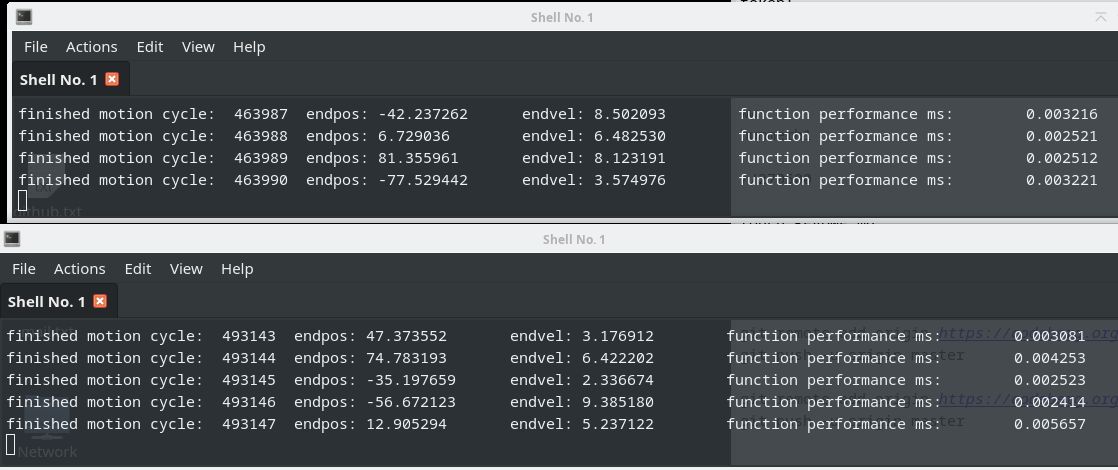
Today the scurve lib is stress tested for 2.000.000 iterations, motions using random double values between :
1. Positions -100 to 100
2. End velocity's -10 to 10

The stress test file : stress test
Output, running 2 instances:
 

For visualising what is happening i have a gui test app.

Another thing that is changed today is the way we compile projects with cmake.
We now compile each project in it's own build dir, directed by the toplevel cmakelists.
This makes things much easyer.
Normally it would build everything besides the toplevel cmakelists. But this is unwanted for me.
Modified toplevel cmakelists

Ok, we now may expect the scurve planner is stable. image missing /media/kunena/emoticons/cool.png
The following user(s) said Thank You: akb1212, tommylight, Clive S, pommen, tiagounderground, Darium, anton610, nwallace, Unlogic

Please Log in or Create an account to join the conversation.

More
2 years 1 week ago #313061 by Grotius
Replied by Grotius on topic linuxcnc trajectory planner
Hi,

First off all thanks for the many likes, is appreciated. image missing /media/kunena/emoticons/smile.png

Today we made a linuxcnc installer.
Can someone help me to verify if it works ok?
I could be we miss some things. image missing /media/kunena/emoticons/sad.png
Code:
git clone https://codeberg.org/skynet/linuxcnc_trajectory_planner cd linuxcnc_trajectory_planner ./installer

Work of today:
1. Created a new  cmakelists.txt for the clothoid project.
2. Created a library  motionizer to calculate the best vo's, ve's, vm's  for the trajectory. Also based on curvature input.
3. Created a project installer
4. Renaming of directory's, etc.


The following user(s) said Thank You: akb1212, Aciera

Please Log in or Create an account to join the conversation.

More
2 years 1 week ago - 2 years 1 week ago #313064 by Aciera
Replied by Aciera on topic linuxcnc trajectory planner
You may want to change it to:
Code:
cd ~ git clone https://codeberg.org/skynet/linuxcnc_trajectory_planner cd linuxcnc_trajectory_planner ./installer
Last edit: 2 years 1 week ago by Aciera.
The following user(s) said Thank You: Grotius

Please Log in or Create an account to join the conversation.

Time to create page: 0.168 seconds
Powered by Kunena Forum
