
- Posts: 350
- Thank you received: 410
scurve trajectory planner
- grandixximo
- Offline
- Platinum Member
-

Less
More
1 year 5 months ago #329345
by grandixximo
Replied by grandixximo on topic scurve trajectory planner
The best way to know is testing for yourself, it all depends on what you mean by "real work", if you find issues for your use case politely post them here.
I did my own testing, and it is getting closer to my "real work", it is very exciting, but there is still a lot of work, and I'm extremely impressed and grateful to Grotius and co to be tackling this, much appreciated...
I did my own testing, and it is getting closer to my "real work", it is very exciting, but there is still a lot of work, and I'm extremely impressed and grateful to Grotius and co to be tackling this, much appreciated...
The following user(s) said Thank You: HalaszAttila
Please Log in or Create an account to join the conversation.
- ruediger123
- Offline
- Junior Member
-

Less
More
- Posts: 36
- Thank you received: 35
1 year 5 months ago - 1 year 4 months ago #329438
by ruediger123
Replied by ruediger123 on topic scurve trajectory planner
Hallo,
I tested the new version today and noticed that when I round the corners P64 P10.0 the speed of the axis (joint) does not behave as expected (yellow circle).
The acceleration (green circles) is interrupted by (blue circles) whereby the change in acceleration (jerk) appears to be too large.
At P64 P0.0 the axis (joint) behaves as expected.
Can this behavior be set via parameters?
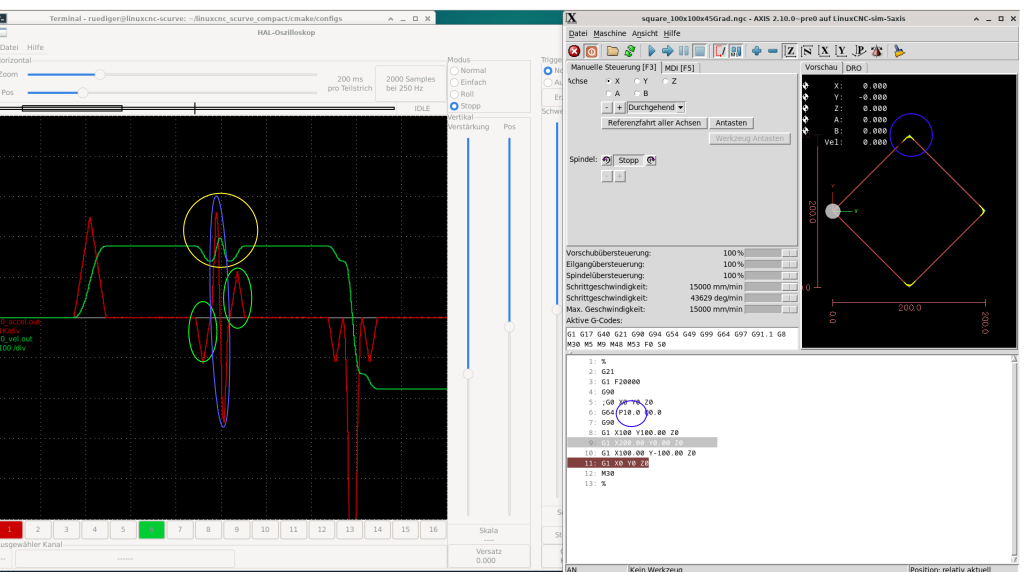
Gruß
Rüdiger
I tested the new version today and noticed that when I round the corners P64 P10.0 the speed of the axis (joint) does not behave as expected (yellow circle).
The acceleration (green circles) is interrupted by (blue circles) whereby the change in acceleration (jerk) appears to be too large.
At P64 P0.0 the axis (joint) behaves as expected.
Can this behavior be set via parameters?
Gruß
Rüdiger
Last edit: 1 year 4 months ago by ruediger123.
The following user(s) said Thank You: HalaszAttila
Please Log in or Create an account to join the conversation.
- automata
- Offline
- Premium Member
-

Less
More
- Posts: 105
- Thank you received: 93
1 year 2 months ago #333033
by automata
Replied by automata on topic scurve trajectory planner
Hi, is there any more testing and progress on the scurve planner to report?
-automata
-automata
Please Log in or Create an account to join the conversation.
- konrad
- Offline
- New Member
-

Less
More
- Posts: 9
- Thank you received: 3
1 year 2 months ago #333114
by konrad
Replied by konrad on topic scurve trajectory planner
@Rüdiger
May this be a result of the missing (?, the screenshot is hard to read) Q parameter? From the readme :
May this be a result of the missing (?, the screenshot is hard to read) Q parameter? From the readme :
Important Runtime NotesWhen using the S-curve trajectory planner, always use the
command combination. IfCode:G64 P[x] Q[x]is not specified, the interpreter may:Code:Q[x]A standard input should look like this:
- Remove or filter out small segments.
- Convert arc segments into line segments.
Code:G64 P0.01 Q0.0
Please Log in or Create an account to join the conversation.
- ruediger123
- Offline
- Junior Member
-
Less
More
- Posts: 36
- Thank you received: 35
1 year 2 months ago #333260
by ruediger123
Replied by ruediger123 on topic scurve trajectory planner
As far as I know, the Scurve Trajectory Planner plans the tool's trajectory using jerk, acceleration, and speed, which works very well, but doesn't take the constraints of the individual axes into account.
For example, the trajectory speed is constant in a 90° corner, while the axis speeds change without considering constraints.
This can be seen in my previous post.
I hope I explained the connections correctly.
gruss
Rüdiger
For example, the trajectory speed is constant in a 90° corner, while the axis speeds change without considering constraints.
This can be seen in my previous post.
I hope I explained the connections correctly.
gruss
Rüdiger
Please Log in or Create an account to join the conversation.
- Grotius
- Offline
- Platinum Member
-
Less
More
- Posts: 2419
- Thank you received: 2349
1 year 2 months ago #333360
by Grotius
Replied by Grotius on topic scurve trajectory planner
but doesn't take the constraints of the individual axes into account.
This is correct. In the source code the trajectory path is used to calculate xyz coordinates.
There it doesn't apply any calculation to reduce any speed for x or y or z. So if Z maxvel is very low, it does not reduce
speed for z.
This is correct. In the source code the trajectory path is used to calculate xyz coordinates.
There it doesn't apply any calculation to reduce any speed for x or y or z. So if Z maxvel is very low, it does not reduce
speed for z.
The following user(s) said Thank You: Darium
Please Log in or Create an account to join the conversation.
Time to create page: 0.443 seconds