

- Posts: 266
- Thank you received: 120
A Widescreen Blender-Style Interface
8 years 5 months ago - 8 years 5 months ago #110805
by BrendaEM
A Widescreen Blender-Style Interface was created by BrendaEM
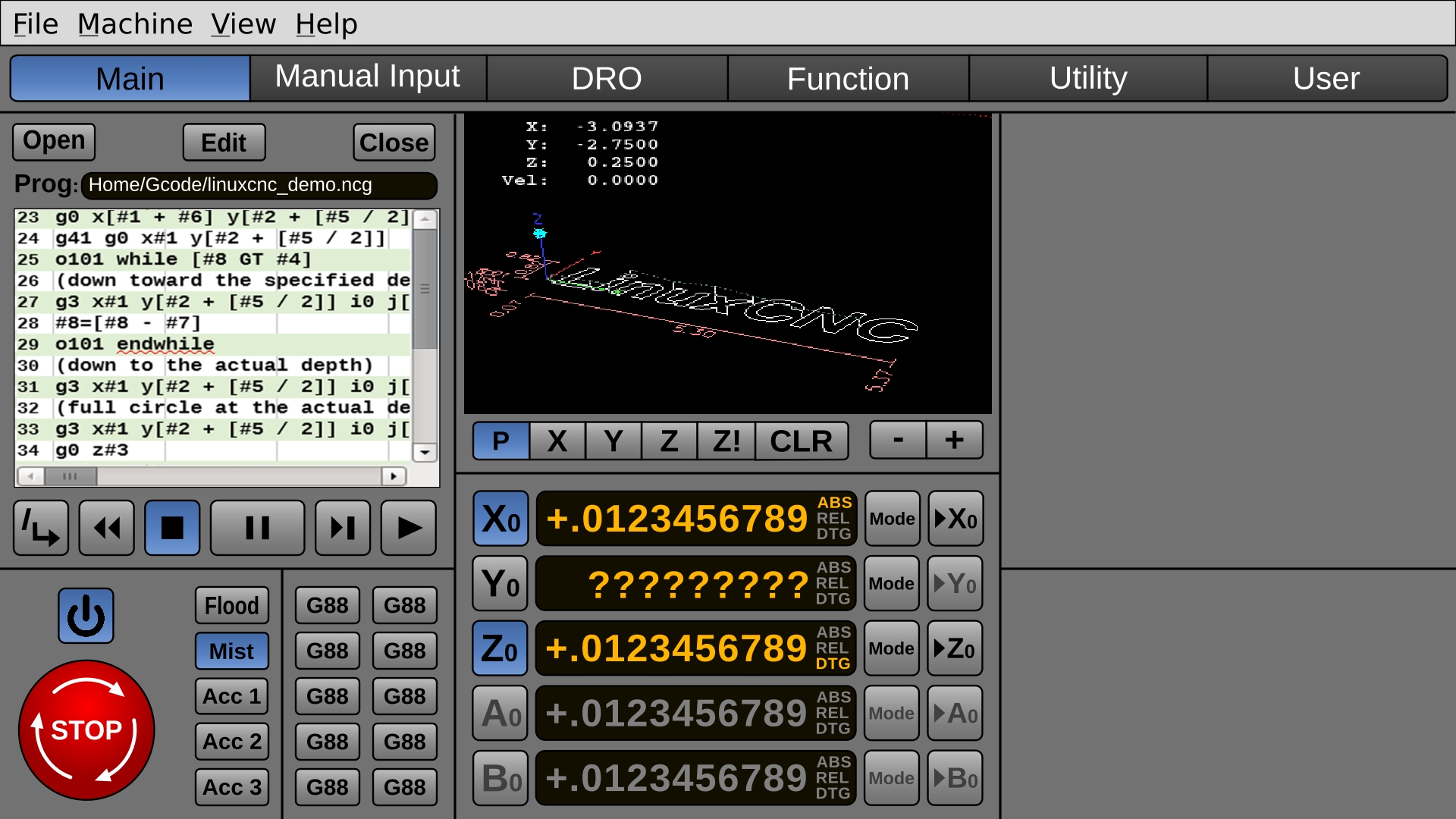
There are a lot of good ideas in the user interfaces I have seen for LinuxCNC. Still, I was inspired to fire up Inkscape and try moving some some shapes around. Outright, shamelessly, I am drawing on a lot of other people's ideas. I hope to inspire the others, just as they have inspired me.
Functionally, I would like one or two changes from the user interfaces, I want a DRO-like utility page for ordinary things, like you would find on a DRO for bolt circles, but also pocketing bolt layout and other things.
So, This these are the ideas I am messing around with:
* To do a Blender-styled interface, which has 3D shading in it, where it helps, so it's not too flat.
* To do a touch interface layout.
* To make it 16x9 for modern monitors.
* To incorporate as many ideas as I can from other interfaces.
* To make it consistent, uniform, and easy to read.
* To use all open source fonts.
* When it's time, put the artwork out in both 1920x1080 and for the future 4k. I would help others, if they want to help on it. I will share the source files for non-commerical use.
So, this is what I have so far. This will be updated.
By using more buttons that show state, fewer indicators are needed.
It's laid out for 5 axis, but 2 can be grayed out for 3 axis machines.
The Pause button was made largest of script/play controls as there is already an Estop, and pause can preserve the job.
I might make the buttons a little brighter and contrasty, but that will be it for colors.
MDI was changed to "Manual Input" to speed new users acclamation.
It needs spindle and jogging, and Home-All.
The file buttons will have GTK-style icons.
Functionally, I would like one or two changes from the user interfaces, I want a DRO-like utility page for ordinary things, like you would find on a DRO for bolt circles, but also pocketing bolt layout and other things.
So, This these are the ideas I am messing around with:
* To do a Blender-styled interface, which has 3D shading in it, where it helps, so it's not too flat.
* To do a touch interface layout.
* To make it 16x9 for modern monitors.
* To incorporate as many ideas as I can from other interfaces.
* To make it consistent, uniform, and easy to read.
* To use all open source fonts.
* When it's time, put the artwork out in both 1920x1080 and for the future 4k. I would help others, if they want to help on it. I will share the source files for non-commerical use.
So, this is what I have so far. This will be updated.
By using more buttons that show state, fewer indicators are needed.
It's laid out for 5 axis, but 2 can be grayed out for 3 axis machines.
The Pause button was made largest of script/play controls as there is already an Estop, and pause can preserve the job.
I might make the buttons a little brighter and contrasty, but that will be it for colors.
MDI was changed to "Manual Input" to speed new users acclamation.
It needs spindle and jogging, and Home-All.
The file buttons will have GTK-style icons.
Last edit: 8 years 5 months ago by BrendaEM.
The following user(s) said Thank You: karlram
Please Log in or Create an account to join the conversation.

8 years 5 months ago #110841
by cmorley
Replied by cmorley on topic A Widescreen Blender-Style Interface
This looks pretty good - not sure from your description if this is a live display or concept artwork.
If you are interested in GUI building - there is a qtscreen branch that I have done a ton of work on.
I am interested in collaborators.
pyQT can have style sheets incorporated in add a nice look.
The macro dialog uses inkscape images.
I have taken a pause on that branch but would get back into it if someone showed interest.
Chris M
If you are interested in GUI building - there is a qtscreen branch that I have done a ton of work on.
I am interested in collaborators.
pyQT can have style sheets incorporated in add a nice look.
The macro dialog uses inkscape images.
I have taken a pause on that branch but would get back into it if someone showed interest.
Chris M
Please Log in or Create an account to join the conversation.
8 years 5 months ago #110848
by BrendaEM
Replied by BrendaEM on topic A Widescreen Blender-Style Interface
Cmorely, where I am the video isn't loading, but the still image looks easily understood.
~
I am just focusing on concepts and art, AFAIK.
I want to layout a 2nd page, that did everything you could do manually with a DRO, so, there likely a lot of icons to make, such as bolt-circle, dividing, calculator functions, etc.
Currently, I am working on the spindle and jogging on the main page.
~
I am just focusing on concepts and art, AFAIK.
I want to layout a 2nd page, that did everything you could do manually with a DRO, so, there likely a lot of icons to make, such as bolt-circle, dividing, calculator functions, etc.
Currently, I am working on the spindle and jogging on the main page.
Please Log in or Create an account to join the conversation.
8 years 5 months ago - 8 years 5 months ago #110860
by cmorley
Replied by cmorley on topic A Widescreen Blender-Style Interface
youtube.com/watch?v=Dq4JMI1My98
Last edit: 8 years 5 months ago by cmorley.
Please Log in or Create an account to join the conversation.
8 years 5 months ago - 8 years 5 months ago #110876
by BrendaEM
Replied by BrendaEM on topic A Widescreen Blender-Style Interface
Thank you for the link, but the problem was: was at a coffee shop at the time.
I like the probe menu.
I wish the 3D preview for all interfaces could be higher resolution or perhaps it could be anti-aliased--even if it is only was done when the user isn't moving the display position, as a post-processing step.
It would have to be an option for slower machines, I suppose.
I like the probe menu.
I wish the 3D preview for all interfaces could be higher resolution or perhaps it could be anti-aliased--even if it is only was done when the user isn't moving the display position, as a post-processing step.
It would have to be an option for slower machines, I suppose.
Last edit: 8 years 5 months ago by BrendaEM.
Please Log in or Create an account to join the conversation.
8 years 5 months ago - 8 years 5 months ago #110929
by BrendaEM
Replied by BrendaEM on topic A Widescreen Blender-Style Interface
Perhaps a version of Pycam or something similar could be integrated, for generating gcode.
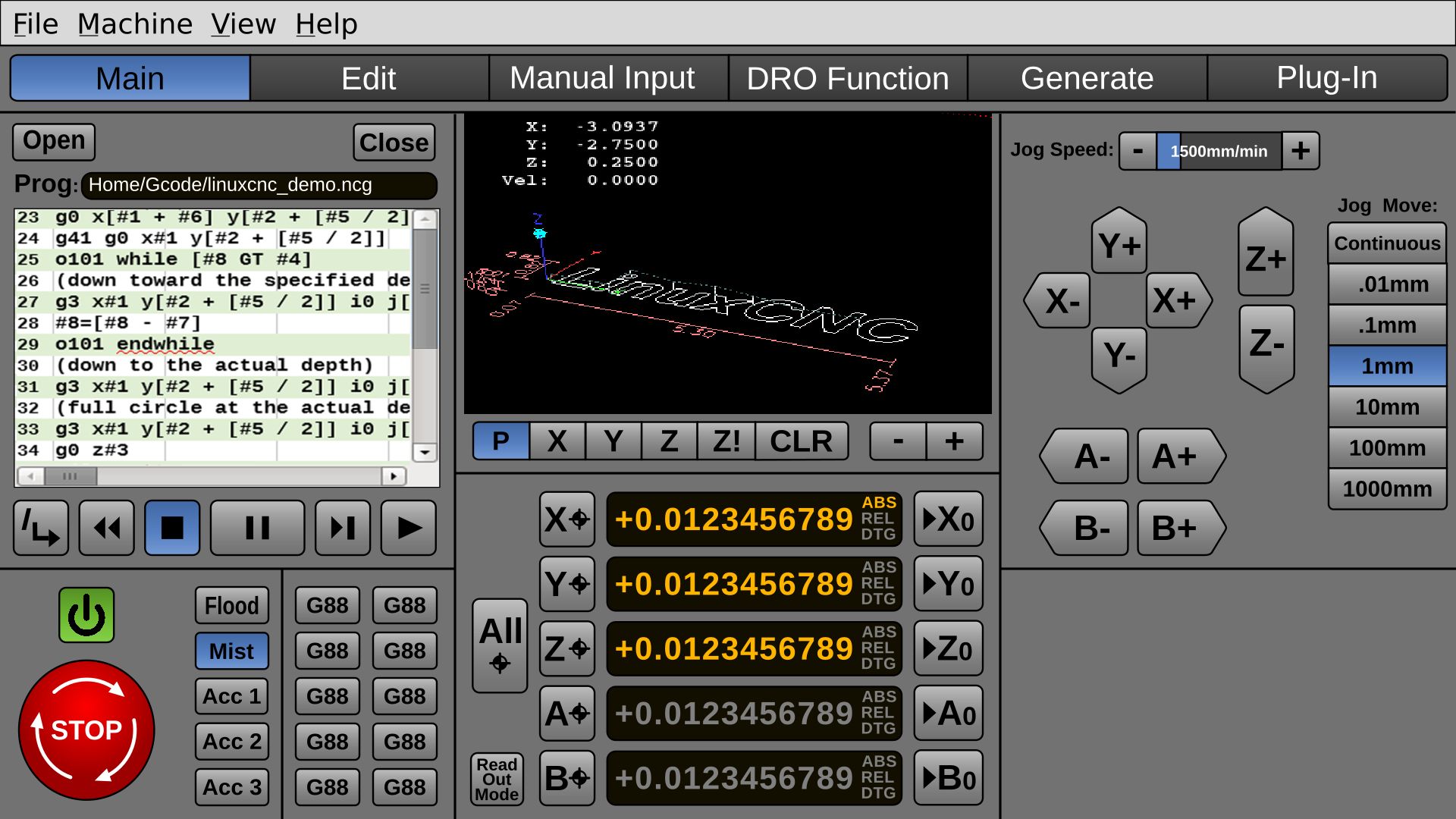
I felt that making the buttons for movement pointy makes them easier to understand, other than just having glyphs.
Many people have only 3 axis, but I want to keep 5 axis. I am not sure if enough pros have a 6th axis to warrant putting a C axis on.
This is a challenging project because, for some of the modes of operation, certain UI sets should remain, and others should go.
In certain modes, the smaller gcode window and the often-used-gcode buttons would be replaced, but they aren't in the same block, yet.
The spindle control and the other speed controls need to be added.
I felt that making the buttons for movement pointy makes them easier to understand, other than just having glyphs.
Many people have only 3 axis, but I want to keep 5 axis. I am not sure if enough pros have a 6th axis to warrant putting a C axis on.
This is a challenging project because, for some of the modes of operation, certain UI sets should remain, and others should go.
In certain modes, the smaller gcode window and the often-used-gcode buttons would be replaced, but they aren't in the same block, yet.
The spindle control and the other speed controls need to be added.
Last edit: 8 years 5 months ago by BrendaEM.
The following user(s) said Thank You: tommylight
Please Log in or Create an account to join the conversation.
Time to create page: 0.072 seconds