
- Posts: 1682
- Thank you received: 784
A Widescreen Blender-Style Interface
- ozzyrob
- Visitor
-

8 years 4 months ago #112961
by ozzyrob
Amen brother....machinekit (a fork of linuxcnc) seems to be going this way.....the Maker crowd seem to like that kind of thing.
"Over the interent" seems to be a thing as well.....go figure
Replied by ozzyrob on topic A Widescreen Blender-Style Interface
Sparky961 wrote: The day CNC machines are controlled through a web interface is the day I stop machining.
Amen brother....machinekit (a fork of linuxcnc) seems to be going this way.....the Maker crowd seem to like that kind of thing.
"Over the interent" seems to be a thing as well.....go figure
- Lcvette
- Offline
- Platinum Member
-

Less
More
8 years 4 months ago #112965
by Lcvette
Replied by Lcvette on topic A Widescreen Blender-Style Interface
Yeah...... That's a bit premature. Maybe it something completely buffered before starting, but not way real-time. I guess using fusion cry all the time about it being web based, is all peaches until internet hiccups then the pikes come out...lol
- BrendaEM
- Offline
- Elite Member
-

Less
More
- Posts: 266
- Thank you received: 120
8 years 4 months ago - 8 years 4 months ago #112967
by BrendaEM
Replied by BrendaEM on topic A Widescreen Blender-Style Interface
We should probably
www.theverge.com/2017/8/30/16230048/fda-...e-cybersecurity-hack
stay on topic : )
www.theverge.com/2017/8/30/16230048/fda-...e-cybersecurity-hack
stay on topic : )
Last edit: 8 years 4 months ago by BrendaEM.
- BrendaEM
- Offline
- Elite Member
-
Less
More
- Posts: 266
- Thank you received: 120
8 years 4 months ago #113057
by BrendaEM
Replied by BrendaEM on topic A Widescreen Blender-Style Interface
I have a problem in that, I see several different axis definitions for lathes. I've read, X,Y,U. I have seen the ways the apron slide across be called Z.
I am not sure what buttons most people will want.
I've noticed that on the probe page that just applying labels to indicators makes it uneasy for the the eye to scan them. Perhaps a lable area thingy can be used, which are lighter than the button perimeters.
BTW, lathe feedback would be appreciated. As with the mill and torch, I am trying to meet most needs, and not be too limiting.
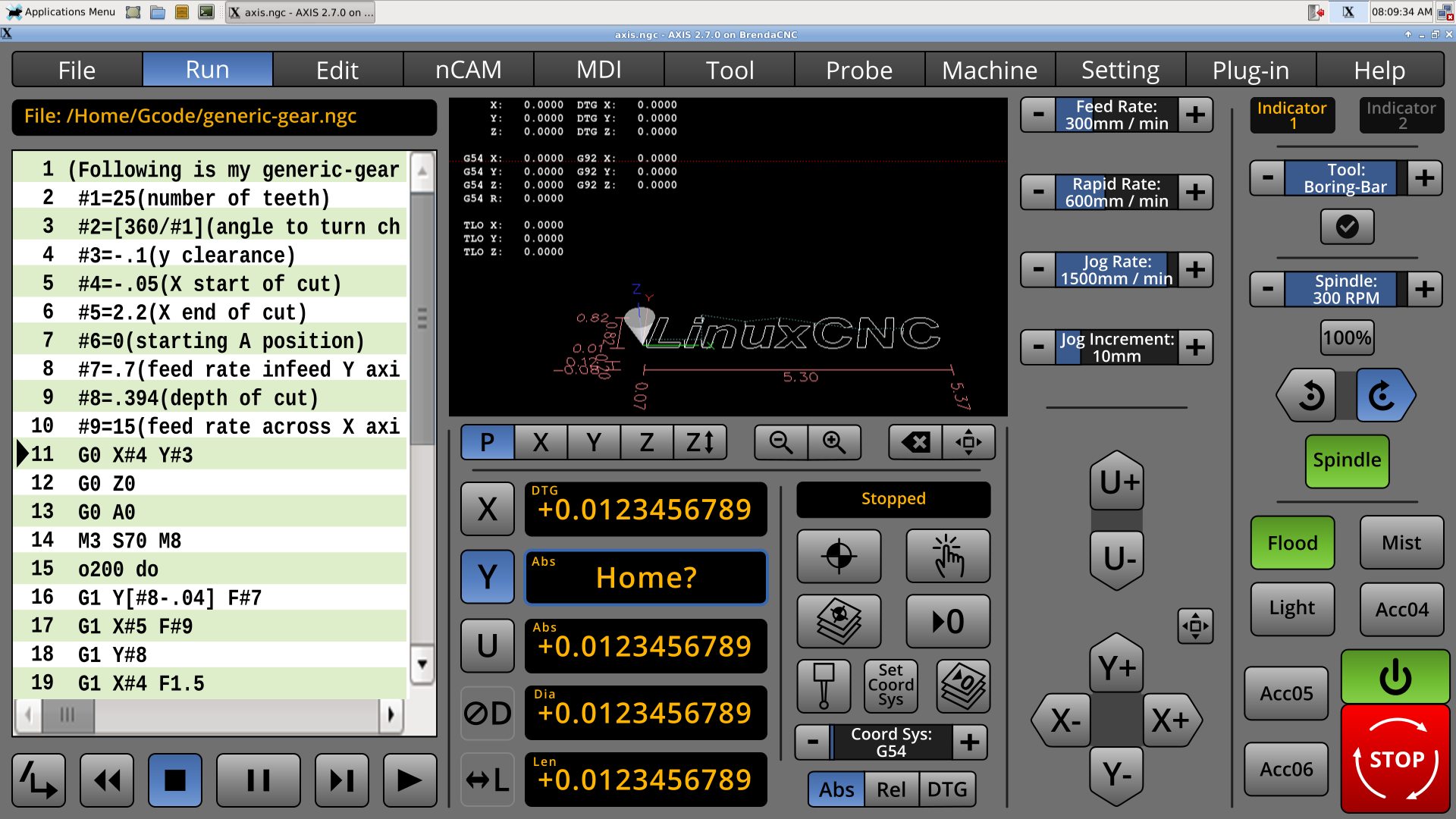
I am not sure what buttons most people will want.
I've noticed that on the probe page that just applying labels to indicators makes it uneasy for the the eye to scan them. Perhaps a lable area thingy can be used, which are lighter than the button perimeters.
BTW, lathe feedback would be appreciated. As with the mill and torch, I am trying to meet most needs, and not be too limiting.
- BrendaEM
- Offline
- Elite Member
-
Less
More
- Posts: 266
- Thank you received: 120
8 years 4 months ago - 8 years 4 months ago #113153
by BrendaEM
Replied by BrendaEM on topic A Widescreen Blender-Style Interface
Well, I finally got to run my CNC machine, today. I think that using my machine will make a better interface.
For some reason, I did not find it easy to read the Gcode in Axis.
Aside from layouts, I had a few UI ideas:
For some reason, I did not find it easy to read the Gcode in Axis.
Aside from layouts, I had a few UI ideas:
- Wordwrap on the gcode editor, that can be toggled.
- Long press/click on the readout to enter a go-to position. Of course it would need an are-you-sure.
- Coordinate systems can have real names, or still use g54....
- Adjusters that can be long-pressed/clicked for entering numerical values like in NativeCam]
Last edit: 8 years 4 months ago by BrendaEM.
- KCJ
- Offline
- Platinum Member
-
Less
More
- Posts: 328
- Thank you received: 267
8 years 4 months ago #113154
by KCJ
Replied by KCJ on topic A Widescreen Blender-Style Interface
Looking great as usual!
Before you spend any more time trying to export images ... I do not think it is a good idea to use images (in any format) for UI elements. It is a nightmare trying to keep up with all the image files for the different states, and if you want to tweak a color (or border width, or .. ) you have to regenerate ALL the files. Also it makes the code much more complicated and less efficient as you have to load and unload the images constantly,
A much better approach is to style widgets. Almost all modern GUI toolkits support styling in one way or another. Both Gtk3 and Qt use a form of CSS, which is easy to use and extremely powerful.
In a few minutes and 40 lines of code, I came pretty close to reproducing your DROs using Qt widgets styled with qss:

Concentrate on the design, that's is clearly where your talent lies. Don't worry too much about the implementation at this point!
Cheers,
Kurt
Before you spend any more time trying to export images ... I do not think it is a good idea to use images (in any format) for UI elements. It is a nightmare trying to keep up with all the image files for the different states, and if you want to tweak a color (or border width, or .. ) you have to regenerate ALL the files. Also it makes the code much more complicated and less efficient as you have to load and unload the images constantly,
A much better approach is to style widgets. Almost all modern GUI toolkits support styling in one way or another. Both Gtk3 and Qt use a form of CSS, which is easy to use and extremely powerful.
In a few minutes and 40 lines of code, I came pretty close to reproducing your DROs using Qt widgets styled with qss:
Concentrate on the design, that's is clearly where your talent lies. Don't worry too much about the implementation at this point!
Cheers,
Kurt
The following user(s) said Thank You: BrendaEM
Time to create page: 0.788 seconds