
- Posts: 266
- Thank you received: 120
A Widescreen Blender-Style Interface
- BrendaEM
- Offline
- Elite Member
-

Less
More
8 years 4 months ago - 8 years 4 months ago #112436
by BrendaEM
Replied by BrendaEM on topic A Widescreen Blender-Style Interface
Thank you. The issue is: the dock would have taken up too much screen real-estate. As you know I was pretty upset about it.
I am glad it's easy to disable it, because I am designing the UI without it. In other words, users will have to shut off the dock to use this interface. On a 1920 x 1080 screen you can fit a more than a dozen icons on the upper bar.
The dock wastes too much space, and unlike a Tribble it not only provides no benefit, it doesn't love you.
~
I just wrote FernV about the interface. I just used nCAM because it fits on the bar. I mean no disrespect to NativeCAM.
~
I like the dark theme : ) I had no idea what NativeCAM was under the hood. It's great. The controls in Axis are often logical, but the widgets are getting on in years, a little small for touch.
My thoughts on colors are:
Red: Trouble
Blue: Choice
Green: On
Amber: Info
I could post a pic of the interface with a white background, but people would be confused that I had lost my way.
I am glad it's easy to disable it, because I am designing the UI without it. In other words, users will have to shut off the dock to use this interface. On a 1920 x 1080 screen you can fit a more than a dozen icons on the upper bar.
The dock wastes too much space, and unlike a Tribble it not only provides no benefit, it doesn't love you.
~
I just wrote FernV about the interface. I just used nCAM because it fits on the bar. I mean no disrespect to NativeCAM.
~
I like the dark theme : ) I had no idea what NativeCAM was under the hood. It's great. The controls in Axis are often logical, but the widgets are getting on in years, a little small for touch.
My thoughts on colors are:
Red: Trouble
Blue: Choice
Green: On
Amber: Info
I could post a pic of the interface with a white background, but people would be confused that I had lost my way.
Last edit: 8 years 4 months ago by BrendaEM.
- KCJ
- Offline
- Platinum Member
-

Less
More
- Posts: 328
- Thank you received: 267
8 years 4 months ago #112437
by KCJ
Replied by KCJ on topic A Widescreen Blender-Style Interface
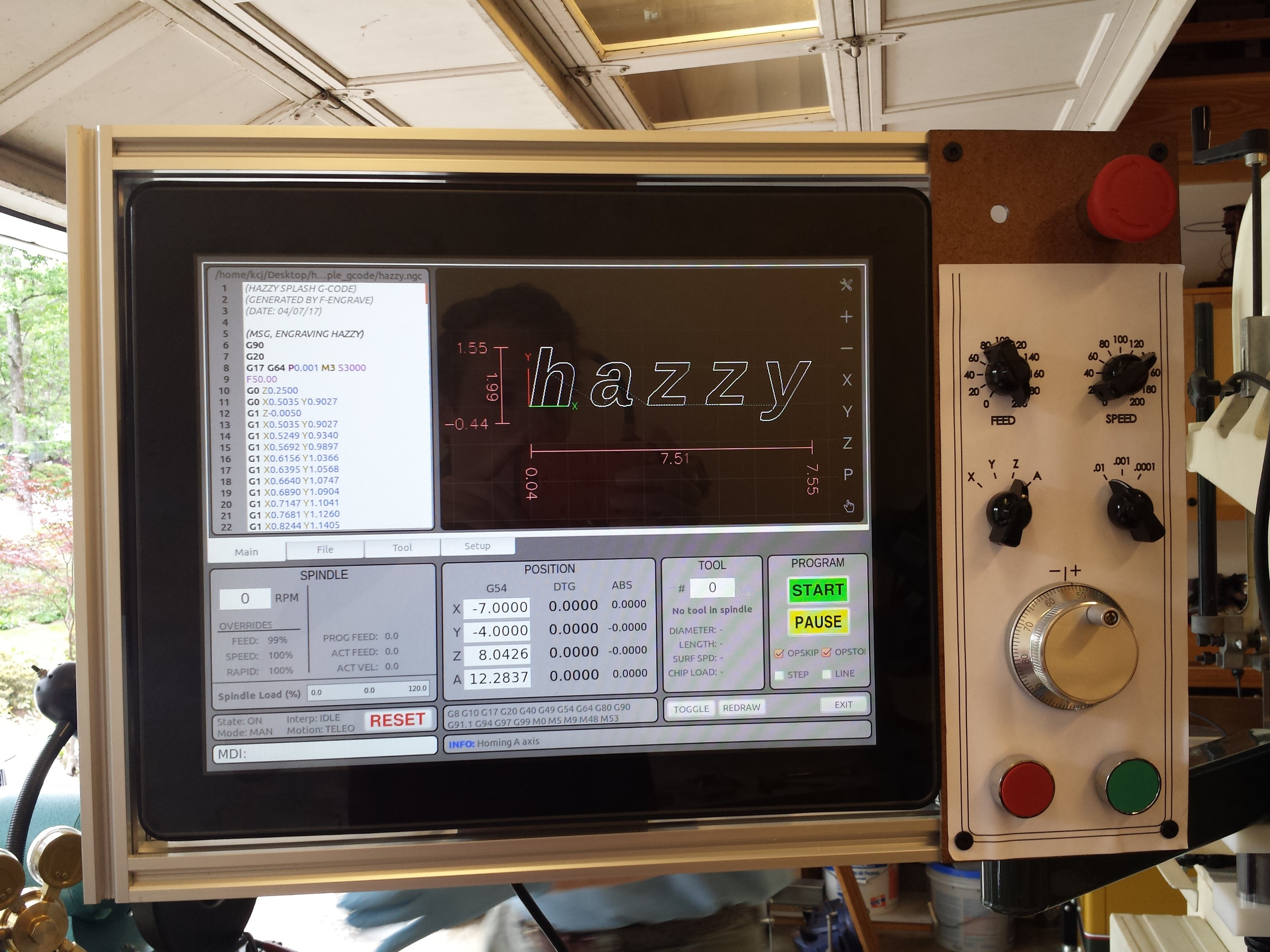
That is how I designed my first interface, the background image was 1024x768px so it filled the entire screen. I did not leave room for window decorations or the panel. I had some code in the init section that would check the screen size, If the screen was 1024x768px it would disable the dock and remove the window decorations (the bar along the top with the title, close/minimize buttons etc.), else it would add window decorations and enable the XFCE panels so it could be moved around.
It seems like you are aware of this, but the disadvantage of using images extensively in a UI is that is becomes non trivial to make the window resizable, but it is possible. It seems easier to do in Qt than in Gtk, though PP is entirely image based and uses Gtk and is resizable. I never could find the code where they resize the bitmaps, but it was not for lack of looking ...
Cheers,
Kurt
It seems like you are aware of this, but the disadvantage of using images extensively in a UI is that is becomes non trivial to make the window resizable, but it is possible. It seems easier to do in Qt than in Gtk, though PP is entirely image based and uses Gtk and is resizable. I never could find the code where they resize the bitmaps, but it was not for lack of looking ...
Cheers,
Kurt
- BrendaEM
- Offline
- Elite Member
-
Less
More
- Posts: 266
- Thank you received: 120
8 years 4 months ago #112438
by BrendaEM
Replied by BrendaEM on topic A Widescreen Blender-Style Interface
Nice panel!
I like the chicken-head knobs.
You need to send that jog control to me. : )
I like the chicken-head knobs.
You need to send that jog control to me. : )
The following user(s) said Thank You: KCJ
- KCJ
- Offline
- Platinum Member
-
Less
More
- Posts: 328
- Thank you received: 267
8 years 4 months ago - 8 years 4 months ago #112439
by KCJ
Replied by KCJ on topic A Widescreen Blender-Style Interface
Oh, everybody calls it NCAM! I think Fern or Nick started calling it that, so it is an "official" name for NativeCAM. 
EDIT: You certainly deserve an MPG jog wheel after all the work you have done on the interface!
EDIT: You certainly deserve an MPG jog wheel after all the work you have done on the interface!
Last edit: 8 years 4 months ago by KCJ.
- andypugh
- Offline
- Moderator
-

Less
More
- Posts: 19899
- Thank you received: 4655
8 years 4 months ago #112442
by andypugh
If you use svg it's a lot easier.
Not anything like a solution, but if you take a look at how my lathe macros work, the background of each tab is a specific layer all held in the same SVG file.
The ugly thing there is that the controls all live in a transparent "table" object on top of the image.
Replied by andypugh on topic A Widescreen Blender-Style Interface
kcj wrote: It seems like you are aware of this, but the disadvantage of using images extensively in a UI is that is becomes non trivial to make the window resizable, but it is possible. It seems easier to do in Qt than in Gtk, though PP is entirely image based and uses Gtk and is resizable. I never could find the code where they resize the bitmaps, but it was not for lack of looking
If you use svg it's a lot easier.
Not anything like a solution, but if you take a look at how my lathe macros work, the background of each tab is a specific layer all held in the same SVG file.
The ugly thing there is that the controls all live in a transparent "table" object on top of the image.
The following user(s) said Thank You: KCJ
- andypugh
- Offline
- Moderator
-
Less
More
- Posts: 19899
- Thank you received: 4655
8 years 4 months ago #112443
by andypugh
I think you need to get a lathe. (Everyone needs a lathe, but most don't realise it).
The typical lathe UI needs a left/right Z and an in/out X.
X should show radius or diameter (selectable) but I don't think anyone would complain if there was only diameter.
An optional C display/jog would be cool.
I have said this before, but I will repeat it: Much better to make a great mill/plasma UI and ignore lathes. Then, if you feel the urge, make a great lathe UI. The key to a good lathe UI would be a good preview, that handled both front and back tools at the same time.
Replied by andypugh on topic A Widescreen Blender-Style Interface
BrendaEM wrote: * First Lathe Attempt.
I think you need to get a lathe. (Everyone needs a lathe, but most don't realise it).
The typical lathe UI needs a left/right Z and an in/out X.
X should show radius or diameter (selectable) but I don't think anyone would complain if there was only diameter.
An optional C display/jog would be cool.
I have said this before, but I will repeat it: Much better to make a great mill/plasma UI and ignore lathes. Then, if you feel the urge, make a great lathe UI. The key to a good lathe UI would be a good preview, that handled both front and back tools at the same time.
Time to create page: 0.571 seconds