
- Posts: 266
- Thank you received: 120
A Widescreen Blender-Style Interface
- BrendaEM
- Offline
- Elite Member
-

Less
More
8 years 4 months ago - 8 years 4 months ago #112866
by BrendaEM
Replied by BrendaEM on topic A Widescreen Blender-Style Interface
I've had a pretty bad cold, but the probe screen is still progressing. Layout-wise Verser's probe screen was good, but the controls need to fit into 2/3 of the screen, and work for touch.
* The probe symbol is changed mostly to top-downs. My other ones were from the side, but that was confusing once Z axis came into play.
* The arrows and axis letters are integrated to give a good sense of direction.
I don't like cramming all eight settings together like that, but there is not enough width to make another column.
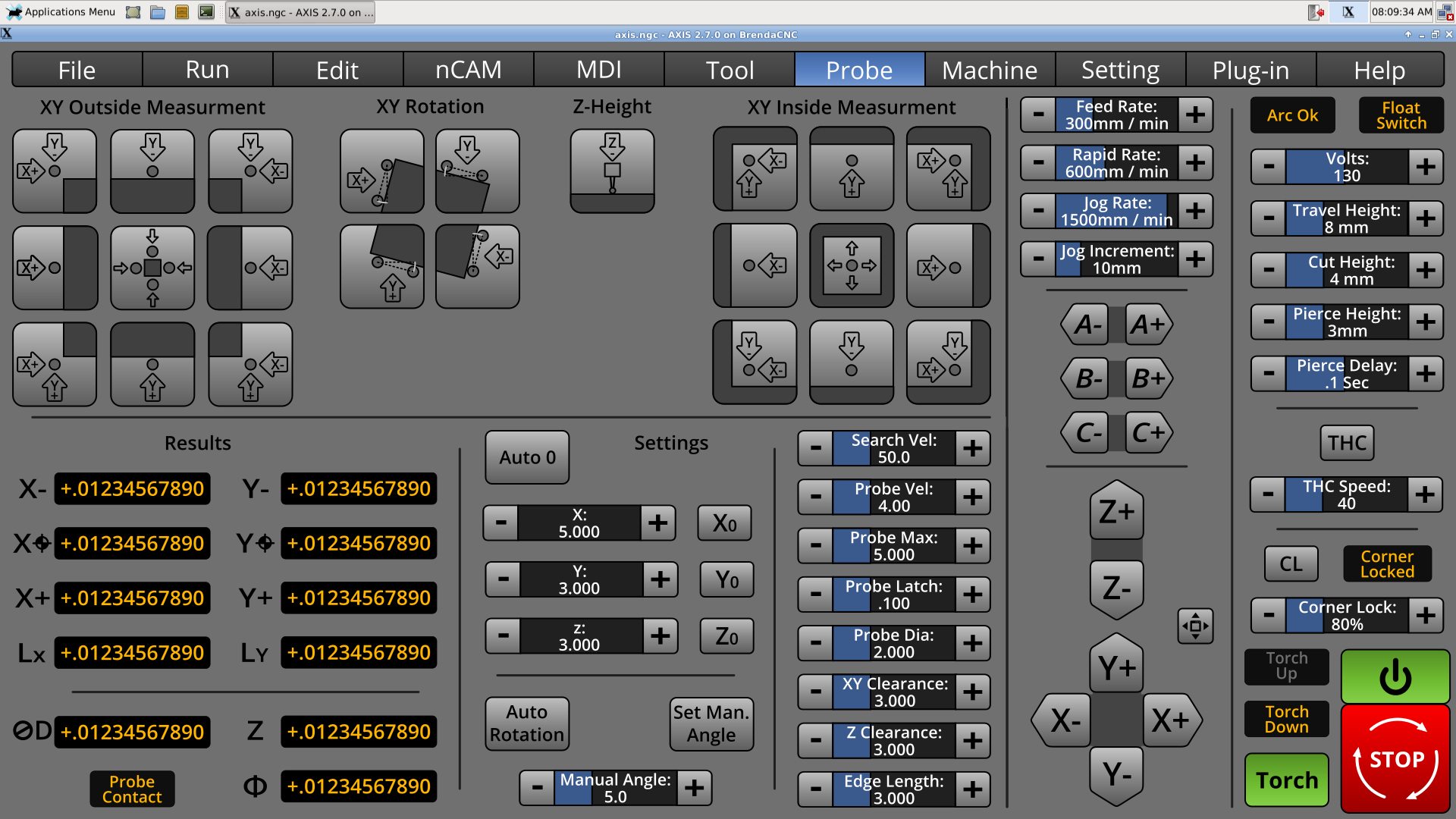
* The probe symbol is changed mostly to top-downs. My other ones were from the side, but that was confusing once Z axis came into play.
* The arrows and axis letters are integrated to give a good sense of direction.
I don't like cramming all eight settings together like that, but there is not enough width to make another column.
Last edit: 8 years 4 months ago by BrendaEM.
- BrendaEM
- Offline
- Elite Member
-
Less
More
- Posts: 266
- Thank you received: 120
8 years 4 months ago - 8 years 4 months ago #112868
by BrendaEM
Replied by BrendaEM on topic A Widescreen Blender-Style Interface
* Mocked up large-screen panel. This can be toggled from the right-most button on the view controls. It's simple, but it should work.
The machine and jogging controls would still be available, except for the large jog which takes up the same space.
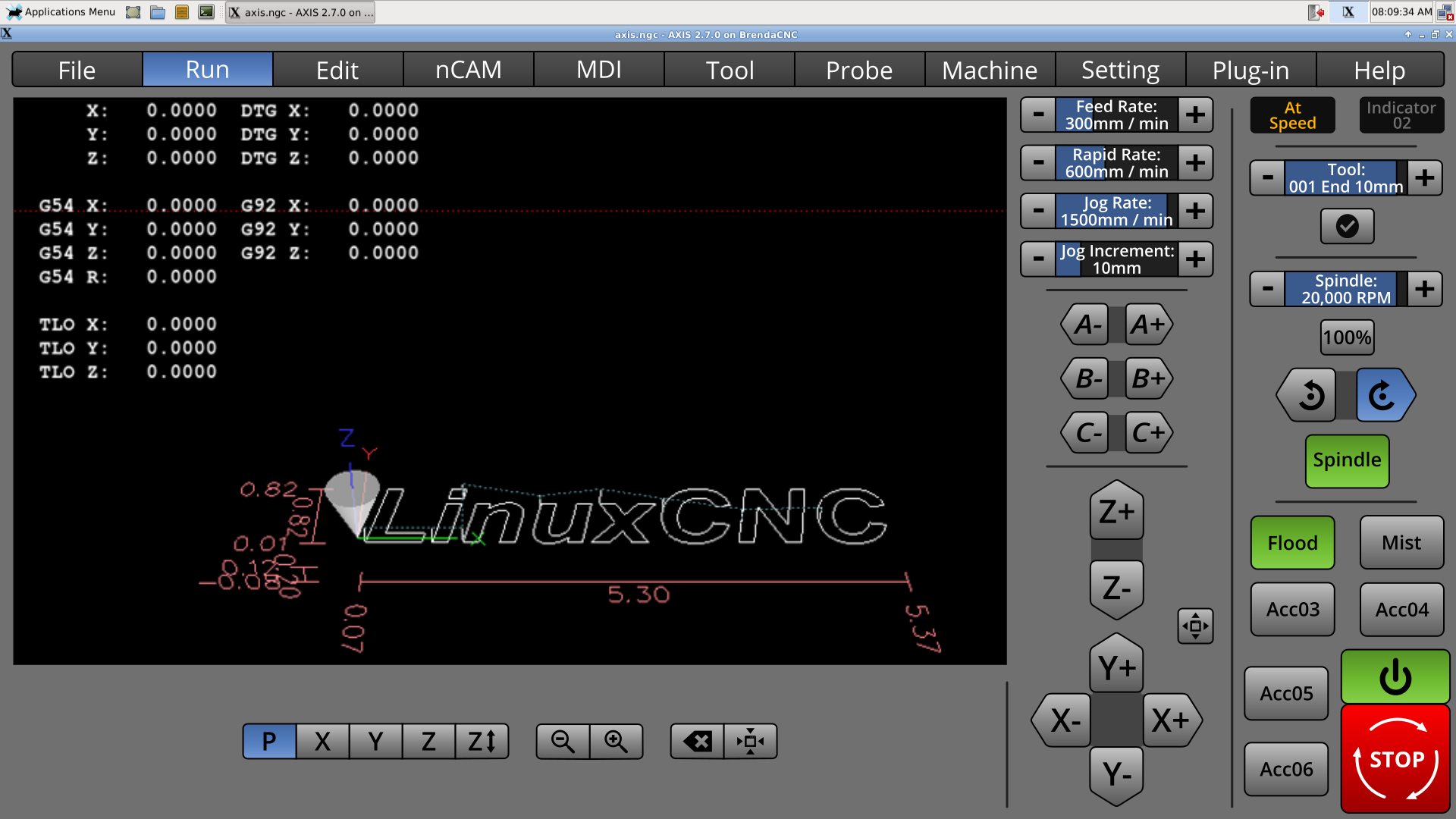
The machine and jogging controls would still be available, except for the large jog which takes up the same space.
Last edit: 8 years 4 months ago by BrendaEM.
The following user(s) said Thank You: tommylight
- BrendaEM
- Offline
- Elite Member
-
Less
More
- Posts: 266
- Thank you received: 120
8 years 4 months ago - 8 years 4 months ago #112869
by BrendaEM
Replied by BrendaEM on topic A Widescreen Blender-Style Interface
I made an updated collage' showing most of the panels. There are two sizes of left panels; the larger ones also cover the middle portion of the screen as well, but not the jog and machine-specific controls. The left panels are: Run, Edit, Probe, Large-Screen, nCAM, MDI, and Large-Jog. The center overlay hopes to be for a lathe. The right overlay is for a torch.
nCam could have 2 sizes, either taking up just the left, or the left and middle sections, perhaps taking the jog controls as well when the machine is not running.
The lathe controls still need more work, as do the panels for Tool, Machine, Setting, Plugin, but the screen arrangement works fairly well.
It's my hope to get enough together to create a system that other people can add to. The style is still largely Blender (coloring, Axis(vertical), and Gmoccapy(buttons), with a newspaper-like separator strip motif to lead the eye around, and elements from the other interfaces.
I hope there to be an inclusive interface system, just as I hope that LinuxCNC integrates NativeCAM, and the probe screen, whether this is done with the next LinuxCNC release or not.
LOL, I got your big jog buttons right here : )
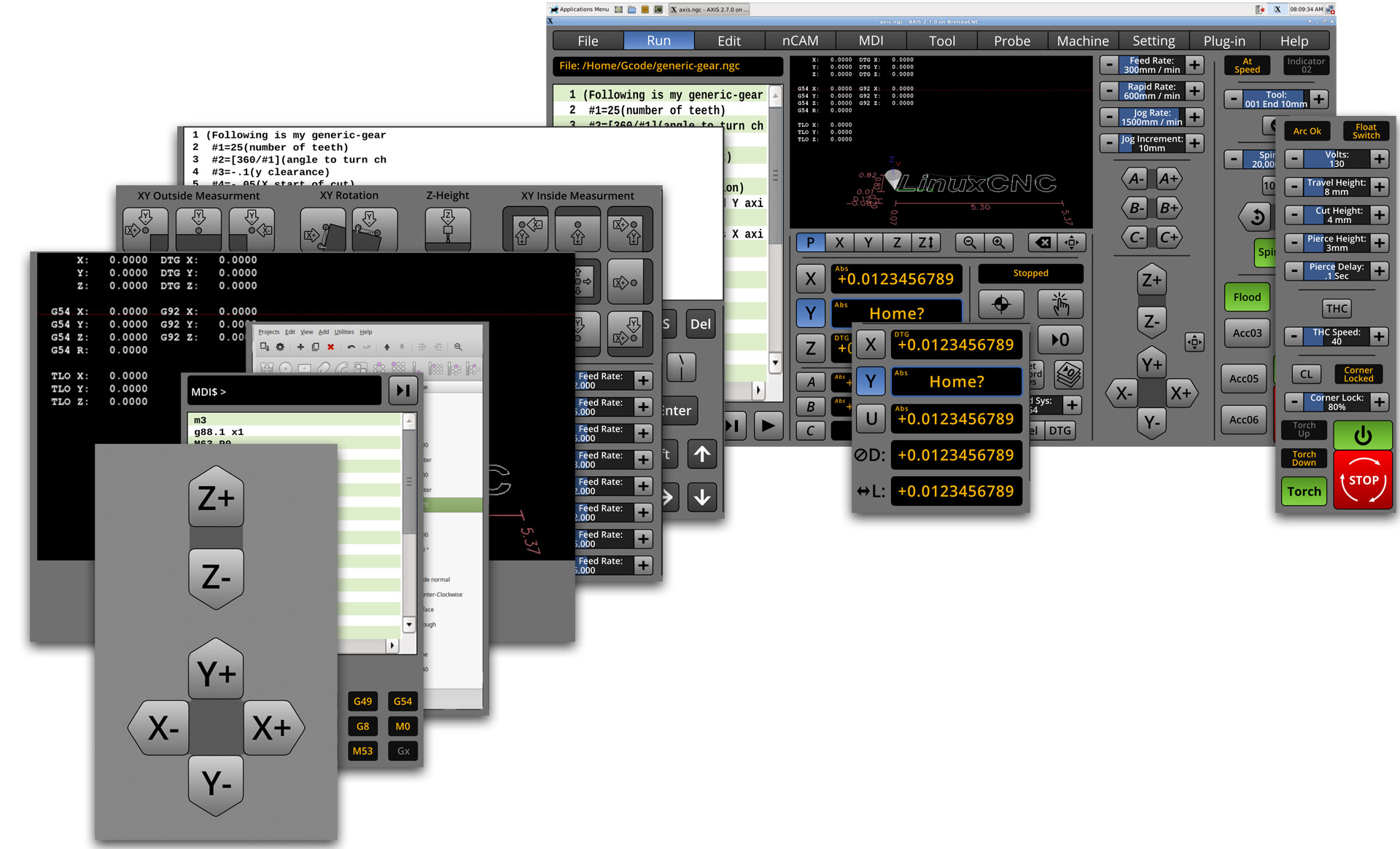
nCam could have 2 sizes, either taking up just the left, or the left and middle sections, perhaps taking the jog controls as well when the machine is not running.
The lathe controls still need more work, as do the panels for Tool, Machine, Setting, Plugin, but the screen arrangement works fairly well.
It's my hope to get enough together to create a system that other people can add to. The style is still largely Blender (coloring, Axis(vertical), and Gmoccapy(buttons), with a newspaper-like separator strip motif to lead the eye around, and elements from the other interfaces.
I hope there to be an inclusive interface system, just as I hope that LinuxCNC integrates NativeCAM, and the probe screen, whether this is done with the next LinuxCNC release or not.
LOL, I got your big jog buttons right here : )
Last edit: 8 years 4 months ago by BrendaEM.
- grijalvap
- Offline
- Elite Member
-
Less
More
- Posts: 200
- Thank you received: 63
8 years 4 months ago #112912
by grijalvap
Replied by grijalvap on topic A Widescreen Blender-Style Interface
how can I test this interface?
- BrendaEM
- Offline
- Elite Member
-
Less
More
- Posts: 266
- Thank you received: 120
8 years 4 months ago - 8 years 4 months ago #112913
by BrendaEM
Replied by BrendaEM on topic A Widescreen Blender-Style Interface
Thank you for the interest.
It has to be programmed first, and well, I need to finish the design before the programming starts, at least as much to make sure the programming effort is efficient. I've been working on this about 5 weeks.
The interface is meant to be very derivative from the other interfaces. I'm just trying to meld together what's already here.
It has to be programmed first, and well, I need to finish the design before the programming starts, at least as much to make sure the programming effort is efficient. I've been working on this about 5 weeks.
The interface is meant to be very derivative from the other interfaces. I'm just trying to meld together what's already here.
Last edit: 8 years 4 months ago by BrendaEM.
- grijalvap
- Offline
- Elite Member
-
Less
More
- Posts: 200
- Thank you received: 63
8 years 4 months ago #112914
by grijalvap
Replied by grijalvap on topic A Widescreen Blender-Style Interface
Ok, thanks, I will keep an eye on it, it looks nice, I'm looking for a good plasma interface.
Time to create page: 0.238 seconds